
1. Увод
This manual provides detailed instructions for the installation, operation, and maintenance of your Mcezdy M7C-2-5-Pin Ebike LCD Display. This display is designed to enhance your electric bike experience by providing essential riding data and control functions. Please read this manual thoroughly before using the product to ensure correct operation and to prevent damage.
2. Безбедносне информације
- Always ensure your ebike controller is compatible with the UART No. 2 protocol and the 5-pin connector of this display. Incompatibility can lead to malfunction.
- Не покушавајте да растављате или модификујете екран. То може поништити гаранцију и проузроковати оштећење.
- Ensure all connections are secure and waterproof before riding, especially in wet conditions. The display has an IPX65 waterproof rating, but proper connection is crucial.
- Regularly check the display and its mounting for any signs of damage or looseness.
- Avoid exposing the display to extreme temperatures or direct sunlight for prolonged periods.
- Always prioritize road safety. Do not operate display functions that distract you from riding.

Figure 1: Compatibility Reminder. This image highlights the critical need to verify your ebike's compatibility with the UART No. 2 protocol before installation.
3. Садржај пакета
Након отварања пакета, молимо вас да проверите да ли су укључене све следеће ставке:
- Mcezdy M7C-2-5-Pin Ebike LCD Display
- Упутство за употребу (овај документ)
- Fault Code Description sheet
4. Карактеристике производа
The Mcezdy M7C-2-5-Pin Ebike LCD Display offers a range of features designed for an optimized riding experience:
- Advanced Color LCD Display: Provides clear, vibrant visuals of riding data.
- Робусна конструкција: Crafted with ABS+PC housing, tempered glass screen, and a durable nylon bracket for longevity and scratch resistance.
- ИПКС65 водоотпорна оцена: Offers protection against water splashes and rain.
- UART No. 2 Protocol: Ensures seamless communication with compatible ebike controllers.
- Виде Волtagе Компатибилност: Supports 24V, 36V, 48V, and 60V ebike battery systems.
- Интегрисани УСБ порт за пуњење: Features a 5V/500mA USB port for charging mobile devices.
- Universal Handlebar Fit: Compatible with handlebar diameters of 22.2mm, 25.4mm, and 31.8mm.
- Свеобухватни приказ података: Shows speed, PAS level, battery status, odometer (ODO), trip distance (TRIP), voltage (VOL), current (CUR), and error codes.
- Прилагодљиви параметри: Allows modification of wheel diameter and speed limit settings.
- Додатни режими: Includes walk-assist mode and cruise control.

Слика 2: Карактеристике екрана. This image illustrates the advanced color LCD, the control keypad, and the various cable connector types available for the display.
5. Подешавање и инсталација
5.1 Провера компатибилности
Before installation, confirm that your ebike controller uses the UART No. 2 protocol and has a compatible 5-пински конектор. This display is specifically designed for this protocol and connector type. Refer to your ebike's controller manual for verification.
5.2 Монтирање дисплеја
- Choose a suitable position on your ebike's handlebar. The display's flexible bracket is compatible with handlebar diameters of 22.2mm, 25.4mm, and 31.8mm.
- Loosen the screws on the display bracket.
- Position the display on the handlebar and tighten the screws securely. Ensure the display is stable and does not rotate freely.

Figure 3: Handlebar Mounting. This image demonstrates the display mounted on a handlebar, highlighting its adjustable bracket for different handlebar diameters.
5.3 Повезивање каблова
- Locate the 5-pin waterproof cable (JL-F-Z509AG) extending from the display. The exposed cable length is approximately 150mm.
- Connect this cable to the corresponding 5-pin connector on your ebike's controller. Ensure the connectors are aligned correctly before pushing them together.
- Secure the connection firmly. If it is a waterproof connector, ensure the seal is properly engaged.
- Route the cable neatly along the ebike frame, securing it with cable ties if necessary, to prevent it from interfering with moving parts or getting damaged.
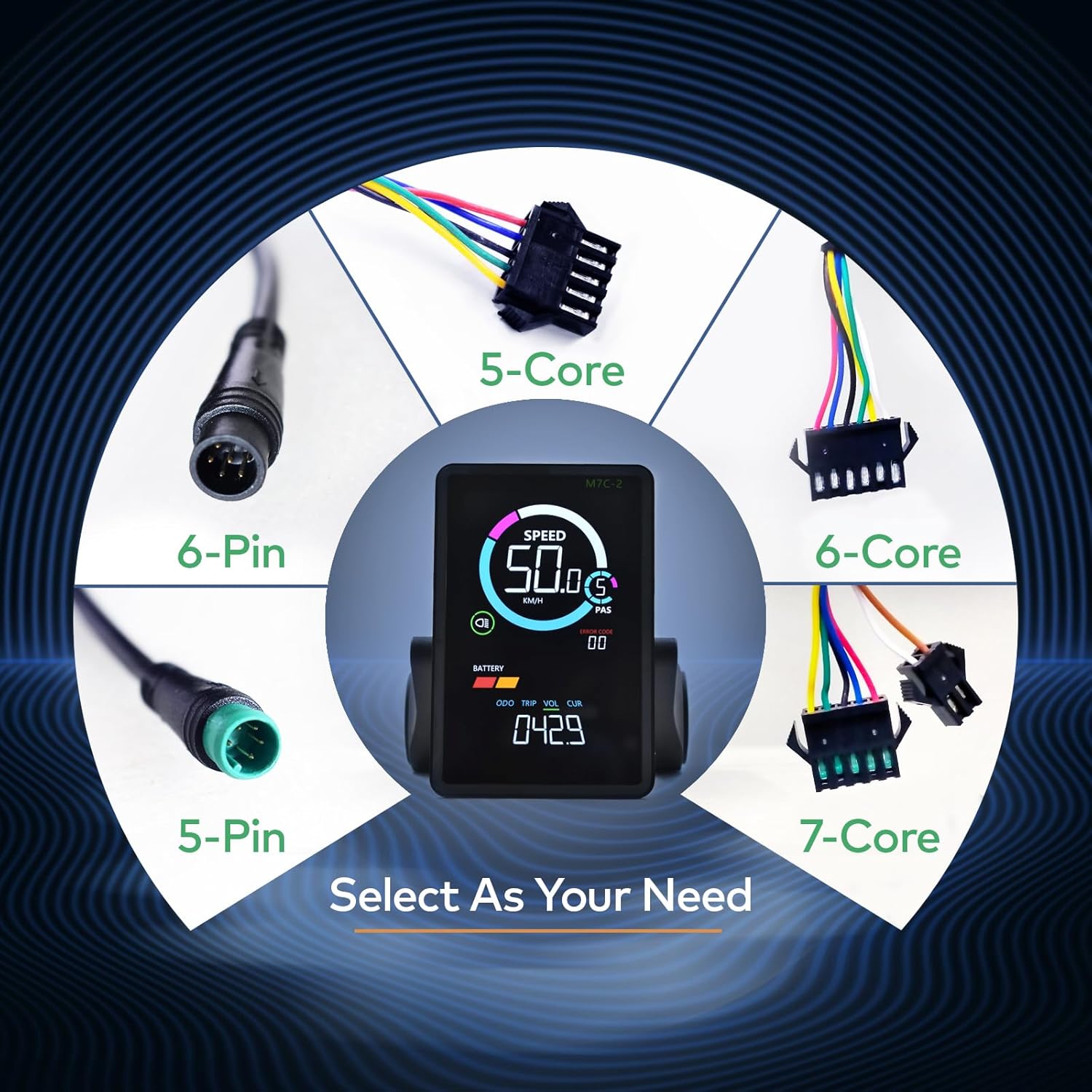
Figure 4: Cable Selection. This image displays different cable types, emphasizing the importance of selecting the correct 5-pin connector for this specific display model.
6. Упутство за употребу
6.1 Укључивање/искључивање
To power on the display, press and hold the power button on the keypad. To power off, press and hold the power button again.
6.2 Display Interface Overview

Figure 5: Display Metrics. This image labels the various metrics shown on the display, including speed, PAS level, battery indicator, headlight indicator, error code, odometer, trip distance, voltagе, и струја.
Екран пружа информације о вашој вожњи у реалном времену:
- брзина: Тренутна брзина вожње (км/х или мпх).
- ПАС (Систем помоћи при педалирању): Current pedal assist level.
- батерија: Remaining battery charge level.
- Индикатор фарова: Shows if the ebike's headlight is active.
- Код грешке: Displays numerical codes for system faults. Refer to the included "Fault Code Description" sheet for details.
- Мултифункционална област приказа: Cycles through Odometer (ODO), Trip Distance (TRIP), Battery Voltage (VOL), and Motor Current (CUR).
6.3 Navigating Settings
Use the keypad buttons (typically +, -, and power/mode) to navigate through display modes and adjust settings. Specific button functions may vary; refer to the detailed instructions in the included User's Manual for precise navigation.
6.4 Модификација параметара
The display allows you to modify key parameters to optimize your ebike's performance:
- Пречник точка: Adjust this setting to match your ebike's wheel size for accurate speed and distance readings.
- Ограничење брзине: Set the maximum assisted speed according to local regulations or personal preference.
Accessing and modifying these parameters typically involves entering a settings menu by holding specific buttons. Consult the included User's Manual for the exact procedure.
6.5 Посебни режими
- Режим помоћи при ходању: Provides low-speed assistance for pushing the ebike when walking.
- темпомат: Maintains a set speed without continuous throttle or pedal input.
Activation of these modes is usually done via specific button combinations. Refer to the comprehensive User's Manual for detailed instructions.
6.6 УСБ прикључак за пуњење
The display includes a 5V/500mA USB port on its side, allowing you to charge mobile devices while riding. Ensure the port cover is securely closed when not in use to maintain its waterproof integrity.
7. Одржавање
- Чишћење: Обришите екран и кућиште меком крпомamp cloth. Do not use abrasive cleaners or solvents, as these can damage the screen or housing.
- Заштита вода: While the display is IPX65 waterproof, avoid submerging it in water. Ensure the USB port cover is always closed when not in use to prevent water ingress.
- Складиштење: When not in use for extended periods, store the ebike and display in a dry, cool place away from direct sunlight.
- Провера везе: Periodically inspect the cable connections for any signs of wear, corrosion, or looseness.
КСНУМКС. Решавање проблема
If you encounter issues with your Mcezdy Ebike LCD Display, consider the following common troubleshooting steps:
- Екран се не укључује:
- Check if the ebike battery is charged and properly connected.
- Ensure all display cables are securely connected to the controller.
- Verify that the display's power button is being pressed and held correctly.
- Нетачна очитавања брзине/удаљености:
- Check the wheel diameter setting in the display's parameters. Adjust it to match your ebike's actual wheel size.
- Ensure the speed sensor on your ebike is clean and properly aligned.
- Приказани кодови грешака:
If an error code appears on the display, refer to the dedicated "Fault Code Description" sheet included with your product. This sheet provides specific meanings for each code and recommended actions.
- USB Charging Not Working:
- Ensure the ebike is powered on.
- Check the USB cable and the device being charged for proper connection.
Ако ови кораци не реше проблем, контактирајте корисничку подршку за додатну помоћ.
9. Спецификације
| Број модела | M7C-2-5-Pin |
| Бранд | Мцезди |
| Дисплаи Типе | LCD (Color) |
| Технологија повезивања | UART NO.2 (Wired, 5-Pin Connector) |
| Ворк Волtage | DC 24V, 36V, 48V, 60V |
| Оцена међународне заштите | ИПКС65 |
| Тип монтаже | Handlebar Mount (22.2mm, 25.4mm, 31.8mm) |
| УСБ прикључак за пуњење | 5В/500мА |
| Cable Length Exposed | 150mm (Waterproof Cable) |
| Материјал | ABS+PC Housing, Tempered Glass Screen, Nylon Bracket |
| Тежина артикла | 249 г |

Figure 6: Product Dimensions and Electrical Specifications. This image provides key physical dimensions, cable length, compatible product models, and operating voltage range for the display.
10. Гаранција и подршка
For warranty information and customer support, please refer to the specific warranty card or documentation included with your purchase. You may also contact the retailer or manufacturer directly for assistance with product inquiries, technical support, or warranty claims.
Молимо вас да сачувате доказ о куповини за све услуге везане за гаранцију.


