
1. Увод
Хвала вам на куповиниasing the Xiaomi Cordless Vacuum Cleaner G20 Lite. This manual provides essential information for the safe and efficient use, maintenance, and troubleshooting of your new vacuum cleaner. Please read this manual thoroughly before first use and keep it for future reference.
2. Безбедносна упутства
To reduce the risk of fire, electric shock, or injury, always follow basic safety precautions when using your vacuum cleaner:
- Прочитајте сва упутства пре употребе уређаја.
- Не користите на отвореном или на мокрим површинама.
- Не дозволити да се користи као играчка. Посебна пажња је неопходна када се користи од стране деце или у близини.
- Користите само онако како је описано у овом приручнику. Користите само додатке које препоручује произвођач.
- Не користите са оштећеним каблом или утикачем. Ако уређај не ради како би требао, ако је пао, оштећен, остављен на отвореном или пао у воду, вратите га у сервисни центар.
- Немојте вући нити носити за кабл, користити кабл као ручку, затварати врата на каблу или вући кабл око оштрих ивица или углова. Не стављајте уређај преко кабла. Држите кабл даље од загрејаних површина.
- Не искључујте утикач повлачењем за кабл. Да бисте искључили утикач, ухватите утикач, а не кабл.
- Немојте руковати утикачем или уређајем мокрим рукама.
- Не стављајте никакве предмете у отворе. Не користите са блокираним отвором; чувајте прашину, длачице, косу и све што може смањити проток ваздуха.
- Држите косу, широку одећу, прсте и све делове тела даље од отвора и покретних делова.
- Не узимајте ништа што гори или дими, као што су цигарете, шибице или врући пепео.
- Немојте користити за усисавање запаљивих или запаљивих течности, као што је бензин, нити користити у областима где оне могу бити присутне.
- Не усисавајте токсичне материјале, као што су хлорни избељивач, амонијак или средство за чишћење одвода.
- Не користите без посуде за прашину и/или филтера на месту.
- Искључите све контроле пре искључивања.
- Будите посебно пажљиви када чистите на степеницама.
- Уређај чувајте у затвореном.
- Не пуните јединицу на отвореном.
- Користите само пуњач који је навео произвођач.
3. Производ је готовview
The Xiaomi Cordless Vacuum Cleaner G20 Lite is designed for efficient cleaning with its powerful suction and versatile attachments. Key features include:
- Maximum 18,000Pa suction power for thorough cleaning.
- Integrated white LED light on the brush head to illuminate dark areas.
- Адванцед 5-сtage powerful filter system to prevent secondary pollution.
- Large capacity 2200mAh battery providing up to 45 minutes of runtime.
- One-touch dust disposal for easy and hygienic emptying.
- 2-way brush nozzle and extension rod for versatile cleaning.
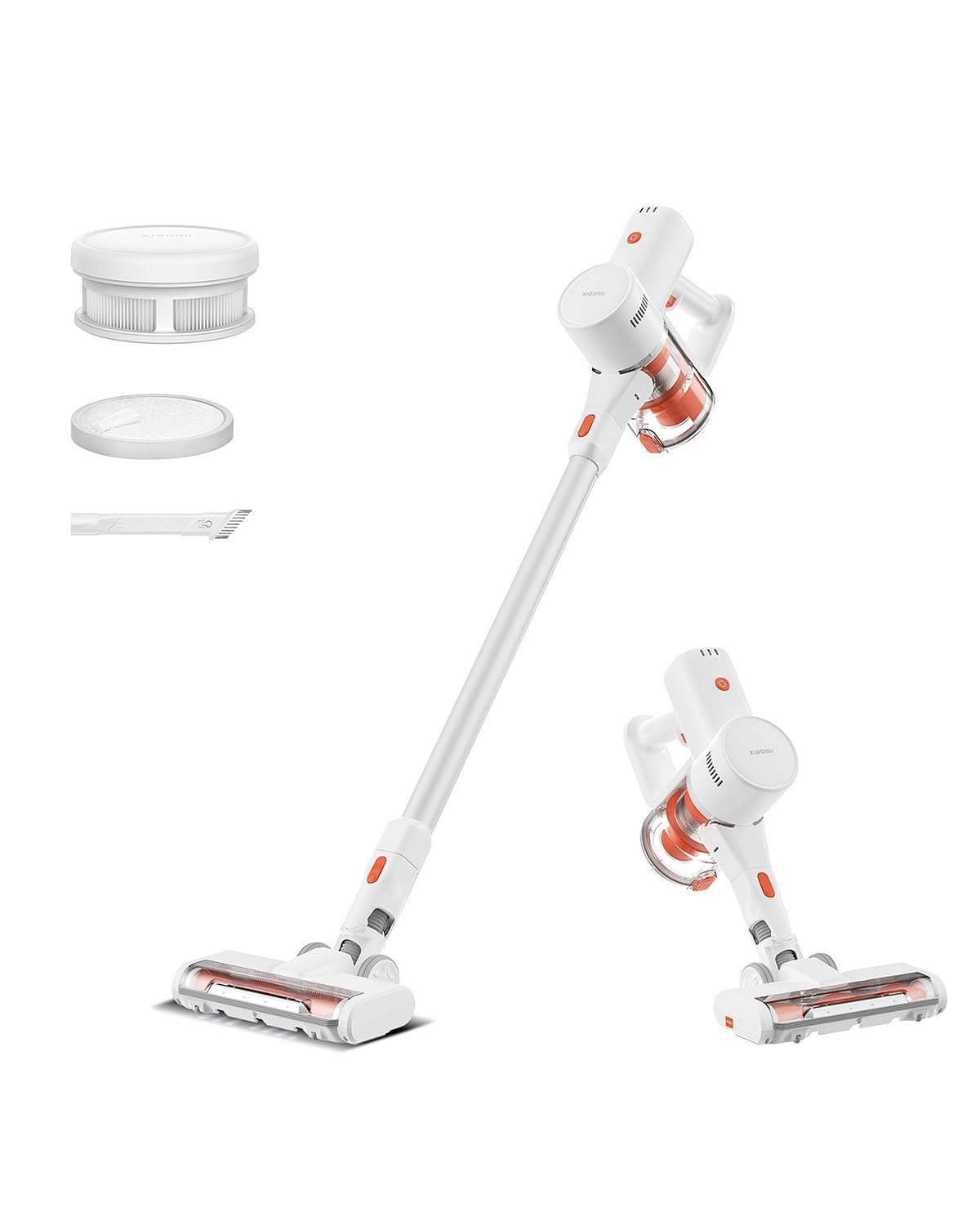
Image: Xiaomi Cordless Vacuum Cleaner G20 Lite, showing the full product assembly.

Image: Illustration of the vacuum cleaner's internal motor, highlighting its 18,000Pa suction power.
Слика: Провидна view of the vacuum cleaner's handle, showing the internal large-capacity battery cells.
4. Подешавање
Пратите ове кораке да бисте саставили свој усисивач:
- Распакујте компоненте: Carefully remove all parts from the packaging. Ensure all accessories (main unit, extension rod, motorized brush head, 2-way brush nozzle, crevice nozzle, adapter) are present.
- Причврстите продужну шипку: Connect the extension rod to the main unit until it clicks into place.
- Причврстите главу четкице: Connect the desired brush head (motorized brush or 2-way brush nozzle) to the other end of the extension rod. For handheld use, attach the 2-way brush nozzle or crevice nozzle directly to the main unit.
- Напуните батерију: Before first use, fully charge the vacuum cleaner. Connect the adapter to the charging port on the main unit and plug it into a power outlet. The power indicator lights will show the charging status.

Image: The vacuum cleaner being stored on a wall-mounted charging dock, illustrating convenient storage and charging.
5. Упутство за употребу
Your Xiaomi Cordless Vacuum Cleaner G20 Lite offers versatile cleaning options:
Укључивање/искључивање и режими усисавања
Press the power button to turn the vacuum on. Press the mode button to cycle through different suction power levels (Standard, Turbo). The power indicator lights will show the current mode and battery level.
Video: A short demonstration of turning the vacuum cleaner on and cycling through its suction modes using the power and mode buttons.
Коришћење прилога
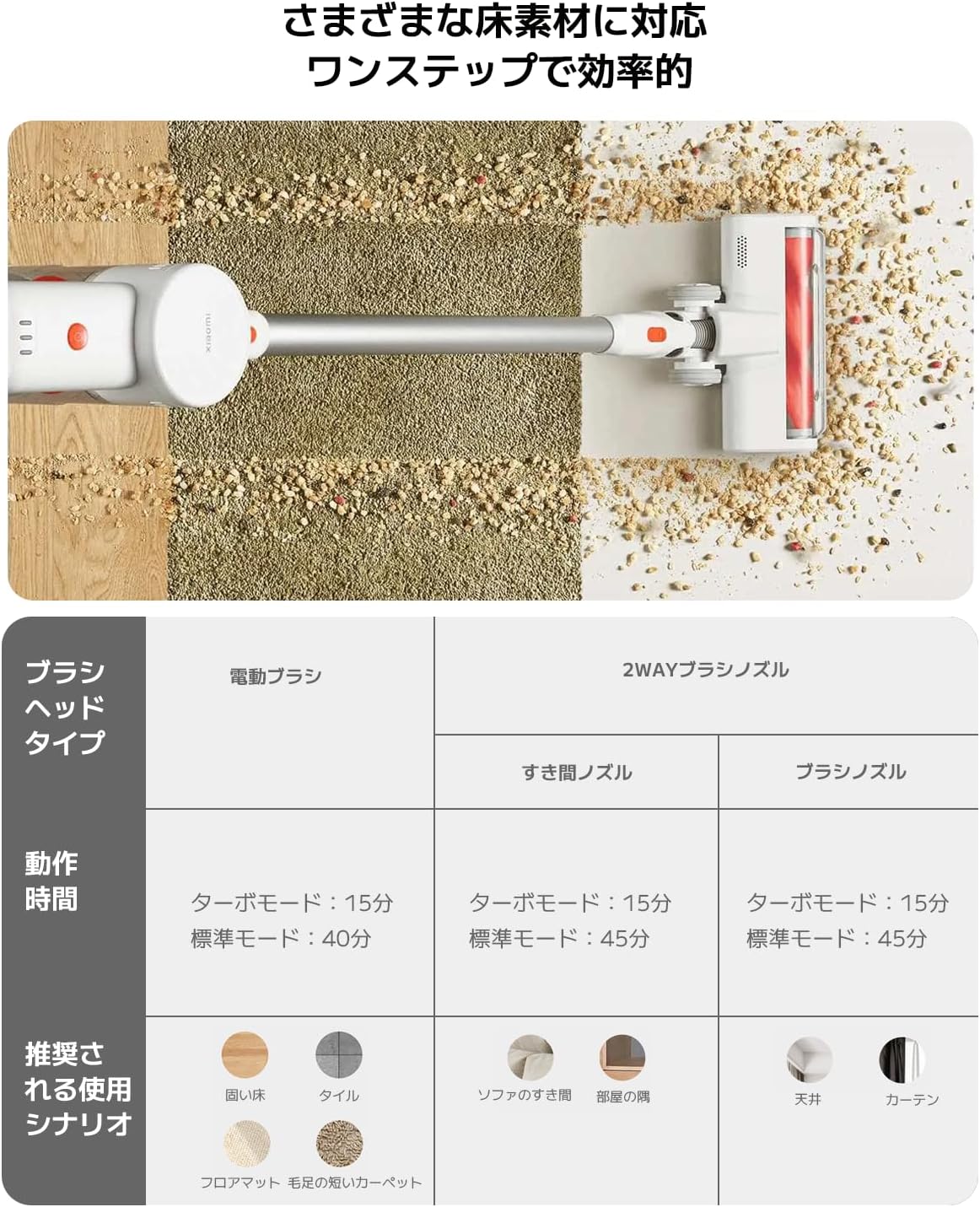
Изаберите одговарајућу главу четкице за ваш задатак чишћења:
| Тип главе четкице | Operating Time (Standard/Turbo) | Recommended Use Scenario |
|---|---|---|
| Моторизована четка | 40 мин / 15 мин | Hard Floor, Tile, Floor Mat, Short Pile Carpet |
| 2-Way Brush Nozzle (Crevice) | 45 мин / 15 мин | Sofa Crevices, Room Corners |
| 2-Way Brush Nozzle (Brush) | 45 мин / 15 мин | Ceiling, Curtains |

Image: Close-up of the vacuum cleaner's motorized brush head, showing the integrated white LED lights illuminating the floor.

Image: A person using the vacuum cleaner with the extension rod to clean high areas, and with a specialized nozzle for narrow gaps and desk surfaces.
6. Одржавање
Редовно одржавање обезбеђује оптималне перформансе и продужава век трајања вашег усисивача.
Пражњење канте за смеће
The vacuum cleaner features a one-touch dust disposal system. Simply press the release button on the dustbin to open the bottom flap and empty collected debris directly into a trash can. Empty the dustbin regularly to maintain suction power.

Image: A hand demonstrating the one-touch dust disposal mechanism, showing debris falling from the dustbin. Also visible is the power indicator light on the handle.
Чишћење филтера
Тхе 5-сtage powerful filter system requires periodic cleaning. Refer to the diagram below for filter components. Remove the dustbin and separate the filter components. Tap off loose dirt and rinse washable parts under running water. Ensure all filter components are completely dry before reassembling them into the vacuum cleaner.

Слика: Експлодирана view of the vacuum cleaner's main unit, illustrating the components of the 5-stagсистем филтера.
Cleaning Brush Heads
Periodically check brush heads for tangled hair or debris. Use scissors to cut away any tangled hair and remove any obstructions to ensure smooth operation.
КСНУМКС. Решавање проблема
Ако наиђете на проблеме са усисивачем, погледајте следеће уобичајене проблеме и решења:
- Нема напајања:
- Проверите да ли је батерија напуњена. Напуните је ако је потребно.
- Уверите се да је дугме за напајање чврсто притиснуто.
- Мала усисна снага:
- Испразните канту за смеће.
- Clean the filters. Ensure they are dry before reinstallation.
- Check for blockages in the brush head, extension rod, or main unit.
- Brush Head Not Rotating:
- Check for tangled hair or debris obstructing the brush roll.
- Ensure the brush head is correctly attached.
- Необична бука:
- Check for any foreign objects caught in the brush head or suction path.
- Уверите се да су сви делови добро састављени.
Ако проблем и даље постоји, обратите се корисничкој подршци.
8. Спецификације
| Спецификација | Детаљ |
|---|---|
| Бранд | Ксиаоми |
| Број модела | BHR8232US |
| Врста производа | Стицк Цлеанер |
| Карактеристике | Бежични |
| Тип филтера | ХЕПА филтер |
| Препоручена употреба | Carpet, Hard Floors, Sofa, Curtains, Beds, Tiles, Blankets |
| Извор напајања | Battery Powered (Charges via power cord) |
| Капацитет | 0.55 литара |
| Боја | Бела |
| Портабле | Да |
| Унутрашња/спољна употреба | Индоор |
| Оператинг Волtage | 21.6 Волтс |
| Капацитет батерије | 215 Watt-hours (2200mAh) |
| Тип контролера | Ручна контрола |
| Повезивање | Bluetooth (for potential smart features) |
| Укључене компоненте | Accessory kit, Adapter |
| Земља порекла | Кина |
| Тежина производа | 2.4 килограма |
| Димензије артикла (Д к Ш к В) | 66.2 цм к 32 цм к 13.2 цм |
9. Гаранција и подршка
Xiaomi products are designed with quality and reliability in mind. For warranty information and customer support, please refer to the details below:
Информације о гаранцији
This product comes with a standard manufacturer's warranty. Please retain your proof of purchase for warranty claims. For specific warranty terms and conditions, refer to the documentation included with your product or visit the official Xiaomi webсајту.
Корисничка подршка
For technical assistance, troubleshooting, or service inquiries, please contact the Xiaomi Customer Service Center:
- Телефон: 0120-767-378 (Reception hours: 9:00 - 18:00, excluding year-end and New Year holidays)
- Емаил: service.jp@support.mi.com
Xiaomi Service Center (Akihabara Store)
For in-person support or repairs, you may visit our service center:
- Адреса: 4-6-7 Kanda Sakumacho, Chiyoda-ku, Tokyo
- Радно време: 10:00 - 19:00
- Затворено: среда
- Last Reception: 18:00