
Увод
This manual provides essential information for setting up, operating, maintaining, and troubleshooting your Alienware X16 Gaming Laptop. Designed for high-performance gaming, this laptop features cutting-edge components and advanced cooling solutions to deliver an immersive experience.

Figure 1: Alienware X16 Gaming Laptop, showcasing its high-refresh-rate display and powerful graphics capabilities.
Шта је у кутији
Upon unboxing your Alienware X16 Gaming Laptop, verify that all components are present:
- Алиенваре Кс16 Р2 лаптоп
- Power Adapter (330W Small Form Factor)
- Повер Цорд
- Документација (укључујући и овај приручник)
Сетуп
Прво укључивање
- Повежите адаптер за напајање: Plug the power adapter into the Power/DC-in Port on the rear of the laptop. Connect the power cord to the adapter and then to a wall outlet.
- Отворите лаптоп: Пажљиво подигните поклопац дисплеја.
- Укључено: Притисните дугме за напајање, које се обично налази на тастатури.
- Пратите упутства на екрану: Лаптоп ће вас водити кроз почетни процес подешавања система Windows 11 Pro, укључујући избор језика, мрежну везу и креирање корисничког налога.
Повезивање периферних уређаја
The Alienware X16 offers a variety of ports for connecting external devices:
- USB 3.2 Gen 1 портови (x2): За стандардне УСБ уређаје попут мишева, тастатура или екстерних дискова.
- USB-C 3.2 Gen 2 порт са DisplayPort-ом: For modern USB-C devices and external displays.
- Thunderbolt 4 Port with Power Delivery and DisplayPort: High-speed connectivity for advanced peripherals, external GPUs, and charging.
- ХДМИ 2.1 порт: За повезивање са екстерним мониторима или телевизорима.
- Headset (Headphone and Microphone Combo) Port: За аудио улаз/излаз.
- слот за мицроСД картицу: За проширење складишног простора или пренос fileс са меморијских картица.

Figure 2: Rear port configuration of the Alienware X16, detailing connectivity options.
Управљање лаптопом
Приказ и визуелни елементи
The Alienware X16 features a 16.0" QHD+ (2560 x 1600) display with a 240Hz refresh rate and 3ms response time, ensuring smooth and vibrant visuals. It supports 100% DCI-P3 color gamut, ComfortView Plus for reduced blue light, and NVIDIA G-SYNC + Advanced Optimus for tear-free gaming.

Figure 3: The integrated FHD HDR IR Camera supports facial recognition and provides clear video quality.
Тастатура и унос
The English US AlienFX RGB backlit (per-key) Alienware X Series keyboard offers a responsive typing and gaming experience. The AlienFX lighting zones are programmable with up to 16.8 million distinct colors, allowing for extensive customization.
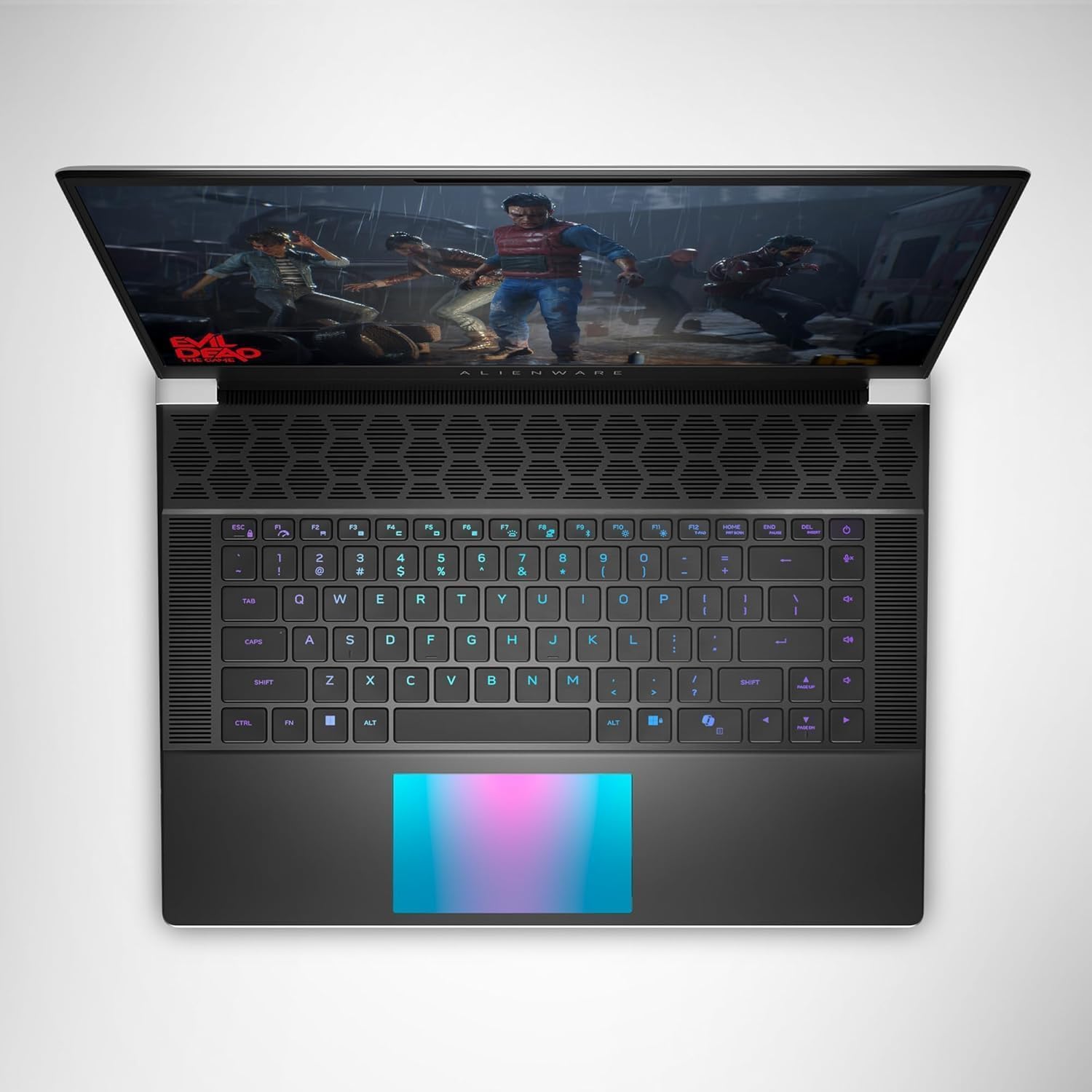
Слика 4: Врх view of the Alienware X16, highlighting the customizable RGB keyboard and touchpad.
Алиенваре Цомманд Центер
Utilize the Alienware Command Center software to customize your gaming experience. This application allows you to manage performance presets, monitor system vitals, and configure AlienFX lighting effects and combinations for a personalized setup.

Figure 5: Alienware Command Center interface for system control and customization.
Одржавање
Систем за хлађење
The Alienware X16 incorporates advanced Alienware Cryo-tech™ cooling technology, featuring six laser-welded flat end heat pipes. To ensure optimal performance and longevity, regularly check and clean the ventilation grilles to prevent dust accumulation, which can impede airflow.
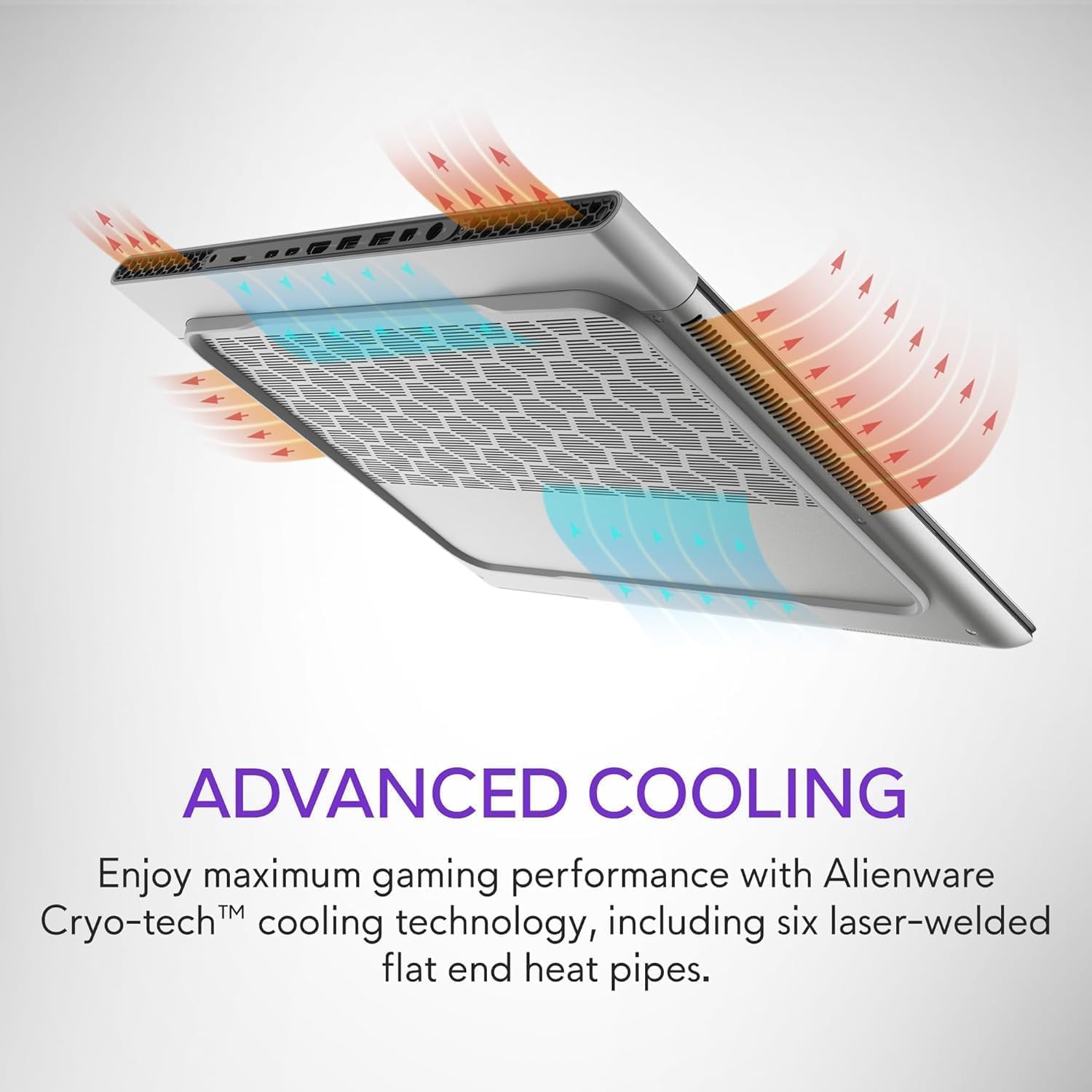
Figure 6: Illustration of the Alienware Cryo-tech™ advanced cooling system.
Општа нега
- Keep the laptop on a flat, stable surface to ensure proper ventilation.
- Избегавајте излагање лаптопа екстремним температурама, директној сунчевој светлости или високој влажности.
- Clean the screen with a soft, lint-free cloth specifically designed for electronics.
- Use compressed air to clear dust from keyboard keys and ports.
Решавање проблема
Уобичајени проблеми и решења
| Проблем | Могући узрок | Решење |
|---|---|---|
| Лаптоп се не укључује. | Нема напајања, неисправан адаптер или проблем са батеријом. | Ensure power adapter is securely connected to laptop and wall outlet. Check wall outlet with another device. Try a different power outlet. |
| Екран је празан или трепери. | Incorrect display settings, driver issue, or hardware problem. | Restart the laptop. Update graphics drivers. If using an external monitor, check cable connections. |
| Poor performance during gaming. | Overheating, outdated drivers, or background applications. | Ensure proper ventilation. Update graphics and chipset drivers. Close unnecessary background applications. Adjust power settings to high performance. |
| Проблеми са Wi-Fi везом. | Driver issue, router problem, or interference. | Restart the laptop and router. Update wireless drivers. Check router settings. |
За сложеније проблеме, обратите се званичној подршци компаније Alienware. webсајту или контактирајте корисничку подршку.
Спецификације
| Компонента | Детаљ |
|---|---|
| Процесор | Intel® Core™ Ultra 9 processor 185H (24MB cache, 16 cores, 2.30 to 5.10 GHz P-Core) |
| Оперативни систем | Виндовс 11 Про |
| графичка картица | NVIDIA GeForce RTX 4090 16GB GDDR6 |
| Дисплаи | 16.0" QHD+ (2560 x 1600) 240Hz 3ms, 100% DCI-P3, ComfortView Plus, NVIDIA G-SYNC + Advanced Optimus |
| Меморија | 32GB, 2x16GB, LPDDR5X, 7467MT/s |
| Складиштење | 2 TB, M.2, PCIe NVMe, SSD |
| Тастатура | English US AlienFX RGB backlit (per-key) Alienware X Series keyboard |
| Бежични | Intel Killer™ 1750 2x2 and Bluetooth 5.4 Wireless Card with Wifi 7 Ready |
| Камера | 1080p at 30fps, FHD HDR RGB+IR camera; Dual-array microphones |
| Аудио | Tweeter speaker: 2W x 2; Woofer speaker: 3W x 4 |
| Портс | 2 USB 3.2 Gen 1, 1 USB-C 3.2 Gen 2 (DP), 1 Thunderbolt 4 (PD, DP), 1 Headset, 1 HDMI 2.1, 1 microSD-card slot |
| Батерија | 6 Cell, 90 Wh |
| Димензије (ВкШкД) | 18.57 мм (0.73 ин.) к 364.81 мм (14.36 ин.) к 289.98 мм (11.41 ин.) |
| Тежина (минимална) | 2.66 кг (5.86 лб) |
Гаранција и подршка
Your Alienware X16 Gaming Laptop comes with a standard manufacturer's warranty. For detailed warranty terms and conditions, please refer to the documentation included in the box or visit the official Alienware support webсајту.
За техничку помоћ, преузимање драјвера или додатну подршку, посетите Alienware Official Store или њихов наменски портал за подршку.