
ALLIMITY RC45162
ALLIMITY RC45162 Voice Remote Control User Manual
Model: MME-RC45162-NP
Compatible with Panasonic TV models: TX-65MX700E, TX-65MX710E, TX-43MX700E, TX-55MX710E, TX-50MX710E, TX-55MX700E
1. Увод
This manual provides instructions for the ALLIMITY RC45162 Voice Remote Control. This remote is designed to be fully compatible with various Panasonic TV models, offering a direct replacement experience without complex setup procedures. Its ergonomic design ensures comfortable handling and reliable performance for controlling your television.
2. Подешавање
2.1 Инсталација батерије
The ALLIMITY RC45162 remote control requires batteries for operation. Please follow these steps to install them:
- Пронађите поклопац одељка за батерије на задњој страни даљинског управљача.
- Slide or press the latch to open the battery compartment.
- Insert the required Lithium batteries, ensuring the positive (+) and negative (-) terminals align correctly with the markings inside the compartment.
- Добро затворите поклопац одељка за батерије.
Note: This remote control requires no programming or complex installation. Once batteries are correctly inserted, it is ready for use with compatible Panasonic TV models.

Слика: Леђа view of the remote control, highlighting the battery compartment for easy access and installation.
3. Упутство за употребу
The ALLIMITY RC45162 remote control is designed for intuitive use. Below are the primary functions:
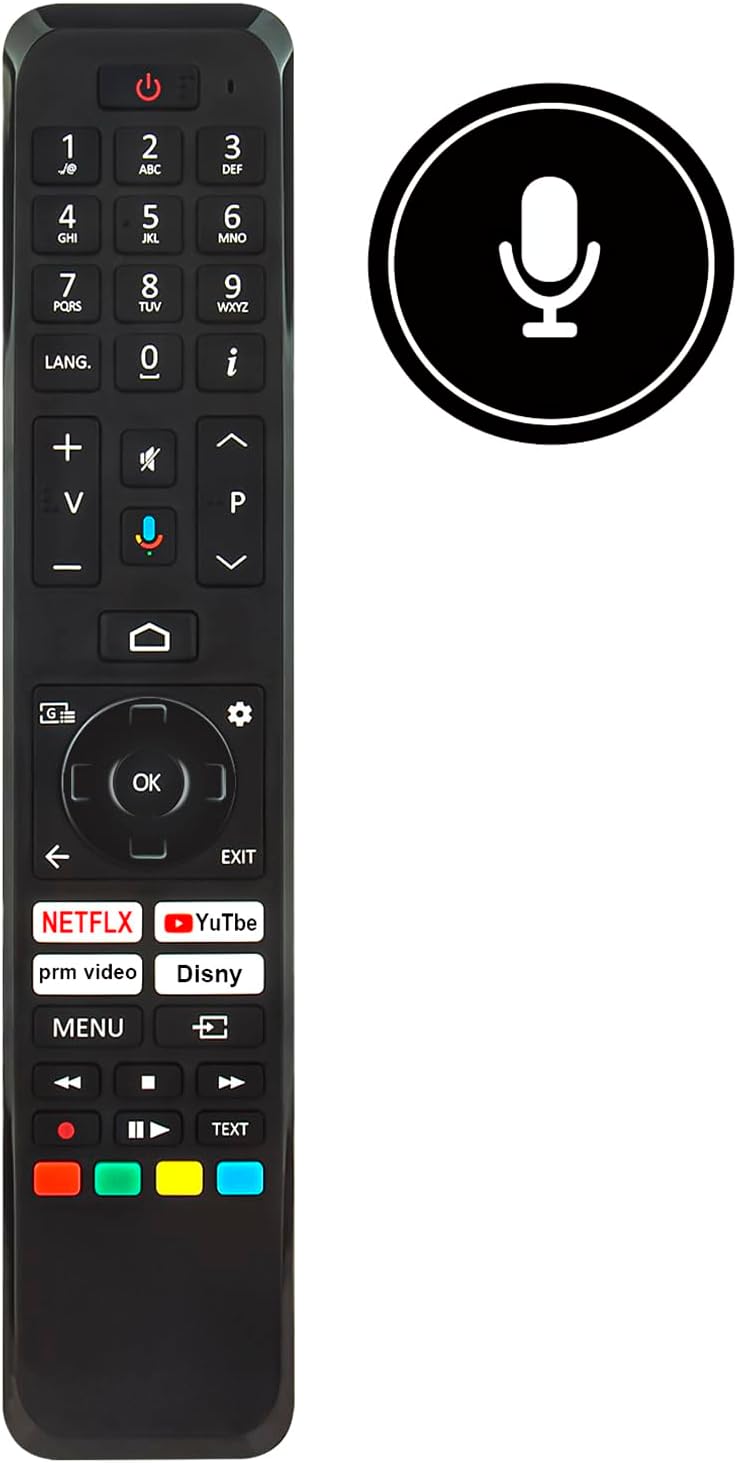
Слика: Фронт view of the ALLIMITY RC45162 remote control, displaying the full button layout.
3.1 Основне функције
- Дугме за укључивање (U): Укључује или искључује ТВ.
- Дугмад са бројевима (0-9): Директно бирајте канале.
- Појачавање/утишавање (+/-): Подешава јачину звука ТВ-а.
- Channel Up/Down (P^/P<): Мења ТВ канале.
- Дугме за утишавање: Искључује или укључује звук телевизора.
- Навигациона тастатура (горе, доле, лево, десно, ОК): Користи се за навигацију кроз меније и потврђивање избора.
- Back Button (<): Враћа се на претходни мени или екран.
- Дугме за излаз: Излази из тренутног менија или апликације.
- Хоме дугме: Accesses the TV's main home screen or smart TV interface.
3.2 посебних карактеристика
- Voice Control Button (Microphone icon): Activates the voice control feature. Press and hold this button, then speak your command clearly into the remote. Release the button when finished.
- Дугмад за брзи приступ: Dedicated buttons for popular streaming services such as Netflix, YouTube, Prime Video, and Disney+ for direct access.
- Дугме ЈЕЗИК: For language selection or audio track changes.
- Info Button (i): Приказује информације о тренутном програму или уносу.
- Дугме менија: Приступа главном менију подешавања телевизора.
- Дугмад у боји (црвена, зелена, жута, плава): These buttons often correspond to specific functions within TV menus or applications, as indicated on the screen.
4. Одржавање
4.1 Чишћење
Да бисте одржали изглед и функционалност даљинског управљача:
- Wipe the remote with a soft, dry cloth.
- За тврдокорну прљавштину, благо дampи крпу са водом или благим, неабразивним средством за чишћење.
- Avoid using harsh chemicals, solvents, or abrasive materials, as these can damage the remote's surface or internal components.
4.2 Замена батерије
Replace batteries when the remote control's response becomes sluggish or stops working. Always replace all batteries at the same time with new ones of the same type. Do not mix old and new batteries or different types of batteries.
4.3 Складиштење
Ако даљински управљач неће бити коришћен дуже време, извадите батерије како бисте спречили цурење и потенцијално оштећење уређаја.
КСНУМКС. Решавање проблема
If you encounter issues with your ALLIMITY RC45162 remote control, please refer to the following common solutions:
- Даљински не реагује:
- Проверите да ли су батерије правилно уметнуте и да ли су довољно напуњене. Замените их ако је потребно.
- Уверите се да нема препрека између даљинског управљача и инфрацрвеног сензора телевизора.
- Усмерите даљински управљач директно ка телевизору.
- Гласовна контрола не ради:
- Ensure you are pressing and holding the voice control button while speaking.
- Говорите јасно и нормалном јачином звука.
- Check your TV's settings to ensure voice control is enabled and configured correctly.
- Ограничен домет или повремени одзив:
- Replace the batteries. Low battery power can affect signal strength.
- Ensure the remote is within the maximum operating range (up to 10 meters).
- Minimize sources of infrared interference, such as direct sunlight or strong artificial light.
6. Спецификације

Слика: Предња и бочна страна view of the remote control, illustrating its dimensions for reference.
| Бранд | АЛЛИМИТИ |
| Назив / број модела | MME-RC45162-NP |
| Посебне карактеристике | Ергономски |
| Боја | Црно/Бело |
| Максимални број подржаних уређаја | 10 |
| Компатибилни уређаји | TX-65MX700E, TX-65MX710E, TX-43MX700E, TX-55MX710E, TX-50MX710E, TX-55MX700E |
| Технологија повезивања | Инфрацрвени |
| Тип контролера | Инфрацрвена контрола |
| Максимални домет | 10 метара |
| Тип батерије | литијум |
| Тежина артикла | 59 грама |
7. Информације о гаранцији
This product is typically covered by a standard manufacturer's warranty. For specific details regarding warranty duration, coverage, and claims, please refer to the documentation provided at the time of purchase or contact your retailer. Extended warranty options may be available from third-party providers.
8. Подршка
For further assistance or if you have questions not covered in this manual, please contact the seller or the manufacturer directly. You may find contact information on the product packaging or the retailer's webсајту.
Ask a question about this manual
Ask about setup, troubleshooting, compatibility, parts, safety, or missing instructions. Manuals+ will review the question and use this page’s manual context to help answer it.