
Splenssy Intelligent Soil Detector
Splenssy 6-in-1 Soil Tester User Manual
Модел: Intelligent Soil Detector
Бренд: Спленсси
Увод
The Splenssy 6-in-1 Soil Tester is a versatile tool designed to help you monitor the health of your soil and optimize plant growth. This device provides accurate readings for six key parameters: soil moisture, fertility, pH level, temperature, ambient humidity, and light intensity. Its 90-degree rotatable display and backlit LCD ensure clear readability in various conditions.
Understanding these soil conditions is crucial for effective gardening, whether for indoor plants, outdoor gardens, lawns, or farms. This manual provides detailed instructions for setting up, operating, and maintaining your soil tester to ensure accurate and reliable results.

Image: The Splenssy 6-in-1 Soil Tester, illustrating its multi-functional capabilities and rotatable display for easy viewинг.
Безбедносне информације и мере предострожности
- Do not insert the metal probe into very hard soil or other hard objects to prevent damage to the probe.
- This product is designed exclusively for testing soil. Do not use it for testing pure water or other liquids.
- Avoid leaving the probe inserted in soil for extended periods to prevent corrosion and maintain data accuracy.
- Always clean the probe thoroughly after each use to ensure it remains in a clean state.
- Soil test data may vary at different depths. For best results, take multiple readings and average the data.
- When testing soil fertility or pH, ensure the soil is moist.
Садржај пакета
Молимо вас да проверите пакет за следеће ставке:
- 1 x Splenssy 6-in-1 Soil Tester
- 1 x Упутство за употребу (овај документ)
Note: 2 x AAA batteries are required and are not included in the package.
Производ је завршенview
Familiarize yourself with the components of your Splenssy 6-in-1 Soil Tester:
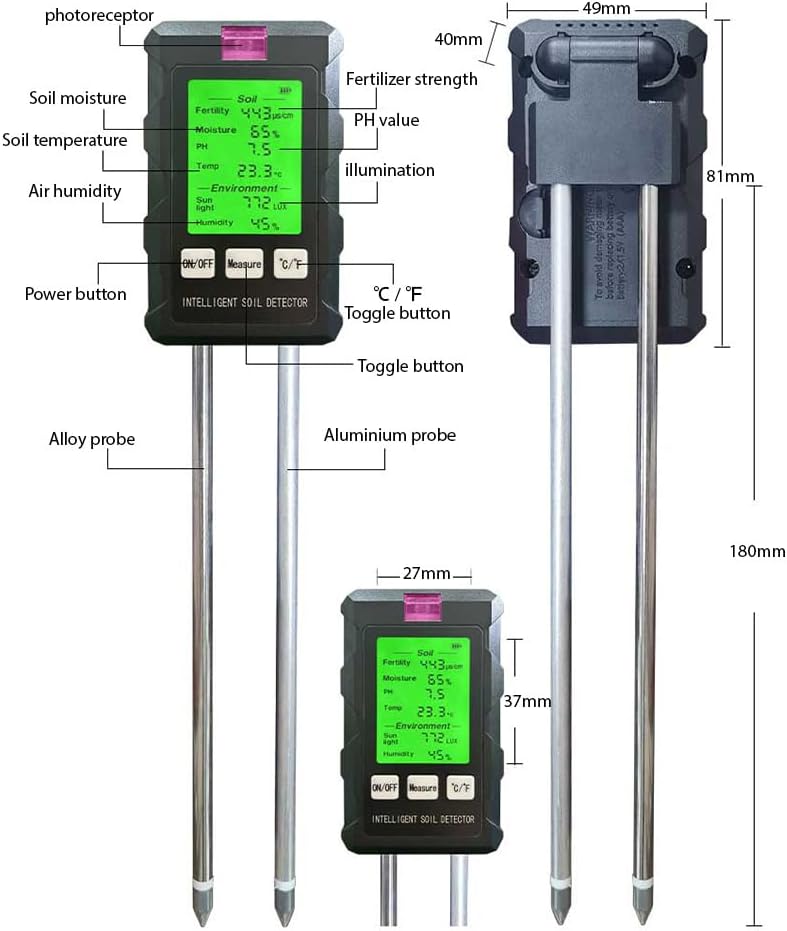
Image: Detailed diagram of the soil tester, indicating the location and function of its various parts, including probes, display, and buttons.
- Екран: Backlit LCD for clear readings of all parameters.
- Дугме за укључивање/искључивање: Укључује или искључује уређај.
- Дугме за мерење: Initiates a measurement cycle.
- Дугме °Ц/°Ф: Toggles temperature units between Celsius and Fahrenheit.
- Photoreceptor: Sensor for detecting light intensity.
- Alloy Probe: Used for various soil measurements.
- Aluminium Probe: Used for various soil measurements.
- Одељак за батерије: Located at the back, requires 2 AAA batteries.
Сетуп
1. Инсталација батерије
- Пронађите одељак за батерију на задњој страни уређаја.
- Отворите поклопац батерије.
- Уметните 2 ААА батерије, водећи рачуна о исправном поларитету (+/-).
- Добро затворите поклопац батерије.

Image: The battery compartment of the soil tester, illustrating where to insert the AAA batteries.
2. Initial pH Calibration (Optional but Recommended)
For optimal pH accuracy, perform a 0-point calibration:
- Thoroughly clean the probe.
- Press and hold the "Measure" button until the soil indicator light illuminates.
- Once the flashing stops, release the "Measure" button to complete the pH 0 calibration.
Упутство за употребу
General Measurement Steps:
- Укључено: Press the "ON/OFF" button to turn on the device. The backlit LCD will illuminate.
- Prepare Soil: Ensure the soil is moist enough for accurate readings, especially for pH and fertility tests. Remove any large debris or rocks from the testing area.
- Убаци сонду: Gently insert the metal probes vertically into the soil to the desired depth (approximately 7.1 inches or 180mm, up to the base of the plastic housing). Avoid forcing the probes into hard soil.
- Take Reading: Press the "Measure" button. The device will display readings for all six parameters within approximately 3 seconds.
- Прочитајте податке: Observe the values on the backlit display. The display can be rotated 90 degrees for easier viewинг.
- Уклоните сонду: Carefully withdraw the probes from the soil.
- Чиста сонда: Immediately clean the probes after use (see Maintenance section).
- Искључивање: Press the "ON/OFF" button to turn off the device, or it will automatically power off after a period of inactivity to conserve battery.
Specific Parameter Guidance:
Мерење влаге
The device displays soil moisture as a percentage (0-99%). Refer to the general measurement steps. Different plants have varying moisture requirements. The display provides a clear indication of current moisture levels.
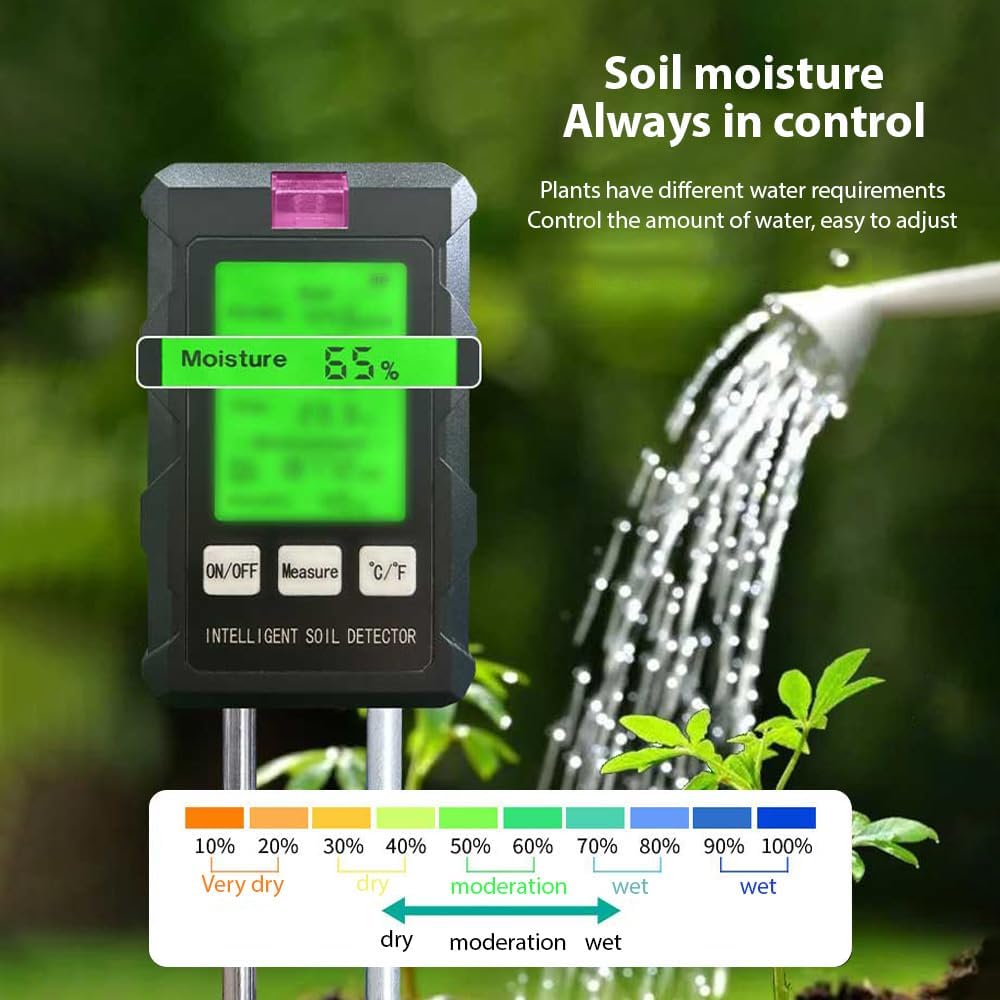
Image: The soil tester showing a moisture reading of 65%, accompanied by a color-coded scale indicating different moisture levels from dry to wet.
Fertility Measurement
The fertility reading helps assess nutrient levels in the soil. Ensure the soil is adequately moist for accurate fertility readings. Adjust fertilization based on the results to promote healthy plant growth.

Image: Comparison illustrating the impact of soil fertility on plant health, with the tester indicating optimal conditions for growth.
пХ Меасуремент
The pH value (3.5-9) indicates the acidity or alkalinity of the soil. Ensure the soil is moist for accurate pH readings. If you performed the optional pH calibration during setup, your readings will be more precise.
Мерење температуре
The device measures soil temperature (0-50°C / 32-122°F). Use the "°C/°F" button to switch between Celsius and Fahrenheit units as preferred.
Мерење влажности
This refers to the ambient humidity around the device, displayed as a percentagе (0-99%).
Лигхт Меасуремент
The photoreceptor on the device measures ambient light intensity (0-100000 LUX). Position the device to ensure the photoreceptor is exposed to the light conditions you wish to measure.
Одржавање
Cleaning the Probes:
- After each use, gently wipe the metal probes with a clean, damp cloth to remove any soil residue.
- Ensure the probes are completely dry before storing the device.
- Do not use abrasive cleaners or immerse the main body of the device in water.
Складиштење:
- Store the soil tester in a cool, dry place, away from direct sunlight and extreme temperatures.
- Ако уређај неће бити коришћен дуже време, извадите батерије да бисте спречили цурење.
Решавање проблема
| Проблем | Могући узрок | Решење |
|---|---|---|
| Уређај се не укључује. | Батерије су истрошене или неправилно постављене. | Проверите поларитет батерија; замените их новим ААА батеријама. |
| Нетачна или флуктуирајућа очитавања. | Probes are dirty; soil is too dry; probe damaged; multiple readings not averaged. | Clean probes thoroughly; moisten soil before testing; ensure probes are not damaged; take multiple readings and average. |
| Probe difficult to insert into soil. | Soil is too hard or compacted. | Do not force the probe. Loosen the soil gently before insertion, or choose a softer testing spot. |
| Екран је замагљен или нечитљив. | Low battery; extreme lighting conditions. | Replace batteries; use the backlit feature in low light; avoid direct harsh sunlight on the display. |
Спецификације
| Параметар | Домет |
|---|---|
| Влага | 0-99% |
| pH | 3.5-9 |
| Температура | 0–50 ° Ц / 32–122 ° Ф |
| Sunlight (Illumination) | 0-100000 ЛУКС |
| Humidity (Ambient) | 0-99% |
| Батерија | КСНУМКС к ААА батерија (није укључена) |
| Величина производа | 49 к 40 к 81 мм (1.9 к 1.6 к 3.2 инча) |
| Дужина сонде | 180 мм (7.1 инча) |
| Тежина артикла | 5.1 унци |
Гаранција и подршка
For warranty information or technical support, please refer to the documentation provided with your purchase or contact Splenssy customer service directly. Contact details can typically be found on the product packaging or the official Splenssy webсајту.
Ask a question about this manual
Ask about setup, troubleshooting, compatibility, parts, safety, or missing instructions. Manuals+ will review the question and use this page’s manual context to help answer it.