
1. Производ је готовview
The Aramox Smart Thermostat is designed for electric heating systems, offering precise temperature control and a clear LCD display. It integrates a highly reliable single-chip microcomputer for accurate temperature regulation and strong anti-interference capabilities. The thermostat provides a wide temperature measurement range and adjustable settings for a comfortable indoor environment.

Figure 1: Aramox Smart Thermostat installed in a room, displaying temperature.
2. Садржај пакета
Након отварања пакета, уверите се да су присутни сви следећи елементи:
- 1 x Aramox Smart Thermostat Unit
- 2 к завртњи за монтажу
- 1 к Кабелски свежањ
- 1 x Упутство за употребу (овај документ)
3. Подешавање и инсталација
Warning: Electrical installation should be performed by a qualified professional to prevent electric shock or damage to the device. Always turn off power at the circuit breaker before beginning installation.
3.1 Монтажа термостата
- Choose a suitable location on an interior wall, away from direct sunlight, drafts, or heat sources.
- Carefully remove the front panel of the thermostat to access the mounting holes.
- Mark the positions for the mounting screws on the wall.
- Избушите пробне рупе ако је потребно и причврстите основу термостата на зид помоћу приложених вијака.
3.2 Упутства за ожичење
Refer to the wiring diagram on the back of the thermostat and the provided wiring harness. Ensure connections are secure and correct for your electric heating system.

Слика 2: Задња страна view of the thermostat with wiring terminals labeled.
- Connect the Live (L) wire from your power supply to the L terminal on the thermostat.
- Connect the Neutral (N) wire from your power supply to the N terminal on the thermostat.
- Connect the heating load wires to the appropriate output terminals (e.g., L1, N1 for heating element).
- Once wiring is complete, reattach the front panel of the thermostat.
- Вратите напајање на прекидач.
4. Упутство за употребу
The thermostat features an intuitive keypad and a clear LCD display for easy operation.
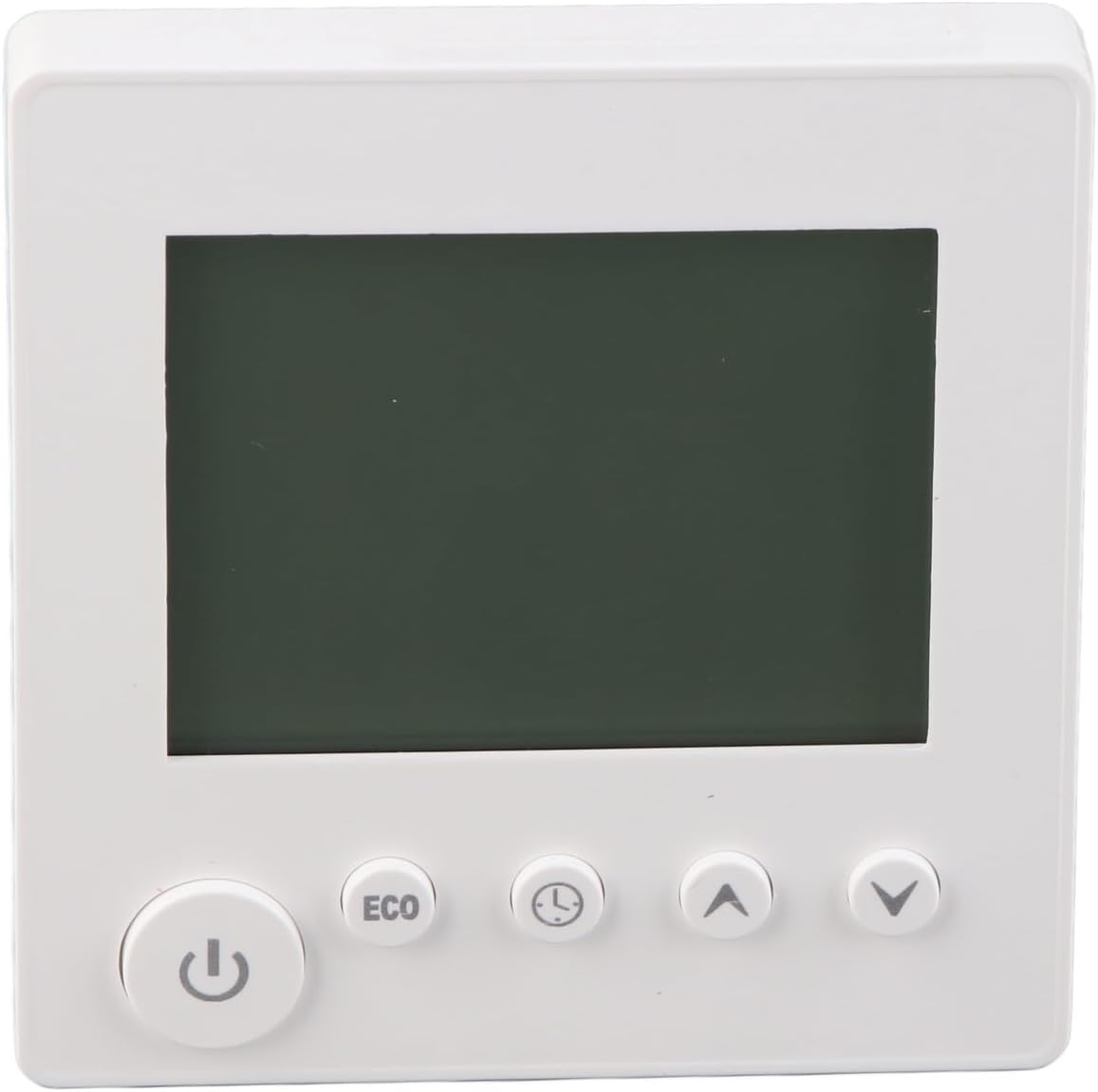
Слика 3: Предња страна view of the thermostat showing the LCD and control buttons.
4.1 Укључивање/искључивање
- Притисните тастер Дугме за напајање () да бисте укључили или искључили термостат.
4.2 Подешавање температуре
- Користите Дугме са стрелицом нагоре () to increase the desired temperature.
- Користите Дугме са стрелицом надоле () да смањите жељену температуру.
- The current and set temperatures will be displayed on the LCD screen.
4.3 ЕЦО режим
- Притисните тастер ЕЦО дугме to activate or deactivate energy-saving mode. In ECO mode, the thermostat will adjust the temperature to a more energy-efficient setting.
4.4 Time/Program Settings
- Притисните тастер Дугме за сат/тајмер () to access time and programming settings. Follow the on-screen prompts to set the current time or schedule heating periods.
5. Одржавање
The Aramox Smart Thermostat requires minimal maintenance.
- Чишћење: The LCD screen is scratch-resistant and easy to clean. Use a soft, dry cloth to wipe the screen and the thermostat body. Avoid using abrasive cleaners or solvents.
- инспекција: Периодично проверавајте спојеве ожичења како бисте били сигурни да су безбедни.
КСНУМКС. Решавање проблема
Ако наиђете на проблеме са термостатом, погледајте следеће уобичајене проблеме и решења:
| Проблем | Могући узрок | Решење |
|---|---|---|
| Термостат се не укључује | No power supply; incorrect wiring; circuit breaker tripped. | Check circuit breaker; verify wiring connections; ensure power is supplied to the unit. |
| Нетачно очитавање температуре | Sensor obstruction; thermostat located near heat/cold source. | Ensure sensor is clear; relocate thermostat if exposed to extreme temperatures. |
| Систем грејања не реагује | Incorrect wiring; heating system malfunction; thermostat settings. | Verify wiring to the heating system; check heating system for faults; confirm thermostat is set to heating mode and desired temperature is above ambient. |
| Екран је празан или трепери | Power fluctuation; internal fault. | Cycle power to the thermostat at the circuit breaker. If the problem persists, contact support. |
7. Спецификације
| Феатуре | Спецификација |
|---|---|
| Врста ставке | Термостат |
| Број модела | Aramox6mfynvtsku |
| Материјал | АБС |
| Цуррент | 16А |
| Меасуремент Еррор | ± КСНУМКС ℃ |
| Опсег подешавања температуре | 5-60 ℃ (upper limit adjustable) |
| Температурни опсег | 0-50 ℃ |
| Контролни режим | Кључ |
| Тежина артикла | Прибл. 188 г / 6.63 оз |
| Димензије пакета | 4.33 к 3.94 к 2.76 инча |
8. Информације о гаранцији
Specific warranty details for the Aramox Smart Thermostat (Model Aramox6mfynvtsku) may vary. Please refer to the warranty card included with your product or contact the seller/manufacturer directly for comprehensive warranty terms and conditions.
9. Подршка
For technical assistance, troubleshooting beyond this manual, or inquiries regarding your Aramox Smart Thermostat, please contact your point of purchase or the manufacturer directly. Ensure you have your model number (Aramox6mfynvtsku) and purchase date available when seeking support.