
Xtorm FS405
Xtorm FS405 Solar Powerbank 20W – 10.000 mAh User Manual
Модел: ФС405
Увод
The Xtorm FS405 Fuel Series Solar Powerbank 20W – 10.000 mAh is designed to provide portable power for your electronic devices, offering the flexibility to charge via USB-C or its integrated solar panel. This power bank is built for outdoor adventures, featuring a durable, splash-resistant design and a powerful LED flashlight.
Безбедносне информације
- Do not expose the power bank to extreme temperatures (above 45°C or below -10°C).
- Избегавајте испуштање, растављање или покушај самосталне поправке уређаја.
- Keep away from water, except for the specified splash resistance (IPX4). Do not submerge.
- Користите само сертификоване каблове и адаптере за пуњење.
- Чувати ван домашаја деце.
- Одложите производ одговорно у складу са локалним прописима.
Садржај пакета
Молимо вас да проверите пакет за следеће ставке:
- Xtorm FS405 Solar Powerbank
- УСБ-Ц кабл за пуњење (0.30м)
- Упутство за употребу
Производ је завршенview

Фронт View: Shows the main solar charging panel and the Xtorm logo. The robust casinг је видљив по ивицама.

Назад View (LED Off): Displays the textured back casing and the integrated LED light panel in its off state.
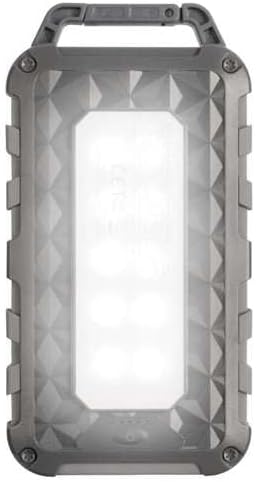
Назад View (LED On): Shows the powerful LED light panel fully illuminated, indicating the flashlight function is active.

Врх View: Highlights the sturdy integrated carabiner handle, designed for easy attachment to bags or gear.
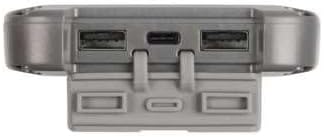
Дно View: Displays the USB-C PD input/output port and two USB-A Quick Charge 3.0 output ports, protected by a cover.
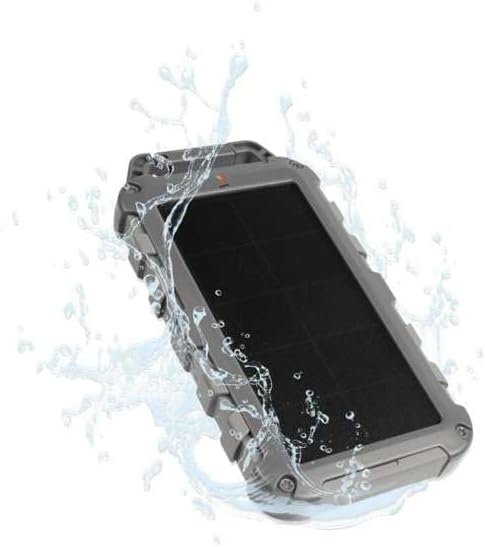
Durability Feature: Illustrates the power bank's splash-resistant design, suitable for outdoor conditions (IPX4 rated).
Сетуп
Иницијална наплата
Before first use, it is recommended to fully charge the Xtorm FS405 Solar Powerbank via the USB-C port for optimal performance.
- Повежите приложени USB-C кабл са USB-C портом на преносном пуњачу.
- Connect the other end of the USB-C cable to a compatible USB wall adapter (not included) or a computer's USB port.
- The LED indicators on the power bank will show the charging status. A full charge via USB-C typically takes approximately 2 hours.
Упутство за употребу
Пуњење Повер Банк-а
The Xtorm FS405 can be charged using two methods:
1. Via USB-C (Recommended for Fast Charging)
- Connect the power bank to a USB-C power source using the included cable.
- The power bank will begin charging. This method provides the fastest charging speed for the power bank itself.
2. Via Solar Panel
The integrated solar panel allows for convenient charging when outdoors. For best results, place the power bank directly under strong sunlight.
- Place the solar panel facing direct sunlight.
- A small indicator light (usually green) will illuminate when solar charging is active.
- Note on Solar Charging Speed: Solar charging is a supplementary method and is significantly slower than USB-C charging. Factors like season, location, time of day, and cloud cover heavily influence charging speed.
Approximate solar charging times for a full charge:
- Spring/Summer (mostly sunny day): Отприлике 10 дана
- Autumn/Winter (mostly sunny day): Отприлике 20 дана
Solar charging is not effective on mostly cloudy days.
Пуњење спољних уређаја
The power bank features one USB-C PD (Power Delivery) output and two USB-A Quick Charge 3.0 outputs.

Могућност брзог пуњења: The power bank can charge compatible smartphones, such as an iPhone 14 or 12/13, up to 50% in approximately 30 minutes using the 20W USB-C PD output.
- Connect your device's charging cable to one of the available output ports (USB-C or USB-A) on the power bank.
- Повежите други крај кабла са уређајем.
- Повер банк ће аутоматски почети да пуни ваш уређај.
- ЛЕД индикатори на преносном пуњачу ће приказивати преостали ниво напуњености батерије.
The 10,000mAh capacity is sufficient to charge most smartphones at least 2 times.
Коришћење ЛЕД лампе
The Xtorm FS405 includes a powerful integrated LED flashlight on its back.
- Locate the power button (usually on the side or near the ports).
- Press and hold the power button for a few seconds to turn the flashlight ON.
- Press and hold the power button again to turn the flashlight OFF.
Одржавање
- Очистите преносни пуњач меком, сувом крпом. Не користите јаке хемикалије или абразивне материјале.
- Чувајте повер банк на хладном и сувом месту када се не користи.
- For long-term storage, charge the power bank to about 50-70% every 3-6 months to preserve battery health.
- Ensure the port covers are properly sealed when exposed to water splashes.
Решавање проблема
Повер Банк се не пуни
- Проверите кабл: Ensure the USB-C cable is securely connected to both the power bank and the power source. Try a different cable.
- Проверите извор напајања: Verify that the wall adapter or USB port is functioning correctly.
- Соларно пуњење: For solar charging, ensure the panel is in direct, strong sunlight. Remember solar charging is slow and not effective in low light or cloudy conditions.
Device Not Charging from Power Bank
- Проверите напуњеност преносног пуњача: Уверите се да је преносна батерија довољно напуњена.
- Проверите каблове: Use the original charging cable for your device and ensure it's properly connected to both the power bank and your device. Try a different cable.
- Компатибилност: Verify that your device is compatible with USB charging.
- Поново покрени: Искључите и поново повежите уређај.
Лампа не ради
- Проверите напуњеност преносног пуњача: Ensure the power bank has some charge remaining.
- Исправан рад: Ensure you are pressing and holding the power button correctly to activate the flashlight.
Спецификације
| Феатуре | Детаљ |
|---|---|
| Модел | ФС405 |
| Бранд | Ксторм |
| Сериес | Fuel Series 4 |
| Капацитет батерије | 10,000 mAh (литијум-полимер) |
| Максимална излазна снага | 20 В |
| Output 1 (USB-C PD) | 20 В |
| Output 2 (USB-A QC 3.0) | 18 В |
| Output 3 (USB-A QC 3.0) | 18 В |
| Број излаза | 3 |
| Тип уноса | УСБ-Ц ПД |
| Снага соларне плоче | 1 W (SunPower cells) |
| Димензије (Д к Ш к В) | 17 цм к 9 цм к 2 цм |
| Тежина | 289 г |
| Материјал | ПЦ, АБС |
| Отпорност на воду | IPX4 (отпорно на прскање) |
| Интегрисана батеријска лампа | Да |
| Battery Charge Time (USB-C) | Прибл. 2 сата |
Гаранција и подршка
For warranty information and customer support, please refer to the Xtorm official webсајт или контактирајте локалног продавца. Сачувајте доказ о куповини за евентуалне рекламације.
Подршка на мрежи: ввв.кторм.еу
Ask a question about this manual
Ask about setup, troubleshooting, compatibility, parts, safety, or missing instructions. Manuals+ will review the question and use this page’s manual context to help answer it.