
Увод
This manual provides instructions for the installation, operation, and maintenance of your Xtreme Smart Wi-Fi Window & Door Sensor. This device is designed to enhance home security by detecting the opening and closing of windows and doors, sending instant notifications to your smartphone.
Безбедносне информације
- Не излажите уређај екстремним температурама, директној сунчевој светлости или влази.
- Не покушавајте сами да растављате или поправљате уређај. То ће поништити гаранцију.
- Држите батерије ван домашаја деце. Ако се прогута, одмах потражите медицинску помоћ.
- Dispose of batteries according to local regulations. Do not mix old and new batteries.
- Ensure the installation surface is clean and dry for proper adhesive attachment.
Садржај пакета
Проверите да ли су све ставке присутне у вашем пакету:
- Xtreme Smart Wi-Fi Window & Door Sensor (Main Unit)
- Xtreme Smart Wi-Fi Window & Door Sensor (Magnetic Contact)
- Кориснички приручник (овај документ)

Image: The main sensor unit and the smaller magnetic contact unit.
Водич за подешавање
1. Инсталација батерије
- Gently slide open the battery cover on the main sensor unit.
- Insert two AAA batteries (not included) into the compartment, ensuring correct polarity (+/-).
- Добро затворите поклопац батерије.
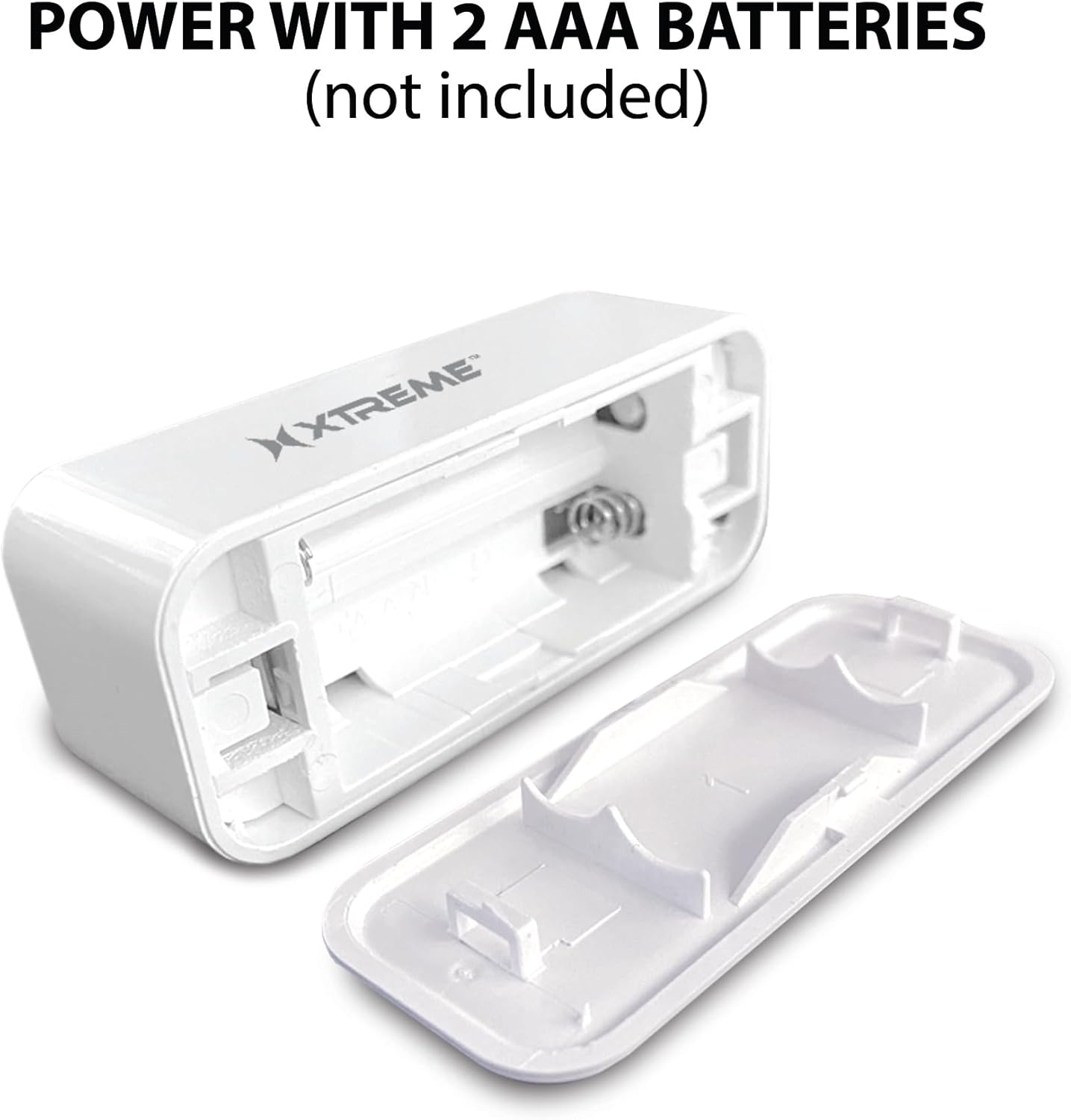
Image: The main sensor unit with its battery compartment open, showing where to insert two AAA batteries.
2. Преузимање апликације и креирање налога
- Преузмите Xtreme Connect Home App from the Apple App Store (for iOS 11 or higher) or Google Play Store (for Android 7.0 or higher).
- Отворите апликацију и пратите упутства на екрану да бисте креирали нови налог или се пријавите ако га већ имате.

Image: The product box illustrating the Xtreme Connect Home App download options for both iOS and Android devices.
3. Упаривање уређаја
- Ensure your smartphone is connected to a 2.4GHz Wi-Fi network. The sensor does not support 5GHz networks.
- In the Xtreme Connect Home App, tap the "+" icon to add a new device.
- Select "Sensor" or "Door/Window Sensor" from the device list.
- Follow the app's instructions to put the sensor into pairing mode (usually involves pressing and holding a button on the sensor until an indicator light flashes).
- Confirm the Wi-Fi network and enter the password in the app. The sensor will then connect to your home network.
- Once successfully paired, you can name your sensor within the app (e.g., "Front Door," "Bedroom Window").
4. Физичка инсталација
The sensor consists of two parts: a main unit and a smaller magnetic contact. These two parts must be installed close to each other (within 1 cm) on a door or window frame.
- Choose a clean, dry, and flat surface on your door or window frame.
- Peel off the protective backing from the adhesive on both the main unit and the magnetic contact.
- Attach the main unit to the fixed part of the door/window frame.
- Attach the magnetic contact to the moving part of the door/window (the door or window itself), aligning it with the main unit so they are no more than 1 cm apart when the door/window is closed.
- Test the installation by opening and closing the door/window. The app should register the change in status.


Image: Left: The sensor installed on a window sill with the window closed. Right: The sensor detecting an open window, with the magnetic contact separated from the main unit.
Операција
Monitoring Door/Window Status
Once installed and paired, the Xtreme Smart Wi-Fi Window & Door Sensor will continuously monitor the open/closed status of your designated entry point. When the magnetic contact separates from the main unit (door/window opens), the sensor will detect this change.
Тренутна обавештења
Upon detecting an open or close event, the sensor will send an instant notification to your smartphone via the Xtreme Connect Home App. Ensure app notifications are enabled in your phone's settings to receive these alerts.
Ремоте Аццесс
Можеш view the current status of your sensor (open or closed) and review event history from anywhere using the Xtreme Connect Home App, provided your smartphone has an internet connection.
Smart Scenes Integration
The Xtreme Connect Home App allows you to create "Smart Scenes" to automate actions based on sensor activity. For exampле:
- "If door opens, then turn on living room lights."
- "If window opens after 10 PM, then send an alert to family members."
Explore the "Smart Scenes" section within the app to customize your home automation.
Одржавање
Замена батерије
The sensor is powered by two AAA batteries. When the battery level is low, you may receive a notification via the Xtreme Connect Home App. To replace batteries:
- Gently slide open the battery cover on the main sensor unit.
- Уклоните старе батерије.
- Insert two new AAA alkaline batteries, ensuring correct polarity (+/-).
- Добро затворите поклопац батерије.
Note: The sensor is designed for up to four months of battery life under normal usage conditions.
Чишћење
Wipe the sensor with a soft, dry cloth. Do not use liquid cleaners or abrasive materials, as these can damage the device.
Решавање проблема
| Проблем | Могући узрок | Решење |
|---|---|---|
| Сензор се не повезује на Wi-Fi. | Incorrect Wi-Fi password; 5GHz network used; sensor too far from router. | Ensure correct 2.4GHz Wi-Fi network and password. Move sensor closer to the router. Re-attempt pairing. |
| Нису примљена обавештења. | App notifications disabled; sensor offline; app not running in background. | Check phone's notification settings for the Xtreme Connect Home App. Verify sensor status in the app. Ensure app is allowed to run in the background. |
| Sensor not detecting open/close. | Sensor parts misaligned; dead batteries. | Ensure the main unit and magnetic contact are within 1 cm when closed. Replace batteries if low. |
| Кратко трајање батерије. | Frequent activations; poor quality batteries. | Use high-quality alkaline batteries. Reduce unnecessary activations if possible. |
Спецификације
| Феатуре | Детаљ |
|---|---|
| Број модела | КСХС7-2001-ВХТ |
| Извор напајања | 2 к ААА батерије (нису укључене) |
| Тип батерије | Алкална |
| Волtage | 1.5 волти (ДЦ) |
| Повезивање | 2.4GHz 802.11n Wi-Fi, Bluetooth 4.0 (optional) |
| Контролни метод | App (Xtreme Connect Home) |
| Компатибилан ОС | Андроид 7.0+, иОС 11+ |
| Тип монтаже | Adhesive / Wall Mount |
| Димензије производа | 2.7 к 2.4 к 4.6 инча |
| Тежина артикла | 2.39 унци |
| Боја | Бела |
| УПЦ | 805106232399 |
Гаранција и подршка
For warranty information and technical support, please refer to the documentation included with your purchase or visit the official Xtreme Digital Lifestyle Accessories website. Do not attempt to return the product to the retailer without first contacting customer support, as per manufacturer guidelines.
Произвођач: Кстреме
Бренд: XTREME DIGITAL LIFESTYLE ACCESSORIES