
1. Увод
This manual provides essential information for the proper setup, operation, and maintenance of your Azeyou 10.1-inch Android 14 Tablet, model AT1016U5. Please read this manual thoroughly before using your device to ensure optimal performance and safety.

Слика 1.1: Предња и задња страна view of the Azeyou 10.1-inch Android 14 Tablet.
2. Безбедносне информације
To prevent damage to your device or injury to yourself and others, observe the following precautions:
- Не излажите таблет екстремним температурама, директној сунчевој светлости или високој влажности.
- Избегавајте испуштање или излагање таблета јаким ударцима.
- Use only the charger and accessories provided or approved by Azeyou.
- Држите таблету даље од воде и других течности.
- Do not attempt to disassemble or repair the tablet yourself. Contact customer support for assistance.
- Одложите таблет и његову батерију одговорно у складу са локалним прописима.
3. Садржај пакета
Проверите да ли су све ставке присутне у пакету:
- 1x Azeyou Android 14 Tablet
- 1x TYPE C Cable
- 1x Tablet Adaptor
- 1к упутство за употребу

Image 3.1: Contents included in the Azeyou Tablet package.
4. Производ је готовview
Familiarize yourself with the physical components and controls of your Azeyou Tablet.
4.1. Физички распоред

Image 4.1: Diagram showing the location of ports and buttons on the Azeyou Tablet.
- Дугме за напајање/закључавање: Press to turn on/off the tablet or to lock/unlock the screen.
- Дугмад за јачину звука: Подесите јачину звука.
- Ресетујте Пинхоле: Use a thin pin to reset the device if it becomes unresponsive.
- УСБ Типе-Ц порт: За пуњење и пренос података.
- Утор за микро СД картицу: Insert a Micro SD card for expandable storage (up to 1TB, not included).
- камера: Предња (5MP) и задња (8MP) камера за фотографије и видео позиве.
- говорници: Dual multimedia box speakers for audio output.
4.2. Кључне карактеристике
- Оперативни систем: Андроид 14
- процесор: 2.0 GHz Octa-Core Processor (Allwinner A523)
- Приказ: 10.1-inch IPS Touch Screen, 1280x800 resolution
- Меморија: 8 ГБ РАМ-а (4 ГБ физичке + 4 ГБ виртуелне)
- Складиштење: 128GB ROM, expandable up to 1TB via TF card
- батерија: Литијум полимер 6000мАх
- Повезивање: Wi-Fi 6 (802.11a/b/g/n/ac), Bluetooth 5.0
- камере: 5МП напред, 8МП позади
- Додатно: GMS certified, Widevine L1 support

Image 4.2: Visual representation of the tablet's core features including OS, memory, cameras, and connectivity.
5. Подешавање
5.1. Пуњење батерије
Before first use, fully charge the tablet. Connect the provided USB Type-C cable to the tablet's charging port and the other end to the tablet adaptor. Plug the adaptor into a power outlet. The charging indicator will show the charging status. A full charge typically takes approximately 1.5 hours.
5.2. Укључивање/искључивање
- За укључивање: Press and hold the Power/Lock button until the Azeyou logo appears on the screen.
- За искључивање: Притисните и држите дугме за напајање/закључавање док се не појави мени са опцијама напајања. Изаберите „Искључивање“ и потврдите.
- Рестартовати: From the power options menu, select "Restart."
5.3. Почетно подешавање
Upon first power-on, follow the on-screen prompts to configure your tablet:
- Изаберите свој језик.
- Повежите се на Ви-Фи мрежу.
- Пријавите се помоћу свог Google налога или креирајте нови. Ово је неопходно за преузимање апликација из Google Play продавнице.
- Review и прихватите услове и одредбе.
- Подесите закључавање екрана (ПИН, шаблон или лозинка) ради безбедности.
5.4. Уметање микро СД картице
To expand storage, insert a Micro SD card (not included) into the Micro SD card slot. Gently push the card until it clicks into place. Ensure the tablet is powered off before inserting or removing the card.
6. Упутство за употребу
6.1. Навигација кроз Андроид 14
Your tablet runs on Android 14, offering enhanced privacy controls and a user-friendly interface. Use touch gestures to navigate:
- Додирните: Изаберите ставку.
- Превуците: Померајте се кроз екране или листе.
- Прстохват: Увећајте или умањите слике и web странице.
- Дуго притисните: Приступите контекстуалним менијима или померите иконе.
6.2. Wi-Fi и Bluetooth повезивање
Access the Quick Settings panel by swiping down from the top of the screen to enable or disable Wi-Fi and Bluetooth. For detailed settings, go to Подешавања > Мрежа и интернет or Подешавања > Повезани уређаји.
6.3. Инсталирање апликација
The Google Play Store is pre-installed. Tap the Play Store icon to browse and download applications. A Google account is required for this process.
6.4. Употреба камере
Open the Camera app to take photos or record videos. The tablet features a 5MP front camera and an 8MP rear camera. Tap the screen to focus and press the shutter button to capture.

Слика 6.1: Примерamples of camera usage and dual camera setup on the Azeyou Tablet.
6.5. Display and Eye Protection
The 10.1-inch IPS display offers a 1280x800 resolution. It includes low blue light technology to reduce eye strain. Adjust display settings under Подешавања > Екран.

Image 6.2: The 10.1-inch IPS display of the Azeyou Tablet.
6.6. Управљање батеријом
The 6000mAh battery provides approximately 6 hours of mixed usage. To optimize battery life, reduce screen brightness, disable Wi-Fi/Bluetooth when not in use, and close unused applications.

Image 6.3: Battery capacity and estimated usage times for the Azeyou Tablet.
7. Одржавање
7.1. Чишћење таблета
Use a soft, lint-free cloth to clean the screen and body of the tablet. Do not use abrasive cleaners or solvents, as they may damage the surfaces.
7.2. Ажурирања софтвера
Периодично проверавајте системска ажурирања како бисте били сигурни да ваш таблет има најновије функције и безбедносне закрпе. Идите на Подешавања > Систем > Ажурирање система.
7.3. Управљање складиштем
Редовно чистите непотребно files and uninstall unused apps to maintain optimal performance. You can manage storage under Подешавања > Складиштење.
КСНУМКС. Решавање проблема
Ако наиђете на проблеме са таблетом, погледајте следећа уобичајена решења:
| Проблем | Решење |
|---|---|
| Таблет се не укључује | Ensure the battery is charged. Connect the charger and wait a few minutes before attempting to power on again. If unresponsive, use a thin pin to press the Reset pinhole. |
| Екран не реагује | Restart the tablet by holding the Power/Lock button. If unresponsive, use the Reset pinhole. |
| Повезивање на Ви-Фи није могуће | Ensure Wi-Fi is enabled in settings. Check if the router is working correctly. Try forgetting the network and reconnecting. |
| Апликације се руше или су споре | Close background applications. Clear app cache (Settings > Apps > [App Name] > Storage & cache). Ensure sufficient storage space. Restart the tablet. |
| Батерија се брзо празни | Reduce screen brightness. Disable Wi-Fi, Bluetooth, and GPS when not in use. Close unused apps. Check battery usage in Settings > Battery. |
If the problem persists, please contact Azeyou customer support for further assistance.
9. Спецификације
Detailed technical specifications for the Azeyou 10.1-inch Android 14 Tablet (Model AT1016U5).
| Феатуре | Спецификација |
|---|---|
| Број модела | AT1016U5 |
| Оперативни систем | Андроид 14 |
| Процесор | Octa-Core (Allwinner A523), 2 GHz |
| РАМ | 8 GB (4 GB физичке + 4 GB виртуелне) |
| Интерна меморија | 128 ГБ |
| Екпандабле Стораге | Up to 1 TB via Micro SD card (not included) |
| Величина екрана | 10.1 инча |
| Резолуција екрана | 1280x800 IPS |
| Задња камера | 8 МП |
| Предња камера | 5 МП |
| Капацитет батерије | 6000 мАх литијум полимер |
| Просечно трајање батерије | 6 Hours (mixed usage) |
| Бежично повезивање | Ви-Фи 6 (802.11а/б/г/н/ац) |
| Блуетоотх | Блуетоотх 5.0 |
| Димензије (ДкШкВ) | 9.5 к 6.3 к 0.32 инча |
| Тежина артикла | 1.68 фунти |
| Боја | Греи |
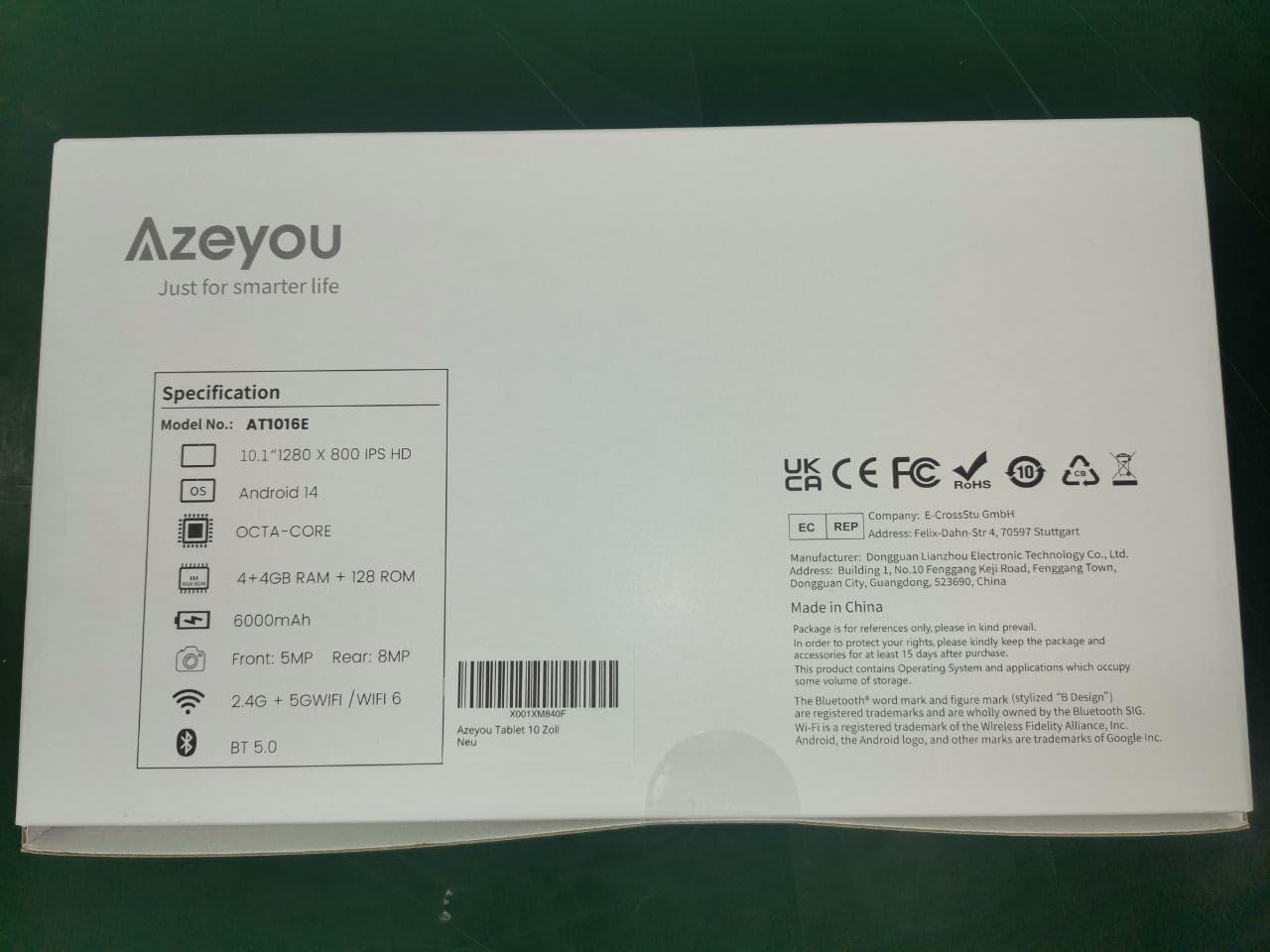
Image 9.1: Back of the product packaging displaying key specifications.
10. Гаранција и подршка
Your Azeyou Tablet is covered by a manufacturer's warranty. For specific warranty terms and conditions, please refer to the documentation included with your purchase or visit the official Azeyou website. For technical support, troubleshooting assistance, or warranty claims, please contact Azeyou customer service.
Више информација и подршке можете пронаћи на Azeyou Brand Store.