
1. Увод
This manual provides essential information for setting up, operating, maintaining, and troubleshooting your Maxtang MTN-6900HX Mini PC. Please read this manual thoroughly before using the product to ensure proper and safe operation.
The Maxtang MTN-6900HX is a high-performance mini PC equipped with an AMD Ryzen 9 6900HX processor, designed for a wide range of applications including office work, multimedia, and light gaming. Its compact design and robust features make it a versatile computing solution.
2. Садржај пакета
Пажљиво распакујте кутију и уверите се да су све ставке наведене у наставку присутне и у добром стању. Ако неке ставке недостају или су оштећене, обратите се продавцу.
- 1x Maxtang MTN-6900HX Mini PC
- 1к ХДМИ кабл
- 1к адаптер за напајање
- 1к кабл за напајање
- 1x VESA Mount
- 4x zavrtnja za montažu
- 1x Product Manual (this document)

Figure 2.1: Maxtang MTN-6900HX Mini PC and Included Accessories
3. Производ је готовview
The Maxtang MTN-6900HX Mini PC features a comprehensive set of ports and internal components designed for high performance and connectivity.
3.1 Предња и задња плоча
Familiarize yourself with the input/output ports on your Mini PC:
- Предњи панел: Power Button, USB 3.2 Gen2 ports, USB 2.0 port, Audio Jack.
- Задња плоча: 2x USB-C (USB4) ports, 2x USB 3.2 Gen2 ports, 1x 2.5GbE LAN port, 1x HDMI port, 1x DisplayPort (DP), DC-in power port.

Figure 3.1: Front and Rear Panel Ports
3.2 Унутрашње компоненте
The Mini PC supports upgrades for memory and storage:
- Меморија: Dual channel SO-DIMM DDR5 memory slots, supporting up to 64GB.
- Складиштење: Two PCIe Gen4 2280 M.2 slots for NVMe SSDs, supporting up to 4TB each, for a total of up to 8TB.
- бежични: One M.2 slot for Wi-Fi and Bluetooth modules.

Figure 3.2: Internal Memory and Storage Expansion
4. Подешавање
Follow these steps to set up your Maxtang MTN-6900HX Mini PC.
4.1 Почетно повезивање
- Повежи екран: Connect your monitor to the Mini PC using an HDMI, DisplayPort, or USB4 cable. The Mini PC supports up to three displays simultaneously.
- Повежите периферне уређаје: Plug in your keyboard, mouse, and other USB devices into the available USB ports.
- Повежи мрежу (опционо): For a wired connection, connect an Ethernet cable from your router or modem to the 2.5GbE LAN port on the Mini PC. For wireless, ensure the Wi-Fi antenna (if external) is connected or the internal module is installed.
- Прикључите напајање: Connect the power adapter to the DC-in port on the Mini PC, then plug the power cord into an electrical outlet.
4.2 VESA Mount Installation
The included VESA mount allows you to attach the Mini PC to the back of a compatible monitor or to a wall, saving desk space.
- Attach the VESA bracket to the back of your monitor or desired surface using the provided mounting screws. Ensure it is securely fastened.
- Slide the Mini PC onto the VESA bracket until it clicks into place.
5. Упутство за употребу
5.1 Укључивање/искључивање
- Укључено: Press the power button located on the front panel. The power indicator light will illuminate.
- Искључивање: From the Windows 11 Pro operating system, click the Start button, then Power > Shut down. Alternatively, you can press and hold the power button for 4-6 seconds to force a shutdown (use only when necessary).
КСНУМКС Оперативни систем
Your Maxtang MTN-6900HX Mini PC comes pre-installed with Windows 11 Pro (64-bit). Follow the on-screen instructions for initial setup, including language, region, and user account creation.
5.3 Multi-Display Setup
The Mini PC supports up to three independent displays via HDMI, DisplayPort, and USB4. Connect your monitors to the respective ports. Windows 11 Pro will automatically detect the displays. You can configure display settings (resolution, orientation, extension/duplication) through the Display Settings in Windows.
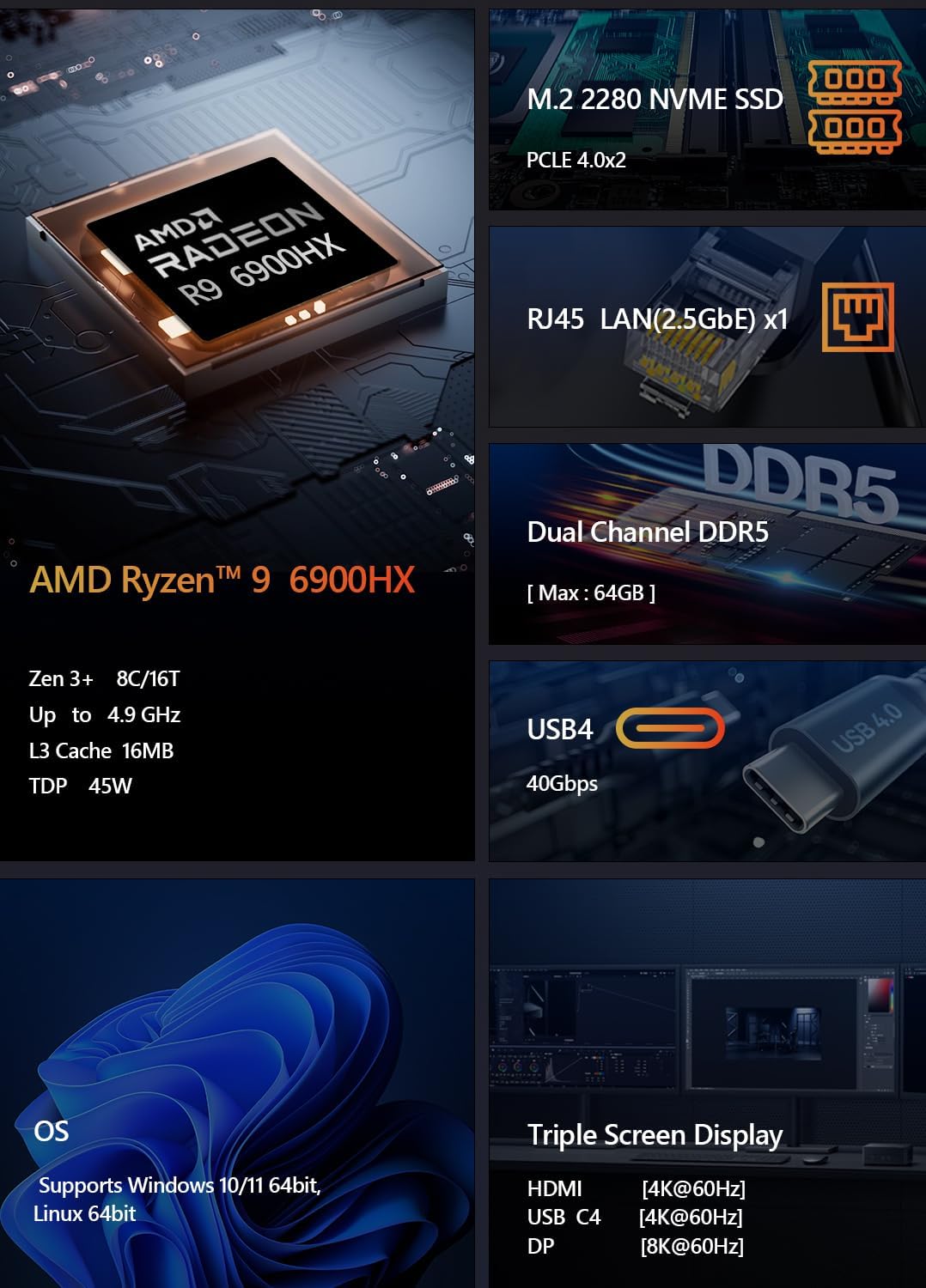
Figure 5.1: Triple Screen Display Setup
5.4 USB4 Functionality
The USB4 ports offer versatile connectivity, supporting:
- Power Delivery (PD 3.0): Up to 100W power input.
- Пренос података: Up to 40Gbps, compatible with Thunderbolt 3.
- Видео излаз: Up to 8K resolution via DisplayPort 1.4 Alt Mode.

Figure 5.2: USB4 All-in-One Connection
5.5 Мрежна повезаност
- Жични ЛАН: Connect an Ethernet cable to the 2.5GbE LAN port for high-speed wired internet access.
- Ви-Фи: The Mini PC supports Wi-Fi 6 for fast and stable wireless connectivity. Configure Wi-Fi settings through Windows Network & Internet settings.
- Блуетоотх: Integrated Bluetooth 5.2 allows you to connect wireless peripherals such as keyboards, mice, and headphones.

Figure 5.3: LAN, Wi-Fi, and Bluetooth Connectivity
6. Одржавање
Правилно одржавање осигурава дуготрајност и оптималне перформансе вашег Мини рачунара.
6.1 Чишћење
- Regularly clean the exterior of the Mini PC with a soft, dry cloth.
- Use compressed air to clear dust from ventilation openings and ports to prevent overheating. Ensure the PC is powered off and unplugged before cleaning.
6.2 Надоградње компоненти
The Maxtang MTN-6900HX is designed for easy upgrades:
- Меморија: You can upgrade the DDR5 SO-DIMM memory up to a maximum of 64GB by replacing or adding modules in the two available slots.
- Складиштење: The two M.2 2280 NVMe SSD slots allow for storage expansion up to 8TB (2x 4TB).
Напомена: Always power off and unplug the Mini PC before opening the chassis for upgrades. Refer to online resources or professional assistance if you are unsure about the upgrade process.
КСНУМКС. Решавање проблема
If you encounter issues with your Mini PC, refer to the following common troubleshooting steps.
7.1 Нема напајања
- Уверите се да је адаптер за напајање безбедно повезан и са Мини рачунаром и са исправном електричном утичницом.
- Проверите да ли је утичница функционална тако што ћете укључити други уређај.
- Проверите адаптер за напајање да ли има видљивих оштећења.
7.2 Нема излаза за приказ
- Confirm that the display cable (HDMI, DP, or USB4) is securely connected to both the Mini PC and the monitor.
- Уверите се да је монитор укључен и подешен на исправан улазни извор.
- Пробајте други кабл за дисплеј или монитор ако је доступан.
7.3 Проблеми са мрежном повезивањем
- Виред: Проверите да ли је Етернет кабл правилно повезан и да ли рутер/модем ради.
- бежични: Ensure Wi-Fi is enabled in Windows settings and you are connected to the correct network with the correct password. Restart your router/modem.
7.4 Проблеми са перформансама система
- Затворите непотребне апликације које раде у позадини.
- Уверите се да су Windows и драјвери ажурирани.
- Проверите да ли на вашем SSD-у има довољно слободног простора за складиштење.
- Monitor system temperatures to ensure proper cooling.
8. Спецификације
Detailed technical specifications for the Maxtang MTN-6900HX Mini PC:
| Компонента | Спецификација |
|---|---|
| Број модела | MTN-6900HX |
| Процесор | AMD Ryzen 9 6900HX (8 Cores/16 Threads, up to 4.9GHz) |
| Графика | AMD Radeon 680M (интегрисана) |
| Оперативни систем | Виндовс 11 Про (64-бит) |
| Меморија | Dual Channel DDR5 SO-DIMM, up to 64GB (2x slots) |
| Складиштење | 2x M.2 2280 NVMe PCIe Gen4 SSD slots (up to 4TB each) |
| И/О портови | 2x USB-C (USB4), 4x USB 3.2 Gen2, 1x USB 2.0, 1x HDMI, 1x DisplayPort, 1x 2.5GbE LAN, Audio Jack |
| Бежично повезивање | Wi-Fi 6, Bluetooth 5.2 |
| Повер Инпут | 19V/20V DC-in |
| Метод хлађења | Ваздушно хлађење |
| Димензије | 127 mm x 135 mm x 55 mm (approximate) |

Figure 8.1: AMD Ryzen 9 6900HX Processor Details

Figure 8.2: AMD Radeon 680M Graphics Details
9. Гаранција и подршка
9.1 Гаранција на производ
The Maxtang MTN-6900HX Mini PC comes with a 12-месечна гаранција на производ from the date of purchase. This warranty covers manufacturing defects and ensures the product meets its specified performance. Please retain your proof of purchase for warranty claims.
9.2 Служба за кориснике
For technical support, warranty inquiries, or any questions regarding your Maxtang Mini PC, please contact our customer service team. Refer to the contact information provided with your purchase or visit the official Maxtang webсајт за ресурсе подршке.
Контакт информације произвођача: 6/F, Bldg 3, Honghui Industrial Park, Liuxian 2nd Road, Bao'an Dist, Shenzhen, China 518101