
1. Увод
Хвала вам на куповиниasing the RCA SP550BT Portable Speaker. This manual provides important information regarding the setup, operation, and maintenance of your new speaker. Please read it thoroughly before use and keep it for future reference.
The RCA SP550BT is a versatile portable speaker featuring 50W output, Bluetooth connectivity, USB playback, FM radio, AUX input, True Wireless Stereo (TWS) function, LED lights, and a microphone input for an enhanced audio experience.
2. Садржај пакета
Молимо вас да проверите пакет за следеће ставке:
- RCA SP550BT Portable Speaker
- Ремоте Цонтрол
- Повер Цабле
- Кориснички приручник (овај документ)
3. Производ је готовview
Familiarize yourself with the main components and features of your RCA SP550BT speaker.

Слика 3.1: Фронт view of the RCA SP550BT portable speaker. This image displays the speaker in an upright position, highlighting the top control panel and the three prominent speaker cones with red illumination.

Слика 3.2: Сиде view of the RCA SP550BT portable speaker. This perspective shows the depth of the speaker and the integrated handle for portability.

Слика 3.3: Хоризонтално view of the RCA SP550BT portable speaker. This image illustrates the speaker's design when placed on its side, emphasizing the speaker grille and LED lighting.
3.1 Даљински управљач
The included remote control allows for convenient operation of the speaker from a distance.
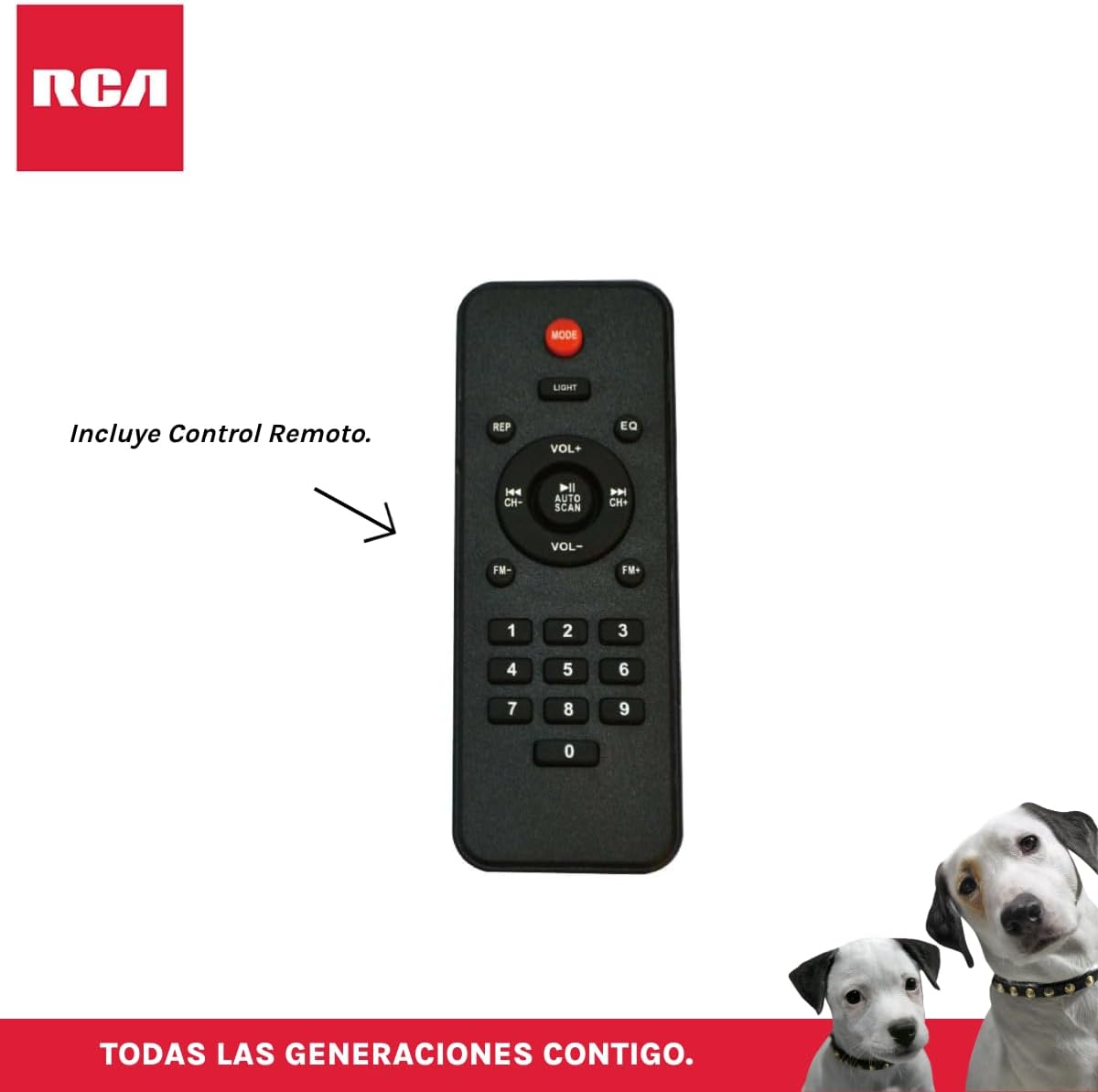
Слика 3.4: RCA SP550BT Remote Control. This image displays the full layout of the remote control, including buttons for power, mode selection, volume adjustment, track navigation, equalizer settings, and a numeric keypad.
4. Подешавање
4.1 Прикључак за напајање
- Ensure the speaker is placed on a stable, flat surface.
- Connect the power cable to the speaker's power input port.
- Plug the other end of the power cable into a standard electrical outlet (AC 100-240V, 50/60Hz).
- Press the power button on the speaker or remote control to turn it on.
5. Упутство за употребу
5.1 Укључивање/искључивање
- To turn on the speaker, press the ПОВЕР button on the control panel or the remote control.
- To turn off the speaker, press the ПОВЕР дугме поново.
5.2 Избор режима
Притисните тастер МОДЕ button on the control panel or remote control to switch between Bluetooth, USB, FM, and AUX input modes.
5.3 Блуетоотх упаривање
- Turn on the speaker and select Bluetooth mode using the МОДЕ button. The display will show "BLUE" and a pairing indicator will flash.
- Омогућите Блутут на свом мобилном уређају (паметном телефону, таблету итд.).
- Тражи "RCA SP550BT" in your device's Bluetooth list and select it to pair.
- Once paired, the speaker will emit a confirmation sound, and the Bluetooth indicator will stop flashing.
- Сада можете да репродукујете звук са свог уређаја преко звучника.
5.4 Репродукција са УСБ-а
- Insert a USB flash drive (FAT32 format, max 32GB) containing MP3 audio fileс у УСБ порт.
- The speaker will automatically switch to USB mode and begin playing the first track. If not, press the МОДЕ дугме за избор УСБ режима.
- Користите ПЛАИ/ПАУСЕ, ПРЕТХОДНА, и НЕКСТ buttons on the control panel or remote to control playback.
5.5 ФМ Радио
- Turn on the speaker and select FM mode using the МОДЕ дугме.
- Притисните и држите ПЛАИ/ПАУСЕ дугме (или АУТОМАТСКО СКЕНИРАЊЕ on remote) to automatically scan and save available FM stations.
- Користите ПРЕТХОДНА и НЕКСТ buttons to navigate through the saved stations.
5.6 АУКС улаз
- Connect an external audio device (e.g., MP3 player, laptop) to the speaker's AUX input port using a 3.5mm audio cable (not included).
- Изаберите AUX режим помоћу МОДЕ дугме.
- Контролишите репродукцију и јачину звука са повезаног уређаја.
5.7 TWS (Прави бежични стерео) функција
The TWS function allows you to connect two RCA SP550BT speakers wirelessly for a stereo sound experience.
- Ensure both SP550BT speakers are powered on and in Bluetooth mode, but not yet paired with any device.
- На једном од звучника притисните и држите ТВС button (if available, or a dedicated TWS pairing button) until you hear a confirmation tone. The speakers will attempt to pair with each other.
- Once successfully paired, one speaker will act as the master (left channel) and the other as the slave (right channel).
- Now, pair your mobile device with the master speaker via Bluetooth as described in section 5.3.
5.8 ЛЕД светла
Притисните тастер ЛИГХТ button on the control panel or remote control to cycle through different LED light modes or to turn them off.
5.9 Употреба микрофона
Connect a wired microphone (not included) to the microphone input port on the speaker. Adjust the microphone volume using the dedicated knob (if available) or the main volume control.
6. Одржавање
- Чишћење: Користите меку, суву крпу за чишћење спољашњости звучника. Не користите абразивна средства за чишћење или раствараче.
- Складиштење: Када се звучник не користи дуже време, чувајте га на хладном и сувом месту, даље од директне сунчеве светлости и екстремних температура.
- Изложеност води: Овај звучник није водоотпоран. Избегавајте излагање води или прекомерној влази.
КСНУМКС. Решавање проблема
Ако наиђете на проблеме са звучником, погледајте следеће уобичајене проблеме и решења:
| Проблем | Могући узрок | Решење |
|---|---|---|
| Нема струје | Power cable not connected; Power outlet not working; Speaker off. | Check power cable connection; Try a different outlet; Press the POWER button. |
| Нема звука | Јачина звука је прениска; изабран је погрешан режим; уређај није правилно повезан. | Increase volume; Select correct input mode (Bluetooth, USB, AUX); Reconnect device. |
| Блуетоотх упаривање није успело | Speaker not in pairing mode; Device Bluetooth off; Speaker already paired. | Ensure speaker is in Bluetooth pairing mode; Turn on device Bluetooth; Disconnect from other devices. |
| УСБ репродукција не ради | USB drive format incompatible; Corrupt files; USB drive not inserted correctly. | Ensure USB is FAT32 format; Check file integrity; Reinsert USB drive. |
| Слаб пријем ФМ радија | Слаб сигнал; Сметње. | Relocate speaker; Extend antenna (if applicable). |
8. Спецификације
| Феатуре | Спецификација |
|---|---|
| Модел | СП550БТ |
| Бранд | РЦА |
| Излазна снага звучника | 50 вати (максимално) |
| Технологија повезивања | Блуетоотх, УСБ, АУКС |
| Бежична технологија | Блуетоотх |
| Режим аудио излаза | Стерео |
| Спеакер Типе | Преносиви, Спољни |
| Тип монтаже | Таблетоп Моунт |
| Контролни метод | Ремоте Цонтрол |
| Величина звучника | 6.5 инча |
| Пречник вуфера | 6.5 инча |
| Капацитет батерије | 4400 Милиamp Сати |
| Извор напајања | Електрични кабл |
| Компатибилни уређаји | Лаптоп, МП3 плејер, паметни телефон, таблет |
| GTIN / UPC | 044476152061 |
9. Гаранција и подршка
This product comes with a limited warranty. Please refer to the warranty card included in your package for specific terms and conditions. For technical support or service inquiries, please contact RCA customer service through their official webсајт или контакт информације које сте добили уз куповину.
Note: Warranty terms may vary by region. Keep your proof of purchase for warranty claims.