
1. Увод
The LEOBOG HI75C Pro is a 75% TKL mechanical wireless keyboard designed for versatility and performance. It features an aluminum alloy case, tri-mode connectivity (Bluetooth 5.0, 2.4GHz wireless, and USB-C wired), RGB backlighting, a multi-functional knob, and hot-swappable switches. This manual provides detailed instructions for setting up, operating, and maintaining your keyboard.

Figure 1: LEOBOG HI75C Pro Mechanical Wireless Keyboard Overview
2. Садржај пакета
Проверите да ли су све ставке присутне у вашем пакету:
- LEOBOG HI75C Pro Mechanical Wireless Keyboard
- Кеицап Пуллер
- УСБ кабл (тип-Ц)
- Replace Switch (Spare Switches)
3. Карактеристике производа
The LEOBOG HI75C Pro keyboard incorporates several advanced features for an enhanced user experience:
- Aluminium Alloy Cover: Provides superior heat dissipation, robustness, and durability. Features an exquisite powder coating process for a luxurious feel and fingerprint resistance.
- Дизајн заптивке: Significantly reduces cavity noise and improves typing sound for a satisfying low-noise experience.
- 3-режимска веза: Supports Bluetooth 5.0, 2.4GHz wireless, and USB wired connections, allowing connection to up to five devices simultaneously.
- 75% Распоред: An 81-key layout that balances concise design with full functionality, saving desk space.
- RGB позадинско осветљење: Features 16.8 million RGB lighting colors with 17 lighting effects and 10 music rhythm modes.
- Dual-Mode Knob: A multi-functional knob for precise control over volume (office mode) and lighting brightness (game mode).
- High Speed Response: Equipped with an advanced gaming keyboard chip for a response speed of up to 2.8ms.
- Прекидачи који се могу брзо заменити: Allows for easy replacement of switches without soldering.
- 4000мАх батерија: Provides extended usage time, approximately one month without backlighting.

Figure 2: Key features of the LEOBOG HI75C Pro keyboard.

Figure 3: Diagram illustrating the multi-layered gasket structure for sound dampенинг.

Figure 4: Ergonomic keycap height design for comfortable typing.
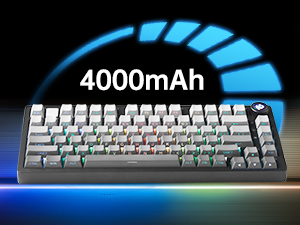
Figure 5: The keyboard is equipped with a 4000mAh battery.
4. Подешавање и повезивање
The LEOBOG HI75C Pro offers three connection modes: wired, 2.4GHz wireless, and Bluetooth. Use the switch on the side of the keyboard to select your desired mode.
4.1 Жична веза
- Ensure the mode switch on the side of the keyboard is set to the wired (USB-C) position.
- Connect the provided USB-C cable to the keyboard and to an available USB port on your computer.
- Тастатура ће бити аутоматски препозната и спремна за употребу.
4.2 Бежична веза од 2.4 GHz
- Ensure the mode switch on the side of the keyboard is set to the 2.4GHz wireless position.
- Укључите УСБ пријемник од 2.4 ГХз у слободан УСБ порт на рачунару.
- Тастатура би требало да се аутоматски повеже. Ако се не повеже, притисните FN + ~ да започне упаривање.
4.3 Bluetooth 5.0 веза
- Ensure the mode switch on the side of the keyboard is set to the Bluetooth position.
- On your device (PC, Mac, Android, iOS), enable Bluetooth and search for new devices.
- Притисните и држите ФН + 1, ФН + 2, или ФН + 3 for 3-5 seconds to enter pairing mode for BT1, BT2, or BT3 respectively. The indicator light will flash.
- Select "LEOBOG HI75C Pro" from the list of available Bluetooth devices on your device.
- Once connected, the indicator light will stop flashing. You can switch between paired Bluetooth devices using ФН + 1/2/3.

Figure 6: The keyboard supports Type-C wired, 2.4GHz wireless, and Bluetooth connections.
Video 1: Official LEOBOG overview of the HI75C Pro Mechanical Gaming Keyboard, showcasinг његов дизајн и карактеристике.
5. Операција
5.1 РГБ позадинско осветљење
The keyboard features extensive RGB backlighting with 17 preset lighting effects. Additionally, it offers 10 music rhythm RGB lighting modes that synchronize with audio output. You can adjust lighting effects and brightness using the multi-functional knob or dedicated key combinations. To turn off the lights, use the knob in game mode.
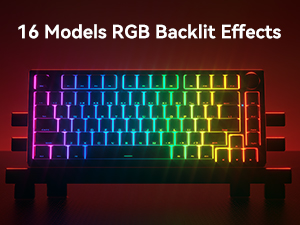
Figure 7: The keyboard offers 16 models of RGB backlit effects.
5.2 Dual-Mode Knob Control
The multi-functional knob allows for quick adjustments based on the selected mode:
- Промена режима: Press and hold the knob to toggle between Office Mode and Game Mode.
- Канцеларијски режим: When the indicator light is continuously on, the keyboard is in office mode. Rotate the knob to adjust the system volume.
- Режим игре: When the indicator light is breathing, the keyboard is in game mode. Rotate the knob to adjust the lighting brightness.

Figure 8: The multi-functional knob for volume and lighting control.
5.3 Прекидачи са могућношћу замене током рада
The LEOBOG HI75C Pro supports hot-swappable 3-pin/5-pin mechanical switches, allowing you to easily change switches without soldering. This feature enables customization of typing feel and sound.

Figure 9: The keyboard features hot-swappable switches for customization.
6. Одржавање
6.1 Чишћење
Да бисте одржали оптималне перформансе и изглед, редовно чистите тастатуру:
- Искључите тастатуру из свих извора напајања пре чишћења.
- Користите меку крпу која не оставља длачицеampводом или благим раствором за чишћење да бисте обрисали капице тастера и кућиште.
- За дубље чишћење, користите приложени алат за извлачење капица тастера да бисте уклонили капице тастера и очистили доњу страну компримованим ваздухом или малом четком.
- Уверите се да је тастатура потпуно сува пре поновног повезивања.
6.2 Замена тастера и прекидача
The hot-swappable design allows for easy replacement of keycaps and switches:
- Use the provided keycap puller to gently remove keycaps.
- Use a switch puller (not included, but often comes with replacement switches) to carefully remove switches. Grip the switch firmly and pull straight up.
- Align the pins of the new switch with the holes on the PCB and press down gently until it clicks into place. Ensure pins are not bent.
- Place the desired keycap onto the new switch stem.
КСНУМКС. Решавање проблема
7.1 Проблеми са повезивањем
- Без конекције: Ensure the mode switch on the side of the keyboard is set correctly for wired, 2.4GHz, or Bluetooth.
- 2.4GHz Disconnection: Re-plug the USB receiver. Try pairing again by pressing FN + ~.
- Блуетоотх прекид везе: Ensure Bluetooth is enabled on your device. Re-enter pairing mode on the keyboard (ФН + 1/2/3) and re-select the keyboard on your device.
- сметње: Померите тастатуру ближе пријемнику/уређају или даље од других бежичних уређаја који могу изазвати сметње.
7.2 Софтвер и фирмвер
For advanced customization, macro programming, and firmware updates, please visit the official LEOBOG website or authorized distributors' websites. Ensure you download the correct software/firmware version specifically for the LEOBOG HI75C Pro model to avoid compatibility issues.
7.3 RGB осветљење не ради
- Check if the keyboard is in Game Mode, where the knob controls brightness. Rotate the knob to increase brightness.
- Ensure the battery is sufficiently charged if using wireless mode.
- If using software, verify that lighting effects are enabled and configured correctly.
8. Спецификације
| Феатуре | Детаљ |
|---|---|
| Број модела | HI75C PRO |
| Димензије производа | 12.97 к 5.35 к 1.74 инча |
| Тежина артикла | 3.41 фунти |
| Технологија повезивања | Блутут, УСБ-Ц, бежична веза од 2.4 GHz |
| Опис тастатуре | Механички |
| Компатибилни уређаји | Играчка конзола, лаптоп, рачунар, паметни телефон, таблет |
| Посебне карактеристике | Customizable Display Keys, Ergonomic, Hot-Swappable, Hotkeys and Media Keys, Programmable Keys |
| Позадинско осветљење тастатуре | РГБ |
| Батерија | 1 A battery required (included), 4000mAh |
9. Гаранција и подршка
LEOBOG provides a 2 година гаранције for the HI75C Pro Mechanical Wireless Keyboard, covering manufacturing defects from the date of purchase. For warranty claims, technical assistance, or product inquiries, please contact LEOBOG customer support through their official webсајт или продавницу где је производ купљен.

Figure 10: LEOBOG customer service is available for support.