
1. Увод
The TP-Link Deco BE65 Pro WiFi 7 Mesh System is designed to provide a seamless, high-speed wireless network throughout your home. This 3-pack system utilizes cutting-edge WiFi 7 technology, offering tri-band BE9300Mbps speeds, Multi-Link Operation (MLO), and advanced security features like WPA3. With multiple 5Gbps and 2.5Gbps ports, it ensures robust wired and wireless connectivity for all your devices. This manual will guide you through the setup, operation, maintenance, and troubleshooting of your Deco BE65 Pro system.

Figure 1: A single TP-Link Deco BE65 Pro unit in a home environment.
2. Шта је у кутији
Your TP-Link Deco BE65 Pro (3-Pack) package should contain the following items:
- 3 x Deco BE65 Pro Units
- 3 к адаптера за напајање
- 1 к Етхернет кабл
- 1 к Упутство за брзу инсталацију

Figure 2: The product packaging, indicating the contents and model information.
3. Производ је готовview
The Deco BE65 Pro units are designed for optimal performance and ease of use. Each unit features multiple high-speed ports and advanced wireless capabilities to create a robust mesh network.
Кључне карактеристике:
- Стандард WiFi 7: Experience the latest generation of Wi-Fi with enhanced speed, lower latency, and increased capacity.
- Tri-Band BE9300Mbps: Delivers combined speeds of up to 9300 Mbps across 6 GHz, 5 GHz, and 2.4 GHz bands.
- Вишеструки рад (MLO): Simultaneously send and receive data across different bands and channels to boost throughput, reduce latency, and improve reliability.
- High-Speed Ports: Each unit includes two 5Gbps ports and one 2.5Gbps port for ultra-fast wired connections.
- Беспрекорни роминг: Move freely throughout your home with a single Wi-Fi name and uninterrupted connectivity.
- ТП-Линк ХомеСхиелд: Provides comprehensive network protection, robust parental controls, and real-time IoT security.
- ВПА3 безбедност: Enhanced security protocol for a safer network.
- Широка компатибилност: Backward compatible with all Wi-Fi generations and works with any Internet Service Provider (ISP) and modem.

Слика 3: Завршеноview of the Deco BE65 Pro's key WiFi 7 features.
Прикључци и индикатори:
Each Deco BE65 Pro unit is equipped with the following ports and indicators:
- ЛЕД индикатор: Located on the top of the unit, it displays the Deco's status (e.g., solid white for connected, pulsing blue for setup mode, solid red for no internet).
- WAN/LAN портови: Two 5Gbps ports and one 2.5Gbps port. These ports automatically detect WAN or LAN connections.
- УСБ порт: За повезивање екстерних уређаја за складиштење.
- Напајање: За повезивање адаптера за напајање.
- Дугме за ресетовање: A small button usually located at the bottom or back, used to reset the unit to factory settings.
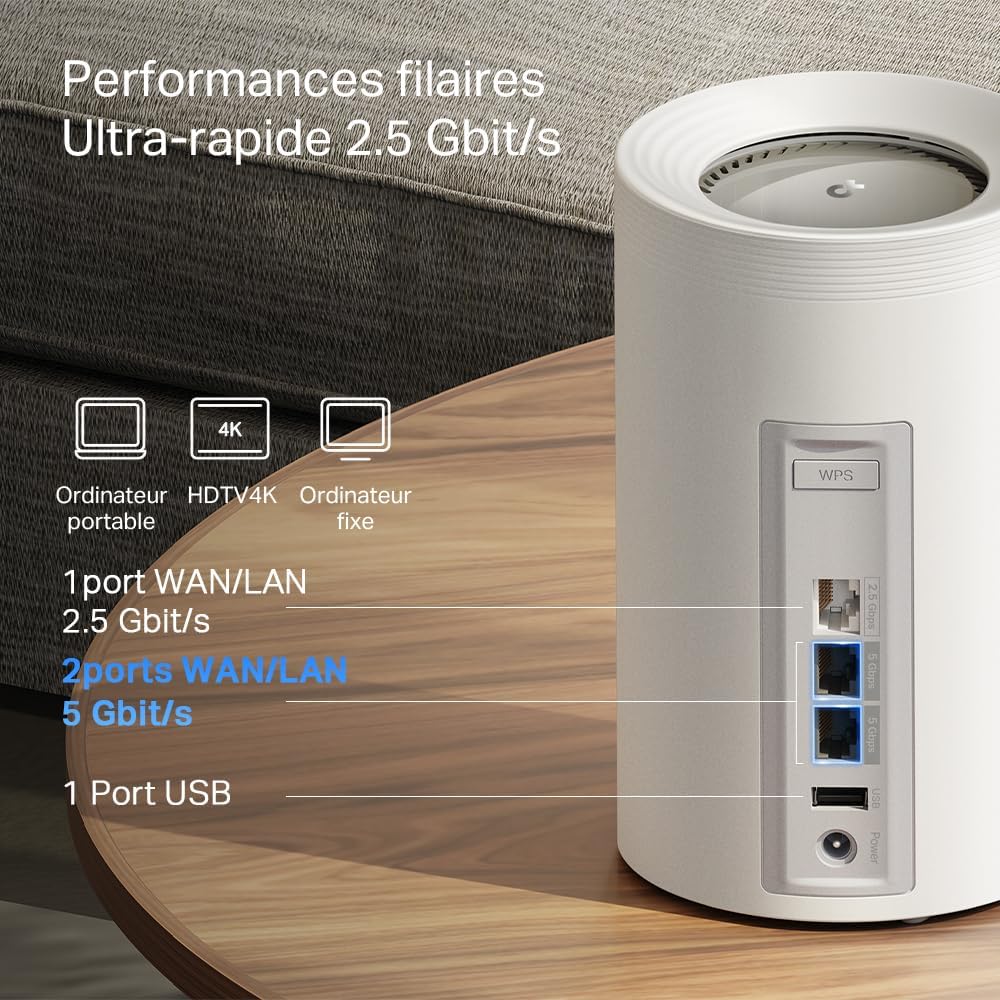
Слика 4: Детаљно view of the high-speed WAN/LAN and USB ports on a Deco BE65 Pro unit.
Backhaul Solution:
The Deco BE65 Pro system utilizes a robust backhaul solution, combining both wired Ethernet and multiple Wi-Fi bands (6 GHz, 5 GHz, 2.4 GHz) to ensure stable and high-speed communication between Deco units. This multi-gigabit mesh backhaul enhances overall network performance and reliability.

Figure 5: Illustration of the combined wired and wireless backhaul connections between Deco units.
4. Упутства за подешавање
Setting up your TP-Link Deco BE65 Pro Mesh System is a straightforward process using the Deco app. Follow these general steps:
- Преузмите апликацију Deco: Тражи "TP-Link Deco" in the App Store (iOS) or Google Play Store (Android) and install the app.
- Припремите свој модем: Power off your modem and remove its battery (if applicable).
- Повежите главну Deco јединицу:
- Connect one Deco unit to your modem using the provided Ethernet cable. Use any of the WAN/LAN ports on the Deco.
- Укључите модем.
- Plug in the main Deco unit and wait for its LED to pulse blue.
- Set Up via App: Open the Deco app, log in or sign up for a TP-Link ID, and follow the on-screen instructions to set up your main Deco unit.
- Додајте додатне деко јединице: Once the main Deco is set up, the app will guide you to add the remaining Deco units. Place them strategically to ensure optimal coverage. Plug in each additional Deco unit and wait for its LED to pulse blue, then follow the app's instructions to add it to your mesh network.
For detailed, step-by-step instructions, refer to the Quick Installation Guide included in your package or the in-app setup wizard.
5. Упутство за употребу
The TP-Link Deco app is your central hub for managing your mesh Wi-Fi network. After successful setup, you can use the app to control various aspects of your network.
Network Management via Deco App:
- Контролна табла: View connected devices, network status, and real-time speed.
- Родитељски надзор: Подесите проfiles for family members, filter content, set time limits, and pause internet access.
- Квалитет услуге (КоС): Prioritize devices or activities (e.g., gaming, streaming) to ensure optimal performance.
- Мрежа гостију: Направите засебну Wi-Fi мрежу за госте, одржавајући вашу главну мрежу безбедном.
- Antivirus & IoT Security: Utilize TP-Link HomeShield features for network protection against malicious threats and to secure your smart home devices.
- Ви-Фи подешавања: Change your Wi-Fi name (SSID) and password, enable/disable specific bands, and configure advanced settings.
- Беспрекорни роминг: The Deco system automatically connects your devices to the strongest Wi-Fi signal as you move around your home, ensuring a smooth and uninterrupted experience.
6. Одржавање
Regular maintenance helps ensure the optimal performance and longevity of your Deco BE65 Pro system.
- Ажурирања фирмвера: The Deco app will notify you of available firmware updates. It is highly recommended to keep your Deco units updated to benefit from the latest features, security enhancements, and performance improvements. Updates can typically be performed directly through the app.
- Чишћење: Gently wipe the exterior of the Deco units with a soft, dry cloth. Do not use liquid cleaners or abrasive materials. Ensure the units are unplugged before cleaning.
- Оптимално постављање: For best performance, ensure your Deco units are placed in open areas, away from obstructions like large metal objects, thick walls, and other electronic devices that may cause interference. Maintain a clear line of sight between units where possible.
- Рестартовање: Occasionally, rebooting your Deco units and modem can resolve minor network issues and improve performance. This can be done via the Deco app or by unplugging and replugging the power adapters.
КСНУМКС. Решавање проблема
If you encounter issues with your Deco BE65 Pro system, try the following troubleshooting steps:
- Нема интернет везе:
- Проверите да ли ваш модем исправно ради.
- Уверите се да је Етернет кабл између главног Деко уређаја и модема безбедно повезан.
- Рестартујте модем и главну Deco јединицу.
- Check the Deco app for diagnostic tools or error messages.
- Мала брзина Wi-Fi-ја:
- Ensure your Deco units are optimally placed and not too far apart.
- Проверите да ли има сметњи од других електронских уређаја.
- Проверите брзину вашег интернет пакета са својим интернет провајдером.
- Користите апликацију Deco да бисте покренули оптимизацију мреже или тест брзине.
- Деко јединица се не повезује:
- Ensure the unit is powered on and its LED is pulsing blue for setup.
- Try moving the unit closer to an existing Deco unit.
- Perform a factory reset on the problematic Deco unit (refer to the Reset Button section in Product Overview) and try adding it again via the app.
- Проблеми са апликацијом:
- Уверите се да је ваша Deco апликација ажурирана на најновију верзију.
- Покушајте да поново покренете апликацију или мобилни уређај.
If these steps do not resolve your issue, please contact TP-Link support for further assistance.
8. Спецификације
Below are the technical specifications for the TP-Link Deco BE65 Pro Mesh System:

Figure 6: Illustration of the ultra-fast tri-band Wi-Fi speeds.
| Феатуре | Спецификација |
|---|---|
| Бранд | ТП-Линк |
| Назив модела | Деко БЕ65 Про |
| Ви-Фи генерација | ВиФи 7 |
| Стандард бежичне комуникације | 802.11бе |
| Класа фреквенцијског опсега | Тропојасни (6 GHz, 5 GHz, 2.4 GHz) |
| Брзина преноса података | До 9300 Mbps (BE9300) |
| Пропусни опсег LAN порта | 2 x 5000 Mbps, 1 x 2500 Mbps |
| Број портова | 3 (WAN/LAN auto-sensing) |
| Сигурносни протокол | WPA3, WPA2-PSK, WPA-PSK |
| Контролни метод | Application (TP-Link Deco App) |
| Компатибилни уређаји | Surveillance Camera, Personal Computer, Smartphone, Tablet |
| Препоручена употреба | Хоме |
| Антенна Типе | Fixed (4 antennas per unit) |
| Оперативни систем | TP-Link Archer OS |
| Компатибилност паметног дома | Компатибилан са паметним кућним уређајима |
| Router Firewall Security Level | Високо |
| Modem Compatible | Да |
| Покривеност | Large (with 3 units) |
| Тежина артикла | 3.51 Kilograms (total for 3 units) |
| Димензије артикла Д к Ш к В | 24.1Д к 36В к 11.9Х центиметара |
| Security Updates Received | Да |
9. Гаранција и подршка
Информације о гаранцији:
The TP-Link Deco BE65 Pro Mesh System comes with a 2 година гаранцијеМолимо вас да сачувате доказ о куповини за потребе гаранције.
техничка подршка:
For technical support, product registration, and further information, please visit the official TP-Link website or contact their customer support. You can usually find support resources, FAQs, and contact details on the TP-Link support page for your region.
The TP-Link Deco app also provides in-app support options and access to helpful resources.