
1. Увод
This manual provides essential information for the safe and efficient operation of your VISION VP-621 4K Ultra HD Multimedia Projector. Please read this manual thoroughly before using the projector and retain it for future reference.
The VISION VP-621 is a versatile smart projector featuring 4K Ultra HD support, 11000 lumens brightness, 5G WiFi, Bluetooth 5.0, Auto Focus, Wireless Miracast, and an integrated Android 9.0 operating system. It is designed for various applications including home entertainment, business presentations, and educational purposes.
2. Безбедносне информације
- Do not block the ventilation openings. Ensure adequate airflow around the projector to prevent overheating.
- Не гледајте директно у сочиво пројектора када је укљученоamp је укључено. Јако светло може изазвати оштећење ока.
- Поставите пројектор на стабилну, равну површину како бисте спречили његов пад.
- Држите пројектор даље од воде, влаге и екстремних температура.
- Користите само адаптер за напајање који се испоручује са пројектором.
- Не покушавајте сами да отворите или поправите пројектор. Сва сервисирања препустите квалификованом особљу.
- Unplug the projector during lightning storms or when unused for long periods.
3. Садржај пакета
Проверите да ли су све ставке наведене у наставку укључене у ваш пакет:
- VISION VP-621 Projector
- Повер Цорд
- Адаптер
- Ремоте Цонтрол
- АВ кабл
- Поклопац сочива пројектора
4. Производ је готовview
Familiarize yourself with the main components and interfaces of your VISION VP-621 projector.

Слика: Предња и бочна страна view of the VISION VP-621 projector, showcasinг његов компактни дизајн и објектив.
4.1 Предња и горња плоча
- Пројекционо сочиво: Емитује слику.
- Инфрацрвени пријемник: За сигнале даљинског управљања.
- Контролна дугмад: Power, Navigation (OK, Up, Down, Left, Right), Back.
- Вентилационе решетке: For cooling the internal components.

Слика: Врх view of the projector highlighting the integrated control buttons for power and navigation.
4.2 Rear Panel and Connectivity Ports
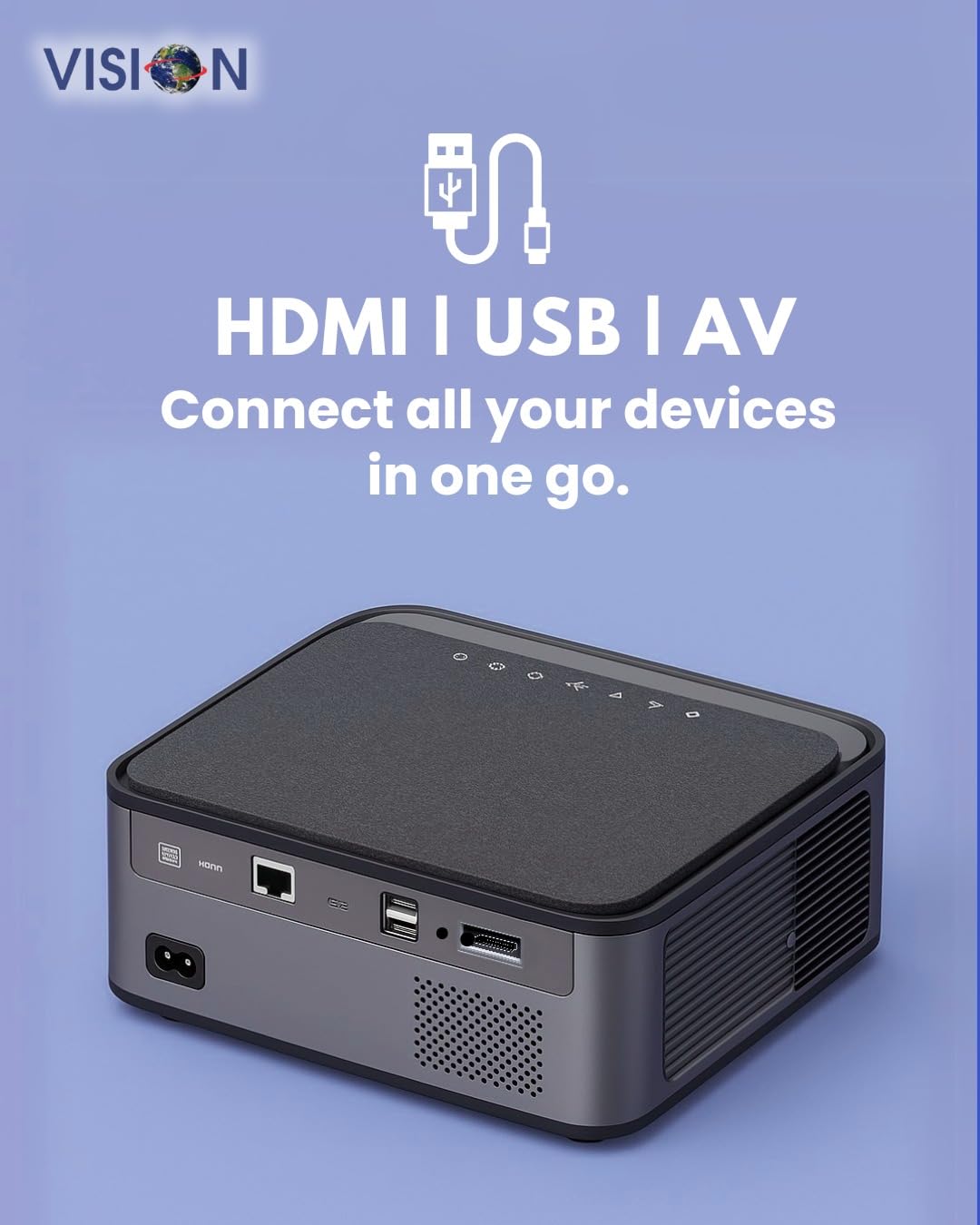
Слика: Позади view of the projector displaying the various input and output ports, including HDMI, USB, and AV.
- Улазна снага: Повежите адаптер за напајање овде.
- ХДМИ порт: Connect to HDMI-enabled devices (laptops, gaming consoles, streaming sticks).
- USB портови (x2): Connect USB drives for media playback or external devices.
- АВ улаз: Connect to older devices using the provided AV cable.
- Аудио излаз (3.5 мм): Повежите екстерне звучнике или слушалице.
- ЛАН порт: For wired internet connection (if available).
5. Подешавање
5.1 Постављање пројектора
Choose a flat, stable surface for the projector. Ensure there are no obstructions in front of the lens and that the ventilation grilles are clear.

Image: A projector positioned on a desk, illustrating a typical setup environment.
5.2 Прикључак за напајање
- Прикључите адаптер за напајање на улазни порт за напајање пројектора.
- Укључите кабл за напајање у зидну утичницу.
- Индикаторска лампица напајања на пројектору ће се упалити.
5.3 Почетно укључивање
- Притисните дугме за напајање на пројектору или даљинском управљачу да бисте га укључили.
- The projector will boot up and display the Android 9.0 home screen.
5.4 Подешавање фокуса и трапезоидног искривљења
The VISION VP-621 features automatic focus and 4D keystone correction for a clear and properly aligned image.

Image: Illustrates the projector's automatic focus and keystone correction capabilities, ensuring a sharp and aligned picture.
- Ауто фокус: The projector will automatically adjust the focus for a sharp image upon startup or movement.
- 4Д корекција Кеистоне: The projector automatically corrects image distortion when placed at an angle. Manual adjustments may be available in the settings menu if needed.
6. Упутство за употребу
6.1 Android 9.0 Smart OS
The integrated Android 9.0 system allows direct access to streaming services and apps.
- Навигација: Use the remote control's directional buttons and "OK" button to navigate the interface.
- Инсталација апликације: Access the Google Play Store to download and install applications like YouTube, Netflix, and Prime Video.
- Мрежна конекција: Go to Settings > Network to connect to a 5G WiFi network or a wired LAN connection.
6.2 Повезивање екстерних уређаја
ХДМИ веза
- Connect an HDMI cable from your device (laptop, gaming console, Fire TV Stick) to the HDMI port on the projector.
- On the projector's home screen, select the HDMI input source.
УСБ веза
- Insert a USB drive into one of the USB ports on the projector.
- The projector will typically prompt you to open the media player or file browser. If not, navigate to the file manager app on the Android home screen.
АВ веза
- Connect the provided AV cable to the AV input port on the projector and to your external device.
- Select the AV input source on the projector.
Bluetooth 5.0 Audio Output
- Go to Settings > Bluetooth on the projector.
- Омогућите Блуетоотх и потражите доступне уређаје.
- Select your Bluetooth speaker or headphones from the list to pair and connect.
Wireless Miracast (Screen Mirroring)
Miracast allows you to wirelessly mirror the screen of your compatible smartphone, tablet, or laptop.
- On the projector's home screen, select the "Miracast" or "Screen Mirroring" application.
- On your mobile device, enable screen mirroring (often found in quick settings or display settings, named "Cast," "Smart View," "Wireless Display," etc.).
- Select the projector from the list of available devices to establish the connection.
7. Одржавање
7.1 Чишћење пројектора
- Објектив: Користите меку крпу без влакана, посебно дизајнирану за оптичка сочива. Не користите абразивна средства за чишћење.
- Casing: Обришите пројектор casing with a soft, dry cloth. For stubborn dirt, slightly dampнатопите крпу водом, а затим обришите сувим.
- вентилација: Regularly check and clean the ventilation grilles to ensure proper airflow and prevent dust buildup. Use a soft brush or compressed air.
7.2 Лamp Живот
The VISION VP-621 utilizes advanced LED technology, providing an estimated lamp life of up to 50,000 hours. This significantly reduces the need for lamp замена у поређењу са традиционалним пројекторима.
КСНУМКС. Решавање проблема
| Проблем | Могући узрок | Решење |
|---|---|---|
| Нема приказане слике |
|
|
| Замућена слика |
|
|
| Нема звука |
|
|
| Повезивање на Ви-Фи није могуће |
|
|
9. Спецификације
| Бранд | ВИЗИЈА |
| Назив модела | VP-621 AN |
| Дисплаи Тецхнологи | ЛЦД |
| Дисплаи Типе | ЛЕД |
| Осветљеност | 11000 лумена |
| Однос контраста слике | 18000:1 пиксела |
| Нативе Ресолутион | 1920 к 1280 (Фулл ХД) |
| Подржана резолуција | Up to 4K Ultra HD |
| Аспецт Ратио | 16:9, 4:3 |
| Оперативни систем | Андроид 9.0 |
| Технологија повезивања | Bluetooth 5.0, HDMI, USB, Wi-Fi (5G) |
| Хардверски интерфејс | Bluetooth 5, HDMI, USB 3.0 |
| Посебне карактеристике | Built-In 3D, Built-In Cooling System, Built-In Speaker, Electric Focus, Wi-Fi Ready, Auto Focus, 4D Keystone Correction, Wireless Miracast |
| Димензије производа | 30 к 18 к 7 цм |
| Тежина артикла | 8 кг |
| Lamp Живот | До 50,000 сати |

Image: Illustrates the projector's Full HD (1920x1080) resolution capability for crisp visuals.

Image: Highlights the projector's 11000 lumens brightness, ensuring clear visuals in various lighting conditions.
10. Гаранција и подршка
For warranty information and technical support, please contact the manufacturer:
- Произвођач: Scorpio Infosolutions
- Локација: Delhi, India
- Телефон: +91-7982647130
- Webсајт: visionsheen.in
Please have your product model (VP-621) and purchase details ready when contacting support.