
COOLGEEK B0DD41WKCH
Упутство за употребу
COOLGEEK Portable Stereo CD Player Boombox
Model: B0DD41WKCH
1. Увод
Хвала вам на куповиниasing the COOLGEEK Portable Stereo CD Player Boombox. This manual provides essential information for the safe and efficient operation of your device. Please read it thoroughly before use and retain it for future reference.
2. Производ је готовview
2.1 Кључне карактеристике
- 3-у-1 функционалност: Combines a vertical CD player, Bluetooth speaker, and FM radio.
- Винtage & Fashion Design: Blends leather hues with brushed aluminum for a unique aesthetic.
- Преносиви дизајн: Features a leather handle for easy carrying.
- Продужено трајање батерије: Up to 18 hours of wireless playback on a single charge (approx. 2.5 hours charging time).
- Стерео звучници: Built-in stereo speakers with an aluminum grille for enhanced audio.
- Versatile CD Compatibility: Supports various types of CDs with simple operation and 360° surround sound.
- Блуетоотх КСНУМКС: Брза и стабилна бежична веза.
- ФМ радио: Tunable from 87.5 to 108 MHz.
- Inverted Phase Hole: Designed for powerful and booming bass experience.

Figure 2.1: The COOLGEEK Portable Stereo CD Player Boombox in green, showcasinг његово виноtage design and portable handle.

Figure 2.2: Visual representation of the boombox's key features, including its 3-in-1 functionality, Bluetooth 5.0, FM radio, vertical CD playback, and long battery life.
2.2 Шта је у кутији
- Винtage CD Player (1 unit)
- Адаптер за напајање (1 јединица)
- Упутство за употребу (овај документ)
3. Подешавање
- Распакивање: Пажљиво извадите све компоненте из амбалаже. Сачувајте амбалажу за будући транспорт или складиштење.
- Прикључак за напајање: Connect the provided power adapter to the DC IN port on the back of the boombox and plug it into a standard wall outlet.
- Почетна наплата: For optimal battery performance, fully charge the device before first use. A full charge takes approximately 2.5 hours. The device can operate wirelessly for over 18 hours on a full charge.
- Пласман: Place the boombox on a stable, flat surface. Its portable leather handle allows for easy relocation.

Figure 3.1: The portable design of the boombox, highlighting its leather handle for easy transport and versatile placement.
4. Упутство за употребу
4.1 Контроле прекоview
Familiarize yourself with the control buttons and knob located on the top panel of the boombox. Refer to Figure 4.1 for a visual guide.
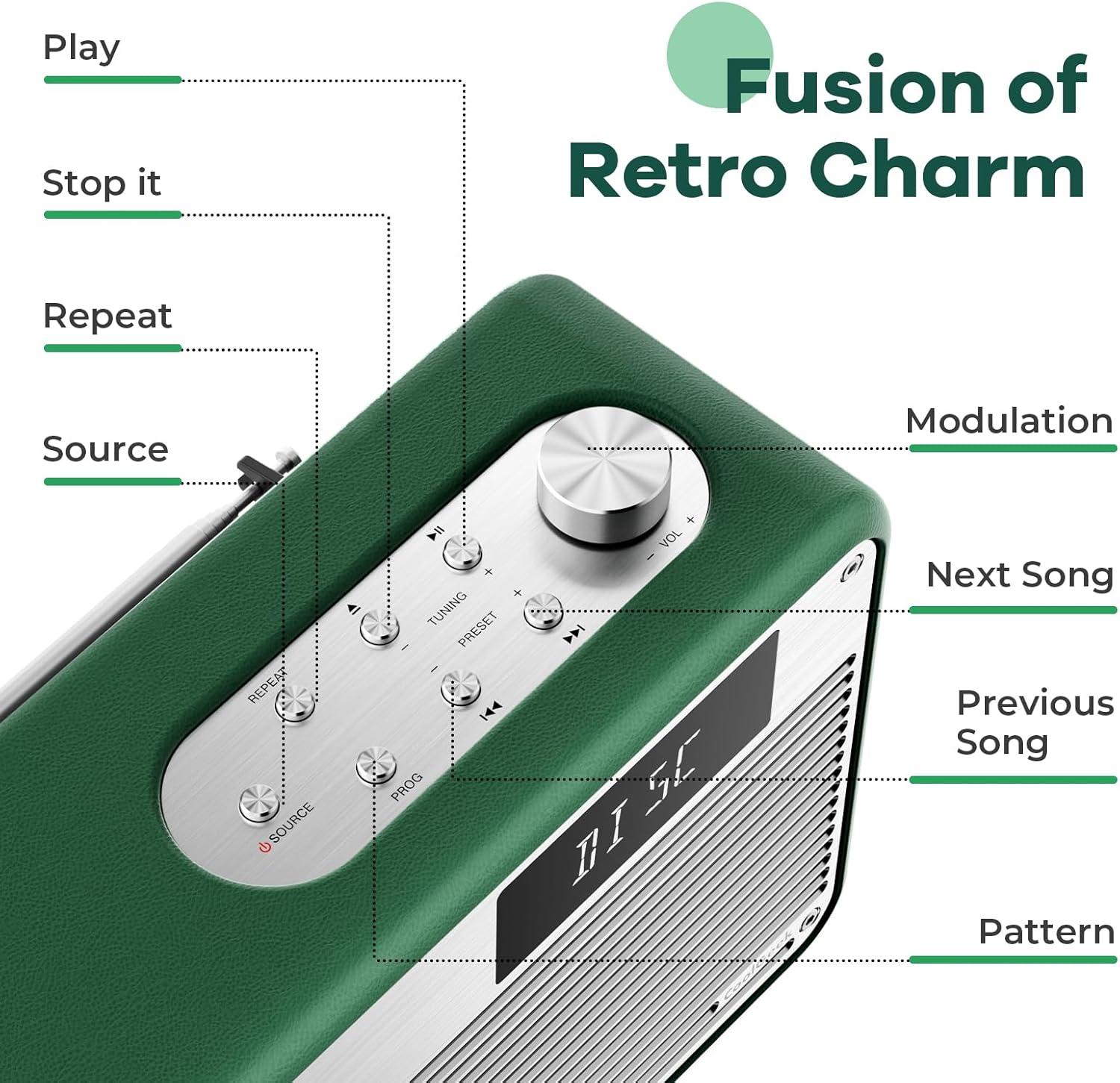
Слика 4.1: Детаљно view of the control panel, indicating the function of each button and the modulation knob.
4.2 Репродукција ЦД-а
- Убаци ЦД: Gently slide your CD into the vertical CD slot on the front of the boombox. The player is designed for simple disc insertion.
- Изаберите извор: Press the 'SOURCE' button until 'CD' mode is displayed.
- Пусти/паузирај: Press the 'PLAY/PAUSE' button to start or pause playback.
- Прескочи песме: Use the 'NEXT SONG' or 'PREVIOUS SONG' buttons to navigate between tracks.
- Контрола јачине звука: Rotate the 'MODULATION' knob to adjust the volume.
- Заустави репродукцију: Press the 'STOP' button to end CD playback.
4.3 Блуетоотх режим
- Изаберите извор: Press the 'SOURCE' button until 'BT' (Bluetooth) mode is displayed. The device will enter pairing mode, indicated by a flashing Bluetooth icon or specific audio prompt.
- Упаривање: On your mobile device (smartphone, tablet, etc.), enable Bluetooth and search for available devices. Select 'COOLGEEK Boombox' (or similar name) from the list.
- веза: Once paired, the boombox will indicate a successful connection. You can now play audio from your mobile device through the boombox.
- Контролишите репродукцију: Use the boombox's 'PLAY/PAUSE', 'NEXT SONG', and 'PREVIOUS SONG' buttons, or control playback directly from your paired device.
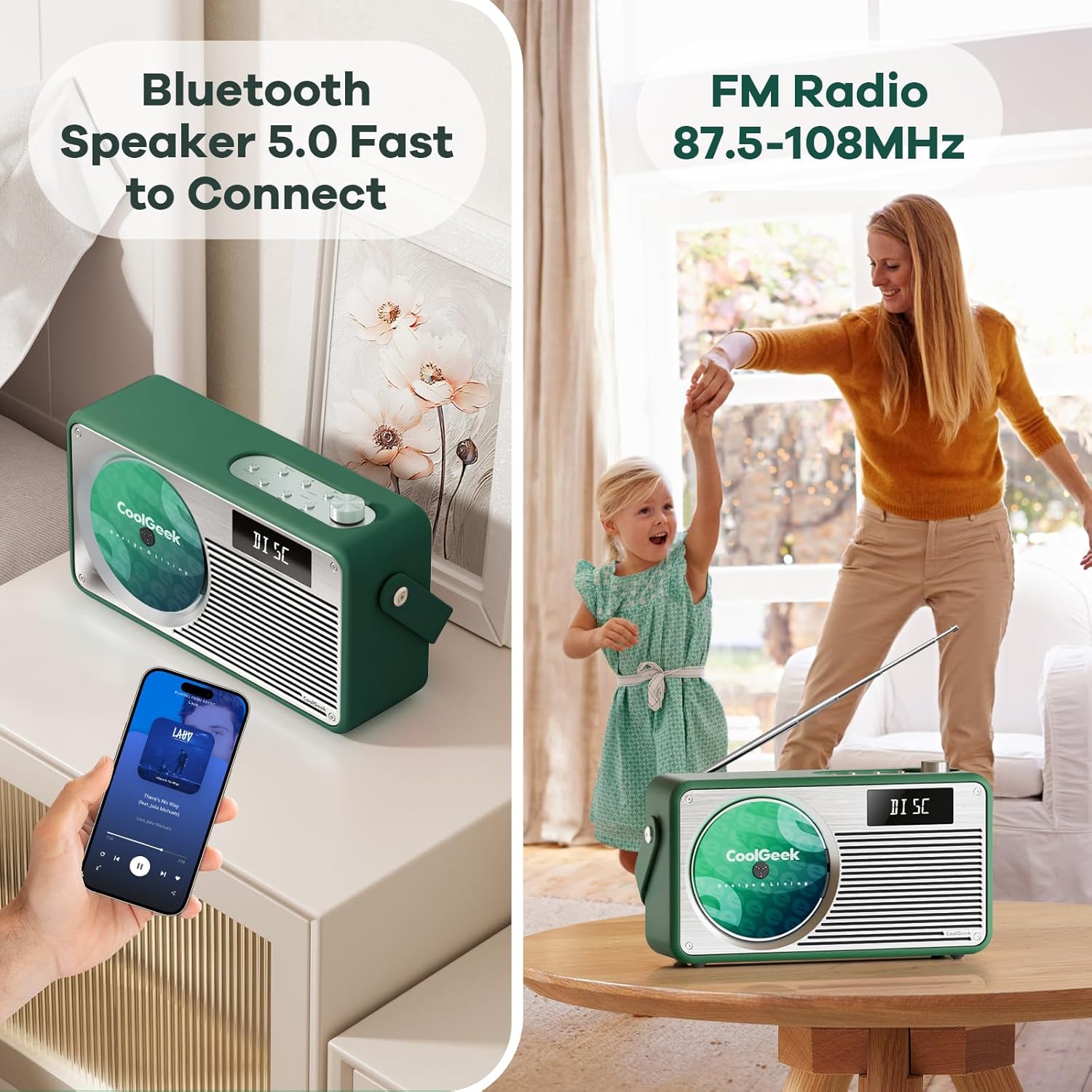
Figure 4.2: The boombox demonstrating its Bluetooth connectivity with a smartphone and its FM radio antenna extended.
4.4 ФМ Радио
- Изаберите извор: Press the 'SOURCE' button until 'FM' mode is displayed.
- Станице за праћење: Use the 'TUNING' buttons (often combined with 'NEXT SONG'/'PREVIOUS SONG' or a dedicated tuning knob) to scan for radio stations. The frequency range is 87.5 to 108 MHz.
- Антена: Extend the telescopic antenna on the back of the unit for better reception. Adjust its position for clearer sound.
- Унапред подешене станице: Some models allow saving favorite stations. Refer to the specific button (e.g., 'PRESET' or 'PROG') for instructions.
5. Одржавање
- Чишћење: Use a soft, dry cloth to clean the exterior of the boombox. Do not use liquid cleaners or abrasive materials.
- ЦД Царе: Држите ЦД-ове за ивице. Прљаве ЦД-ове чистите меком крпом која не оставља влакна, бришући од средине ка споља.
- Одржавање батерије: To prolong battery life, avoid fully discharging the battery frequently. If storing the device for an extended period, charge it to about 50% every few months.
- Складиштење: Уређај чувајте на хладном и сувом месту, даље од директне сунчеве светлости и екстремних температура.
КСНУМКС. Решавање проблема
| Проблем | Могући узрок | Решење |
|---|---|---|
| Нема струје | Батерија је испражњена; Адаптер за напајање није правилно повезан. | Charge the battery; Ensure power adapter is securely connected to both the boombox and the outlet. |
| Нема звука | Volume too low; Incorrect source selected; Device muted. | Increase volume; Press 'SOURCE' to select correct mode (CD, BT, FM); Check if device is muted. |
| CD прескаче или се не репродукује | CD је прљав или изгребан; CD је неправилно уметнут. | Clean the CD; Ensure CD is inserted correctly into the vertical slot. |
| Блуетоотх се не повезује | Boombox not in pairing mode; Device too far; Bluetooth disabled on mobile device. | Ensure boombox is in BT mode and flashing; Move devices closer; Enable Bluetooth on your mobile device. |
| Лош ФМ пријем | Antenna not extended or positioned correctly; Weak signal area. | Fully extend and adjust the telescopic antenna; Try moving the boombox to a different location. |
7. Спецификације
| Феатуре | Детаљ |
|---|---|
| Димензије производа (Д к Ш к В) | 17 к 9.5 к 6.7 инча |
| Тежина артикла | 8.5 фунти |
| Број модела (ASIN) | B0DD41WKCH |
| Батерије | 1 литијум-јонска батерија (укључена) |
| Бранд | COOLGEEK |
| Технологија повезивања | Блуетоотх |
| Боја | Зелена |
| Спеакер Типе | Стерео |
| Произвођач | COOLGEEK |
| Датум првог доступног | 14. августа 2024. године |
8. Гаранција и подршка
COOLGEEK is committed to providing excellent customer service. If you encounter any issues with your product or have questions, please contact us directly. We will do our best to resolve any problems you may experience.
For support, please refer to the contact information provided with your purchase or visit the official COOLGEEK webсајту.
Ask a question about this manual
Ask about setup, troubleshooting, compatibility, parts, safety, or missing instructions. Manuals+ will review the question and use this page’s manual context to help answer it.