
COOLGEEK B0DD41WKCH
COOLGEEK Portable Stereo CD Player Boombox User Manual
Model: B0DD41WKCH
1. Увод
Хвала вам на куповиниasing the COOLGEEK Portable Stereo CD Player Boombox. This versatile device combines a vertical CD player, Bluetooth speaker, and FM radio into a single, stylish unit. Designed for both home and outdoor use, it offers high-fidelity audio and extended battery life. Please read this manual carefully to ensure proper operation and to maximize your enjoyment of the product.

Image: The COOLGEEK Portable Stereo CD Player Boombox, showcasinг његовим компактним дизајном и интегрисаном ручком.
2. Шта је у кутији
- Винtage CD Player (Main Unit)
- Повер Адаптер
- Упутство за употребу
3. Производ је готовview
Familiarize yourself with the various components and controls of your COOLGEEK Boombox.
3.1 Предња плоча и контроле
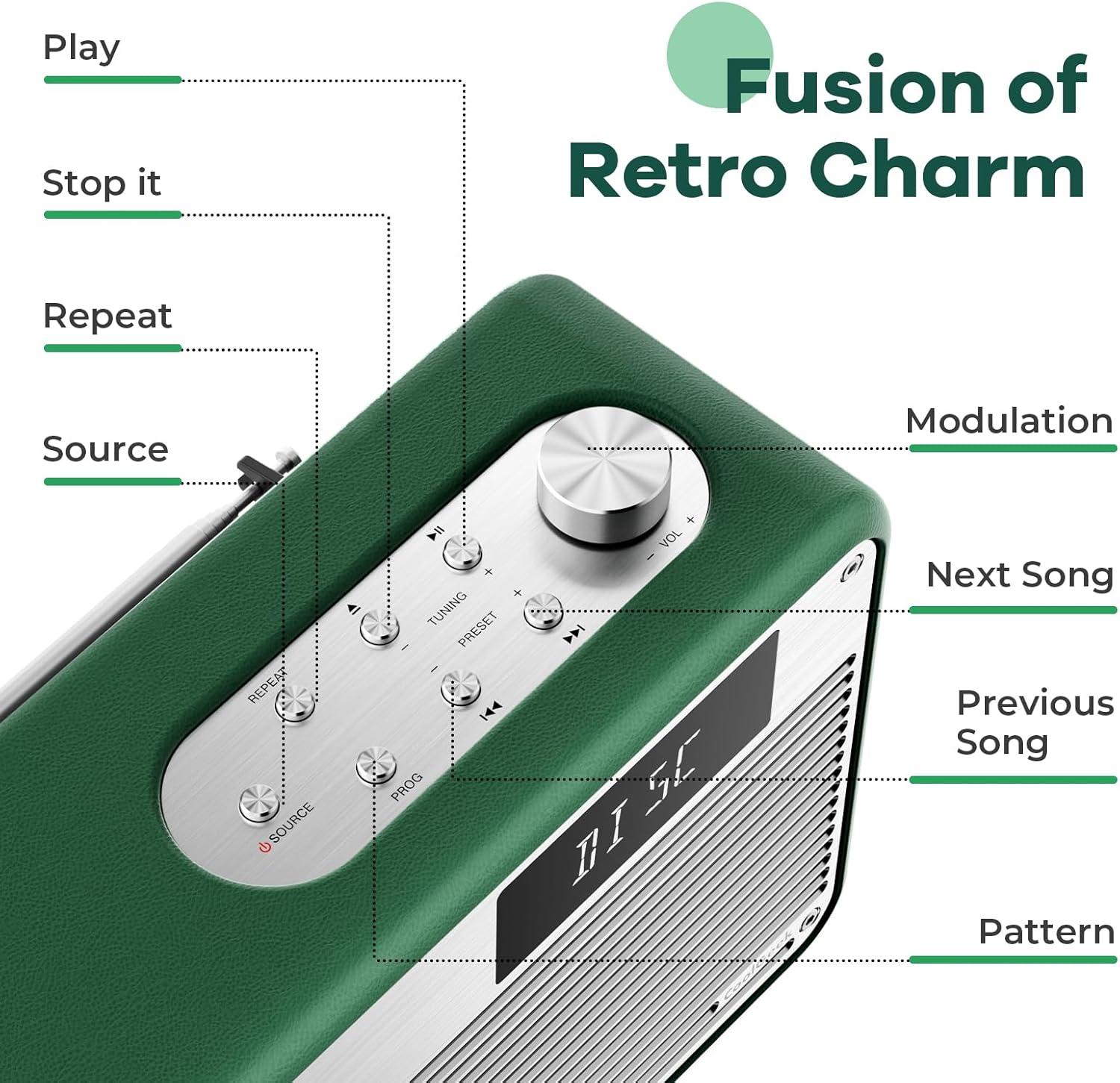
Слика: Детаљна view of the control panel, highlighting buttons for Play, Stop, Repeat, Source, Modulation, Next Song, Previous Song, and Pattern.
- ЦД слот: Vertical slot for inserting CDs.
- Екран: Shows current mode, track number, time, FM frequency, and Bluetooth status.
- Дугме за јачину звука: Окрените за подешавање јачине звука.
- Дугме извора: Press to switch between CD, FM, and Bluetooth modes.
- Дугме за репродукцију/паузу: Покреће или паузира репродукцију.
- Стоп дугме: Зауставља репродукцију.
- Дугме за понављање: Toggles repeat modes for CD playback.
- Tuning Buttons (+/-): For FM radio tuning.
- Preset Buttons (+/-): For navigating saved FM radio presets.
- Дугмад за претходну/следећу нумеру: Skips to the previous or next track on CD, or changes FM frequency/preset.
- Дугме ПРОГ: For programming CD playback order.
3.2 Rear Panel and Features

Image: Close-up of the boombox's leather handle and aluminum shell, highlighting the premium materials.
- ФМ антена: Издувна антена за бољи пријем ФМ радија.
- Улазна снага: DC 12V/3A input for the power adapter.
- Rear Phase Inverter Hole: Enhances bass performance for a richer sound experience.
4. Подешавање
4.1 Пуњење уређаја
Before first use, fully charge the boombox. Connect the provided power adapter to the DC 12V/3A input on the rear of the unit and plug it into a wall outlet. A full charge takes approximately 2.5 hours and provides over 18 hours of wireless playback.

Image: The boombox highlighting its long battery life for extended use.
4.2 Почетно смештање
Place the boombox on a stable, flat surface. For optimal sound, especially bass, consider placing it near a wall or in a corner. Ensure adequate ventilation around the unit.
5. Упутство за употребу
5.1 Укључивање/искључивање
Притисните и држите Извор дугме за укључивање или искључивање уређаја.
5.2 Избор режима
Притисните тастер Извор button repeatedly to cycle through the available modes: CD, FM Radio, and Bluetooth (BT).
5.3 Репродукција ЦД-а
Да бисте пустили ЦД:
- Ensure the unit is in CD mode (display shows "DISC" or "READING").
- Carefully insert a CD into the vertical CD slot. The disc will automatically begin to spin and read.
- Користите Пусти/Паузирај, Стани, Prethodna/Sledeća numera, и Понови дугмад за контролу репродукције.
The boombox supports various types of CDs. For optimal performance, handle CDs by their edges to avoid scratches.
Video: Demonstrates the operation of the COOLGEEK CD Player, including inserting a CD, switching modes, and adjusting volume.
Рад са 5.4 FM радиом
Да бисте слушали ФМ радио:
- Пребаците се на FM режим помоћу Извор button (display shows "FM" and frequency).
- Extend the FM antenna on the rear of the unit for better reception.
- Користите Tuning (+/-) дугмад за ручно подешавање жељене фреквенције.
- Да бисте сачували предефинисану поставку, притисните и држите ПРОГ дугме, а затим користите Preset (+/-) дугмад да бисте изабрали број предефинисане поставке и притисните ПРОГ поново да потврдим.
- Користите Preset (+/-) дугмад за навигацију кроз сачуване станице.
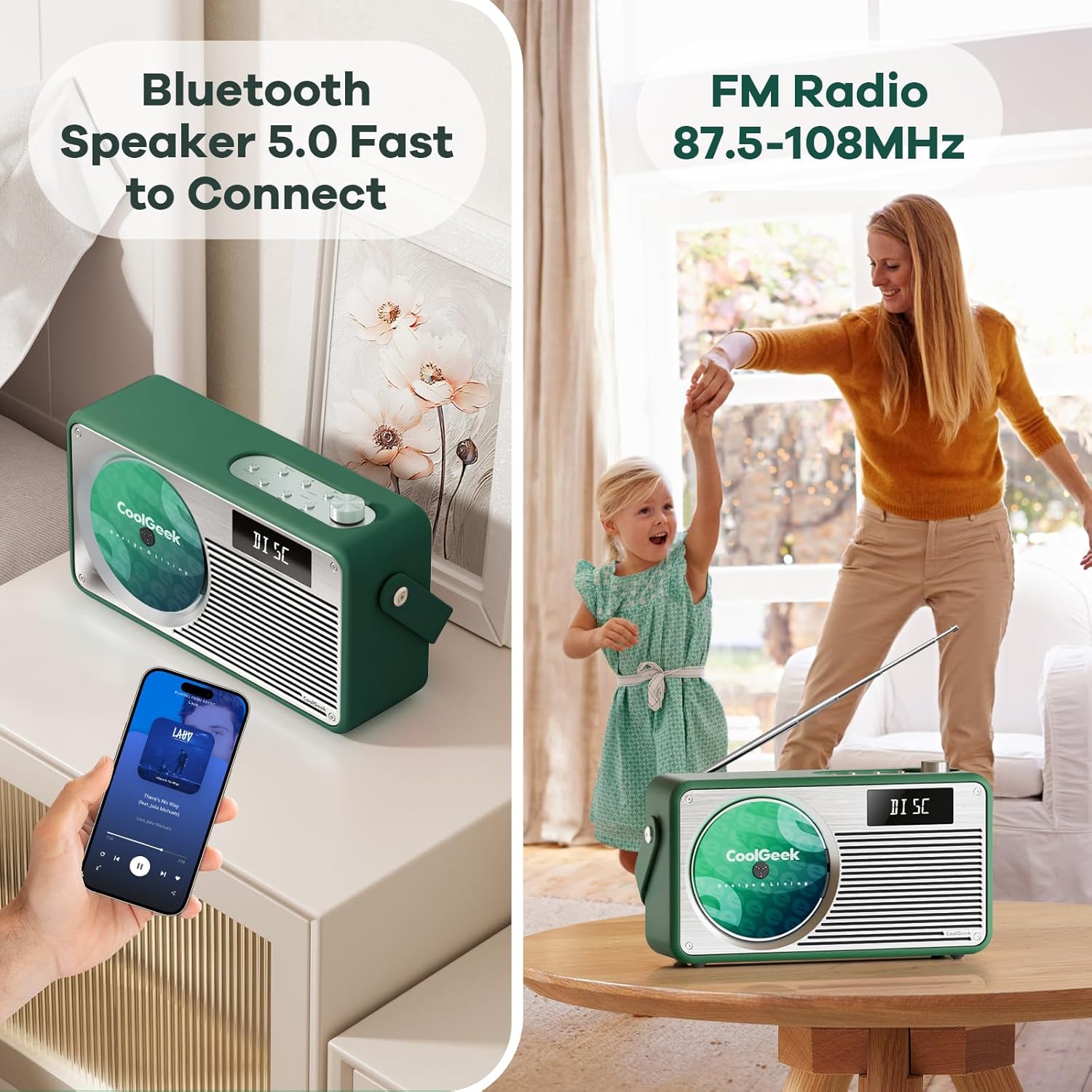
Image: The boombox displaying its Bluetooth and FM radio capabilities, showing a phone connected via Bluetooth and the FM antenna extended.
5.5 Блуетоотх режим
Да бисте се повезали преко Блуетоотх-а:
- Пребаците се на Bluetooth режим помоћу Извор button (display shows "BT"). The unit will automatically enter pairing mode.
- On your mobile device, enable Bluetooth and search for "CoolGeek VS-02" (or similar).
- Select the device to pair. Once connected, the display will indicate a successful connection.
- You can now play audio from your device through the boombox. Use your device or the boombox's Пусти/Паузирај и Prethodna/Sledeća numera дугмад за контролу репродукције.
5.6 Контрола јачине звука
Ротирајте Волуме Квачица у смеру казаљке на сату да бисте повећали јачину звука и у смеру супротном од казаљке на сату да бисте смањили јачину звука.
6. Одржавање
- Чишћење: Користите меку, суву крпу за чишћење спољашњости уређаја. Не користите течна средства за чишћење или абразивне материјале.
- ЦД Царе: Always handle CDs by their edges. Store them in their cases to prevent scratches and dust accumulation.
- Складиштење: When not in use for extended periods, store the boombox in a cool, dry place away from direct sunlight and extreme temperatures.
- батерија: Да бисте продужили век трајања батерије, избегавајте често потпуно пражњење батерије. Редовно је пуните, чак и ако је не користите стално.
КСНУМКС. Решавање проблема
| Проблем | Могући узрок | Решење |
|---|---|---|
| Јединица се не укључује. | Батерија је празна; Адаптер за напајање није повезан или је неисправан. | Charge the unit fully. Ensure power adapter is securely connected and working. |
| Прескакање или не репродукција CD-а. | CD is dirty, scratched, or inserted incorrectly; Unit is on an unstable surface. | Clean the CD with a soft cloth. Re-insert the CD correctly. Place the unit on a stable surface. |
| Слаб ФМ радио пријем. | Antenna not extended; Weak signal in the area. | Fully extend the FM antenna. Try repositioning the unit for better signal. |
| Блутут се не повезује. | Unit not in Bluetooth mode; Device not discoverable; Already connected to another device. | Ensure unit is in BT mode. Make sure your device's Bluetooth is on and discoverable. Disconnect from other devices. |
| Нема звука. | Volume too low; Mute activated; Incorrect mode selected. | Increase volume. Check if unit is muted. Ensure correct mode (CD, FM, BT) is selected. |
8. Спецификације
| Феатуре | Детаљ |
|---|---|
| Димензије производа | 17 к 9.5 к 6.7 инча |
| Тежина артикла | 8.5 фунти |
| Батерије | 1 литијум-јонска батерија (укључена) |
| Технологија повезивања | Блуетоотх 5.0 |
| Боја | Зелена |
| Спеакер Типе | Стерео |
| ФМ радио фреквенција | 87.5 до 108 МХз |
| Трајање батерије | Over 18 hours (wireless playback) |
| Време пуњења | Отприлике 2.5 сата |
9. Гаранција и подршка
COOLGEEK is committed to customer satisfaction. If you encounter any issues with your product or have questions, please contact our customer support team directly. We will do our best to resolve any problems you may have.
For support, please refer to the contact information provided on the product packaging or the official COOLGEEK webсајту.
Ask a question about this manual
Ask about setup, troubleshooting, compatibility, parts, safety, or missing instructions. Manuals+ will review the question and use this page’s manual context to help answer it.