
SMALLRIG Standard Version 4893 (without battery)
SmallRig RC 100B COB Video Light User Manual
Model: Standard Version 4893
1. Увод
The SmallRig RC 100B COB Video Light is a compact and powerful bi-color lighting solution designed for photography and video production. It features a 100W output, adjustable color temperature from 2700K to 6500K, and high color rendering capabilities (CRI 97+, TLCI 98+). This manual provides essential information for the safe and effective operation of your RC 100B video light.
2. Садржај пакета
Проверите да ли су све ставке присутне у вашем пакету:
- RC 100B COB Video Light x 1
- Mini Reflector x 1
- Адаптер за постоље за светло x 1
- Silicone Diffuser x 1
- 3m USB-C to USB-C Cable x 1
- Упутство за употребу к 1

Figure 2.1: Contents of the SmallRig RC 100B Standard Version package.
3. Производ је готовview
The RC 100B is designed for portability and ease of use, featuring a compact form factor and intuitive controls.

Слика 3.1: Предња страна view of the SmallRig RC 100B COB Video Light with reflector.

Figure 3.2: The compact and lightweight design of the RC 100B, weighing only 700 grams.
4. Подешавање
4.1 Attaching the Mini Reflector
- Align the three tabs on the mini reflector with the corresponding slots on the front of the RC 100B light.
- Twist the reflector clockwise until it locks securely into place.
4.2 Монтирање светла
- Attach the light stand adaptor to the bottom of the RC 100B.
- Secure the light stand adaptor onto a compatible light stand.
- Adjust the angle of the light using the tilt mechanism on the adaptor.
4.3 Напајање уређаја
The RC 100B offers versatile power options:
- V-mount батерија: Directly mount a V-mount battery (recommended capacity > 98Wh, output power > 120W, voltage ≤ 35V) to the built-in battery plate on the rear of the unit.
- Брзо пуњење преко USB-C порта: Connect a USB-C PD power bank or PD 140W charger to the USB-C port. Supports up to 110W USB-C PD input.
- ДЦ адаптер за напајање: Use a compatible DC power adapter (not included in this standard version package) to power the unit.
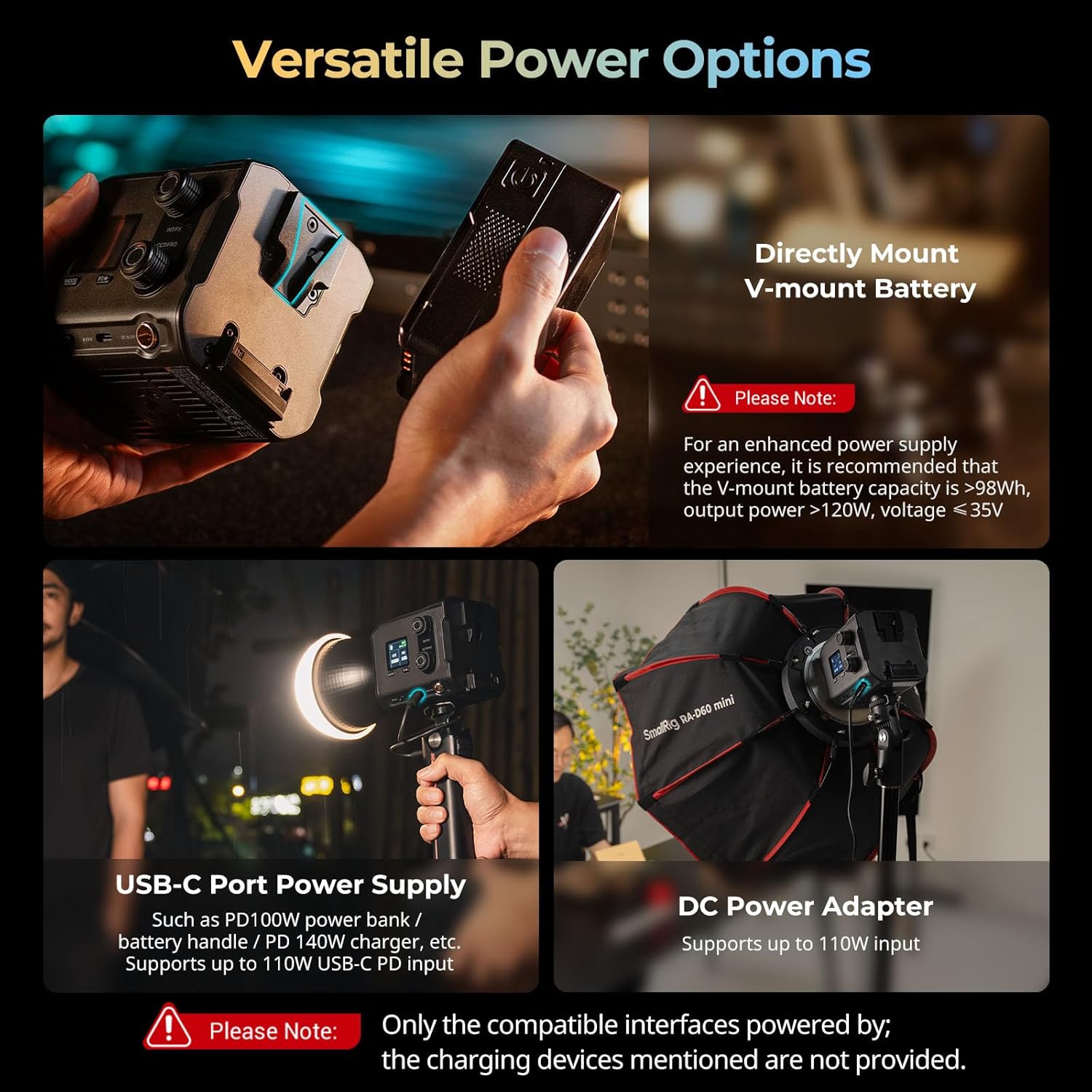
Figure 4.1: Versatile power options for the RC 100B.
5. Упутство за употребу
5.1 Onboard Control
The 1.3-inch LCD color screen provides detailed lighting information. Use the control knobs for precise parameter adjustments:
- INT/FX Knob: Adjusts intensity (brightness) or cycles through special effects. Press to switch between intensity and effects modes.
- CCT/FREQ Knob: Adjusts color temperature (CCT) from 2700K to 6500K or frequency in effects mode. Press to switch between CCT and frequency.
- Дугме МОДЕ: Циклира кроз различите режиме рада.
5.2 Контрола апликација
Manage the RC 100B wirelessly using the SmallRig GOGO app. Download the app from your device's app store and follow the in-app instructions for pairing and control.

Figure 5.1: Multiple control modes: Onboard and App Control.
5.3 специјалних ефеката
The RC 100B includes 12 common special effects for creative lighting scenarios. These can be accessed and adjusted via the onboard controls or the SmallRig GOGO app.
Video 5.1: Official SmallRig video demonstrating the features of the RC 100B COB Video Light, including its various light effects and controls.
6. Спецификације
| Феатуре | Детаљ |
|---|---|
| Модел | Стандардна верзија 4893 |
| Димензије производа | КСНУМКС к КСНУМКС к КСНУМКСмм (КСНУМКС к КСНУМКС к КСНУМКС инча) |
| Тежина артикла | 700 г (1.54 фунти) |
| Опсег температуре боје | 2700К-6500К |
| ЦРИ | 97+ |
| ТЛЦИ | 98+ |
| Illumination (bare, 1m/5600K) | 4,610 лукса |
| Illumination (hyper reflector, 1m/5600K) | 20,100 лукса |
| Fan Noise (Normal Mode) | ~26dB (at 1 meter) |
| Fan Noise (ECO Mode) | ~18dB (at 1 meter) |
| Повезивање | USB Type C, Bluetooth (App Control) |
| Материјал | PC+ABS, Silicone, Aluminum Alloy |
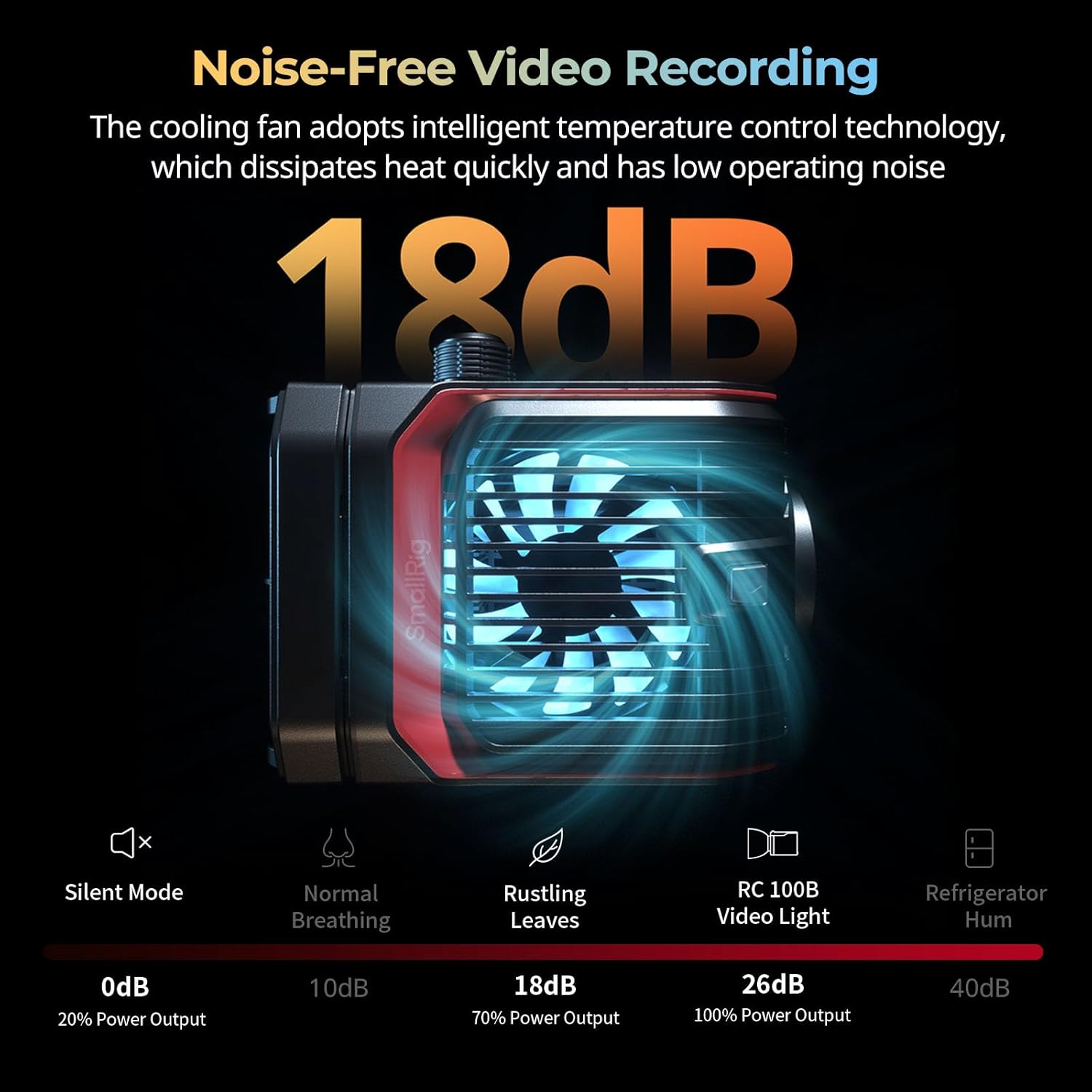
Figure 6.1: Detailed product specifications and package contents.
7. Одржавање
- Keep the device dry. Do not touch with wet hands.
- Очистите површину меком, сувом крпом. Избегавајте употребу јаких хемикалија или абразивних материјала.
- Ensure the cooling fan vents are clear of obstructions to maintain optimal performance and prevent overheating.
- Store the light in a cool, dry place when not in use, preferably in its original packaging or a protective case.
КСНУМКС. Решавање проблема
| Проблем | Могући узрок | Решење |
|---|---|---|
| Светлост се не пали. | No power, low battery, or incorrect power connection. | Check power source (V-mount battery, USB-C, DC adapter). Ensure battery is charged or power cable is securely connected. |
| Light flickers or output is inconsistent. | Нестабилно напајање или лабава веза. | Verify power connections. If using a battery, ensure it has sufficient charge. Try a different power source. |
| Fan noise is too loud. | Operating in normal mode or vents are obstructed. | Switch to ECO mode for reduced fan noise. Ensure cooling vents are clear. |
| Контрола апликације не ради. | Bluetooth not enabled, app not paired, or app issue. | Ensure Bluetooth is enabled on your device. Re-pair the light with the SmallRig GOGO app. Restart the app or your device. |
9. Гаранција и подршка
For warranty information and technical support, please refer to the official SmallRig webсајт или директно контактирајте њихову корисничку службу. Сачувајте рачун као доказ о куповини за потребе гаранције.
Official SmallRig Webсајт: ввв.смаллриг.цом
Ask a question about this manual
Ask about setup, troubleshooting, compatibility, parts, safety, or missing instructions. Manuals+ will review the question and use this page’s manual context to help answer it.