
1. Производ је готовview
The AirheadStorm 450W 80A MPPT Solar Charge Controller is designed for efficient and reliable charging across a wide range of applications. It features advanced Maximum Power Point Tracking (MPPT) technology to optimize power conversion, achieving an efficiency rate of 98%. This controller supports various battery types, including lead-acid, lithium, LiFePO4, and gel batteries, offering flexibility for different energy storage solutions.
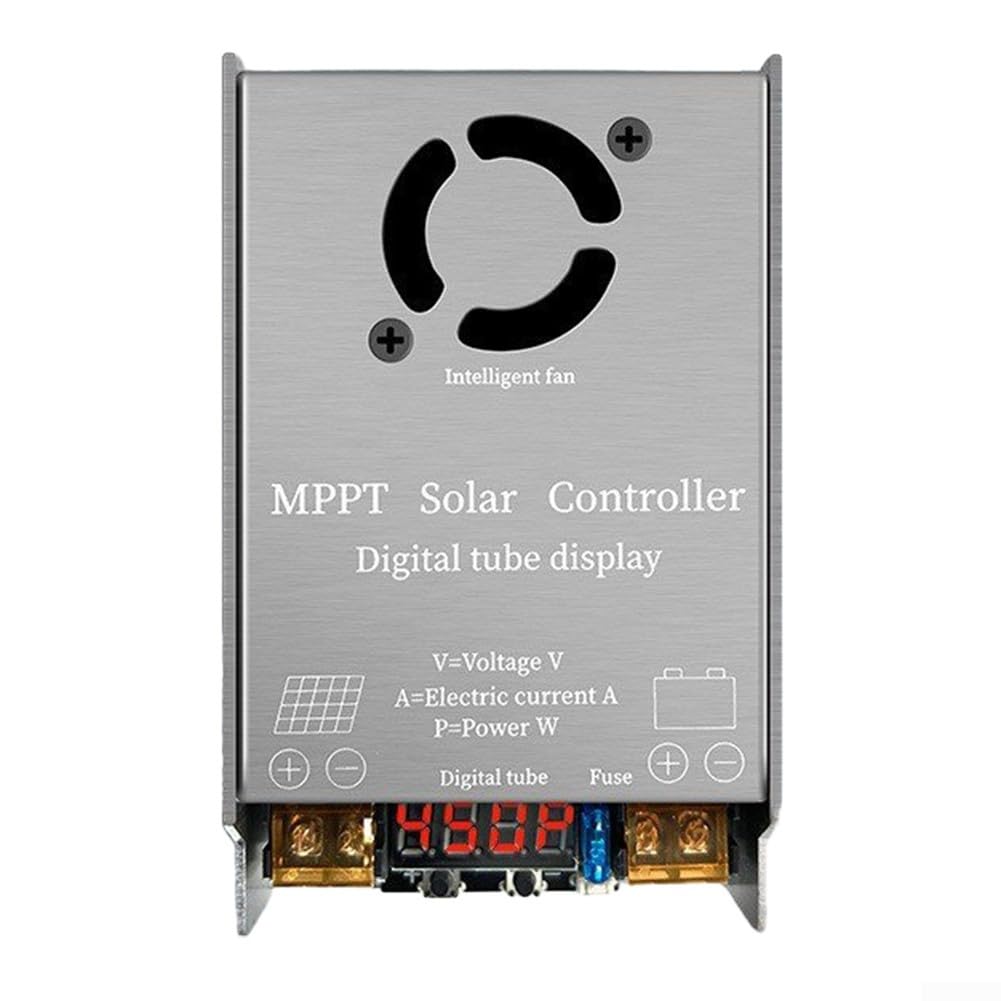
Слика 1: Предња страна view of the MPPT Solar Charge Controller, showing input/output terminals and digital display.
The controller is built with a sturdy magnesium aluminum alloy shell, providing excellent durability and heat dissipation. It includes a user-friendly LED display for monitoring operational status and is equipped with several protective features to ensure safe and reliable operation.
2. Мере предострожности
- Do not use the solar controller under voltage overload or power overload conditions.
- Ensure the solar controller voltage is consistent with the battery voltagе пре инсталације.
- All input and output lines of the solar controller use red for the positive pole and black for the negative pole. Observe correct polarity during connection.
- Keep connecting cables as short as possible to avoid potential power loss.
- Install the solar controller in a well-ventilated environment, as it is normal for the unit to generate heat during operation.
- Do not attempt to change or replace the internal 15A fuse yourself. Contact qualified personnel if fuse replacement is necessary.
- Avoid placing solar panels behind glass objects or allowing anything to cover them, as this reduces power generation.
3. Подешавање и инсталација
Follow these steps for proper installation of your MPPT Solar Charge Controller:
- Волtagе Подешавање: Before connecting any components, set the output voltage of the controller to match your battery bank's voltage (24V, 36V, 48V, 60V, or 72V). Refer to the operating instructions for voltagе подешавање.
- Повезивање соларне плоче: Connect the solar panel(s) to the controller's input terminals (VIN). Ensure correct polarity: red for positive (+), black for negative (-).
- Повезивање батерије: After connecting the solar panel, connect the battery bank to the controller's output terminals (OUT). Again, ensure correct polarity: red for positive (+), black for negative (-).

Слика 2: Под углом view of the controller, highlighting the input (VIN) and output (OUT) connection points.
Важно: The solar controller will not function correctly if the solar panel is not connected or if the connection order is reversed.
4. Операција
Once properly installed, the MPPT Solar Charge Controller will automatically begin optimizing the power transfer from your solar panels to your battery bank. The built-in LED display provides real-time information on the operational status, allowing you to monitor system performance at a glance.
4.1. Supported Battery Types
This controller is compatible with a wide range of battery chemistries, including:
- Оловне батерије
- Литијумске батерије
- ЛиФеПО4 батерије
- Гел батерије
4.2. Волtage and Power Management
The controller accepts an input voltage range of 12V to 50V from solar panels and can output voltage from 24V to 72V to charge compatible battery banks. It manages a maximum current of 12A and has rated power outputs of 18V/300W and 36V/450W, ensuring robust performance for various energy requirements.
5. Одржавање
To ensure the longevity and optimal performance of your solar charge controller, consider the following maintenance guidelines:
- вентилација: The controller generates heat during operation. Ensure it is installed in a well-ventilated area to prevent overheating. Regularly check that the intelligent fan (if present) is free from obstructions.
- Везе: Periodically inspect all wiring connections for tightness and corrosion. Loose connections can lead to power loss or system malfunction.
- Чишћење: Keep the controller's exterior clean and free of dust and debris. Use a dry, soft cloth for cleaning. Do not use liquid cleaners.
- Осигурач: The controller is equipped with a 15A fuse for protection against electrical faults. Do not attempt to change or replace this fuse yourself. Unauthorized replacement can void the warranty and pose a safety risk.

Слика 3: Врх view of the controller, showing the intelligent fan for heat dissipation.
КСНУМКС. Решавање проблема
If you encounter issues with your solar charge controller, consider the following common troubleshooting steps:
- Нема излазне снаге:
- Check if the solar panel is properly connected to the controller. The controller requires solar input to operate.
- Verify that the battery bank is correctly connected to the output terminals with correct polarity.
- Уверите се да је улазна волtage from the solar panels is within the specified range (12V-50V).
- Low Charging Efficiency:
- Confirm that solar panels are exposed to strong, direct sunlight. Obstructions or placement behind glass can significantly reduce power.
- Check for any shading on the solar panels.
- Ensure cable lengths are minimized to reduce resistance and power loss.
- прегревање:
- Verify that the controller is installed in a well-ventilated area.
- Ensure the fan (if applicable) is not blocked and is functioning correctly.
- Netačno Voltagе Читање:
- Confirm that the controller's voltage setting matches the battery bank's nominal voltage.
If problems persist after following these steps, consult a qualified technician.
7. Спецификације
| Феатуре | Спецификација |
|---|---|
| Назив производа | МППТ соларни контролер |
| Улазни волtage | 12V - 50V |
| Оутпут Волtage | 24V / 36V / 48V / 60V / 72V |
| Макимум Цуррент | 12А |
| Називна снага | 18В/300В, 36В/450В |
| Компатибилне батерије | Lead-acid, Lithium, LiFePO4, Gel |
| Величина (Д*Ш*В) | 113 к 86 к 39 мм |
| Тежина | 232 грама |
| Ефикасност конверзије | 98% |
| Ниво заштите | ИП30 |
| Материјал шкољке | Магнезијум алуминијум легура |
| Радна температура | -20℃ до 60℃ |
| Дисплаи Типе | ЛЕД |
| Осигурач | 15А |

Figure 4: Side and bottom views of the controller, illustrating its compact dimensions and robust casing.