
Увод
This manual provides detailed instructions for the setup, operation, and maintenance of your Dpofirs Digital Audio Spectrum Analyzer and 15-Band Equalizer. This device is designed to enhance your audio experience by offering precise sound processing and real-time visual feedback of audio frequencies. Please read this manual thoroughly before using the product to ensure proper functionality and longevity.
Спецификације производа
| Врста ставке | Music Spectrum Equalizer |
| Банд Индицатор | 15 опсега |
| Фреквенцијски одзив | 20 Hz - 20 kHz |
| Осетљивост | >-40 dB (94 dB SPL at 1 KHz) |
| Канали | Дуал Цханнел |
| Gain Equalizer | ±30 дБ |
| Процесор | ARM-CortexM3 |
| Димензије | 26 к 7 к 4 цм |
| Тежина | 294 г |
Садржај пакета
Проверите да ли су све ставке присутне у пакету:
- 1 x Music Spectrum Equalizer Unit
- 1 к Упутство за употребу
- 1 к аудио кабл
- 1 к кабл за пуњење
- 1 x Knob Cap
- 1 x 2-pin Power Cord

Производ је завршенview
Familiarize yourself with the various parts and controls of the Digital Audio Spectrum Analyzer.

Front Side Components:
- 3.5mm Sound Input: Connect your audio source here.
- 3.5mm Sound Output: Повежите се са својим amplifier or other audio playback device.
- EQ Regulating Encoder: Used for adjusting equalizer parameters and navigating menus.
- Spectrum Regulating Roller: Adjusts spectrum display settings.
Reverse Side Components:
- Spectrum Input Attenuation: Adjusts the input sensitivity for the spectrum display.
- 7-18V Power Input: Main power input for the device.
- 5V Power Input: Alternative or supplementary power input.
Сетуп
Follow these steps to set up your Digital Audio Spectrum Analyzer.
Прикључак за напајање:
- Connect the provided 2-pin power cord to the 7-18V Power Input (6) on the reverse side of the unit.
- Alternatively, use a 5V USB charging connector or a dedicated 12V input for power.
- Важно: When using DSP sound processing, the device must be powered independently. Failure to do so may introduce display crosstalk.
Аудио веза:
Use the provided audio cable to connect your audio source and output device.
- Connect your audio source (e.g., DVD player) to the 3.5mm Sound Input (1) on the front side.
- Повежите 3.5mm Sound Output (2) on the front side to your ampLifier (AMP) or other audio playback system.

Упутство за употребу
This section details how to operate your spectrum analyzer and equalizer.
Spectrum Display Usage:
- To enter the menu, press down on the dial wheel (EQ Regulating Encoder).
- Move the dial wheel left or right to navigate through setting items and adjust values.
- When the spectrum is displayed normally, rotate the dial wheel to adjust the gain.
- Hold the dial wheel down for 6 seconds to exit the current menu and save changes.
Време подешавања:
- Enter the time display mode (Mode: 9).
- Press the left key to select a position (e.g., hour, minute).
- Press the right key to select a number. The adjustment will be saved immediately.
Frequency Spectrum Display:
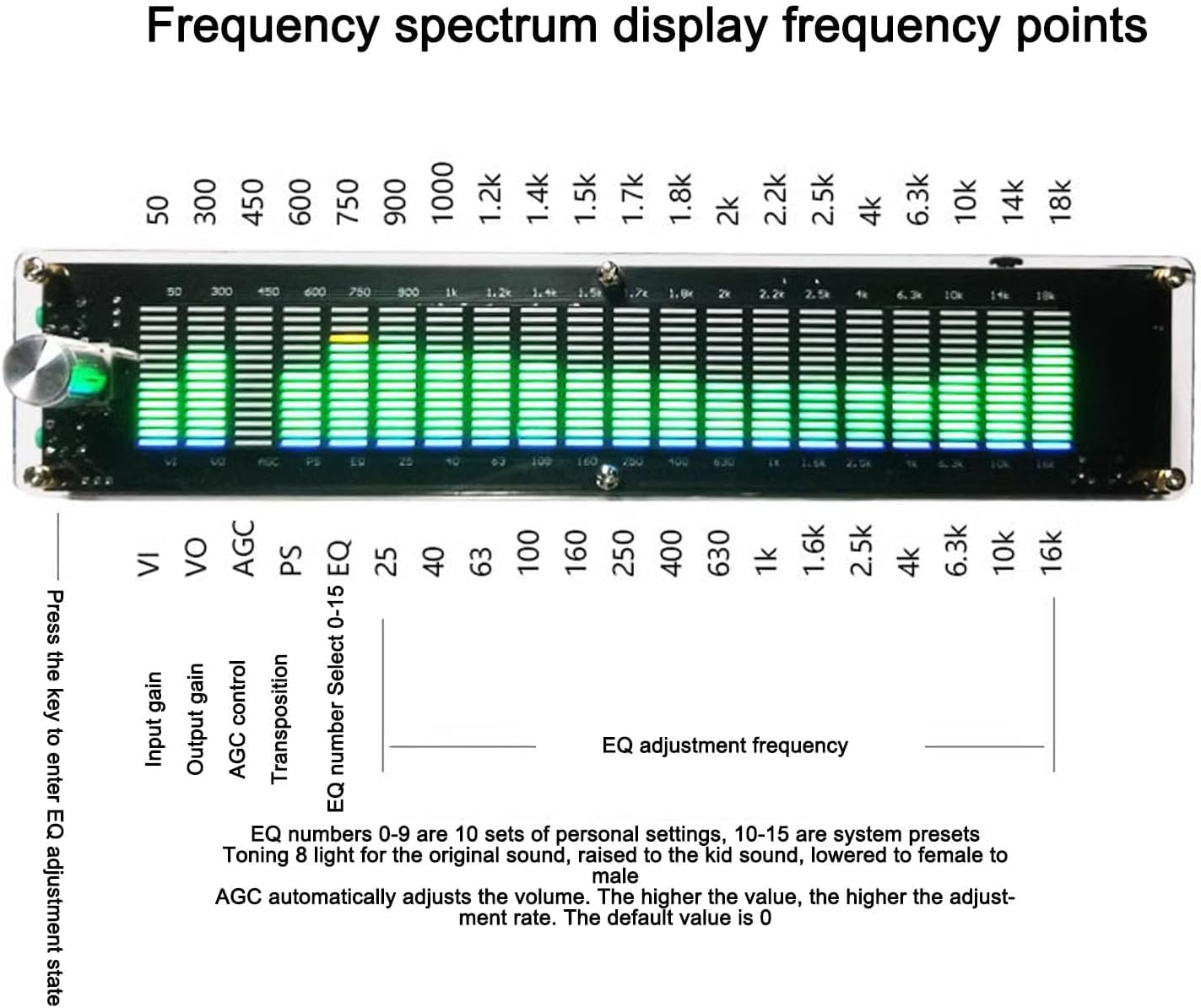
- The display shows 15 frequency points from 20Hz to 20KHz.
- VI: Инпут Гаин
- ГЛАС: Излазни добитак
- АГЦ: Automatic Gain Control. Automatically adjusts volume. Higher value means higher adjustment rate. Default is 0.
- ПС: Транспозиција
- EQ Number Select (0-15 EQ):
- EQ numbers 0-9 are 10 sets of personal settings.
- EQ numbers 10-15 are system presets.
- Example presets: "Toning 8 light for the original sound", "raised to the kid sound", "lowered to female to male".
Press the key to enter EQ adjustment state.

Одржавање
To ensure the longevity and optimal performance of your Dpofirs Digital Audio Spectrum Analyzer, follow these maintenance guidelines:
- Чишћење: Use a soft, dry cloth to clean the exterior of the device. Avoid using liquid cleaners or abrasive materials, as they may damage the surface or internal components.
- Складиштење: Чувајте уређај на хладном и сувом месту, даље од директне сунчеве светлости, екстремних температура и високе влажности.
- Руковање: Handle the device with care to prevent drops or impacts, which could damage the internal circuitry or display.
- Искључивање: Disconnect the power supply when the device is not in use for extended periods.
Решавање проблема
If you encounter any issues with your Digital Audio Spectrum Analyzer, refer to the following common problems and solutions:
| Проблем | Могући узрок | Решење |
|---|---|---|
| Нема екрана/Уређај се не укључује | Power cable not connected or faulty; power source issue. | Ensure the power cable is securely connected. Verify the power source is active. Try a different power adapter if available. |
| Нема аудио излаза | Incorrect audio cable connection; output device issue. | Check that the 3.5mm sound output is correctly connected to your amplifier. Osigurajte ampУређај за напајање је укључен и подешен на исправан улаз. |
| No spectrum display/Incorrect display | No audio input; incorrect input attenuation; crosstalk. | Verify audio source is playing and connected to the 3.5mm sound input. Adjust the Spectrum Input Attenuation. Ensure independent power supply if DSP processing is active to prevent crosstalk. |
| Контроле не реагују | Привремени софтверски квар. | Disconnect and reconnect the power supply to restart the device. |
Гаранција и подршка
This Dpofirs product comes with a standard warranty. For specific warranty details, please refer to the documentation provided at the time of purchase or contact your retailer. For technical support or further assistance, please visit the official Dpofirs webсајту или се обратите њиховом одељењу за корисничку подршку.
Контакт информације:
- Бренд: Дпофирс
- Webсајт: Visit Dpofirs on Amazon