
Nulea KM75
Nulea KM75 Advanced Ergonomic Wireless Keyboard and Mouse Combo User Manual
Модел: КМ75
Увод
This manual provides detailed instructions for the setup, operation, and maintenance of your Nulea KM75 Advanced Ergonomic Wireless Keyboard and Mouse Combo. Please read this manual thoroughly before using the product to ensure optimal performance and longevity.
Садржај пакета
- Nulea KM75 Ergonomic Wireless Keyboard
- Nulea Ergonomic Wireless Mouse
- 2.4G USB Receiver (shared for keyboard and mouse)
- УСБ-Ц кабл за пуњење
- Кориснички приручник (овај документ)
Производ је завршенview
Карактеристике тастатуре
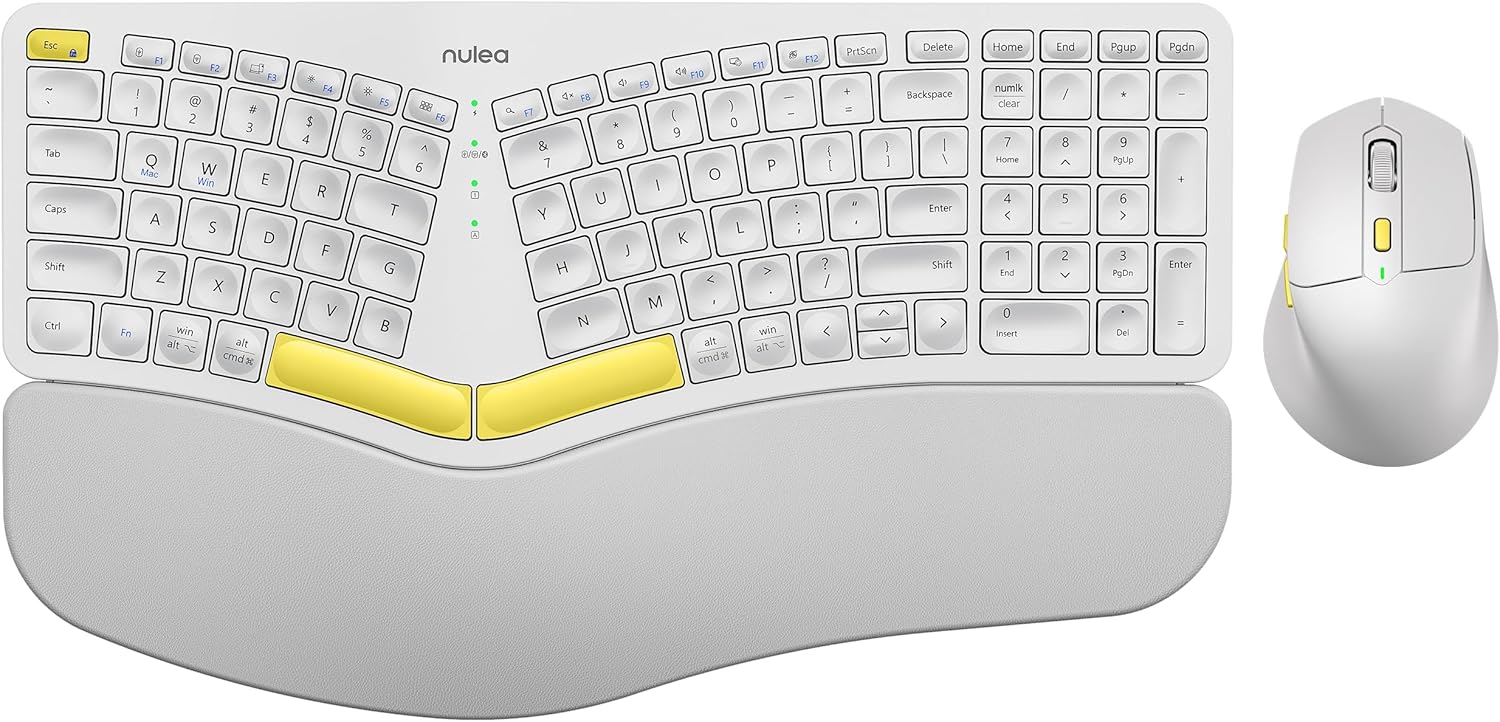
Image: The Nulea KM75 ergonomic keyboard and mouse combo. The keyboard features a curved and split layout with an integrated palm rest, and the mouse is sculpted for comfort. Both are white with yellow accents.
- Ergonomic Curved and Split Key-frame: Designed to position wrists and forearms naturally.
- Интегрисани ослонац за дланове: Features a soft memory foam layer for wrist support.
- Adjustable Tilt Design: Allows for optimal keyboard positioning.
- Повезивање са више уређаја: Supports USB cable, 2.4G USB receiver, and Bluetooth.
- Пуњива батерија: 500mAh capacity with USB-C charging.
- Режим аутоматског спавања: Conserves power after 30 minutes of inactivity.
Карактеристике миша

Image: A close-up of the Nulea ergonomic mouse, showing its sculpted design for a natural hand posture with integrated palm and thumb rests. The mouse is white with yellow accents.
- Ergonomic Sculpted Design: Integrated palm and thumb rests for natural hand position.
- Подесива подешавања ДПИ: For precise cursor control.
- Дугмад за напред/назад: За практичност web навигација.
- Повезивање са више уређаја: Supports 2.4G USB receiver and Bluetooth.
- Пуњива батерија: 300mAh capacity with USB-C charging.
- Режим аутоматског спавања: Conserves power after 30 minutes of inactivity.
Сетуп
1. Пуњење уређаја
Before initial use, fully charge both the keyboard and mouse using the provided USB-C cable. Connect the USB-C end to the device and the USB-A end to a power source (e.g., computer USB port, USB wall adapter).

Image: Illustration showing the keyboard and mouse connected via USB-C cables for charging. The keyboard has a 500mAh battery and the mouse has a 300mAh battery.
The indicator lights will show charging status and turn off when fully charged. A full charge provides approximately two months of operation.
2. Connecting via 2.4G USB Receiver
- Locate the 2.4G USB receiver. It is typically stored in a compartment on the underside of the mouse.
- Уметните УСБ пријемник у слободан УСБ-А порт на рачунару.
- Укључите тастатуру и миш користећи одговарајуће прекидаче за напајање.
- For the keyboard, press Фн + Ф2 to select 2.4G mode.
- For the mouse, switch the mode selector on the bottom to 2.4G.
- The devices should connect automatically.

Image: A close-up of the underside of the mouse, showing the storage compartment for the 2.4G USB receiver.
3. Повезивање преко Блуетоотх-а
- Укључите тастатуру и миш.
- For the keyboard, press Фн + Ф3 to select Bluetooth mode. The indicator light will blink, indicating pairing mode.
- For the mouse, switch the mode selector on the bottom to Bluetooth. The indicator light will blink.
- На свом уређају (рачунару, таблету, паметном телефону) омогућите Блутут и потражите нове уређаје.
- Select "Nulea Keyboard" and "Nulea Mouse" from the list of available devices to pair.
- Пратите сва упутства на екрану да бисте довршили процес упаривања.
4. Повезивање путем жичног режима
- Connect the USB-C charging cable to the keyboard or mouse and the USB-A end to your computer.
- For the keyboard, press Фн + Ф1 to select wired mode.
- For the mouse, switch the mode selector on the bottom to wired mode.
- The devices will function as wired peripherals.

Image: Diagram illustrating the simple connectivity options for the Nulea KM75. Pressing Fn+F1 connects via wired, Fn+F2 via 2.4G, and Fn+F3 via Bluetooth, allowing connection to multiple devices like PCs, laptops, and mobile devices.
5. Пребацивање између уређаја
The Nulea KM75 combo supports multi-device connectivity. You can switch between up to three connected devices (one wired, one 2.4G, one Bluetooth) by pressing the corresponding function keys on the keyboard (Fn + F1/F2/F3) and adjusting the mode selector on the mouse.
Упутство за употребу
Употреба тастатуре
- Ергономски дизајн: The curved and split key-frame is designed for natural hand and wrist positioning. Allow some time to adapt to this layout for optimal comfort.
- Подесиве ноге са нагибом: Located on the underside of the keyboard, these legs allow you to adjust the typing angle for personalized comfort.

Image: A user demonstrating the adjustable tilt legs of the Nulea KM75 keyboard, showing how to customize the typing angle for ergonomic comfort.
- Функцијски тастери (Fn): Many keys have secondary functions accessible by holding down the Fn key and pressing the desired function key (e.g., media controls, volume). Refer to the keycap legends for specific functions.
Употреба миша
- ДПИ подешавање: Use the DPI switch button, usually located near the scroll wheel, to cycle through different sensitivity levels (DPI). This allows for precise control or faster cursor movement.

Image: A close-up of the Nulea ergonomic mouse, highlighting the DPI switch key and indicator light for adjusting cursor sensitivity.
- Бочна дугмад: The side buttons (typically on the left for right-handed users) are often pre-programmed for forward and backward navigation in web претраживачи или file истраживачи.
Одржавање
- Чишћење: Користите меку, суву крпу за чишћење површина тастатуре и миша. За тврдокорну прљавштину, благо дamp cloth with mild soap can be used, ensuring no liquid enters the device. Avoid harsh chemicals or abrasive materials.
- Одржавање батерије: To prolong battery life, avoid fully discharging the devices frequently. Recharge when the low battery indicator appears. Store in a cool, dry place if not used for extended periods.
- Складиштење: When not in use, store the USB receiver in its designated compartment on the mouse to prevent loss.
Решавање проблема
- Уређај се не повезује:
- Уверите се да су и тастатура и миш укључени.
- Verify the correct connection mode (2.4G, Bluetooth, Wired) is selected on both devices and your computer.
- For 2.4G, ensure the USB receiver is securely plugged into a working USB port.
- For Bluetooth, ensure Bluetooth is enabled on your device and the devices are in pairing mode. Try re-pairing if necessary.
- Ensure the devices are charged.
- Try restarting your computer and the devices.
- Кашњење или повремена веза:
- Move the devices closer to the USB receiver or your computer to reduce interference.
- Избегавајте постављање пријемника у близини других бежичних уређаја или великих металних предмета.
- Ensure batteries are sufficiently charged.
- Keys not responding or mouse not moving:
- Проверите нивое батерије и напуните ако је потребно.
- Ensure the devices are properly connected (see "Device not connecting" above).
- Clean any debris from around the keys or mouse sensor.
Спецификације
| Феатуре | Детаљ |
|---|---|
| Бранд | Nulea |
| Модел | КМ75 |
| Повезивање | Bluetooth, 2.4G USB, Wired (USB-C) |
| Батерија за тастатуру | Литијум 500мАх |
| Батерија за миш | Литијум 300мАх |
| Компатибилан ОС | Виндовс, Мац ОС, Андроид |
| Посебне карактеристике | Ergonomic design, Curved/Split key-frame, Integrated palm rest, Adjustable tilt, Adjustable mouse DPI |
| Тежина артикла | 4.2 фунте (комбиновано) |
| Димензије пакета | 16.97 к 11.69 к 2.05 инча |
Гаранција и подршка
Nulea products are designed for reliability and performance. For warranty information, technical support, or customer service inquiries, please refer to the contact details provided on the Nulea official webсајт или вашу документацију о куповини. Молимо вас да сачувате доказ о куповини за потребе гаранције.
Ask a question about this manual
Ask about setup, troubleshooting, compatibility, parts, safety, or missing instructions. Manuals+ will review the question and use this page’s manual context to help answer it.