
Увод
Thank you for choosing the Mesqool CR1025 Digital Alarm Clock Radio. This device combines multiple functions including a digital alarm clock, Bluetooth 5.0 speaker, FM radio, night light, and dual USB charging ports. This manual provides detailed instructions to help you set up and operate your new device effectively.
Садржај пакета
- Mesqool CR1025 Digital Alarm Clock Radio
- Повер Адаптер
- Упутство за употребу
- C Battery (for backup)
Производ је завршенview
Familiarize yourself with the components and controls of your Mesqool CR1025 Digital Alarm Clock Radio.
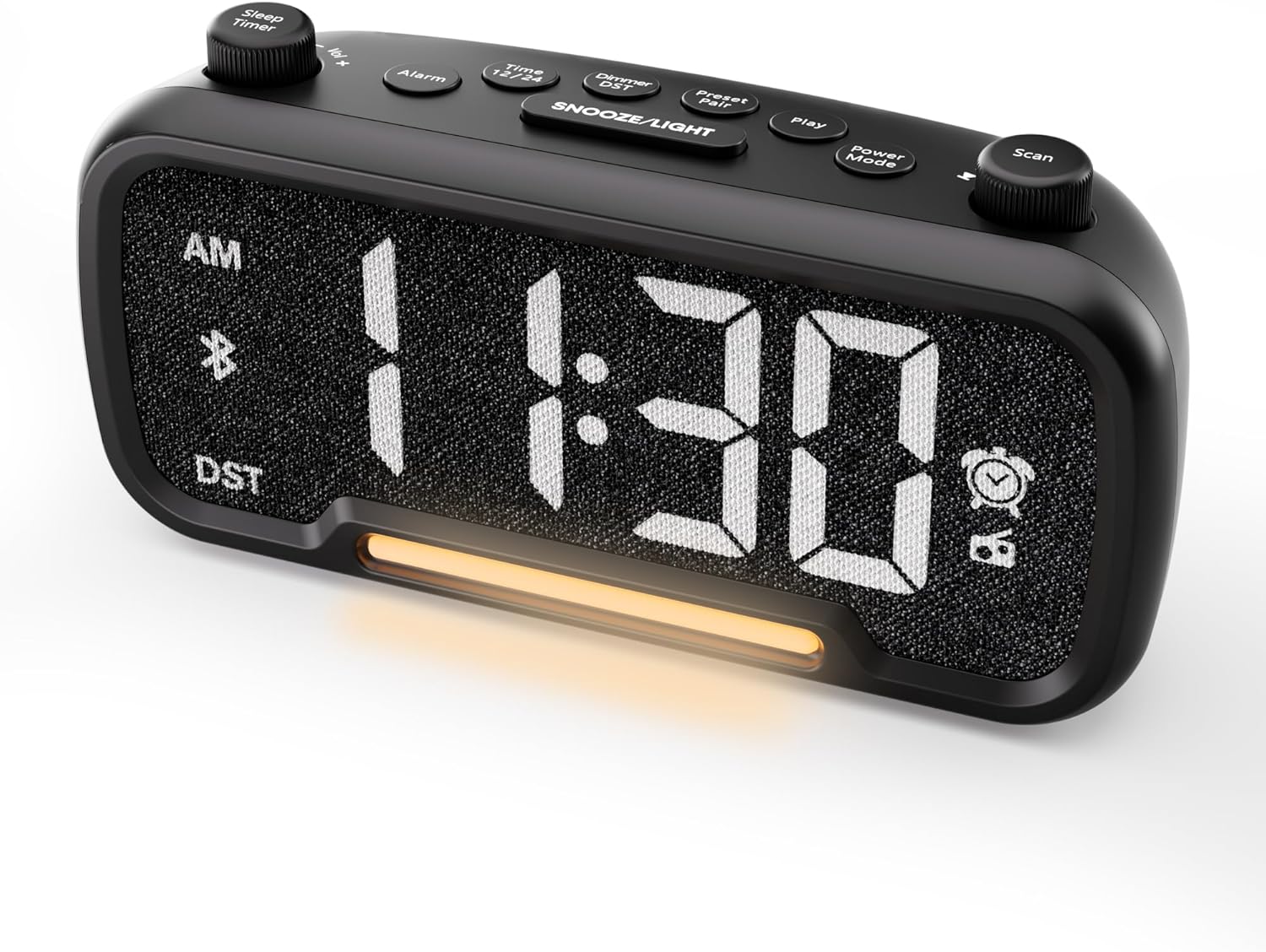

Control Buttons and Knobs:
- Sleep Timer / Vol +/- Knob (Left): Adjusts volume, sets sleep timer duration.
- Дугме за аларм: Подешава и активира/деактивира аларме.
- Time 12/24 Button: Пребацује се између 12-часовног и 24-часовног формата времена.
- Dimmer / DST Button: Adjusts display brightness, activates/deactivates Daylight Saving Time (DST).
- Preset / Pair Button: Saves FM radio presets, initiates Bluetooth pairing.
- Дугме за репродукцију: Plays/pauses media in Bluetooth mode.
- Дугме за режим напајања: Cycles through operating modes (FM, Bluetooth, AUX).
- Scan / TU +/- Knob (Right): Scans FM radio stations, manually tunes FM frequency.
- SNOOZE/LIGHT Button: Activates snooze function, turns night light on/off.

Сетуп
1. Почетно укључивање
Connect the provided power adapter to the DC 5V IN port on the back of the alarm clock and plug it into a standard wall outlet. The display will light up. Ensure the C battery is installed for backup in case of power outage.

2. Подешавање времена
- Притисните и држите Време 12/24 button for 2 seconds. The hour digits will begin to flash.
- Ротирајте Вол +/- knob (left knob) to adjust the hour.
- Притисните тастер Време 12/24 поново притисните дугме. Цифре за минуте ће почети да трепћу.
- Ротирајте Вол +/- дугме за подешавање минута.
- Притисните тастер Време 12/24 button once more to confirm the time setting.
Video demonstrating how to set the time on the Mesqool Digital Alarm Clock Radio.
3. Формат времена од 12/24 сата
To switch between 12-hour and 24-hour time formats, short press the Време 12/24 button. The display will change accordingly.
4. Подешавање летњег рачунања времена (DST)
To activate or deactivate DST, press and hold the Dimmer / DST button for 2 seconds. The time will adjust by one hour forward or backward, and the DST indicator will appear or disappear on the display.
Упутство за употребу
1. Подешавање аларма
- Притисните и држите Аларм button for 2 seconds. The hour digits will flash.
- Ротирајте Вол +/- knob to adjust the desired alarm hour.
- Притисните тастер Аларм поново притисните дугме. Цифре за минуте ће трептати.
- Ротирајте Вол +/- knob to adjust the desired alarm minute.
- Притисните тастер Аларм button again. The alarm sound selection will flash (bell icon for buzzer, radio icon for FM radio). Rotate the Вол +/- knob to choose between buzzer or FM radio as the alarm sound.
- If FM radio is selected, press the Аларм button again. The volume level will flash (L01-L16). Rotate the Вол +/- knob to set the desired alarm volume.
- Притисните тастер Аларм button once more to confirm and activate the alarm. The alarm icon will appear on the display.
To deactivate the alarm, short press the Аларм дугме. Икона аларма ће нестати са екрана.

Одгода функција:
Када се огласи аларм, притисните СНООЗЕ / СВЕТЛО button to activate the snooze function for 9 minutes. The alarm will sound again after 9 minutes. To turn off the alarm completely, press any other button except СНООЗЕ / СВЕТЛО.

2. Рад ФМ радија
- Притисните тастер Повер Моде button repeatedly until the radio icon lights up on the display, indicating FM radio mode.
- Auto-Scan and Save Presets: Притисните тастер Scan / TU +/- knob (right knob) to automatically search for available FM stations and save them as presets (up to 20 stations). The display will show "P01", "P02", etc., as stations are saved.
- Ручно подешавање: Ротирајте Scan / TU +/- knob to manually browse frequencies.
- Подсетите унапред подешене вредности: Кратко притисните на Пресет / Паир дугме за прелазак кроз сачуване унапред подешене станице.
- Подесите јачину звука: Ротирајте Вол +/- knob (left knob) to adjust the radio volume (L01-L16).

Video demonstrating how to set the FM radio alarm on the Mesqool Digital Alarm Clock Radio.
3. Рад Bluetooth звучника
- Притисните тастер Повер Моде button repeatedly until the Bluetooth icon (bt) starts flashing on the display, indicating pairing mode.
- On your mobile device, enable Bluetooth and search for "CR1025" in the list of available devices.
- Select "CR1025" to pair. Once connected, the Bluetooth icon will stop flashing and remain solid.
- You can now play audio from your device through the alarm clock's speaker.
- Користите Вол +/- knob on the alarm clock or your mobile device to adjust the volume.
- Притисните тастер Играј дугме за репродукцију или паузирање звука.

Video demonstrating how to set up Bluetooth on the Mesqool Digital Alarm Clock Radio.
4. Night Light Operation
The alarm clock features a gentle night light. To turn the night light on or off, short press the СНООЗЕ / СВЕТЛО дугме.

5. Dimmer Setting
The display brightness can be adjusted to 5 levels. Short press the Dimmer / DST button to cycle through the brightness levels (L01-L05). Select the level that best suits your environment.

6. Sleep Timer Setting
The sleep timer allows you to set a duration for the FM radio or Bluetooth speaker to play before automatically turning off. This is useful for falling asleep to music or podcasts.
- While in FM radio or Bluetooth mode, press the Слееп Тимер button. The display will show the current sleep timer duration (e.g., "30" for 30 minutes).
- Ротирајте Sleep Timer / Vol +/- knob to select the desired duration: 15, 30, 60, 90, or 120 minutes. You can also select "OFF" to disable the sleep timer.
- The timer will start counting down, and the device will automatically turn off after the selected duration.
7. USB портови за пуњење
The alarm clock is equipped with two USB charging ports (Type-C and USB-A) on the back, each providing 5V/1A output. These ports can be used to conveniently charge your smartphone, tablet, or other USB-powered devices.

Решавање проблема
| Проблем | Могуће решење |
|---|---|
| Приказ сата је празан. | Ensure the power adapter is securely connected to both the clock and a working power outlet. Check if the power outlet is functional. |
| Аларм се не оглашава. | Verify that the alarm is set and activated (alarm icon visible on display). Check the alarm volume level. Ensure the correct alarm sound (buzzer or FM radio) is selected. |
| Слаб ФМ радио пријем. | Extend the FM antenna fully. Try repositioning the antenna or the clock for better signal. Perform an auto-scan again to find stronger stations. |
| Није могуће упарити Bluetooth уређај. | Ensure the clock is in Bluetooth pairing mode (flashing 'bt' icon). Make sure Bluetooth is enabled on your mobile device and it is within range. Forget "CR1025" from your device's Bluetooth list and try pairing again. |
| УСБ портови за пуњење не раде. | Confirm the alarm clock is powered on. Ensure the charging cables are properly connected to both the clock and your device. Try a different USB cable or device to rule out cable/device issues. |
Спецификације
| Феатуре | Детаљ |
|---|---|
| Бранд | Мескоол |
| Број модела | ЦР1025 |
| Боја | Црно |
| Дисплаи Типе | Дигитал ЛЕД |
| Димензије производа | 6.61 cm D x 3.31 cm Š x 2.32 cm V |
| Извор напајања | Електрични са каблом (укључен AC адаптер) |
| Баттери Бацкуп | 1 C батерија (укључена) |
| Блуетоотх верзија | В5.0 |
| ФМ радио фреквенција | 87.5-108МХз |
| ФМ Пресетс | До 20 станица |
| Дисплаи Диммер | 5 нивоа |
| Звукови аларма | Buzzer, FM Radio |
| Трајање одлагања | КСНУМКС минута |
| УСБ излаз за пуњење | Type-C & USB-A, 5V/1A each |
| Материјал | Пластика |
| Тежина артикла | 0.48 фунти (приближно 7.7 унци) |
Одржавање
- Очистите уређај меком, сувом крпом. Не користите течна средства за чишћење или абразивне материјале.
- Држите уређај даље од директне сунчеве светлости, екстремних температура и високе влажности.
- Осигурајте одговарајућу вентилацију око уређаја како бисте спречили прегревање.
- If the device will not be used for an extended period, remove the backup battery.
Безбедносне информације
- Не излажите уређај води или влази.
- Не покушавајте сами да растављате или поправљате уређај. Обратите се квалификованом сервисеру.
- Држите уређај ван домашаја деце.
- Користите само приложени адаптер за напајање. Коришћење неовлашћених адаптера може оштетити уређај и поништити гаранцију.
- Avoid placing the device near heat sources or open flames.
Гаранција и подршка
Specific warranty details are not provided in the product information. For warranty claims, technical support, or further assistance, please contact Mesqool customer service through their official website or the retailer where the product was purchased. Please retain your proof of purchase for any warranty-related inquiries.
Visit the Mesqool Store for more information: Mesqool Official Store