
1. Увод
This manual provides essential information for the safe and efficient operation of your Pretul DESI-36P2 3.6V Cordless Screwdriver. Please read it thoroughly before first use and keep it for future reference. This compact cordless screwdriver is designed for light-duty fastening tasks, featuring a two-position handle and an integrated LED work light.

Слика 1: Pretul DESI-36P2 Cordless Screwdriver. This image shows the screwdriver in its straight configuration, highlighting its compact design and yellow and black color scheme.
2. Безбедносне информације
Увек се придржавајте основних мера безбедности при коришћењу електричних алата како бисте смањили ризик од пожара, струјног удара и телесних повреда.
- Безбедност на радном месту: Одржавајте свој радни простор чистим и добро осветљеним. Претрпане или мрачне области изазивају несреће.
- електрична безбедност: Не излажите електричне алате киши или влажним условима. Улазак воде у електрични алат повећава ризик од струјног удара.
- Лична безбедност: Будите опрезни, пазите шта радите и користите здрав разум када користите електрични алат. Не користите електрични алат док сте уморни или под утицајем дрога, алкохола или лекова.
- Употреба и одржавање алата: Немојте силом притискати електрични алат. Користите одговарајући електрични алат за своју примену. Радиће посао боље и сигурније по стопи за коју је дизајниран.
- Одржавање батерије: Пуните само пуњачем који је одредио произвођач. Пуњач који је погодан за једну врсту батерије може да створи опасност од пожара када се користи са другом батеријом.
3. Компоненте и карактеристике производа
Familiarize yourself with the parts of your Pretul DESI-36P2 cordless screwdriver.
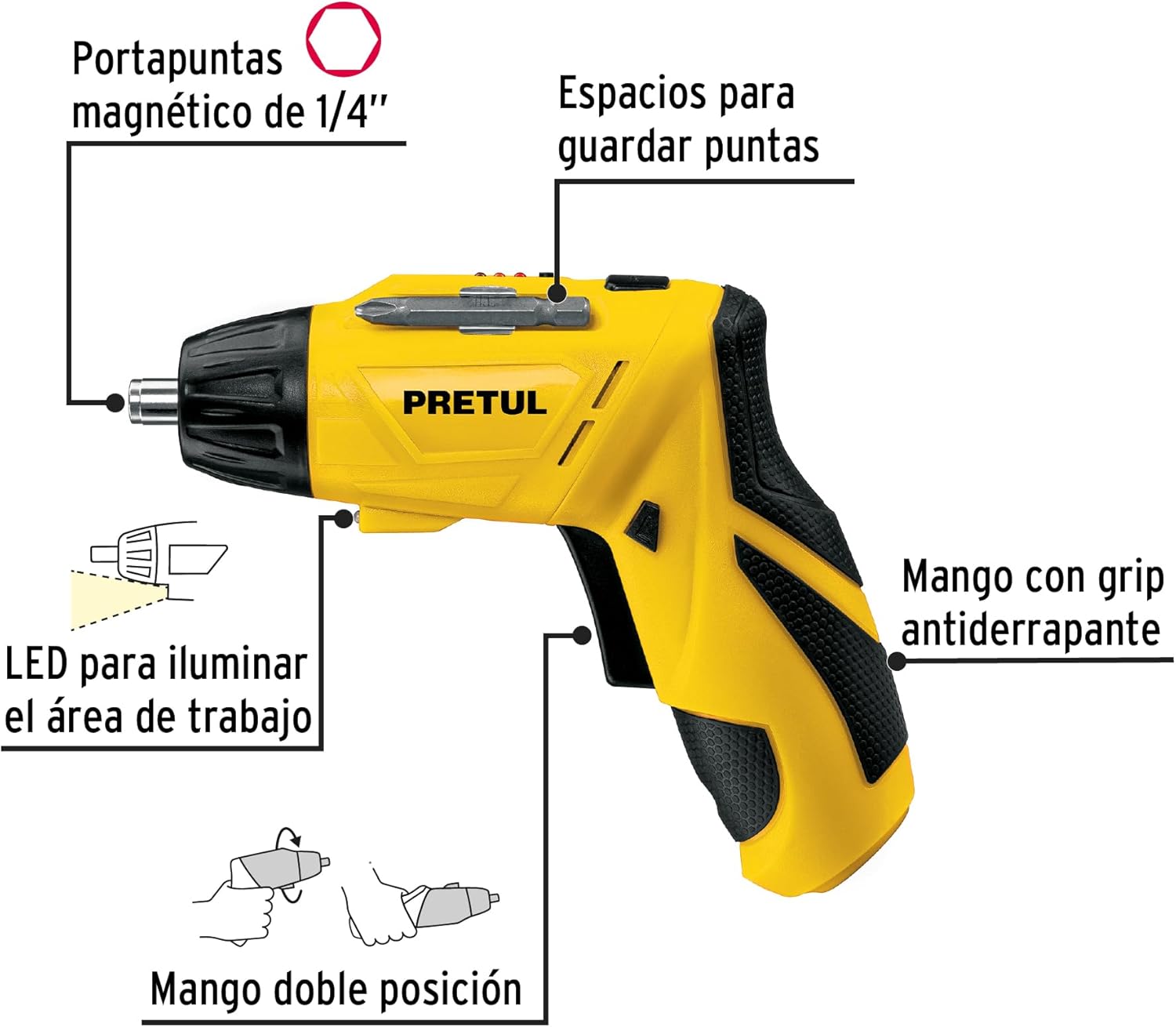
Слика 2: Key features of the Pretul DESI-36P2. This diagram illustrates the magnetic 1/4" bit holder, bit storage slots, anti-slip grip handle, LED work light, and the two-position handle mechanism.
- Magnetic 1/4" Hex Bit Holder: Securely holds screwdriver bits for quick changes.
- Bit Storage Slots: Conveniently located on the tool for storing extra bits.
- Anti-slip Grip Handle: Provides comfortable and secure handling during operation.
- ЛЕД радно светло: Illuminates the work area for improved visibility in dimly lit spaces.
- Two-Position Handle: Allows the screwdriver to be used in a straight or pistol-grip configuration for versatility and access in tight spaces.
- Прекидач за напред/назад: Controls the direction of rotation for tightening and loosening screws.
- Дугме за напајање: Активира одвијач.
4. Подешавање
4.1 Почетно пуњење
Before first use, fully charge the screwdriver's internal battery. Connect the charger to a standard electrical outlet and then to the charging port on the screwdriver. The charging indicator (if present) will show the charging status. Disconnect the charger once the battery is fully charged.
4.2 Attaching Screwdriver Bits
- Select the appropriate 1/4" hex screwdriver bit for your task.
- Insert the bit firmly into the magnetic bit holder at the front of the screwdriver until it is securely seated.
- Да бисте мало уклонили, једноставно га извуците из држача.
4.3 Подешавање положаја ручке
The screwdriver features a two-position handle for enhanced versatility:
- Pistol Grip: Standard configuration for most tasks.
- Straight Grip: For reaching into confined spaces. To change the handle position, firmly grasp the handle and the body of the screwdriver, then pivot the handle until it locks into the desired position.
5. Упутство за употребу
5.1 Укључивање/искључивање
Press and hold the power button to activate the screwdriver. Release the button to stop operation. The LED work light will activate when the power button is pressed.
5.2 Избор правца ротације
Use the forward/reverse switch, typically located near the trigger, to select the desired rotation direction:
- Push the switch to the left for forward rotation (tightening screws).
- Push the switch to the right for reverse rotation (loosening screws).
- Ensure the switch is in the center position to lock the tool and prevent accidental activation.
5.3 завртња за причвршћивање
- Ensure the correct bit is installed and the rotation direction is set to forward.
- Place the bit onto the screw head, applying gentle pressure.
- Press the power button to start driving the screw. Release the button once the screw is fully seated or the desired torque is reached.
5.4 Отпуштање шрафова
- Ensure the correct bit is installed and the rotation direction is set to reverse.
- Place the bit onto the screw head, applying gentle pressure.
- Press the power button to start loosening the screw. Release the button once the screw is free.
6. Одржавање
Редовно одржавање обезбеђује оптималне перформансе и продужава век трајања вашег алата.
- Чишћење: Отворе за вентилацију алата држите чистим и без остатака. Користите меку,amp крпу за чишћење спољашњости. Не користите јаке хемикалије или абразивна средства за чишћење.
- Држач бита: Periodically inspect the bit holder for wear or damage. Clean any accumulated dust or metal shavings.
- Складиштење батерије: Store the screwdriver in a cool, dry place away from direct sunlight and extreme temperatures. For long-term storage, ensure the battery is partially charged (around 50%).
- инспекција: Regularly check for loose screws, damaged cords (if applicable), or any other conditions that may affect safe operation.
КСНУМКС. Решавање проблема
If you encounter issues with your screwdriver, refer to the following common problems and solutions:
| Проблем | Могући узрок | Решење |
|---|---|---|
| Одвијач се не укључује. | Батерија је испражњена. | Напуните батерију до краја. |
| Одвијач нема снаге. | Батерија је празна. | Напуните батерију. |
| Bit slips from screw head. | Неисправна величина бита или истрошен бит. | Use the correct bit size; replace worn bits. |
| Handle does not lock into position. | Not fully pivoted. | Ensure the handle is fully pivoted until it clicks into place. |
Ако проблем и даље постоји након покушаја ових решења, обратите се корисничкој подршци.
8. Спецификације
Technical specifications for the Pretul DESI-36P2 Cordless Screwdriver.

Слика 3: Dimensions of the Pretul DESI-36P2. This image shows the screwdriver with measurements indicating a length of 17.5 cm and a height of 13 cm.
| Феатуре | Спецификација |
|---|---|
| Број модела | DESI-36P2 (26402) |
| Бранд | Цена |
| Извор напајања | Батерија |
| Баттери Волtage | 3.6 Волтс |
| Брзина | 230 РПМ |
| Обртни момент | 3E+1 Pound-inches (approximately 30 in-lbs) |
| Бит Холдер | 1/4" Hex Magnetic |
| Материјал | Пластика, метал |
| Димензије (Л к Х) | 17.5 cm x 13 cm (approximate, based on image) |
| Тежина | 530 г (0.53 кг) |
| Укључене компоненте | 5 Phillips bits 1" (PH1, PH2, PH3), Charger, 2 Phillips bits 2" (PH1, PH2), 1/4" Magnetic extension |
9. Гаранција и подршка
The Pretul DESI-36P2 Cordless Screwdriver comes with a 1 година гаранције од датума куповине. Молимо вас да сачувате доказ о куповини за потребе гаранције.

Слика 4: Product packaging showing the included components and a "1 year warranty" seal.
For technical support, service, or warranty inquiries, please contact Pretul customer service through their official channels or the retailer where the product was purchased.