
1. Увод
This manual provides detailed instructions for the setup, operation, maintenance, and troubleshooting of your Trueque 2 Pack Backlit Wireless Full-Sized Ergonomic Keyboard and Mouse Combo. Please read this manual thoroughly before use to ensure optimal performance and longevity of your devices.
Садржај пакета:
- Wireless Keyboard (x1)
- Wireless Mouse (x1)
- USB Receiver (x1)
- Type-C Adapter (x1)
- Кориснички приручник (овај документ)
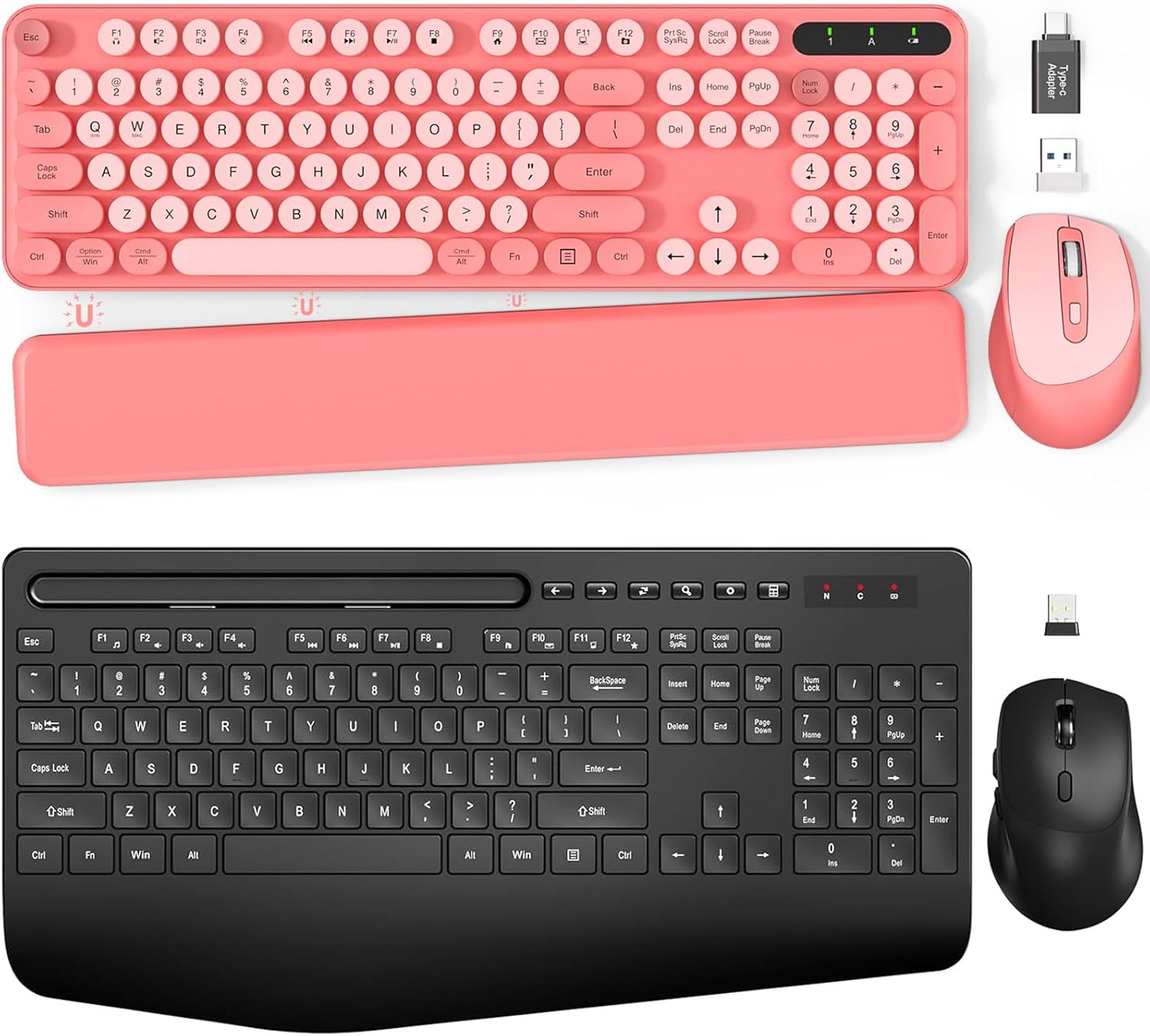
Слика 1.1: Готовоview of the Trueque Wireless Keyboard and Mouse Combo (Pink version).
2. Подешавање
2.1 Инсталација батерије
The keyboard requires two (2) AAA batteries, and the mouse requires one (1) AA battery (batteries are not included).
- За тастатуру: Locate the battery compartment on the underside of the keyboard. Open the cover, insert two AAA batteries according to the polarity indicators (+/-), and close the cover.
- За миша: Locate the battery compartment on the underside of the mouse. Open the cover, insert one AA battery according to the polarity indicators (+/-), and close the cover.

Image 2.1: Battery compartments and ON/OFF switches for the keyboard and mouse.
2.2 Повезивање USB пријемника
The keyboard and mouse share a single 2.4GHz USB receiver for wireless connectivity.
- Locate the USB receiver, typically stored in the mouse's battery compartment or packaged separately.
- Plug the USB receiver into an available USB port on your computer (PC or Laptop). If your computer only has USB-C ports, use the provided Type-C adapter.
- Turn on the keyboard and mouse using their respective ON/OFF switches. The devices should automatically connect to your computer.

Image 2.2: USB receiver and Type-C adapter for wireless connection.
3. Упутство за употребу
3.1 Карактеристике тастатуре
- Тастери са позадинским осветљењем: The keyboard features backlighting for improved visibility in low-light conditions. Refer to the keyboard's function keys for backlight control (e.g., Fn + specific key for brightness adjustment or on/off toggle).
- Ретро округле капице за тастатуре: The keyboard is equipped with detachable round keycaps, offering a distinct tactile experience and ease of cleaning.
- Integrated Phone/Tablet Holder: A built-in cradle allows you to prop up your smartphone or tablet (under 11.9 inches) for convenient viewing while working.

Image 3.1: Keyboard with a tablet securely placed in the integrated holder.
- Foldable Legs: The keyboard includes foldable legs on the underside, allowing you to adjust the typing angle for improved ergonomics.
- Magnetic Palm Rest: A detachable magnetic palm rest is provided to reduce wrist fatigue during extended use. It can be positioned to suit individual preferences.

Image 3.2: Foldable stands and magnetic palm rest for ergonomic adjustment.
3.2 Карактеристике миша
- Ергономски дизајн: The mouse is contoured to fit the hand comfortably, promoting a natural grip and reducing strain.

Image 3.3: Ergonomic design of the keyboard and mouse for comfortable use.
3.3 Режим уштеде енергије
Да би се уштедела батерија, и тастатура и миш имају аутоматски режим спавања:
- тастатура: Enters sleep mode after 15 minutes of inactivity. Press any key to reactivate.
- миш: Enters sleep mode after 10 minutes of inactivity. Double-click any button to reactivate.

Image 3.4: Details on smart power saving for extended battery life.
4. Одржавање
4.1 Чишћење
Да бисте очистили тастатуру и миш:
- Turn off both devices and disconnect the USB receiver from your computer.
- Користите меку, суву крпу која не оставља влакна да бисте обрисали површине тастатуре и миша.
- For the keyboard, the retro round keycaps are detachable for easier cleaning. Gently pull them off, clean as needed, and then firmly press them back into place.
- Avoid using harsh chemicals, abrasive cleaners, or excessive moisture, as these can damage the devices.
4.2 Замена батерије
Replace batteries when performance degrades or devices become unresponsive. Follow the battery installation steps in Section 2.1. Always use new batteries of the specified type (AAA for keyboard, AA for mouse) and dispose of old batteries responsibly.
КСНУМКС. Решавање проблема
If you encounter issues with your Trueque wireless keyboard and mouse combo, please refer to the following common solutions:
| Проблем | Могуће решење |
|---|---|
| Тастатура/миш не реагује |
|
| Кашњење или повремена веза |
|
| Позадинско осветљење тастатуре не ради |
|
6. Спецификације
| Феатуре | Детаљ |
|---|---|
| Бранд | Бартер |
| Број модела | B0DFGXN2JX |
| Технологија повезивања | 2.4 GHz бежични (USB пријемник) |
| Домет | До 33 стопе (10 метара) |
| Батерија за тастатуру | 2 к ААА (није укључено) |
| Батерија за миш | 1 к АА (није укључено) |
| Компатибилни уређаји | Laptop, Personal Computer (Windows OS) |
| Посебне карактеристике | Ergonomic Design, Foldable Legs, Wrist Rest, Backlit, Phone/Tablet Holder, Retro Round Keycaps |
7. Гаранција и подршка
For warranty information or technical support, please refer to the contact details provided with your purchase or visit the official Trueque webсајт. Сачувајте рачун као доказ о куповини за евентуалне рекламације по гаранцији.