
1. Производ је готовview
The HIFI WALKER H20 Ultra is a high-resolution digital audio player designed for audiophiles. It features advanced audio processing, versatile connectivity, and a user-friendly interface, delivering studio-grade sound quality in a portable form factor.

2. Садржај пакета
Проверите да ли су све ставке наведене у наставку укључене у ваш пакет:
- H20 Ultra MP3 Player
- УСБ-Ц кабл за пренос података
- 128ГБ ТФ картица
- Velvet Storage Bag
- Упутство за употребу

3. Распоред и контроле уређаја
Familiarize yourself with the physical layout and controls of your H20 Ultra player.
Бочне контроле

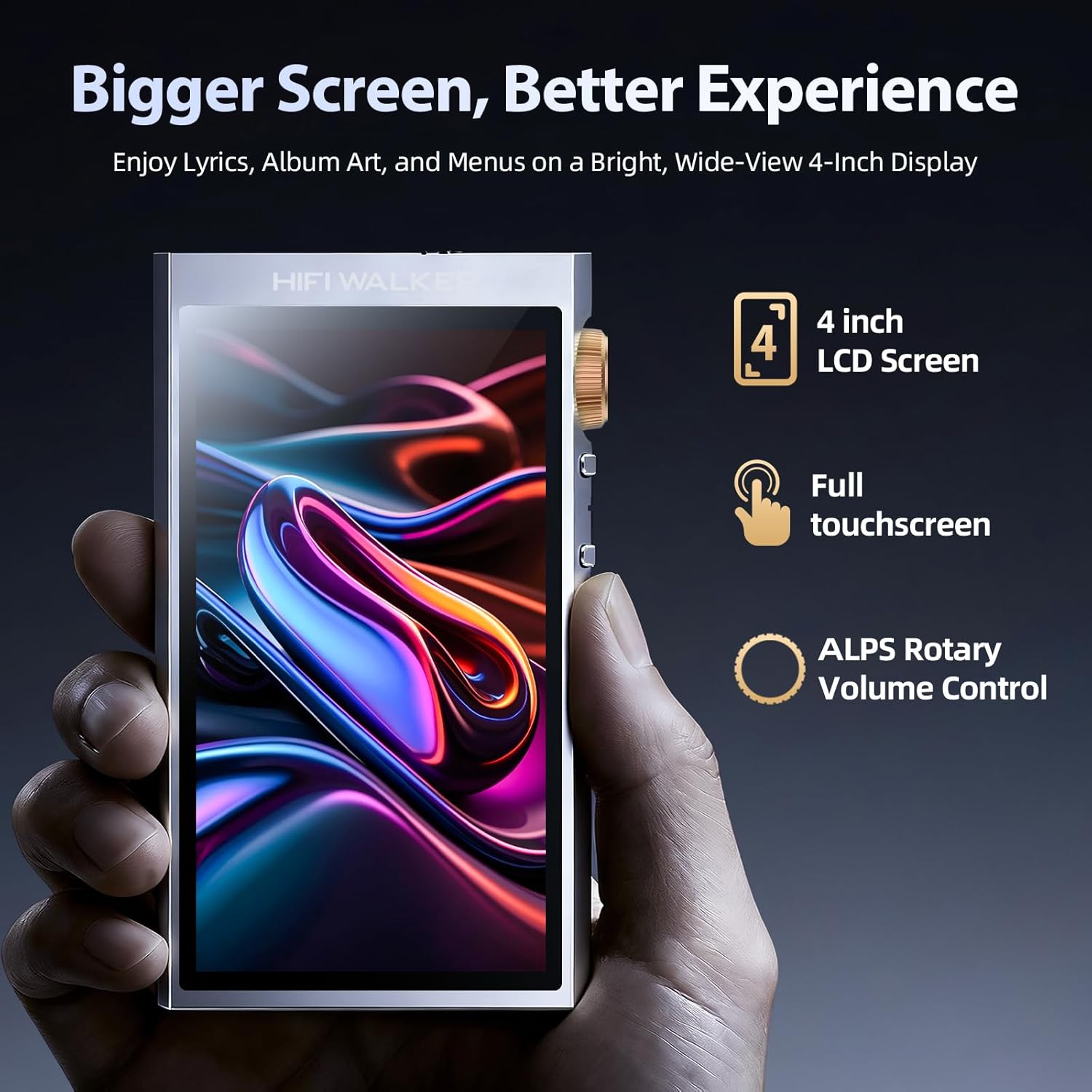
- Дугме за јачину звука: Rotatable knob for precise volume adjustment.
- Дугме за напајање: Press and hold to power on/off. Short press to toggle screen on/off.
- Дугмад за претходну/следећу нумеру: Navigate between tracks.
- Дугме за репродукцију/паузу: Контролишите репродукцију музике.
Top and Bottom Ports
- 3.5 мм једнострани излаз: Стандардни прикључак за слушалице.
- 4.4 мм балансирани излаз: For high-fidelity audio with compatible headphones.
- УСБ-Ц порт: For charging, data transfer, and USB DAC functionality.
- Утор за мицроСД картицу: For expandable storage up to 1TB.
4. Подешавање
4.1 Пуњење уређаја
Before first use, fully charge your H20 Ultra. Connect the provided USB-C cable to the device and a compatible USB power adapter (not included). The device supports 3-hour fast charging and offers up to 36 hours of playback on a full charge.

4.2 Уметање MicroSD картице
The H20 Ultra comes with 128GB of internal storage and supports expandable storage via a microSD card up to 1TB. Gently insert the microSD card into the designated slot until it clicks into place.
4.3 Укључивање/искључивање
Press and hold the Power button on the side of the device for a few seconds to power it on or off. A short press will toggle the screen on or off during operation.
4.4 Почетни избор језика
Upon first startup, you will be prompted to select your preferred language from the touchscreen interface.
5. Упутство за употребу
5.1 Навигација корисничког интерфејса
The H20 Ultra features a 4-inch full touchscreen with an intuitive UI. Navigate through menus and options by tapping and swiping. Physical buttons on the side provide quick access to playback controls and volume adjustment.

5.2 Репродукција музике
The H20 Ultra supports a wide array of high-resolution audio formats, including DSD, FLAC, WAV, ALAC, APE, M4A, and MP3. It offers native DSD256 decoding and PCM up to 768kHz/32bit.

Прегледавање музике
Access your music library through categories such as All Songs, Folders, Albums, Artists, and Genres. You can also create and manage playlists.
Подешавања еквилајзера
Customize your audio experience with the built-in equalizer. Choose from preset modes (e.g., Pop, Blues, Classic, Jazz, Rock, Dance, Metal, Voice) or create a custom profile да одговара вашим жељама.

5.3 Bluetooth повезивање
The H20 Ultra features Bluetooth 5.2 with support for aptX HD and LDAC codecs, ensuring high-resolution wireless audio streaming. It supports both transmitter (TX) and receiver (RX) modes.

Упаривање са Блуетоотх уређајима
- Иди на Подешавања > Вирелесс Сеттингс > Блуетоотх.
- Укључите Блуетоотх ON.
- Изаберите Блуетоотх скенирање to search for available devices.
- Изаберите жељени уређај са листе за упаривање.
5.4 Wi-Fi повезивање
The device supports Wi-Fi for firmware updates and receiving songs wirelessly. To connect to Wi-Fi, navigate to Подешавања > Вирелесс Сеттингс > Ви-Фи, turn it ON, and select your network.
5.5 Функционалност USB DAC-а
The H20 Ultra can function as a USB DAC, allowing it to process digital audio from your computer or other devices for enhanced sound quality. Connect the device to your computer via the USB-C cable and select the USB DAC mode in the settings.
6. Одржавање
6.1 Одржавање батерије
To prolong battery life, avoid fully discharging the device frequently. Charge the 3000mAh battery regularly. The device supports up to 36 hours of playback and 3-hour fast charging.
6.2 Чишћење
Use a soft, dry cloth to clean the device. Avoid using harsh chemicals or abrasive materials that could damage the screen or casing.
6.3 Ажурирања фирмвера
Periodically check for firmware updates to ensure optimal performance and access to new features. Connect the device to Wi-Fi and navigate to Подешавања > Системске поставке > Ажурирање фирмвера.
КСНУМКС. Решавање проблема
- Уређај се не укључује: Ensure the device is fully charged. Connect it to a power source and try again.
- Нема звука: Check headphone connections (3.5mm or 4.4mm) and ensure volume is not muted or too low. Verify that the correct output mode is selected.
- Проблеми са Bluetooth везом: Ensure Bluetooth is enabled on both the H20 Ultra and the pairing device. Try unpairing and re-pairing the devices. Move closer to the Bluetooth device to reduce interference.
- Fileније препознато: Осигурајте звук files are in a supported format. Verify that the microSD card is properly inserted and not corrupted. Try updating the music database via settings.
- Екран осетљив на додир не реагује: Restart the device. If the issue persists, perform a factory reset (note: this will erase all data).
8. Спецификације
| Број модела ставке | Х20 Ултра |
| Бранд | ХИФИ ВАЛКЕР |
| ДАЦ Цхип | ЕСС ЕС9038К2М |
| Капацитет меморије | 128 GB (прошириво до 1 TB путем microSD картице) |
| Технологија повезивања | Bluetooth 5.2 (aptX HD, LDAC), USB-C, Wi-Fi |
| Величина екрана | 4 инча |
| Батерија | 3000mAh (up to 36 hours playback) |
| Аудио излаз | 3.5 мм једнострани, 4.4 мм балансирани |
| Подржани аудио формати | DSD256, PCM up to 768kHz/32bit, WAV, FLAC, ALAC, APE, M4A, MP3, etc. |
| Тежина артикла | 14.4 унци |
| Произвођач | ХИФИ ВАЛКЕР |
9. Гаранција и подршка
For warranty information and customer support, please refer to the specific warranty card included in your product package or visit the official HIFI WALKER website. The manufacturer is HIFI WALKER.