
Увод
This manual provides detailed instructions for the operation and maintenance of your Timex Ironman Triathlon Flix 100 Lap Watch. Please read this manual thoroughly to ensure proper use and to maximize the features of your watch.
The Timex Ironman Triathlon Flix 100 Lap Watch is designed for athletes and active individuals, featuring a 100-lap memory chronograph, timer, alarm, and Indiglo backlight. It is water-resistant up to 100 meters.
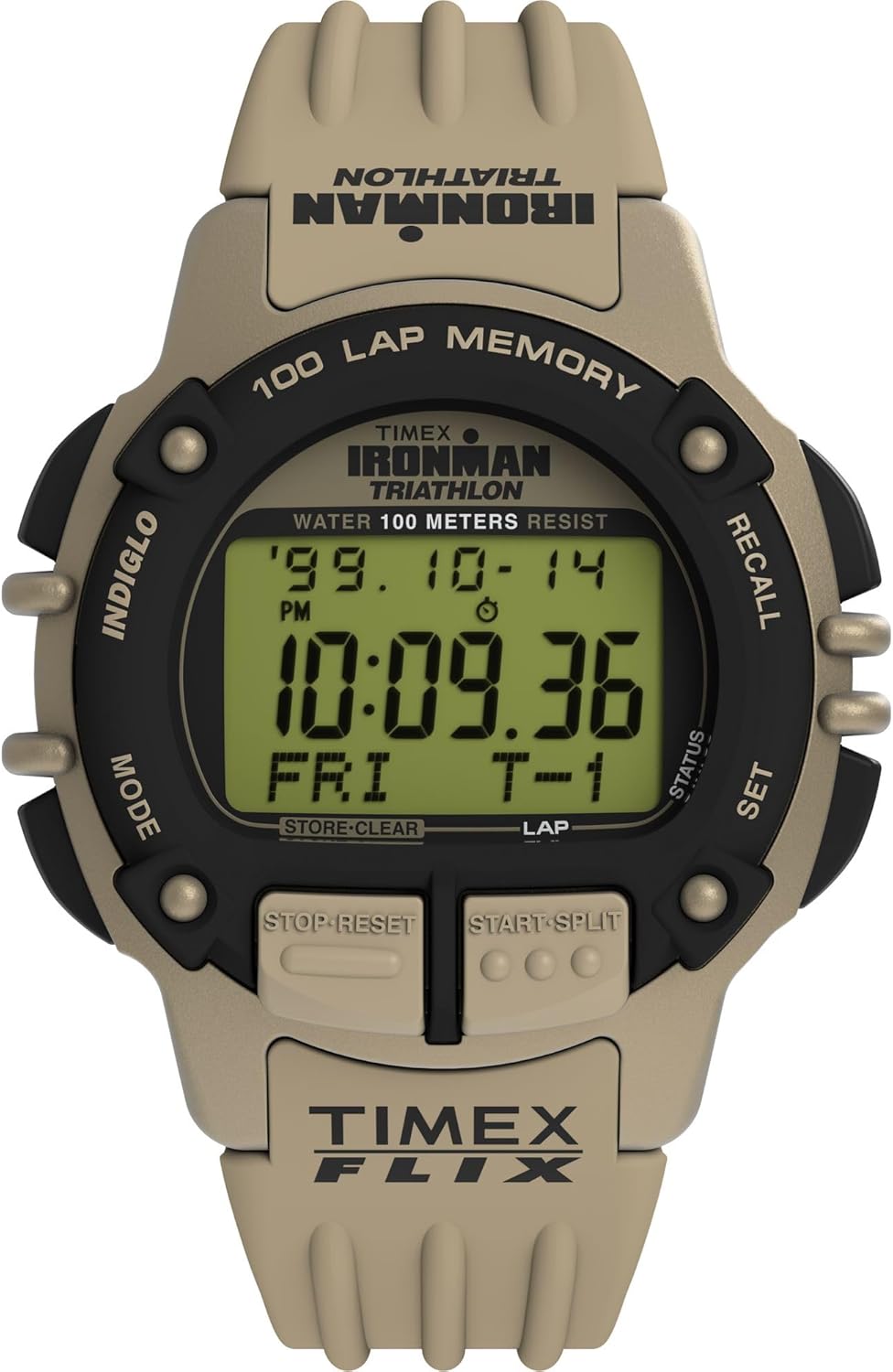
Слика 1: Фронт view of the Timex Ironman Triathlon Flix 100 Lap Watch. This image displays the watch face, showing the digital negative display, the 'IRONMAN TRIATHLON' branding, '100 LAP MEMORY', and the various function buttons labeled 'INDIGLO', 'MODE', 'RECALL', 'SET', 'STOP RESET', and 'START SPLIT'. The watch features a green case and strap.
Сетуп
1. Почетна активација
Upon first use, remove any plastic film from the watch face. If the display is blank, press any button to activate it. If the watch remains unresponsive, the battery may need replacement (refer to the Maintenance section).
2. Подешавање времена и датума
- Притисните тастер МОДЕ button repeatedly until the time display is shown.
- Притисните и држите СЕТ дугме док цифре времена не почну да трепћу.
- Користите СТАРТ/СПЛИТ button to increase the flashing digit or the СТОП/РЕСЕТ дугме да бисте га смањили.
- Притисните тастер МОДЕ button to move to the next setting (e.g., minutes, hour, 12/24-hour format, year, month, day).
- Repeat step 3 and 4 until all desired settings are adjusted.
- Притисните тастер СЕТ дугме за излазак из режима подешавања.
Упутство за употребу
1. Navigating Modes
Притисните тастер МОДЕ button to cycle through the following functions: Time, Chronograph, Timer, Alarm, and Recall.
2. Хронограф (штоперица)
The chronograph measures elapsed time and can store up to 100 lap times.
- Идите у режим хронографа помоћу МОДЕ дугме.
- Притисните СТАРТ/СПЛИТ за почетак мерења времена.
- Притисните СТАРТ/СПЛИТ again to record a lap time. The display will show the lap time and then resume total elapsed time.
- Притисните СТОП/РЕСЕТ да паузирате хронограф. Притисните СТАРТ/СПЛИТ да се настави.
- While paused, press and hold СТОП/РЕСЕТ to clear the chronograph and reset it to zero.
3. Тајмер
The timer can be set for a countdown from a specified duration.
- Navigate to the Timer mode using the МОДЕ дугме.
- Притисните и држите СЕТ button until the timer digits flash.
- Користите СТАРТ/СПЛИТ to adjust the flashing digit.
- Притисните МОДЕ to move to the next digit (hours, minutes, seconds).
- Притисните СЕТ да бисте потврдили подешавање тајмера.
- Притисните СТАРТ/СПЛИТ за почетак одбројавања.
- Притисните СТОП/РЕСЕТ to pause the timer. Press СТАРТ/СПЛИТ да се настави.
- When the timer reaches zero, an audible alert will sound. Press any button to stop the alert.
4. Аларм
Set an alarm to sound at a specific time.
- Идите у режим аларма помоћу МОДЕ дугме.
- Притисните и држите СЕТ дугме док цифре времена аларма не почну да трепћу.
- Користите СТАРТ/СПЛИТ to adjust the flashing digit.
- Притисните МОДЕ to move to the next digit (hours, minutes, AM/PM).
- Притисните СЕТ to confirm the alarm setting.
- Притисните СТАРТ/СПЛИТ to toggle the alarm ON or OFF. An alarm icon will appear on the display when activated.
- Када се аларм огласи, притисните било које дугме да бисте га утишали.
5. Индигло ноћно светло
The Indiglo feature illuminates the watch display for visibility in low-light conditions.
- Притисните тастер ИНДИГЛО button (top left) to activate the backlight. It will remain lit for a few seconds.

Слика 2: The Timex Ironman Triathlon Flix 100 Lap Watch worn on a wrist. This image provides a close-up view of the watch face and strap as it appears during wear, highlighting its size and fit.
Одржавање
1. Замена батерије
The watch uses one Lithium Metal battery. When the display dims or functions become erratic, the battery may need replacement. It is recommended to have the battery replaced by a qualified jeweler or watch service center to ensure proper sealing and water resistance.
2. Отпорност на воду
This watch is water-resistant up to 100 meters (330 feet). This means it is suitable for showering, swimming, and snorkeling. However, it is not recommended for scuba diving. Do not press any buttons while the watch is submerged, as this can compromise the water seal.
3. Чишћење
Clean your watch with a soft, damp cloth. Avoid using harsh chemicals or abrasive materials, which can damage the case or strap.

Слика 3: Назад view of the Timex Ironman Triathlon Flix 100 Lap Watch. This image focuses on the stainless steel caseback, displaying engravings such as 'TIMEX', 'IRONMAN TRIATHLON', 'WATER RESISTANT TO 100 METERS', 'STAINLESS STEEL CASEBACK', and 'U.S. PATENT NO. D411,957'.
Решавање проблема
- Екран је празан или замагљен: The battery may be low or depleted. Replace the battery (refer to Maintenance).
- Дугмад не реагују: Ensure the watch is not in a locked mode (if applicable, though this model does not feature a specific lock). If the issue persists, a battery replacement might resolve it.
- Време или датум су нетачни: Re-enter the time and date settings as described in the Setup section.
- Аларм се не оглашава: Check if the alarm is activated (alarm icon visible on display). Ensure the volume is not set to silent (if applicable, though this model has a fixed alarm volume).
- Вода унутар сата: Immediately take the watch to a qualified service center. Do not attempt to open it yourself, as this will void the warranty and may cause further damage.
Спецификације
| Феатуре | Детаљ |
|---|---|
| Број модела | TW5M63100VQ |
| Величина случаја | 42мм |
| Дужина ремена | 8 инча |
| Дисплаи Типе | Дигитални негативни приказ |
| Материјал сочива | Акрил |
| Отпорност на воду | 100 метара (330 стопа) |
| Хронограф | 100-Lap Memory |
| Позадинско осветљење | Индигло ноћна лампа |
| Тип батерије | 1 литијум-метална батерија (укључена) |
Гаранција и подршка
Информације о гаранцији
Your Timex watch is covered by a limited warranty against manufacturing defects. The warranty period typically begins from the date of purchase. Please retain your proof of purchase for warranty claims. The warranty does not cover normal wear and tear, battery life, accidental damage, or damage resulting from improper use or unauthorized repairs.
Корисничка подршка
For further assistance, service, or warranty inquiries, please visit the official Timex website or contact Timex customer service. Contact details can usually be found on the Timex website or on the warranty card included with your purchase.