
1. Увод
Хвала вам на куповиниasing the STN-28 Colorful Cat Ear Luminous Bluetooth Headset. This headset combines wireless audio technology with a unique luminous cat ear design, offering a comfortable and immersive listening experience. This manual provides essential information on how to set up, operate, and maintain your new headset.
2. Безбедносне информације
- Не излажите слушалице екстремним температурама, влази или корозивним супстанцама.
- Избегавајте испуштање или излагање слушалица јаким ударцима.
- Не растављајте нити покушавајте сами да поправите слушалице. То ће поништити гаранцију.
- Clean the headset with a soft, dry cloth. Do not use harsh chemicals or abrasive materials.
- Дуготрајно слушање на високим нивоима јачине звука може проузроковати оштећење слуха. Подесите јачину звука на безбедан ниво.
3. Садржај пакета
- Тело бежичне слушалице STN-28
- УСБ кабл за пуњење
- Кориснички приручник (овај документ)
4. Производ је готовview и контроле
Familiarize yourself with the headset's components and control buttons.
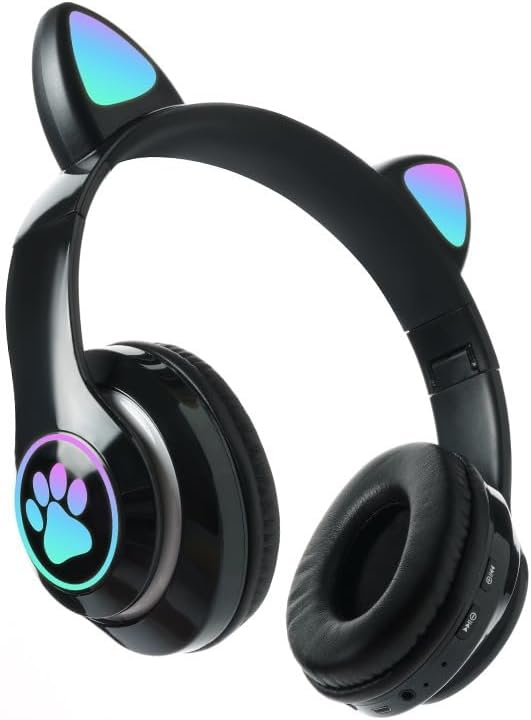
Слика: Фронт view of the STN-28 headset in black, showcasing the luminous cat ears and paw print design on the earcups.

Image: Two STN-28 headsets, one in purple and one in pink, displayed on a wooden stand, highlighting their colorful design and cat ear feature.
Control Buttons (Typical Layout - Refer to your specific model for exact placement):
- Дугме за напајање: Укључено/Искључено, Репродукција/Пауза, Одговори/Заврши позив.
- Јачина звука (+): Повећај јачину звука, Следећа нумера (дуги притисак).
- Утишавање (-): Смањивање јачине звука, Претходна нумера (дуги притисак).
- Дугме за режим (М): Switch between Bluetooth and TF Card mode.
- УСБ пуњач: За пуњење слушалица.
- Слот за ТФ картицу: Insert external TF card for music playback.
- LED indikatorsko svetlo: Shows power, connection, and charging status.
5. Подешавање
5.1 Пуњење слушалица
- Connect the USB charging cable to the headset's USB charging port.
- Повежите други крај кабла са УСБ извором напајања (нпр. УСБ портом рачунара, УСБ адаптером за зид).
- The LED indicator light will show a red light during charging.
- A full charge takes approximately 2 hours. The red light will turn off when fully charged.
Note: Ensure the headset is fully charged before first use for optimal battery life.
5.2 Укључивање/искључивање
- За укључивање: Press and hold the Power button for a few seconds until the LED indicator lights flash red and blue.
- За искључивање: Press and hold the Power button for a few seconds until the LED indicator light turns off.
5.3 Блуетоотх упаривање
- Уверите се да су слушалице потпуно напуњене и искључене.
- Press and hold the Power button until the LED indicator lights flash red and blue alternately. This indicates the headset is in pairing mode.
- На свом уређају (паметном телефону, таблету, лаптопу) омогућите Блутут и потражите доступне уређаје.
- Изаберите „STN-28“ или „LX-B39C“ са листе пронађених уређаја.
- Once successfully paired, the LED indicator light on the headset will flash blue slowly.
Note: The headset supports Bluetooth 5.0+EDR for stable and efficient connection.
6. Упутство за употребу
6.1 Репродукција музике (Блутут режим)
- Пусти/паузирај: Кратко притисните дугме за напајање.
- Појачавање звука: Кратко притисните дугме „+“.
- Смањивање јачине звука: Кратко притисните дугме „-“.
- Следећа нумера: Дуго притисните дугме „+“.
- Претходни запис: Дуго притисните дугме „-“.
6.2 Телефонски позиви
- Одговори на позив: Кратко притисните дугме за напајање када зазвони долазни позив.
- Заврши позив: Кратко притисните дугме за напајање током позива.
- Одбиј позив: Дуго притисните дугме за напајање када зазвони долазни позив.
6.3 Репродукција са ТФ картице
- Уметните TF (MicroSD) картицу са MP3 аудио записом fileс у отвор за ТФ картицу.
- The headset will automatically switch to TF card playback mode, or you may need to short press the "M" (Mode) button to switch.
- Use the Play/Pause, Volume Up/Down, and Next/Previous Track buttons as described in section 6.1.
6.4 Luminous Cat Ear Feature
The cat ears and paw print on the earcups feature luminous accents. This feature is typically activated automatically when the headset is powered on. There is no specific control mentioned for this feature, implying it's always on when the headset is active.
7. Одржавање и њега
- Чишћење: Wipe the headset regularly with a soft, dry, lint-free cloth. Do not use liquid cleaners or sprays.
- Складиштење: Када се не користе, чувајте слушалице на хладном и сувом месту, даље од директне сунчеве светлости и екстремних температура.
- Одржавање батерије: Да бисте продужили век трајања батерије, избегавајте често потпуно пражњење батерије. Редовно пуните слушалице, чак и ако их не користите дуже време.
- Отпорност на воду: The headset is listed as "Waterproof". While it offers protection against water, avoid submerging it in water or exposing it to heavy rain for prolonged periods to prevent damage.
КСНУМКС. Решавање проблема
| Проблем | Могући узрок | Решење |
|---|---|---|
| Слушалице се не укључују. | Ниска батерија. | Потпуно напуните слушалице (приближно 2 сата). |
| Упаривање са уређајем није могуће. | Слушалице нису у режиму упаривања; Блутут искључен на уређају; уређај је предалеко. | Ensure headset is flashing red/blue; enable Bluetooth on device; keep devices within 10 meters. Try forgetting the device on your phone and re-pairing. |
| Нема звука или је јачина звука ниска. | Јачина звука на слушалицама или уређају је прениска; слушалице нису повезане. | Increase volume on both headset and connected device. Ensure headset is properly paired. |
| ТФ картица не репродукује. | Картица није правилно уметнута; није подржана file format; headset not in TF card mode. | Reinsert TF card; ensure files are MP3; press 'M' button to switch to TF card mode. |
9. Спецификације
| Модел | STN-28 / LX-B39C |
| Метод ношења | Head-mounted folding |
| Блуетоотх верзија | Блуетоотх 5.0+ЕДР |
| Подржани Bluetooth режими | А2ДП 1.2, АВРЦП 1.0, ХСП, ХСФ 1.5 |
| Капацитет батерије | 400mAh Polymer A-grade Lithium Battery |
| Speaker Size / Impedance | 40мм / 32Ω |
| Распон преноса | ≤10 meters (33 feet) |
| Време пуњења | Прибл. 2 сата |
| Време репродукције музике | ≤6 сата |
| Талк Тиме | ≤6 сата |
| Време приправности | 200 сата |
| Фреквенцијски опсег | 20 Hz - 20,000 Hz |
| Ниво отпорности на воду | Водоотпоран |
| Тип контроле | Media Control, Touch (via buttons) |
| Посебне карактеристике | Luminous Cat Ears, TF Card Playback |
10. Гаранција и подршка
This product comes with a standard manufacturer's warranty. For specific warranty terms, conditions, and duration, please refer to the warranty card included with your purchase or contact the retailer where you purchased the product.
For technical support or inquiries, please contact your retailer or the manufacturer directly. Keep your purchase receipt as proof of purchase for warranty claims.