
1. Увод
Welcome to the WONNIE DC105P Digital Camera user manual. This guide provides essential information for setting up, operating, and maintaining your new camera. Designed for ease of use, this camera captures vivid 56MP photos and Full HD 1080P videos, making it perfect for young photographers to explore their creativity.
2. Безбедносне информације
- Не излажите фотоапарат води или екстремним температурама.
- Држите камеру даље од јаких магнетних поља.
- Користите само наведене батерије и кабл за пуњење.
- Избегавајте испуштање камере или њено излагање јаким ударцима.
- Очистите сочиво меком, сувом крпом.
3. Шта је у кутији
Upon unboxing your WONNIE DC105P Digital Camera, please ensure all the following items are present:
- WONNIE DC105P Digital Camera
- 32ГБ ТФ картица
- Пуњиве батерије (x2)
- Тип-Ц УСБ кабл
- Ланиард
- Торба за складиштење
- Упутство за употребу (овај документ)
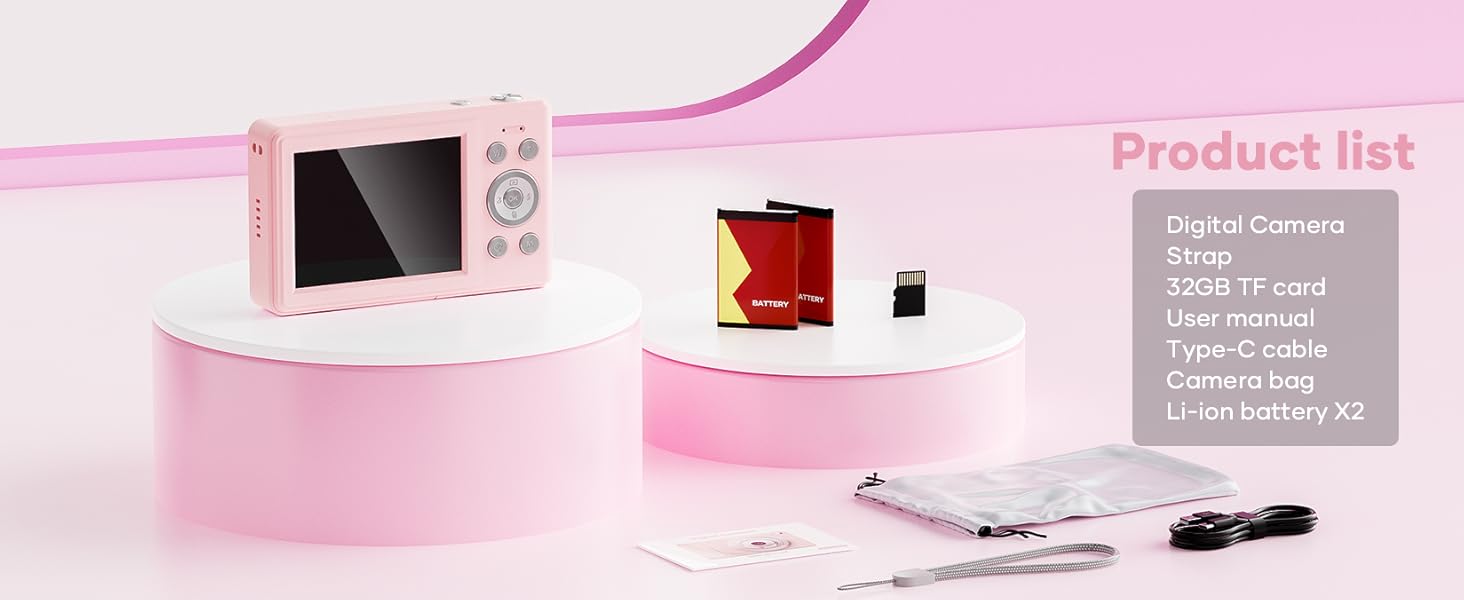
This image displays the WONNIE DC105P Digital Camera alongside its accessories: two rechargeable batteries, a 32GB TF card, a Type-C USB cable, a lanyard, and a soft storage bag, all neatly arranged.
4. Производ је готовview
Упознајте се са компонентама и контролама камере.
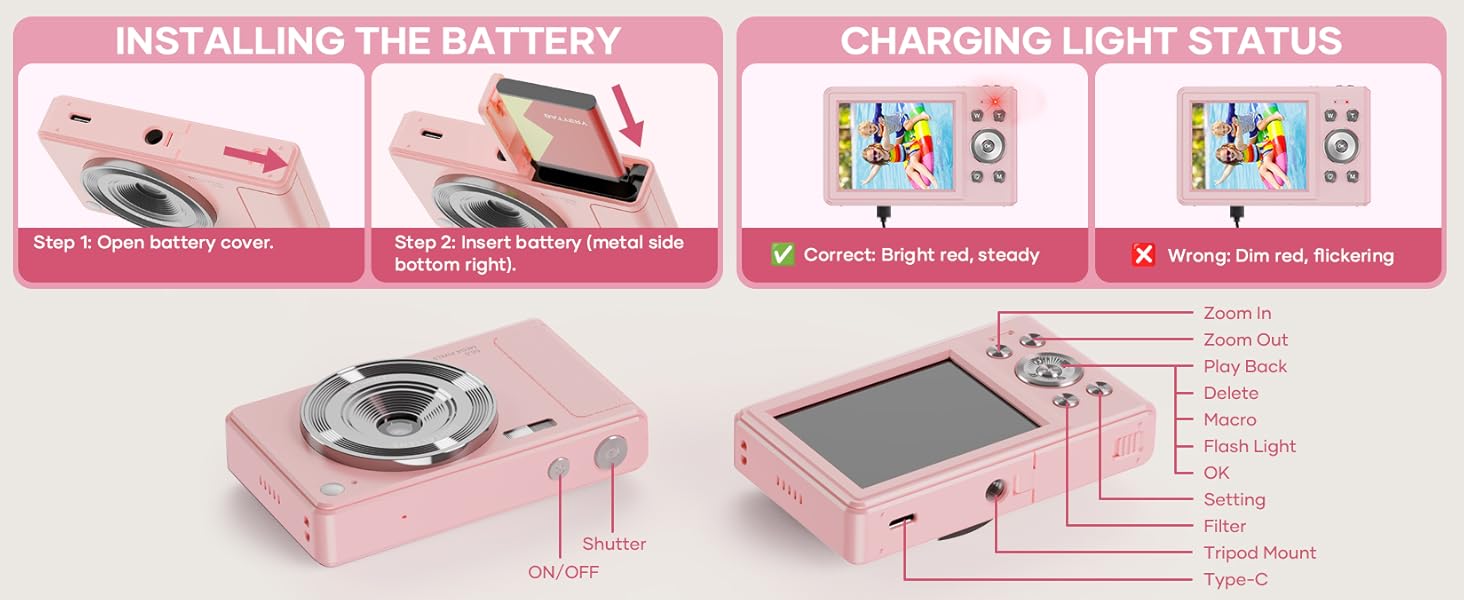
This diagram highlights the various buttons and ports on the WONNIE DC105P Digital Camera, including the power button, shutter button, zoom controls, playback button, menu button, OK button, flash light, tripod mount, and Type-C port.
Кључне компоненте:
- Објектив: Снима слике и видео записе.
- Фласх: Обезбеђује осветљење у условима слабог осветљења.
- Окидач: Притисните да бисте снимили фотографију или започели/зауставили снимање видеа.
- Дугме за напајање: Укључује или искључује камеру.
- ЛЦД екран: Приказује се уживо view, менији и репродукција.
- Навигациона дугмад (горе/доле/лево/десно/ОК): Used for menu navigation and selecting options.
- Дугмад за зумирање (W/T): Adjusts digital zoom.
- Дугме за репродукцију: Улази у режим репродукције да би view заробљени медији.
- Дугме менија: Приступа подешавањима камере.
- Порт типа Ц: За пуњење и пренос података.
- Монтажа за статив: For attaching the camera to a tripod.
5. Подешавање
5.1 Инсталација батерије
- Open the battery compartment cover located on the side of the camera.
- Insert the rechargeable battery with the metal contacts facing down and to the right, ensuring it clicks into place.
- Добро затворите поклопац одељка за батерије.
This image illustrates the two steps for battery installation: first, opening the battery cover, and second, inserting the battery with the metal side facing down and to the right.
5.2 Инсталација СД картице
The camera supports a 32GB TF (Micro SD) card. Insert the TF card into the designated slot in the battery compartment until it clicks.
5.3 Пуњење батерије
- Connect the camera to a power source using the provided Type-C USB cable.
- The charging indicator light will show the charging status. A bright red, steady light indicates correct charging. A dim, flickering light indicates an issue.
This image displays the camera's charging light status: a bright red, steady light for correct charging, and a dim, flickering light indicating an incorrect status.
5.4 Причвршћивање траке
Thread the lanyard through the designated loop on the camera body to prevent accidental drops.
6. Руковање камером
6.1 Укључивање/искључивање
Press and hold the Power button (labeled ON/OFF) on the top of the camera to turn it on or off.
6.2 Фотографисање
In photo mode, frame your shot using the LCD screen and press the Shutter button to capture an image. The camera features 56MP resolution for clear photos.

This image shows a child holding the pink WONNIE DC105P Digital Camera, with the screen displaying a photo of children. Other children are in the foreground, emphasizing the camera's ease of use for capturing vibrant 56MP photos and smooth FHD 1080P videos.
Special Photo Features:
- 16к дигитални зум: Use the 'W' and 'T' buttons to zoom in or out.
- 20 Fun Filters: Apply various creative filters to your photos via the menu.
- Самоокидач: Set a delay (2s, 5s, 10s) before taking a photo, ideal for group shots.
- Continuous Shooting (Burst Mode): Capture a rapid sequence of 3 photos.
- Анти-Схаке: Дигитална стабилизација слике помаже у смањењу замућења услед кретања камере.
- Светло за пуњење: Activate the built-in fill light for brighter photos in dim environments. (Note: Fill light won't activate in macro mode or when battery is too low.)
- Smile Recognition: Аутоматски снима фотографију када се детектује осмех.
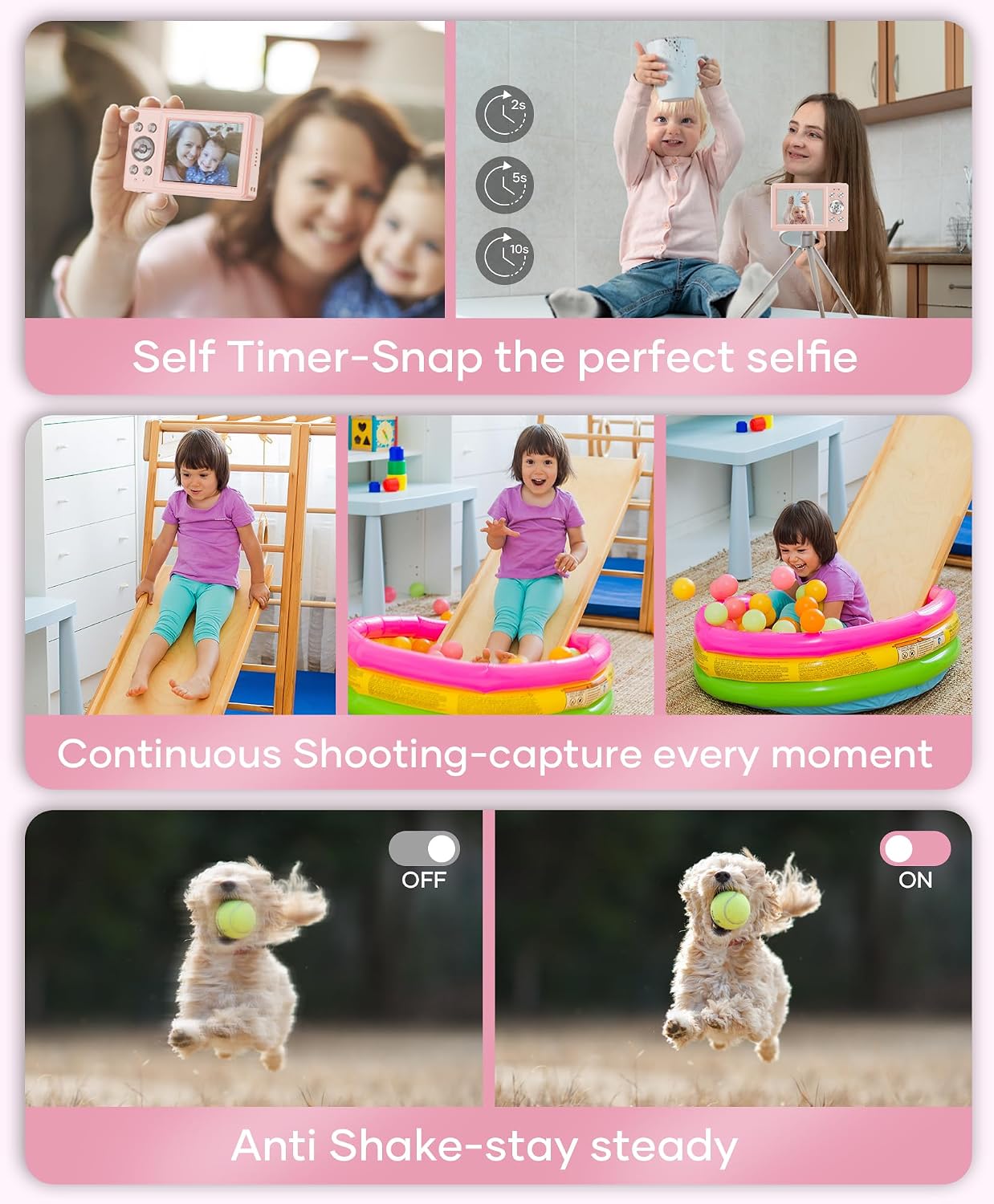
This image showcases three key features: Self Timer for perfect selfies, Continuous Shooting to capture every moment, and Anti Shake for steady shots.

This image illustrates the camera's 16x digital zoom capability with examples at 4x, 8x, and 16x, alongside a selection of 20 fun filters like Normal, Cold Filter, Warm Filter, and more, for endless creativity.
6.3 Снимање видео записа
Switch to video mode (usually indicated by a camcorder icon in the menu) and press the Shutter button to start recording. Press again to stop. Videos are recorded in FHD 1080P with a built-in microphone.
6.4 Playback/Viewинг Медиа
Press the Playback button to enter playback mode. Use the navigation buttons to scroll through your photos and videos. Press the OK button to play videos.
6.5 Преношење Files
You have several options to transfer your media:
- USB to PC: Connect the camera to your computer using the Type-C cable. The camera will appear as a removable disk.
- OTG to Phone: Use a compatible OTG cable adapter (sold separately) to connect the camera to your smartphone (e.g., iPhone 15, Samsung).
- Читач картица: Remove the TF card and insert it into a card reader to transfer files to a computer or phone.

This image illustrates three convenient ways to view and transfer media: directly connecting the camera via USB to a PC, using an OTG adapter to connect to a smartphone, or using a card reader with a smartphone.
6.6 Webцам Функционалност
Connect the camera to a computer via the Type-C USB cable. Select 'Webcam' mode on the camera (if prompted) to use it for video calls or live streaming.

This image demonstrates the WONNIE DC105P Digital Camera's capability to function as a webcam, showing it mounted on a laptop for a video call and for live streaming.
7. Видео демонстрација
Овај видео пружа општи прегледview of the WONNIE Digital Camera, highlighting its features and suitability for kids and teens.
This video offers an introduction to the digital camera, demonstrating its basic functions and design.
8. Одржавање
- Чишћење: Use a soft, lint-free cloth to clean the camera body and screen. For the lens, use a specialized lens cleaning cloth and solution.
- Складиштење: Store the camera in its provided storage bag in a cool, dry place away from direct sunlight and humidity. Remove the battery if the camera will not be used for an extended period.
- Одржавање батерије: Fully charge batteries before first use. Avoid completely draining the battery frequently to prolong its lifespan.
КСНУМКС. Решавање проблема
| Проблем | Могуће решење |
|---|---|
| Камера се не укључује. | Уверите се да је батерија правилно уметнута и потпуно напуњена. |
| Cannot take photos/record videos. | Check if the SD card is inserted correctly and has sufficient free space. Ensure the battery is not critically low. |
| Слике су мутне. | Ensure the lens is clean. Use the anti-shake feature. Hold the camera steady while shooting. |
| Није могуће пренети files to computer/phone. | Verify the USB cable connection. Ensure the camera is in the correct mode for data transfer (if prompted). Try a different USB port or cable. For phones, ensure OTG compatibility and adapter. |
| Charging indicator is flickering. | Refer to Figure 5.2 for correct charging status. Re-insert the cable or try a different power source. |
10. Спецификације
| Феатуре | Детаљ |
|---|---|
| Резолуција фото сензора | 56 МП |
| Видео Ресолутион | 1080п ФХД |
| Оптицал Зоом | 16к дигитални зум |
| Величина екрана | ЛЦД екран од 2.8 инча |
| Стабилизација слике | Дигитал |
| Медији за складиштење | 32GB TF Card (included), Max 32GB supported |
| Повезивање | OTG, USB Type-C |
| Посебне карактеристике | Тиме Стamp, Anti-shake, Time-lapse, Continuous Shoot, Face Detection, Self-timer, Webcam, Filter Effect, Fill light, Selfie mirror, Auto Shut-off, Built-in Microphone |
| Тежина артикла | 0.22 килограма (приближно 0.48 лбс) |
| Димензије | Approx. 3.8 x 0.78 x 2.4 inches (based on image) |
| Тип батерије | Lithium Ion (1000mAh, 3.8V) |
11. Гаранција и подршка
Your WONNIE DC105P Digital Camera comes with a 1 година гаранције. We are committed to providing excellent customer service and offer a hassle-free replacement policy. For any inquiries, missing accessories, or support needs, please contact our customer service team. We aim to respond within 24 hours.
For further assistance, please visit the official WONNIE Store on Amazon: WONNIE Store