
1. Увод
Хвала вам на куповиниasing the LONPOO Mini Hi-Fi Ampлифиер AMP-615B. This 2-channel stereo ampЛифиер је дизајниран да обезбеди звук високог квалитета amplification for your passive speakers, offering versatile connectivity options including Bluetooth 5.3, Optical, Coaxial, USB, and AUX inputs. This manual provides detailed instructions for setup, operation, and maintenance to ensure optimal performance and longevity of your device.
2. Безбедносна упутства
- Извор напајања: Осигурајте amplifier is connected to a power supply within the specified voltage range (AC 100-240V ~ 50/60Hz).
- вентилација: Не блокирајте вентилационе отворе. Обезбедите адекватан проток ваздуха око уређаја како бисте спречили прегревање.
- Влага: Задржи amplifier away from water, moisture, and high humidity environments. Do not operate with wet hands.
- топлота: Избегавајте постављање уређаја у близини извора топлоте као што су радијатори, грејни системи, шпорети или други уређаји који производе топлоту.
- Чишћење: Disconnect the power cord before cleaning. Use a dry, soft cloth. Do not use liquid cleaners or aerosol cleaners.
- Сервисирање: Не покушавајте сами да сервисирате овај производ. Све сервисирање препустите квалификованом сервисном особљу.
- Пласман: Поставите уређај на стабилну, равну површину како бисте спречили његов пад.
3. Садржај пакета
Carefully unpack the box and ensure all items listed below are present and in good condition. If any item is missing or damaged, please contact your retailer.

The package includes the LONPOO Mini Hi-Fi Amplifier, a remote control for convenient operation, an AC power cord, an optical cable for digital audio, and a quick start guide.
- 1x LONPOO Mini Hi-Fi AmpLifier (AMP-615Б)
- 1к даљински управљач
- 1к кабл за напајање наизменичном струјом
- 1x оптички кабл
- 1x User Manual (Quick Start Guide)
4. Производ је готовview
4.1 Предња плоча

The front panel features Treble and Bass controls, a multi-function knob for volume and input selection, AUX IN, USB input, IR receiver, and an indicator light.
- ТРЕБЛЕ контрола: Adjusts high-frequency audio levels.
- БАСС контрола: Adjusts low-frequency audio levels.
- Multi-Function Knob (VOLUME +/- / MODE / POWER ON/OFF):
- Rotate: Adjusts volume.
- Short Press: Cycles through input modes (Bluetooth, AUX, USB, Coaxial, Optical).
- Long Press: Powers the unit On/Off.
- AUX УЛАЗ (3.5 мм): Audio input for devices with a 3.5mm audio jack.
- УСБ улаз: За репродукцију звука files from a USB flash drive (supports MP3, WAV formats).
- IR (Infrared) Receiver: Прима сигнале са даљинског управљача.
- Светло индикатора: Displays the current status/input mode:
- Red: Standby (Power Off)
- Blue: Bluetooth Input
- Green: AUX Input
- Yellow: Coaxial Input
- Light Blue: Optical Input
4.2 Задња плоча
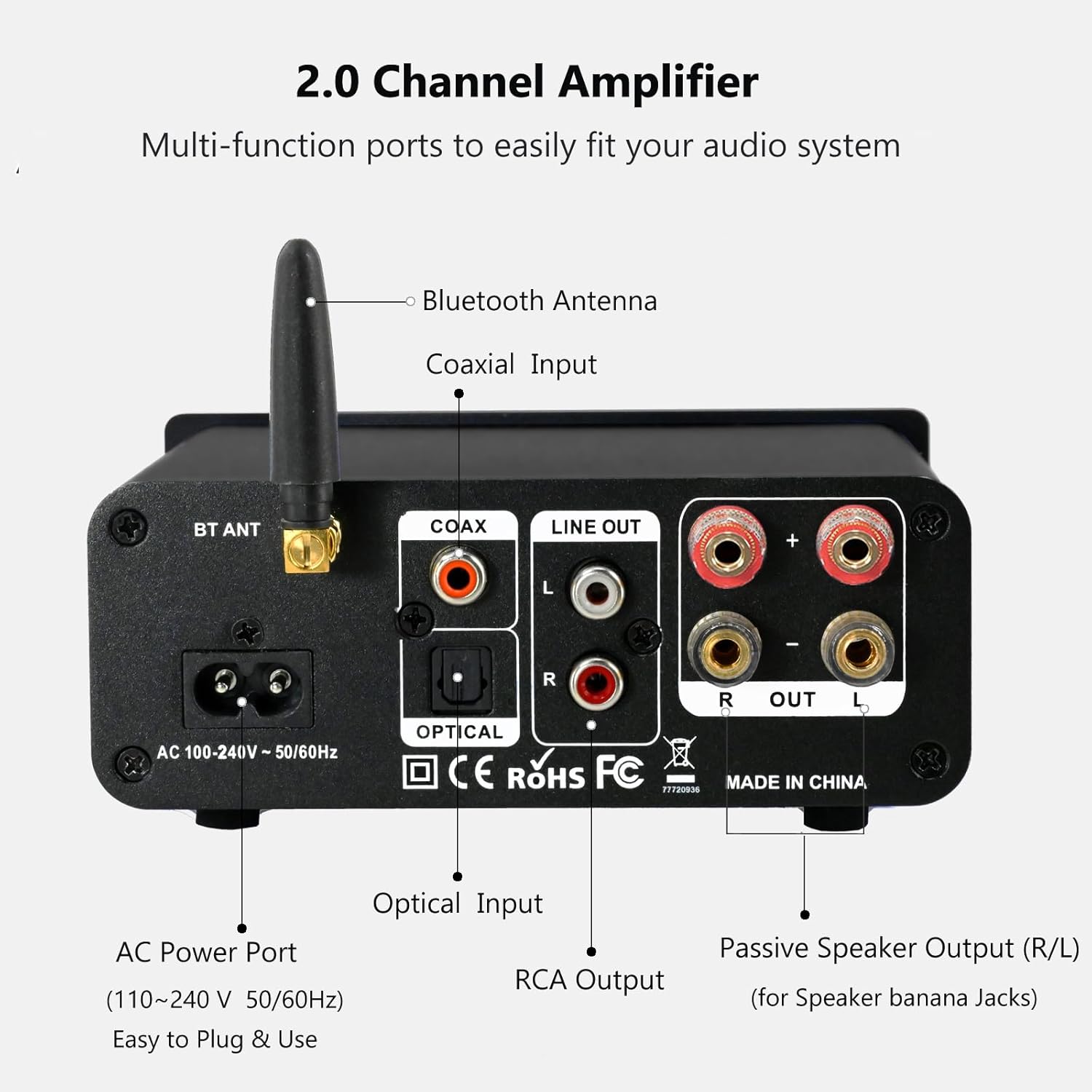
The rear panel provides connections for the Bluetooth antenna, Coaxial and Optical inputs, RCA Line Out, passive speaker outputs, and the AC power port.
- BT ANT (Bluetooth Antenna): Connect the included Bluetooth antenna for optimal wireless range and stability.
- COAX (Coaxial Input): Digital audio input for devices with a coaxial output.
- OPTICAL (Optical Input): Digital audio input for devices with an optical (Toslink) output.
- LINE OUT (RCA L/R): Analog audio output for connecting to powered speakers or a subwoofer.
- PASSIVE SPEAKER OUTPUT (R/L): Connect passive speakers using banana plugs or bare speaker wire.
- AC POWER PORT: Connect the supplied AC power cord (100-240V ~ 50/60Hz).
5. Подешавање
5.1 Повезивање звучника

The LONPOO Mini Hi-Fi Amplifier seamlessly integrates with your home audio setup, providing clear sound to passive bookshelf speakers.
- Пасивни звучници: Connect your passive bookshelf speakers to the PASSIVE SPEAKER OUTPUT (R/L) terminals on the rear panel. Ensure correct polarity (+ to + and - to -) for each speaker. You can use banana plugs or strip the speaker wire ends and insert them into the terminals.
- Powered Speakers/Subwoofer: If you wish to connect powered speakers or a subwoofer, use an RCA cable to connect them to the LINE OUT (RCA L/R) портови на задњој плочи.
5.2 Повезивање аудио извора
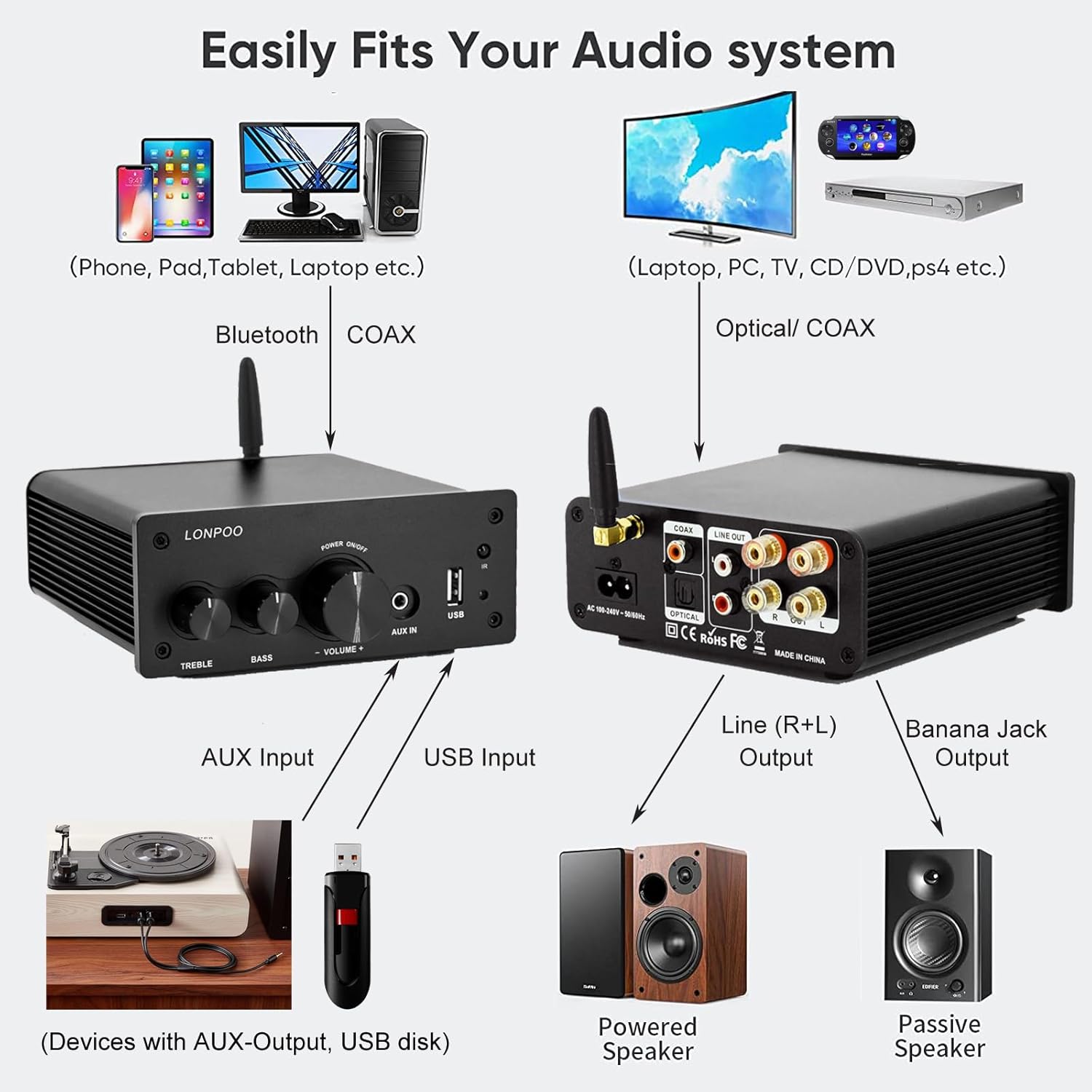
This diagram illustrates how the amplifier connects to a wide range of audio sources and output devices, including phones, PCs, TVs, CD players, powered speakers, and passive speakers.
- Блуетоотх: Ensure the Bluetooth antenna is connected to the БТ АНТ лука.
- АУКС улаз: Connect your smartphone, tablet, or other audio device using a 3.5mm audio cable to the АУКС ИН порт на предњој плочи.
- УСБ улаз: Insert a USB flash drive containing MP3 or WAV audio fileс инто тхе УСБ улаз порт на предњој плочи.
- Оптички улаз: Connect your TV, CD player, or game console with an optical output to the ОПТИЦАЛ port on the rear panel using the provided optical cable.
- Коаксијални улаз: Connect your TV, DVD player, or other audio source with a coaxial output to the ЦОАКС порт на задњој плочи.
5.3 Прикључак за напајање
Connect the supplied AC power cord to the АЦ ПОВЕР ПОРТ on the rear panel of the amplifier, then plug the other end into a wall outlet.
6. Упутство за употребу
6.1 Укључивање/искључивање
Да бисте укључили ampЛифиер, дуги притисак тхе Višenamensko dugme on the front panel. The indicator light will illuminate. To power off, дуги притисак the knob again.
6.2 Избор улаза
To select an audio input source, кратким притиском тхе Višenamensko dugme. Each short press will cycle through the available inputs: Bluetooth, AUX, USB, Coaxial, and Optical. The Светло индикатора will change color to reflect the active input mode (refer to Section 4.1 for color codes).
6.3 Подешавање јачине звука
Ротирајте Višenamensko dugme у смеру казаљке на сату да бисте повећали јачину звука и у смеру супротном од казаљке на сату да бисте је смањили.
6.4 Тоне Цонтрол
Користите ТРЕБЛЕ и Басс knobs on the front panel to adjust the high and low frequencies of the audio output according to your preference.
6.5 Блуетоотх упаривање

Connect your smartphone or other Bluetooth-enabled devices wirelessly to the amplifier for convenient audio streaming.
- Ensure the Bluetooth antenna is securely connected.
- Укључите напајање amplifier and select the Bluetooth input mode (the indicator light will turn blue).
- На уређају који подржава Bluetooth (нпр. паметни телефон, таблет) потражите доступне Bluetooth уређаје.
- Select "LONPOO AMP-615" from the list to pair.
- Једном упарен, amplifier will play a confirmation sound, and you can stream audio wirelessly.
6.6 Репродукција са УСБ-а

Тхе amplifier supports direct audio input via 3.5mm AUX and USB, allowing for plug-and-play functionality with various devices.
Уметните УСБ флеш диск у УСБ улаз лука. amplifier will automatically detect and begin playing supported audio files (MP3, WAV). Use the remote control for playback functions like play/pause, next/previous track.
6.7 Даљински управљач
The included remote control allows for convenient operation of the amplifier from a distance. Functions include:
- Укључивање/искључивање
- Појачавање/утишавање јачине звука
- Муте
- Input Source Selection (BT, AUX, USB, COAX, OPT)
- USB Playback Controls (Play/Pause, Next/Previous Track)
КСНУМКС. Решавање проблема
If you encounter any issues with your LONPOO Mini Hi-Fi Amplifier, please refer to the following troubleshooting guide:
| Проблем | Могући узрок | Решење |
|---|---|---|
| Нема излаза звука |
|
|
| Poor sound quality (distortion, low volume) |
|
|
| Проблеми са Блуетоотх везом |
|
|
| Optical/Coaxial audio dropouts or no sound |
|
|
| Зујање или зујање |
|
|
8. Спецификације
| Број модела | AMP-615 |
| Излазна снага | 100W + 100W (200W total) |
| Канали | 2.0 Стерео |
| Блуетоотх верзија | 5.3 |
| Инпутс | Bluetooth, Optical, Coaxial, USB, 3.5mm AUX |
| Излази | RCA Line Out (L/R), Passive Speaker Output (Banana Jack compatible) |
| Повер Суппли | АЦ 100-240В ~ 50 / 60Хз |
| Димензије (Ш к В к Д) | 132 mm x 55 mm x 140 mm (приближно 5.19 x 2.16 x 5.51 инча) |
| Тежина | 1.09 кг (приближно 2.4 лбс) |
| Укључене компоненте | Хи-Фи Amplifier, AC Cable, Remote Control, Optical Cable |
9. Одржавање
- Чишћење: Disconnect the power before cleaning. Use a soft, dry cloth to wipe the exterior of the ampпуњач. Не користите абразивна средства за чишћење или раствараче.
- Складиштење: Ако чувате amplifier for an extended period, disconnect it from the power supply and store it in a cool, dry place.
- Управљање кабловима: Уверите се да су сви каблови уредно организовани и да нису под затезањем како бисте спречили оштећења.
10. Гаранција и подршка
This product comes with a standard manufacturer's warranty. For specific warranty details, please refer to the documentation provided with your purchase or contact your retailer. For technical support, troubleshooting assistance, or inquiries regarding spare parts, please contact LONPOO customer service or your authorized dealer. Information regarding spare parts availability is currently unavailable.