
LIECTROUX M7S PRO
LIECTROUX M7S Pro Robot Vacuum Cleaner User Manual
Model: M7S Pro
1. Увод
Хвала вам на куповиниasing the LIECTROUX M7S Pro Robot Vacuum Cleaner. This manual provides essential information for the safe operation, maintenance, and troubleshooting of your device. Please read this manual thoroughly before using the product and retain it for future reference.
Безбедносна упутства
- Уверите се да је робот потпуно напуњен пре прве употребе.
- Не користите робота у влажним срединама или у близини течности.
- Држите лабаве каблове, завесе и мале предмете даље од робота како бисте спречили њихово запетљавање.
- Надгледајте децу и кућне љубимце док робот ради.
- Do not use the robot to pick up large debris, sharp objects, or burning materials.
- Only use the original charging dock and power adapter provided with the robot.
- Turn off the robot and unplug it from the charging dock before performing any maintenance.
2. Садржај пакета
Проверите да ли су све ставке присутне у пакету:
- LIECTROUX M7S Pro Robot Vacuum Cleaner
- Доцк за пуњење
- Повер Адаптер
- Бочне четке (сет)
- HEPA Filter (pre-installed or spare)
- Алат за чишћење
- Ремоте Цонтрол
- Упутство за употребу
3. Производ је готовview
Familiarize yourself with the components of your LIECTROUX M7S Pro robot vacuum cleaner.

Слика 3.1: The LIECTROUX M7S Pro robot vacuum cleaner, showcasing its sleek black design, along with its remote control and a smartphone displaying the cleaning map via the app.
Главне компоненте:
- Горња плоча: Power button, Wi-Fi indicator, charging indicator.
- Предњи браник: Obstacle detection sensors.
- Бочне четке: Collect dust and debris from edges and corners.
- Погонски точкови: Allow movement across various floor types.
- канта за отпатке: Collects dry debris.
- Water Tank (for mopping): Holds water for wet cleaning.
- Контакти за пуњење: Повезује се са пуњачем.
- Сензори за литицу: Detects drops and prevents falls.
4. Подешавање
4.1 Постављање пуњача
Place the charging dock against a wall in an open area, ensuring there are no obstacles within 1 meter (3 feet) to the sides and 2 meters (6 feet) in front of the dock. Connect the power adapter to the charging dock and plug it into a power outlet.
4.2 Почетно пуњење
Place the robot onto the charging dock, ensuring the charging contacts align. The robot will begin charging automatically. For first use, allow the robot to charge completely (approximately 4-5 hours) before operation.

Слика 4.1: The robot vacuum cleaner automatically returning to its charging dock when its battery is low, ensuring it is always ready for the next cleaning cycle.
4.3 App Connection (TUYA App)
- Download the "TUYA Smart" app from your smartphone's app store (iOS or Android).
- Register or log in to your TUYA account.
- Ensure your robot is charged and powered on.
- Follow the in-app instructions to add your LIECTROUX M7S Pro robot vacuum cleaner. This typically involves pressing and holding a button on the robot to enter pairing mode and connecting to your home Wi-Fi network.
- Када се повежете, можете контролисати робота, view мапе чишћења и подешавање распореда путем апликације.
4.4 Интеграција гласовног асистента
The LIECTROUX M7S Pro supports voice control via Amazon Alexa and Google Home. Refer to the respective app (Alexa app or Google Home app) for instructions on how to link your TUYA Smart account and control your robot with voice commands.
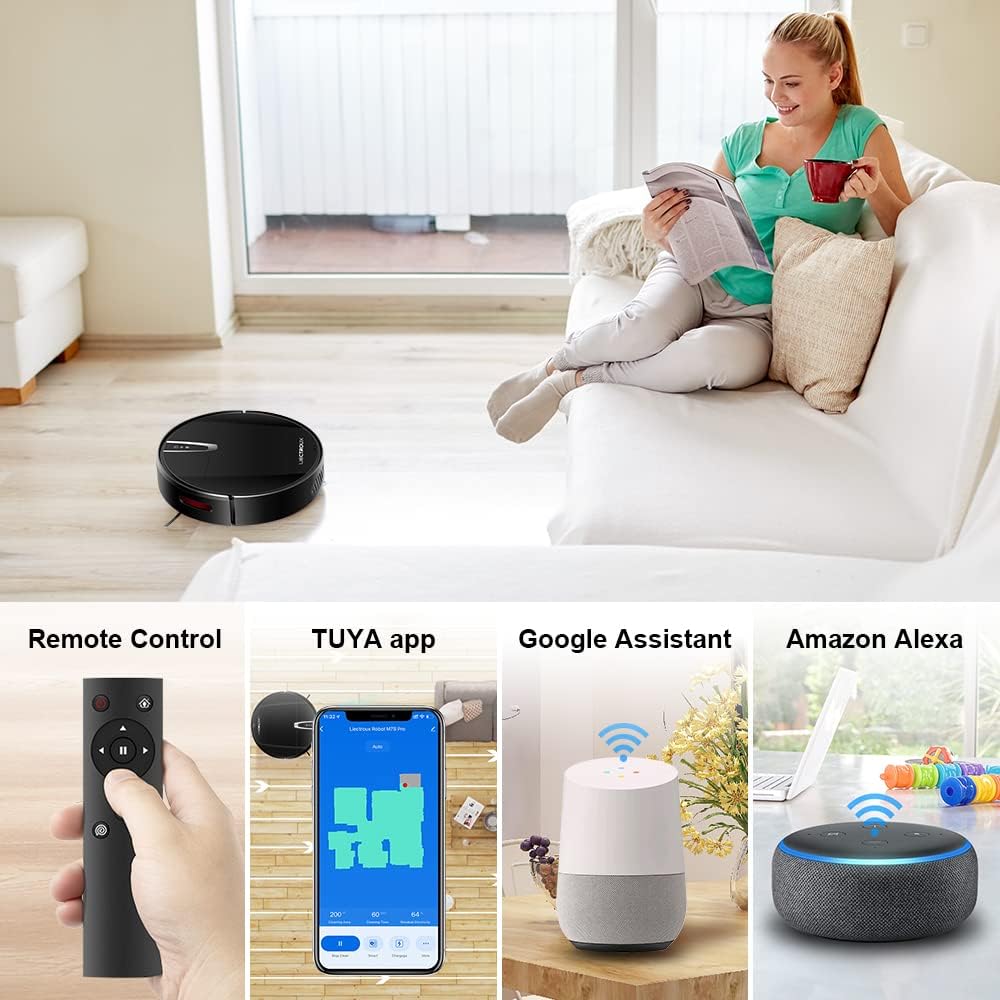
Слика 4.2: Various control methods for the robot vacuum, including a physical remote control, the TUYA smartphone application displaying a cleaning map, and integration with voice assistants like Google Assistant and Amazon Alexa.
5. Упутство за употребу
5.1 Режими чишћења
The robot offers multiple cleaning modes to suit different needs, accessible via the app, remote control, or voice commands:
- Аутоматско чишћење: The robot intelligently navigates and cleans the entire floor area.
- Чишћење места: Фокусира се на одређено прљаво подручје, чистећи у спиралном обрасцу.
- Чишћење ивица: Чисти дуж зидова и ивица намештаја.
- Режим брисања: For wet cleaning, attach the water tank and mopping cloth.

Слика 5.1: The robot vacuum cleaner operating on a floor with scattered debris, illustrating its powerful suction and various cleaning modes: Scheduled Cleaning, Auto Cleaning, Edge Cleaning, and Spot Cleaning.
5.2 Навигација и мапирање
The M7S Pro utilizes smart gyroscope navigation to create a 2D map of your environment, allowing for precise positioning and efficient route planning. This ensures comprehensive coverage and minimizes missed spots.

Слика 5.2: The robot vacuum cleaner navigating a room, with a grid overlay illustrating its smart gyroscope navigation system for precise positioning and thorough cleaning.

Слика 5.3: A visual comparison showing the efficient, systematic cleaning path generated by the LIECTROUX M7S Pro's gyroscope navigation versus a less organized common route planning method, highlighting intelligent route planning.
5.3 Аутоматско пуњење
When the battery level is low or a cleaning task is complete, the robot will automatically return to its charging dock to recharge. Ensure the charging dock is always powered on and accessible.
5.4 Anti-Drop System
The robot is equipped with cliff sensors to detect stairs and elevated surfaces, preventing it from falling. It also intelligently detects different floor types and adjusts its direction within 10 milliseconds.
6. Одржавање
Редовно одржавање обезбеђује оптималне перформансе и продужава век трајања вашег роботског усисивача.
6.1 Пражњење канте за прашину
Empty the dustbin after each cleaning cycle or when the 'full' indicator appears. Open the top cover, remove the dustbin, and dispose of the collected debris.
6.2 Чишћење филтера
The HEPA filter should be cleaned regularly (e.g., weekly) using the provided cleaning tool or a soft brush. Replace the HEPA filter every 3-6 months, depending on usage, to maintain suction efficiency.
6.3 Чишћење бочних четкица
Inspect and clean the side brushes regularly. Remove any tangled hair or debris. If brushes are worn or damaged, replace them with new ones.
6.4 Чишћење сензора и контаката за пуњење
Wipe the cliff sensors and charging contacts on both the robot and the charging dock with a clean, dry cloth to ensure proper function and charging.
6.5 Brush-less Suction Nozzle
The M7S Pro features an advanced brush-less suction nozzle designed to minimize hair entanglement, reducing the frequency of cleaning the main suction path.

Слика 6.1: An illustration of the robot vacuum's underside, highlighting the advanced brush-less suction nozzle designed to prevent hair entanglement and ensure consistent cleaning performance.
КСНУМКС. Решавање проблема
Ако наиђете на проблеме са роботским усисивачем, погледајте следеће уобичајене проблеме и решења:
| Проблем | Могући узрок | Решење |
|---|---|---|
| Робот се не укључује. | Слаба батерија; искључите напајање. | Charge the robot; ensure the main power switch is on. |
| Робот се не пуни. | Контакти за пуњење су прљави; пуњач се не напаја. | Clean charging contacts; ensure charging dock is plugged in. |
| Робот се често заглављује. | Obstacles (cables, rugs); narrow spaces. | Clear the cleaning area; use virtual walls if available. |
| Слабе перформансе чишћења. | Канта за прашину пуна; филтер зачепљен; четке замршене. | Empty dustbin; clean/replace filter; clean brushes. |
| Проблеми са повезивањем апликације. | Incorrect Wi-Fi password; robot not in pairing mode; 5GHz Wi-Fi network. | Verify Wi-Fi details; re-enter pairing mode; ensure 2.4GHz Wi-Fi is used. |
8. Спецификације
| Феатуре | Детаљ |
|---|---|
| Бранд | ЛИЕЦТРОУКС |
| Назив модела | М7С ПРО |
| Боја | Црно |
| Димензије производа | 32Д к 32Ш к 7.8В цм |
| Тежина артикла | 4 килограма |
| Максимална снага усисавања | 4000Па |
| Капацитет батерије | 2500мАх литијум-јонски |
| Рунтиме | До 120 минута |
| Тип филтера | ХЕПА |
| Тип контролера | App Control, Touchpad Control, Voice Control |
| Компатибилност гласовног асистента | Гоогле Хоме, Амазон Алека |
| Тип навигације | Gyroscope Navigation (2D Map) |
| Посебна карактеристика | Anti-drop system, Brush-less suction nozzle |
| Препорука за површину | Low-pile carpet, hard floors, ceramic tiles |
9. Гаранција и подршка
The LIECTROUX M7S Pro Robot Vacuum Cleaner comes with a standard manufacturer's warranty. Please refer to the warranty card included in your package for specific terms and conditions, including the warranty period and coverage details.
For technical support, troubleshooting assistance, or warranty claims, please contact the seller or LIECTROUX customer service. Contact information can typically be found on the product packaging, the seller's website, or within the TUYA Smart app.
When contacting support, please have your product model number (M7S Pro) and purchase details readily available.