
Увод
This instruction manual provides essential information for the safe and effective use of your Sony PXW-Z200 4K XDCAM Camcorder. The PXW-Z200 is designed for professional video production, offering UHD 4K60 HDR footage with advanced features like AI-powered autofocus, 20x optical zoom, and versatile recording formats. Please read this manual thoroughly before operating the camcorder and retain it for future reference.
Сетуп
1. Распакивање и провера садржаја
Пажљиво распакујте све предмете из кутије. Уверите се да су присутне следеће компоненте:
- Sony PXW-Z200 4K 1" CMOS Sensor XDCAM Camcorder
- АЦ адаптер
- Повер Цорд
- Пуњач батерија
- BP-U35 Battery Pack (2 included in bundle)
- LCD Hood
- Сјенило
- Еиецуп
- Држач микрофона
- Cold Shoe Kit
- Меморијска картица од 64 ГБ
- Large Case
- Телепхото Ленс
- Читач меморијских картица
- Комплет филтера
- Wide Angle Lens Attachment
- Новчаник са меморијском картицом
- Држач за поклопац објектива
- Комплет за чишћење
- ХДМИ кабл
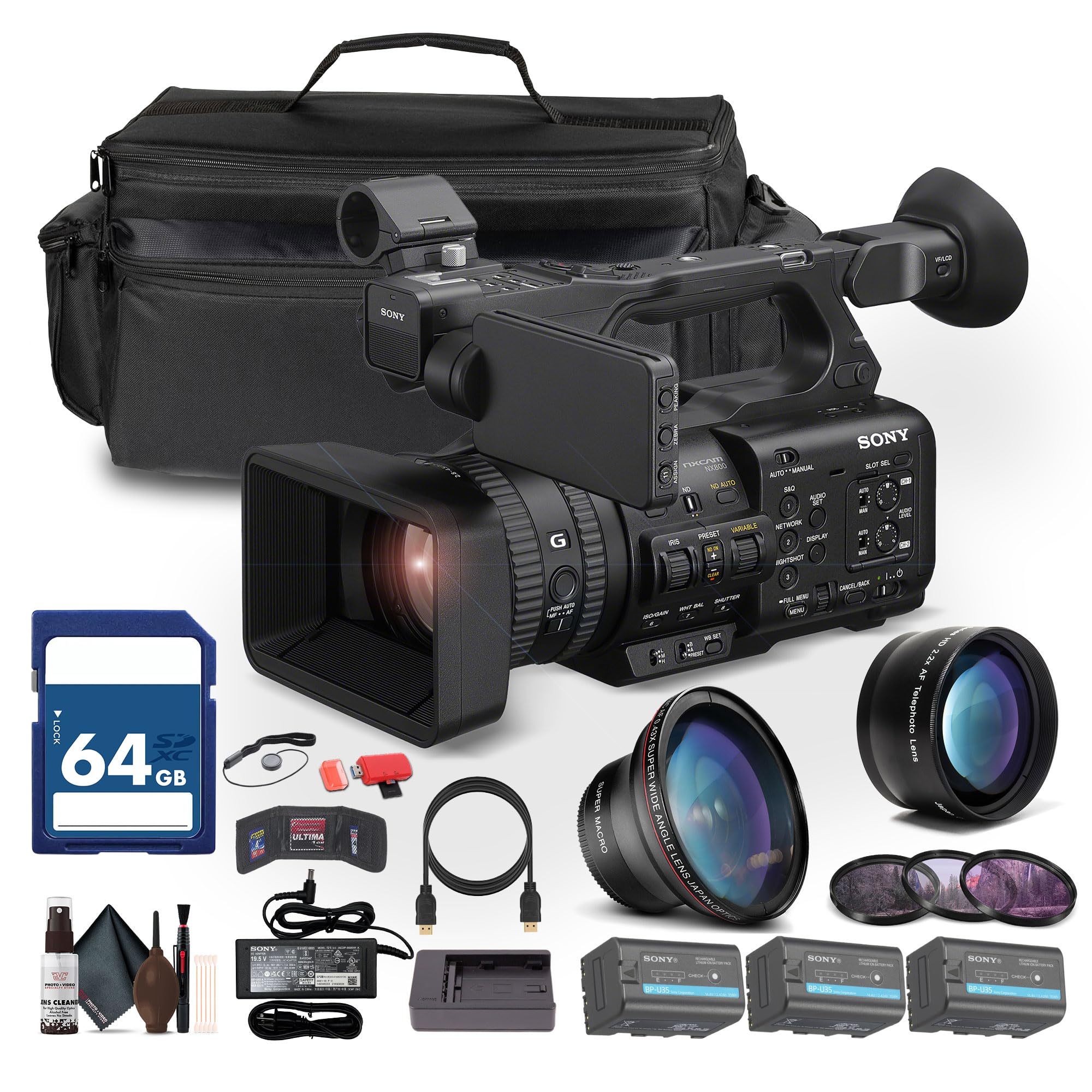
Figure 1: Sony PXW-Z200 4K XDCAM Camcorder (main unit).
2. Attaching the Lens Hood and Eyecup
- Attach the provided lens hood to the front of the camcorder's lens to reduce glare and protect the lens.
- Attach the eyecup to the viewпроналазач за удобност viewинг.
3. Installing and Charging the Battery
- Insert the BP-U35 battery pack into the battery slot on the rear of the camcorder until it clicks into place.
- Connect the AC adapter to the camcorder's DC IN jack and plug it into a power outlet. The battery will begin charging.
- Alternatively, use the external battery charger to charge the BP-U35 battery packs.
- Уверите се да је батерија потпуно напуњена пре прве употребе.
4. Убацивање меморијске картице
The PXW-Z200 supports dual CFexpress Type-A/SD card slots.
- Отворите поклопац слота за меморијску картицу.
- Insert a compatible CFexpress Type-A or SD card into the designated slot with the label facing the correct direction until it clicks.
- Затворите поклопац слота за меморијску картицу.
- Format the memory card in the camcorder's menu before first use to ensure optimal performance.
Управљање камкордером
1. Укључивање/искључивање
- Да бисте укључили напајање, померите прекидач POWER у положај ON.
- Да бисте искључили напајање, померите прекидач POWER у положај OFF.
2. Основно снимање
- Recording Start/Stop: Притисните дугме REC START/STOP да бисте започели или завршили снимање.
- Формати снимања: The camcorder supports XAVC S-I, HS-L, S-L, and HD/QFHD recording formats. Select your desired format via the menu.
- Брзина кадрова: Capture high frame rate footage at 4K120 and 1080p240 for slow-motion effects.
- ХДР: The camcorder supports UHD 4K60 HDR with HLG (Hybrid Log-Gamma) for high dynamic range content.
3. Focus and Zoom Control

Figure 2: AUTO/MANUAL switch for focus and exposure control.
- Аутоматско фокусирање: The camcorder features AI-driven autofocus and auto-framing for precise tracking of subjects. Engage AUTO mode using the switch (refer to Figure 2).
- Ручно фокусирање: For precise control, switch to MANUAL mode and adjust the focus ring on the lens.
- Оптички зум: Utilize the 20x optical zoom for clear magnification.
- Зумирање јасне слике: In 4K, the camcorder offers a 30x Clear Image Zoom, extending your reach without significant loss of quality.
4. Аудио поставке
The PXW-Z200 includes 4-channel audio input.
- Connect external microphones to the XLR inputs for professional audio capture.
- Adjust audio levels using the dedicated audio controls on the camcorder body or via the menu.
- Monitor audio through headphones connected to the headphone jack.
5. Networking and Streaming
The camcorder supports integrated dual-band 2.4/5 GHz Wi-Fi and Ethernet for live streaming and file пренос.
- Connect to a Wi-Fi network or an Ethernet cable.
- Utilize RTMP/RTMPS, SRT, and FTP protocols for direct live streaming and file трансфери.
- Configure network settings and streaming parameters through the camcorder's menu.
6. Color Profiles
The PXW-Z200 supports various color profiles for creative flexibility and matching with other Sony Cinema Line cameras.
- Select from S-Cinetone, ITU709, 709tone, and HLG profiles in the menu to achieve your desired look.
7. Using the Sony Monitor & Control App
Download and install the Sony Monitor & Control app on a compatible smartphone or tablet to remotely control and monitor the camcorder.
- Connect your device to the camcorder via Wi-Fi.
- Use the app for remote control of recording, zoom, focus, and other settings, as well as for monitoring live footage.

Figure 3: Sony PXW-Z200 camcorder in a typical usage scenario.
Одржавање
1. Чишћење камкордера
- Use the provided cleaning kit to gently clean the lens and camcorder body.
- For the lens, use a soft, lint-free cloth and lens cleaning solution. Avoid harsh chemicals.
- For the body, wipe with a dry, soft cloth.
- Немојте користити раствараче или абразивна средства за чишћење.
2. Брига о батерији
- Чувајте батерије на хладном и сувом месту када нису у употреби.
- Избегавајте често потпуно пражњење батерија како бисте продужили њихов век трајања.
- Charge batteries using only the specified Sony charger or the camcorder's AC adapter.
3. Складиштење
- When storing the camcorder for extended periods, remove the battery.
- Store the camcorder in a dry, dust-free environment, preferably in the large case provided.
- Избегавајте екстремне температуре и високу влажност.
Решавање проблема
If you encounter issues with your Sony PXW-Z200, refer to the following common problems and solutions.
| Проблем | Могући узрок | Решење |
|---|---|---|
| Камкордер се не укључује. | Battery is not charged or not inserted correctly. AC adapter is not connected. | Ensure battery is fully charged and properly inserted. Verify AC adapter connection. |
| Cannot record footage. | Memory card is full, not inserted, or not formatted. Recording mode is incorrect. | Check memory card status, insert/format if necessary. Verify recording settings. |
| Autofocus is not working correctly. | Camcorder is in Manual Focus mode. Subject is too close or lacks contrast. | Switch to AUTO focus mode. Ensure adequate lighting and distance to subject. |
| Није снимљен звук. | Microphone is disconnected or audio levels are too low. | Check microphone connections. Adjust audio input levels. |
| Cannot connect to Wi-Fi/Stream. | Incorrect network settings. Out of range. | Verify Wi-Fi password and network settings. Move closer to the access point. |
За детаљније решавање проблема, обратите се званичној Sony подршци webсајту или контактирајте корисничку подршку.
Спецификације
Key technical specifications for the Sony PXW-Z200 4K XDCAM Camcorder:
| Феатуре | Детаљ |
|---|---|
| Бранд | Сони |
| Назив модела | ПКСВ-З200 |
| Тип сензора | 1" Exmor RS CMOS |
| Резолуција снимања видео записа | UHD 4K (3840 Pixels), 720p, 480p |
| Оптицал Зоом | 20к |
| Clear Image Zoom (4K) | 30к |
| Максимални отвор бленде | ф/1.8 |
| Максимална жижна даљина | 154.21 мм |
| Формат видео снимања | XAVC S-I, HS-L, S-L, HD/QFHD |
| Подржани аудио формат | Dolby Digital/AC-3 |
| Величина екрана | 1 inch (LCD Hood included) |
| Технологија повезивања | HDMI, 12G-SDI, Wi-Fi (2.4/5 GHz), Ethernet |
| Посебне карактеристике | AI-Driven Autofocus, Auto-Framing, 4K HDR Capture (HLG), High Frame Rates (4K120, 1080p240), Direct Live Streaming (RTMP/RTMPS, SRT, FTP), S-Cinetone |
| Медији за складиштење | Dual CFexpress Type-A/SD card slots |
| Тежина артикла | 4.3 фунти |
| Ниво отпорности на воду | Није водоотпоран |
| Стабилизација слике | бр |
Гаранција и подршка
The Sony PXW-Z200 Camcorder is manufactured by Sony. For detailed warranty information, including terms, conditions, and registration, please refer to the warranty card included with your product or visit the official Sony support webсајту.
For technical support, service, or to download the latest firmware and software, please visit: Сони подршка Webсајту.