
1. Увод
This manual provides essential information for the safe and efficient operation of your elecsung 43-inch Smart Mirror Bathroom TV. This device integrates a 4K UHD television with a mirror, designed for environments such as bathrooms and kitchens due to its IPX6 waterproof rating. It features ATSC DTV, voice control, Wi-Fi, and Bluetooth connectivity, running on Android 11.0.
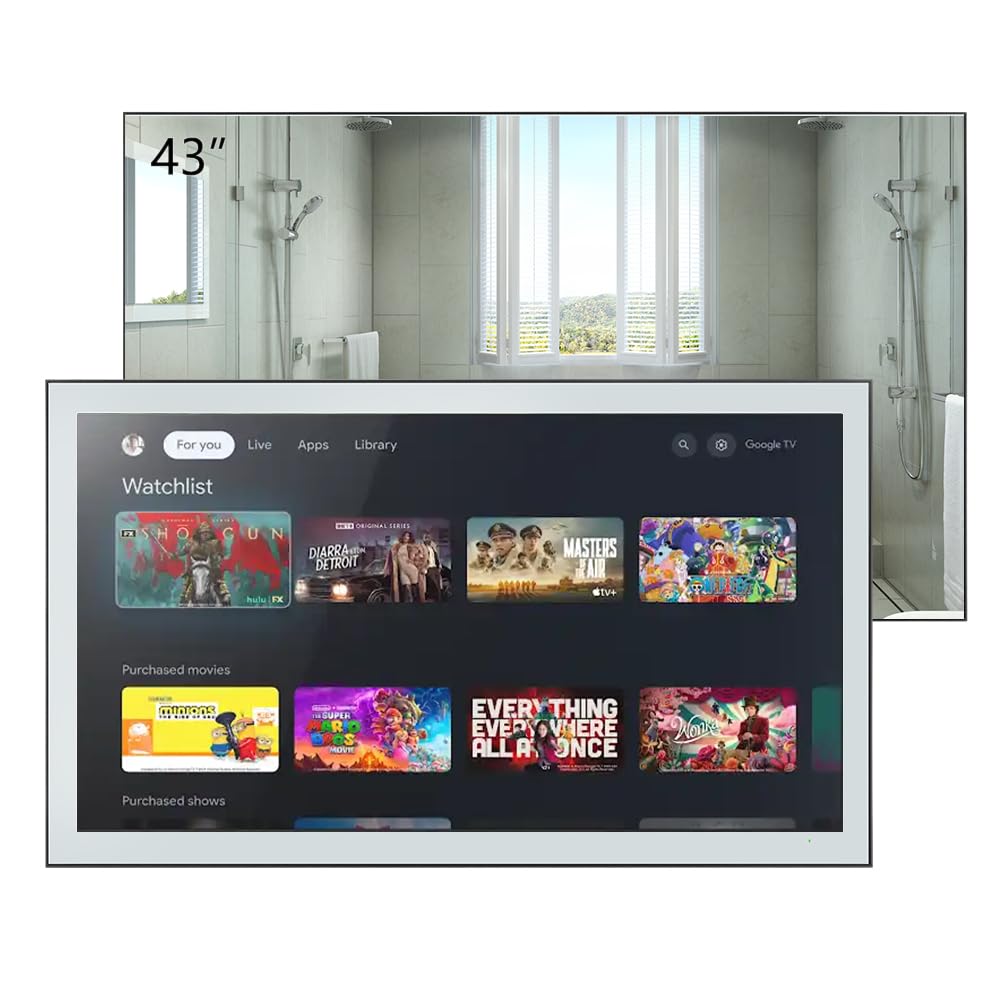
Figure 1.1: elecsung 43-inch Smart Mirror Bathroom TV with its smart interface.
2. Безбедносне информације
- електрична безбедност: Уверите се да напајање одговара запреминиtage requirements (100-240 VAC, 50-60 Hz). Do not expose the power cord to excessive heat or moisture.
- Отпорност на воду: The TV is IPX6 waterproof, meaning it is protected against powerful water jets. However, it is not designed for submersion. Do not spray water directly onto the connections.
- Инсталација: Professional installation is recommended for wall mounting to ensure stability and safety. Follow all mounting instructions carefully.
- Чишћење: Искључите напајање пре чишћења. Користите меку,amp крпу. Избегавајте абразивна средства за чишћење или раствараче.
- вентилација: Обезбедите одговарајућу вентилацију око уређаја. Не блокирајте вентилационе отворе.
3. Садржај пакета
Проверите да ли су све ставке присутне у пакету:
- elecsung 43-inch Smart Mirror Bathroom TV
- Ремоте Цонтрол
- Носач за монтирање на зид
- Адаптер/кабл за напајање
- Кориснички приручник (овај документ)
- Blu-ray (as listed in included components, may refer to Blu-ray playback capability rather than a physical disc)
4. Производ је готовview
4.1 Кључне карактеристике
- Приказ: 43-inch 4K Ultra HD (3840x2160) LED display with 75 Hz refresh rate.
- Водоотпорна оцена: IPX6 for protection against powerful water jets.
- аудио: Dolby Vision & Atmos support, 2.0 channel, 10W x 2 speakers.
- Повезивање: Dual-band Wi-Fi (2.4G/5G), Bluetooth 5.0, HDMI, USB, Ethernet.
- Контрола: Voice control and remote control.
- Оперативни систем: Android 11.0 for smart TV functionality and app access.
- тјунер: ATSC DTV tuner.

Figure 4.1: Product features and included remote control.
4.2 Physical Description and Dimensions
The TV features a sleek design with a mirror finish. When off, it functions as a mirror. The unit dimensions are 994.8mm (39.2") W x 580.1mm (22.8") H x 62.2mm (2.5") D. Recessed dimensions for in-wall installation are 521mm (20.5") W x 476mm (18.7") H x 35mm (1.4") D.

Figure 4.2: Product dimensions with bracket.
4.3 Портови и конекције
The rear panel of the TV provides various input and output ports:
- HDMI портови (x4): For connecting external devices like Blu-ray players, gaming consoles, or set-top boxes. Supports CEC, ARC, eARC.
- USB портови (x2): За повезивање УСБ уређаја за складиштење података.
- Етхернет (РЈ45): За жичану мрежну везу.
- Оптички аудио излаз: За повезивање са екстерним аудио системима.
- АВ улаз: За повезивање старијих аналогних уређаја.
- Антенски улаз: For connecting an ATSC antenna.
- Сателитски улаз: For connecting satellite dish.
- АЦ утичница: За прикључак на струју.

Слика 4.3: Прикључци на задњој плочи.
5. Подешавање
5.1 Монтажа телевизора
The TV can be mounted on or in a wall using the supplied wall-mount bracket or a compatible VESA bracket. The VESA mount standard is 400 x 400 mm for the 43-inch model, requiring M6 x 12mm screws.
- Изаберите локацију: Select a suitable wall location, ensuring it can support the TV's weight and has access to power and necessary connections.
- Инсталирајте носач: Securely attach the wall-mount bracket to the wall according to the bracket's specific instructions. Use appropriate wall anchors for your wall type.
- Прикључи ТВ: Carefully lift the TV and attach it to the installed wall bracket. Ensure it is securely fastened.
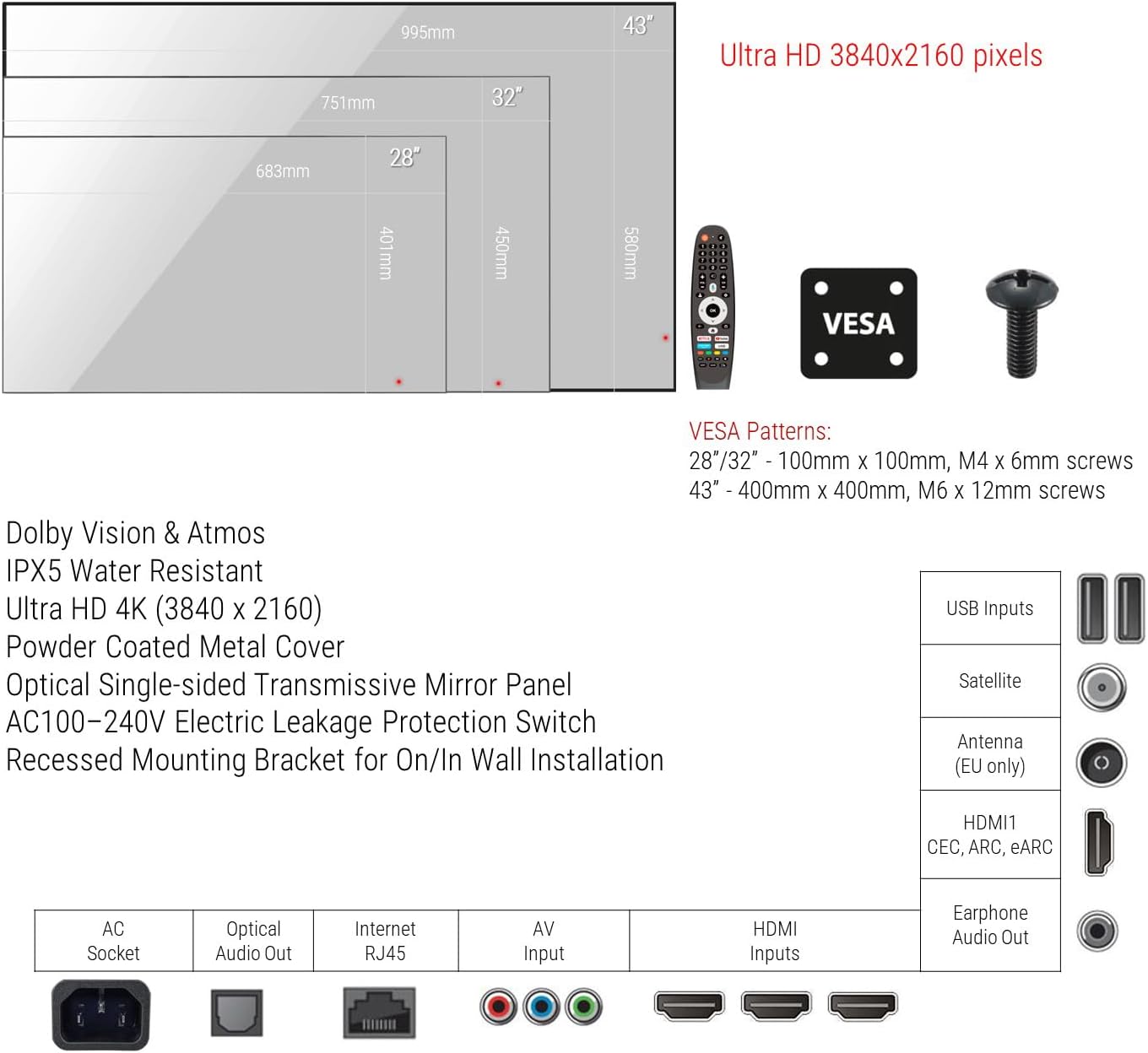
Figure 5.1: VESA mounting patterns and port overview.
5.2 Почетне везе
- Снага: Connect the power cable to the AC socket on the TV and then to a power outlet.
- Антена/кабл: Connect your ATSC antenna or cable TV feed to the Antenna input.
- Спољни уређаји: Connect any external devices (e.g., Blu-ray player, game console) to the HDMI ports.
- Мрежа: For wired internet, connect an Ethernet cable to the RJ45 port. For wireless, you will configure Wi-Fi during initial setup.
6. Упутство за употребу
6.1 Укључивање/искључивање
Press the power button on the remote control to turn the TV on or off. The TV will display the smart interface when powered on.
6.2 Даљински управљач
Use the provided remote control to navigate the TV's interface, adjust volume, change channels, and access smart features. Refer to the remote control diagram for specific button functions.
6.3 Управљање гласом
The TV supports voice control for hands-free operation. Activate voice control by pressing the dedicated voice button on your remote or by saying the wake word (if configured). You can then issue commands such as "Change channel to CNN," "Open Netflix," or "Тражи action movies."
6.4 Smart TV Functions (Android 11.0)
Your TV runs on Android 11.0, providing access to a wide range of applications and streaming services. Navigate the home screen to find installed apps, browse content, and customize settings.
- Приступ апликацији: Download and install apps from the integrated app store.
- стриминг: Access popular streaming platforms for movies, TV shows, and videos.
- Подешавања: Adjust network settings, display options, audio preferences, and more through the settings menu.
6.5 Content Casting
Stream content from your smartphone, tablet, or laptop directly to the TV using its casting feature. Ensure your device and the TV are connected to the same Wi-Fi network. Look for the casting icon within compatible apps on your mobile device to initiate screen mirroring.
7. Одржавање
Proper maintenance ensures the longevity and performance of your Smart Mirror TV.
- Cleaning the Screen/Mirror: Disconnect the TV from power. Use a soft, lint-free cloth slightly dampened with water or a non-abrasive, ammonia-free glass cleaner. Spray cleaner onto the cloth, not directly onto the screen. Wipe gently to avoid streaks.
- Чишћење оквира: Use a soft, dry cloth to wipe the frame. Avoid harsh chemicals.
- вентилација: Periodically check that the ventilation openings are free from dust and debris.
КСНУМКС. Решавање проблема
Ако наиђете на проблеме, погледајте следеће уобичајене кораке за решавање проблема:
| Проблем | Могући узрок | Решење |
|---|---|---|
| Но Повер | Power cable disconnected; Power outlet faulty. | Уверите се да је кабл за напајање безбедно повезан. Тестирајте утичницу са другим уређајем. |
| Нема слике/звука | Incorrect input source; Loose HDMI/AV cable; Device not powered on. | Select correct input source. Check cable connections. Power on external device. |
| Нема Ви-Фи везе | Router issue; Incorrect password; Out of range. | Restart router. Re-enter Wi-Fi password. Move TV closer to router or use Ethernet. |
| Гласовна контрола не реагује | Microphone blocked; Feature disabled; Remote battery low. | Ensure microphone is clear. Check voice control settings. Replace remote batteries. |
Ако проблем и даље постоји након покушаја ових решења, обратите се корисничкој подршци.
9. Спецификације
| Феатуре | Спецификација |
|---|---|
| Величина екрана | 43 инча |
| Дисплаи Тецхнологи | ЛЕД |
| Резолуција | 4K (3840x2160) |
| Рефресх Рате | 75 Хз |
| Водоотпорна оцена | ИПКС6 |
| Оперативни систем | Андроид 11.0 |
| Повезивање | Wi-Fi (Dual-band), Bluetooth 5.0, HDMI (x4), USB (x2), Ethernet, Optical Audio Out, AV Input, Antenna, Satellite |
| Аудио карактеристике | Dolby Vision & Atmos, 2.0 channel, 10W x 2 speakers |
| Контролни метод | Даљински управљач, управљање гласом |
| Димензије производа (Д x Ш x В) | 62.2 mm x 994.8 mm x 580.1 mm |
| Recessed Dimensions (D x W x H) | 35 mm x 521 mm x 476 mm |
| VESA стандард за монтирање | 400 к 400 мм |
| Потрошња енергије | 46 Ваттс |
| Лине Волtage | 100-240 ВАЦ 50-60 Хз |
| Назив модела | HYM43A-0BLS11052 |
10. Гаранција и подршка
This product comes with a Full Warranty. For specific warranty terms and conditions, please refer to the documentation included with your purchase or visit the elecsung official website. For technical support, troubleshooting assistance, or service inquiries, please contact elecsung customer support through their official channels.
Подршка на мрежи: Посетите elecsung Store on Amazon за информације о производу и ресурсе за подршку.