
Увод
This manual provides detailed instructions for the NEMTMCUA Digital Wall Clock, an 8.5-inch large display LED clock. It features a multifunctional display showing time, date, day of the week, and temperature. The clock includes two independent alarms and three adjustable brightness levels. It is designed for versatile placement, suitable for wall mounting or desktop use in various indoor environments such as living rooms, bedrooms, and offices.

Слика: Прекоview of the NEMTMCUA Digital Wall Clock's features, including multiple displays, 3 AAA battery option, 2 alarm sets, USB charging, 3 brightness levels, and 2 placement methods.
Садржај пакета
Молимо вас да проверите да ли су све ставке присутне у пакету:
- Digital Wall Clock x 1
- УСБ кабл к 1
- Упутство за употребу к 1
Сетуп
Повер Суппли
The NEMTMCUA Digital Wall Clock supports two power supply modes: USB plug-in power or 3 AAA batteries (not included).
- УСБ Снага: Connect the provided USB cable to the clock's power input and a compatible USB power adapter (not included). This is the primary power source for continuous display.
- Battery Power (3 x AAA, not included): When powered solely by batteries, the screen will automatically turn off after 10 seconds to conserve energy. To activate the display, make a sound such as tapping on the clock or the surface it rests on.
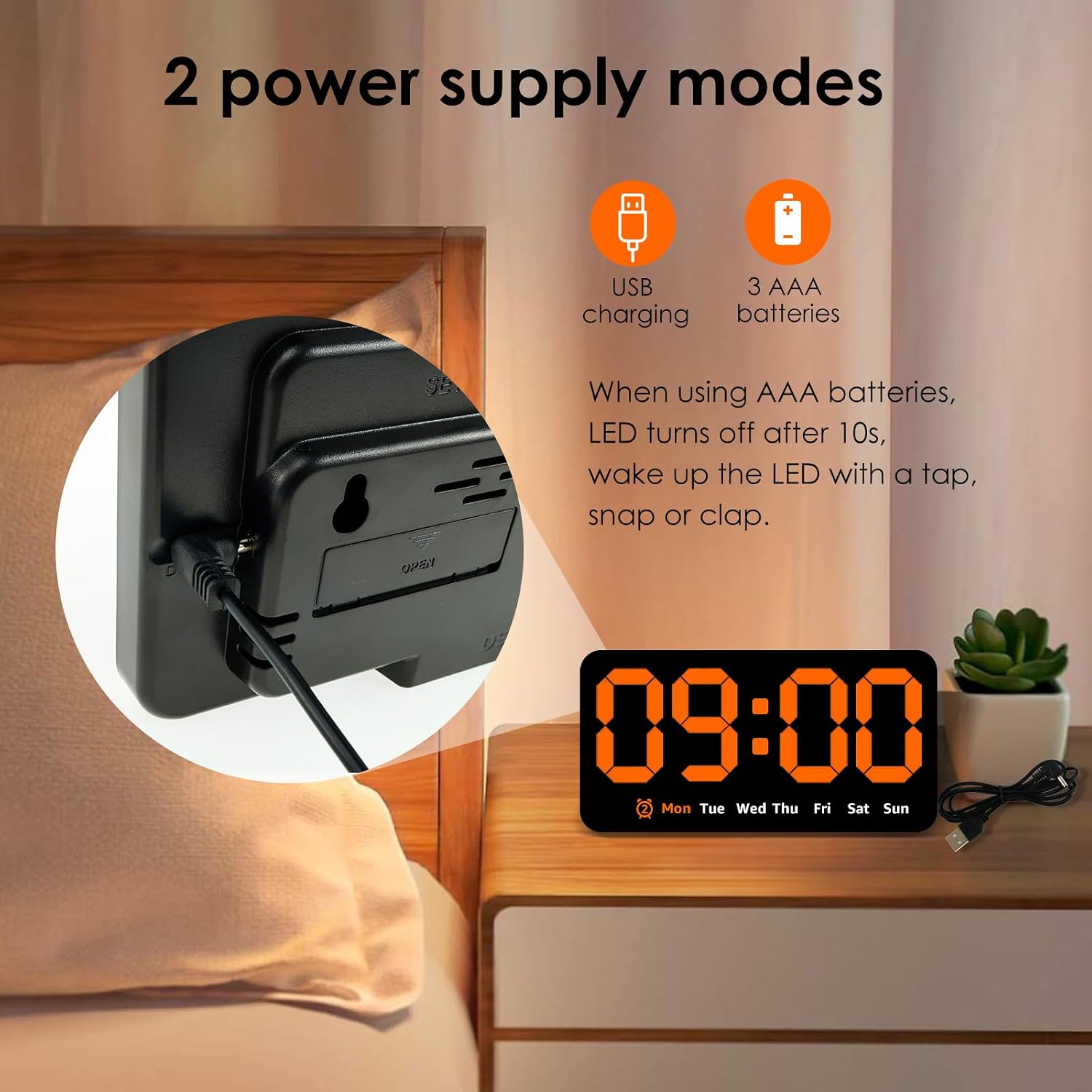
Слика: Позади view of the clock highlighting the USB charging port and the battery compartment, illustrating the two power supply options.
Пласман
The clock offers flexible placement options:
- Монтажа на зид: Utilize the two hanging holes located on the back of the clock to securely mount it on a wall.
- Положај на радној површини: The clock can also stand independently on any flat surface, such as a desk, nightstand, or shelf.
Video: An unboxing and initial setup guide for the Digital Wall Clock, demonstrating how to power on the device and its basic display functions.
Упутство за употребу
Функције дугмета
The clock features several buttons on its top for setting and adjusting functions:
- КОМПЛЕТ: Used to enter setting modes for time, date, and alarms.
- +: Used to increase values during setting or switch display modes.
- -: Used to decrease values during setting.
- ALARM (Bell Icon): Used to activate/deactivate alarms or enter alarm setting mode.
Подешавање времена и датума
- Притисните тастер СЕТ дугме једном да бисте ушли у режим подешавања времена. Цифре за сате ће трептати.
- Користите + or - дугмад за подешавање сата.
- Притисните СЕТ поново да бисте прешли на подешавање минута. Користите + or - за подешавање минута.
- Наставите да притискате СЕТ да бисте се кретали кроз подешавања године, месеца и дана, подешавајући свако помоћу + or -.
- Притисните СЕТ још једном да бисте изашли из режима подешавања.
Подешавање аларма
The clock supports two independent alarms.
- Притисните тастер АЛАРМ дугме за прелазак кроз Аларм 1, Аларм 2 и Аларм искључен.
- To set an alarm, press and hold the АЛАРМ button when the desired alarm (e.g., AL1) is displayed. The hour digits will flash.
- Користите + or - дугмад за подешавање сата аларма.
- Притисните АЛАРМ поново да бисте прешли на подешавање минута. Користите + or - to adjust alarm minutes.
- Притисните АЛАРМ one last time to confirm and exit alarm setting mode.
- When an alarm sounds, press any button to enter snooze mode.

Image: Detail of the clock's top-mounted control buttons, including SET, +, -, and the alarm button, with an alarm icon visible on the display.
Подешавање осветљености
The clock offers three levels of brightness. To adjust the brightness:
- У режиму нормалног приказа времена, притисните + button to cycle through the three brightness levels.
- Dimming the light at night can improve sleep comfort.

Image: A visual comparison of the clock's display at three distinct brightness settings, from brightest to dimmest.
Режими приказа
The clock supports two main display modes:
- ДП1: Displays only the time and day of the week.
- ДП2: Cycles between time + day of the week, and temperature + date.
To switch between display modes, long press the + дугме.

Image: A composite image showing the clock's various display options, including time-only (DP1) and cycling displays of time, date, and temperature (DP2).
Одржавање
To ensure the longevity and proper functioning of your NEMTMCUA Digital Wall Clock, follow these maintenance guidelines:
- Чишћење: Gently wipe the clock's surface with a soft, dry cloth. Avoid using abrasive cleaners, solvents, or harsh chemicals, as these can damage the display or casing.
- Замена батерије: If using battery power, replace all three AAA batteries simultaneously when the display becomes dim or unresponsive. Ensure correct polarity when inserting new batteries.
- Окружење: Држите сат даље од екстремних температура, директне сунчеве светлости и високе влажности.
Решавање проблема
If you encounter issues with your NEMTMCUA Digital Wall Clock, refer to the following common problems and solutions:
| Проблем | Могући узрок | Решење |
|---|---|---|
| Display turns off after 10 seconds (on battery power) | This is a power-saving feature when running on batteries. | Make a sound (e.g., tap the clock or table) to reactivate the display. For continuous display, use USB power. |
| Clock loses time or is inaccurate | Unstable power supply or internal malfunction. | Ensure the USB power connection is stable. If using batteries, replace them with fresh ones. If the issue persists, try resetting the clock by disconnecting all power sources for a few minutes. |
| Alarm sounds even when set to OFF | Alarm setting not properly deactivated. | Press the ALARM button repeatedly until no alarm icon is displayed, indicating all alarms are off. |
| Display is too bright or too dim | Потребно је подесити ниво осветљености. | In normal time display mode, press the '+' button to cycle through the three available brightness levels until the desired setting is reached. |
| Clock resets to 0:00 when touched or moved | Loose power connection or internal issue. | Ensure the USB cable is firmly connected. If using batteries, check they are securely seated. Avoid excessive force when handling the clock. |
Спецификације

Image: Diagram illustrating the product dimensions of the NEMTMCUA Digital Wall Clock, measuring 21.4cm (8.43in) in width and 11cm (4.33in) in height, with a thickness of 2.8cm (1.1in).
| Феатуре | Детаљ |
|---|---|
| Бранд | NEMTMCUA |
| Број модела | 450220240009071633 |
| Дисплаи Типе | Дигитал ЛЕД |
| Боја | Оранге |
| Димензије производа (Ш x В) | 8.27" Ш x 4.33" В (приближно 21.4 цм x 11 цм) |
| Врста материјала | акрилонитрил бутадиен стирен (АБС) |
| Извор напајања | USB (cable included) or 3 x AAA Batteries (not included) |
| Посебне карактеристике | Adjustable Brightness (3 levels), Double Alarm, Date, Week, Temperature Display, Wall Mountable / Desktop |
| Тип собе | Living Room, Bedroom, Office, Classroom |
| Тежина артикла | 0.28 килограма |
Гаранција и подршка
For warranty information, please refer to the documentation provided at the time of purchase or contact your retailer. For technical support or further assistance, please reach out to the manufacturer or the seller through your purchase platform.