
SJOYBRING 7-Inch Double Din Car Stereo
SJoyBring 7-Inch Double Din Car Stereo User Manual
Model: 7-Inch Double Din Car Stereo
Увод
Thank you for choosing the SJoyBring 7-Inch Double Din Car Stereo. This manual provides essential information for the proper installation, operation, and maintenance of your new car stereo. Please read it thoroughly before use to ensure optimal performance and safety.
Карактеристике производа
- Бежични CarPlay и Android Auto: Seamless smartphone integration for navigation, music, and calls without cables.
- 4.2-Channel Audio Output: Supports 4 channels RCA audio out for aftermarket amplifiers and 2 separate subwoofer outputs for enhanced sound.
- Upgraded Bluetooth 5.3: Independent Bluetooth module and antenna ensure stable, fast, and clear wireless streaming and hands-free calling.
- HD QLED Touchscreen: 7-inch screen with 1280x720 resolution, supporting 1920x1080P video playback and MirrorLink functionality.
- Задњи и предњи View Подршка за камеру: Automatically displays camera feed when reversing, includes an HD night vision rear view камера.
- AM/FM Car Radio: Built-in tuner for radio reception.
- Physical Buttons & Rotary Volume Control: For easy and safe operation while driving.
- Паметна контрола гласом: Utilize intelligent voice assistants for calls, navigation, and music playback.
- Подршка за управљање на волану: Integrate with your vehicle's steering wheel controls for convenience.
Шта је у кутији
Након отварања паковања, проверите да ли су све компоненте присутне и у добром стању:
- SJoyBring 7-Inch Double Din Car Stereo Unit
- HD Night Vision Rear View Камера
- Necessary Wiring Harnesses and Connectors
- Монтажни хардвер
- Кориснички приручник (овај документ)
If any items are missing or damaged, please contact SJoyBring customer support.
Подешавање и инсталација
Proper installation is crucial for the performance and longevity of your car stereo. It is highly recommended to have this unit installed by a professional car audio technician.
- Check Dash Opening Size: Before installation, ensure your vehicle's dashboard opening size is compatible with the double din stereo. An additional dash kit may be required for a proper fit.
- Ожичење: Carefully follow the wiring diagram provided. Ensure all connections are secure to prevent electrical issues. Some vehicles may require a wire harness adapter and a radio antenna adapter.
- Монтажа: Utilize the plentiful mounting holes on the unit for secure installation and optimal cooling.
- Инсталација камере: Install the included rear view camera according to the instructions. Ensure proper routing of cables and secure mounting for a clear view.

Image: Detailed diagram showing the dimensions of the car stereo and various wiring connections for power, speakers, cameras, and external amplifiers. It also highlights the mounting holes for installation.
Упутство за употребу
1. Укључивање/искључивање и основне контроле
- Дугме за напајање: Press and hold to turn the unit on or off. A short press may mute/unmute audio.
- Дугме за јачину звука: Окрените у смеру казаљке на сату да бисте повећали јачину звука, у смеру супротном од казаљке на сату да бисте смањили.
- Хоме дугме: Враћа се на главни мени.
- Дугме за ресетовање (RST): A small pinhole button for factory reset if the unit malfunctions. Use a thin object to press.
2. Бежични CarPlay и Android Auto
Connect your compatible smartphone wirelessly to access navigation, music, calls, and messages directly on the stereo's display.
- Уверите се да су Блуетоотх и Ви-Фи омогућени на вашем паметном телефону.
- On the car stereo, select the "CarPlay" or "Android Auto" icon.
- Пратите упутства на екрану да бисте упарили телефон.
- Once connected, your phone's interface will be mirrored on the stereo, allowing for voice control and touch interaction.

Image: The car stereo screen showing both Apple CarPlay and Android Auto interfaces, demonstrating wireless connectivity for navigation, music, and voice commands.
3. Блуетоотх повезивање
The upgraded Bluetooth 5.3 ensures stable connections for hands-free calls and audio streaming.
- Go to the "Bluetooth" menu on the stereo.
- Омогућите Блутут на телефону и потражите доступне уређаје.
- Select "SJoyBring" from the list and confirm pairing.
- You can now make/receive calls and stream music wirelessly.

Image: A visual representation of the car stereo's Bluetooth system, showing a phone call interface on the screen and a smartphone connected via Bluetooth, emphasizing stable and clear communication.
4. Audio Output and Equalizer
The unit features 4.2-channel audio output and a 10-band equalizer for customized sound.
- Access the "EQ Setup" menu to adjust frequency bands (30Hz to 16KHz).
- Select preset modes (Jazz, Classic, Rock, Pop, Soft) or create a custom "User" profile.
- Adjust subwoofer output and sound field balance for optimal listening experience.
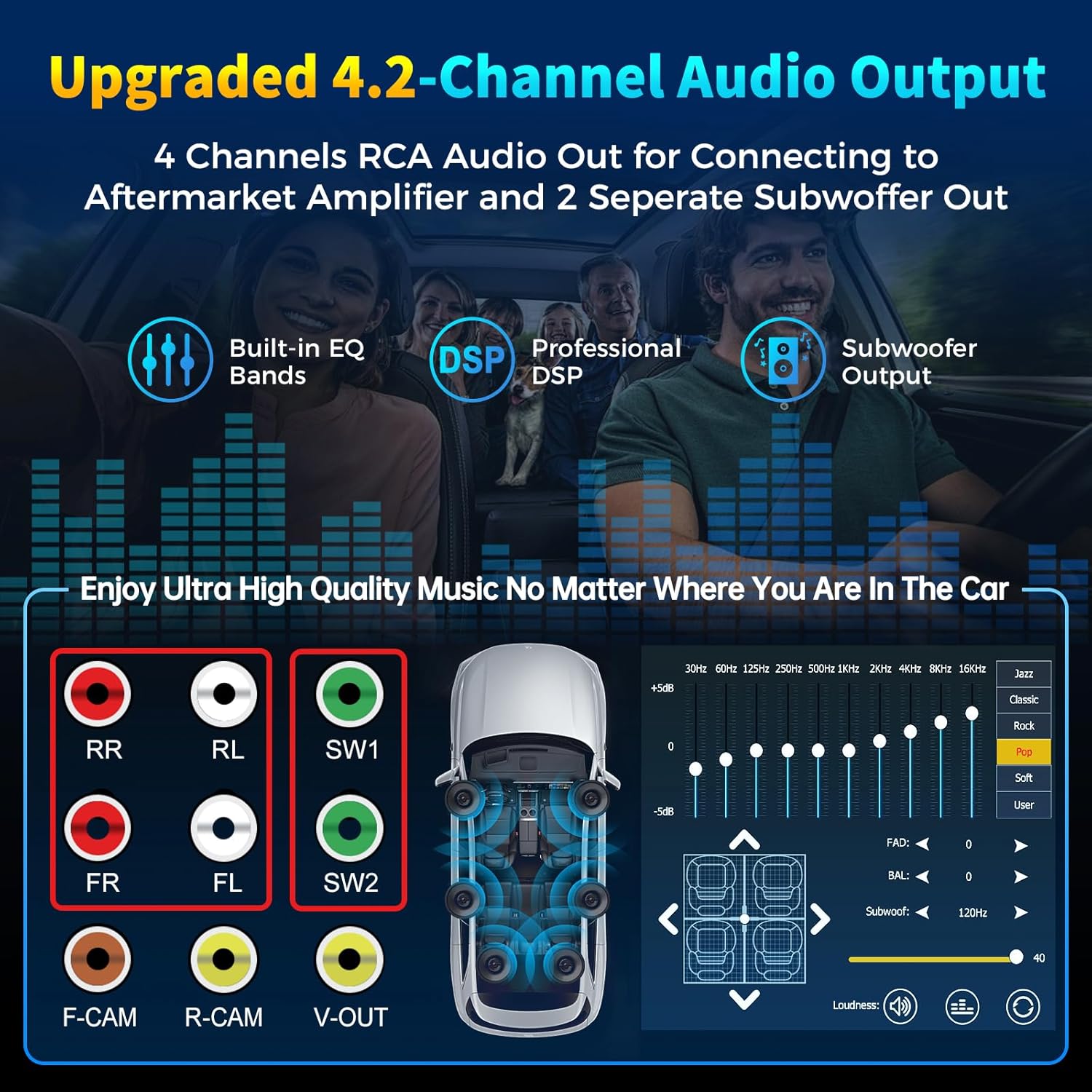
Image: Diagram illustrating the 4-channel RCA audio outputs and 2 subwoofer outputs on the back of the stereo, alongside a screen capture of the 10-band equalizer settings for sound customization.
5. HD QLED Touchscreen and MirrorLink
The 7-inch QLED screen offers high-definition visuals and supports MirrorLink for screen mirroring.
- Рад са екраном осетљивим на додир: Navigate menus and control functions by touching the screen.
- МиррорЛинк: Connect your iOS or Android phone via USB to mirror its screen content (e.g., Google Maps, Spotify, YouTube) onto the stereo display.

Image: An illustration detailing the layers of the QLED HD screen, emphasizing its 1280x720 resolution and touch capabilities, comparing it to other screens.
6. Camera Functionality (Rear and Front View)
The stereo supports both rear and front view cameras, automatically switching to the rear view при кретању уназад.
- When the vehicle is shifted into reverse, the screen will automatically display the rear camera feed with parking guidelines.
- The included HD night vision camera provides a 170° ultra-wide viewing angle and is waterproof.
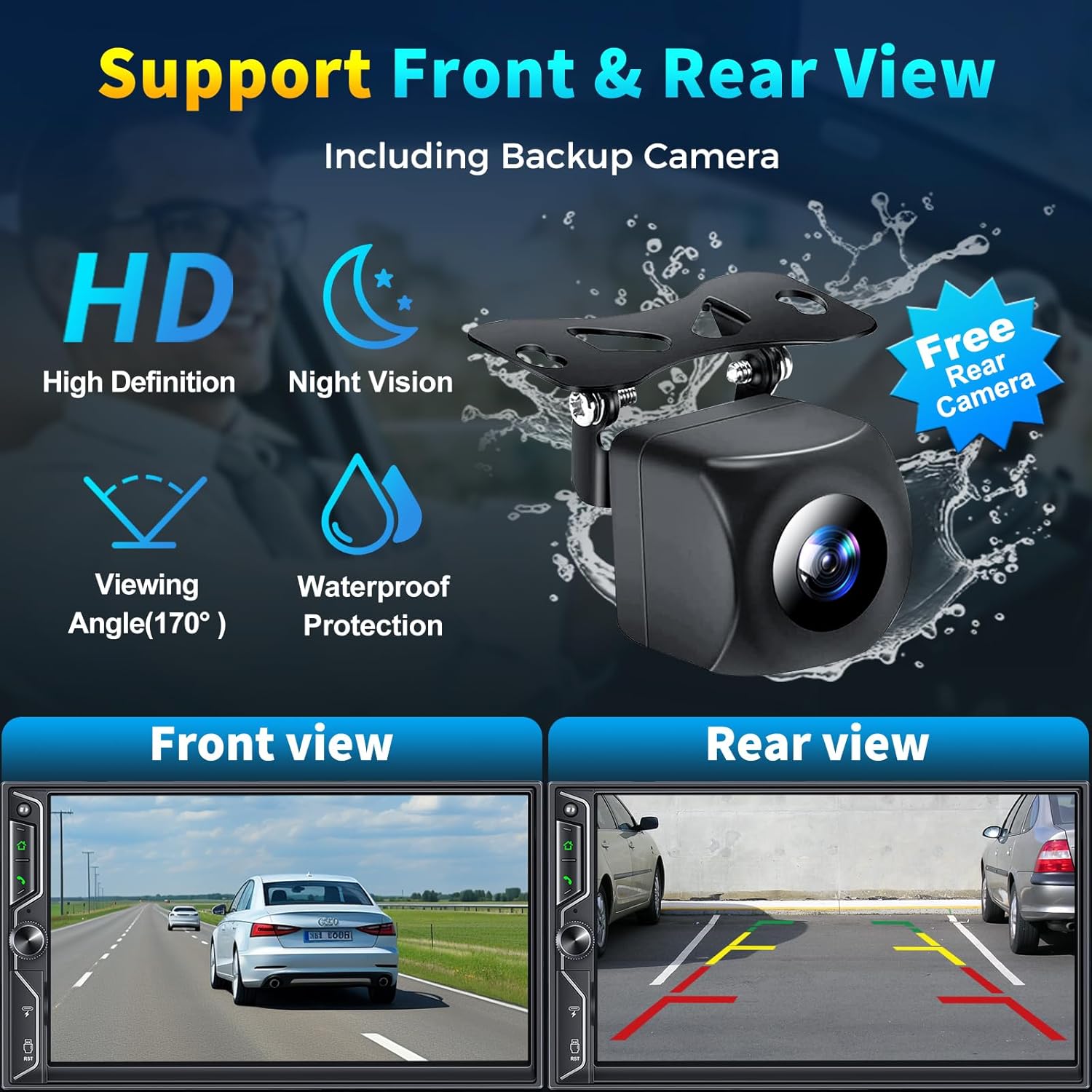
Image: A graphic demonstrating the car stereo's support for front and rear view cameras, showing example views from both perspectives and an image of the included HD night vision backup camera.
7. АМ/ФМ радио
Access the "Radio" application to tune into your favorite AM/FM stations.
- Користите функцију скенирања да бисте пронашли доступне станице.
- Save preferred stations to presets for quick access.
8. Паметно гласовно управљање
Utilize your smartphone's voice assistant (Siri, Google Assistant) through the car stereo for hands-free operation.
- Activate your voice assistant via the stereo's interface or a dedicated button (if available).
- Issue commands for navigation, making calls, playing music, and more.
9. Управљање воланом
If your vehicle supports it, you can connect the stereo to your steering wheel controls for convenient operation without taking your hands off the wheel.
- Refer to your vehicle's manual and the stereo's wiring diagram for proper connection.
- Configuration may be required in the stereo's settings menu to map steering wheel buttons.
10. USB Playback and Charging
The unit includes USB ports for media playback and charging your devices.
- Insert a USB flash drive into the designated port to play audio or video files.
- The USB port can also be used to charge compatible smartphones.
Званични видео производа
Video: An official product video demonstrating the SJoyBring Double Din Car Stereo's features, including its design, smart chip, independent Bluetooth module, audio outputs, QLED screen, CarPlay, Android Auto, voice control, steering wheel control, radio, charging, and MirrorLink capabilities.
Одржавање
- Чишћење екрана: Користите меку крпу која не оставља влакна да нежно обришете QLED екран осетљив на додир. Избегавајте абразивна средства за чишћење или раствараче.
- Генерално чишћење: Keep the unit free from dust and debris. Use a dry cloth for exterior cleaning.
- Ажурирања софтвера: Periodically check the SJoyBring official website or contact customer support for any available software or firmware updates to ensure optimal performance and compatibility.
- Инспекција каблова: Редовно проверавајте све повезане каблове да ли имају знакова хабања или оштећења.
Решавање проблема
| Проблем | Могући узрок | Решење |
|---|---|---|
| Но Повер | Неисправно ожичење; Прегорели осигурач; Проблем са напајањем возила. | Check power connections (ACC, B+); Inspect vehicle fuses; Consult a professional installer. |
| Нема звука | Speaker wiring incorrect; Volume too low; Mute function active; Ampпитање лифиера. | Verify speaker connections; Increase volume; Check mute status; Ensure external amplifier is powered (if applicable). |
| Блуетоотх се не повезује | Bluetooth off on phone/stereo; Incorrect pairing; Interference. | Ensure Bluetooth is on; Delete previous pairings and re-pair; Move phone closer to unit. |
| CarPlay/Android Auto не ради | Phone not compatible; Incorrect connection; Software glitch. | Ensure phone is compatible and updated; Reconnect wirelessly or via USB (for MirrorLink); Restart phone and stereo. |
| Задња камера се не приказује | Camera wiring incorrect; Reverse trigger wire not connected. | Check camera power and video input connections; Verify reverse trigger wire connection. |
| Екран осетљив на додир не реагује | Temporary software issue; Screen damage. | Perform a soft reset using the RST button; If issue persists, contact support. |
If you encounter issues not listed here or if the suggested solutions do not resolve the problem, please contact SJoyBring customer support for further assistance.
Спецификације
| Феатуре | Детаљ |
|---|---|
| Бранд | СЈОИБРИНГ |
| Број модела | 7-Inch Double Din Car Stereo |
| Величина екрана | 7-Inch QLED HD Touchscreen |
| Резолуција екрана | 1280 к 720 |
| Video Playback Support | Up to 1920 x 1080P |
| Технологија повезивања | Auxiliary, Bluetooth, Wi-Fi, USB |
| Блуетоотх верзија | 5.3 |
| Аудио излазни канали | 4.2 (4 Channels RCA Audio Out, 2 Subwoofer Out) |
| Излазна снага | 240 Ваттс |
| Компатибилни уређаји | Smartphone (iOS & Android) |
| Контролни метод | App, Remote, Touch, Steering Wheel Control |
| Уграђени медији | Car stereo, Backup camera |
| Тежина артикла | 2.64 фунти |
Гаранција и подршка
The SJoyBring 7-Inch Double Din Car Stereo comes with a 1-годишња гаранција од дана куповине.
For warranty claims, technical assistance, or any inquiries, please contact SJoyBring customer support. You can also visit the official SJoyBring store for more information and resources:
Ask a question about this manual
Ask about setup, troubleshooting, compatibility, parts, safety, or missing instructions. Manuals+ will review the question and use this page’s manual context to help answer it.