
ACTi A422
ACTi A422 4MP Outdoor Network Bullet Camera User Manual
Model: A422 | Brand: ACTi
Увод
This manual provides comprehensive instructions for the installation, operation, and maintenance of your ACTi A422 4MP Outdoor Network Bullet Camera. Please read this manual thoroughly before using the product to ensure proper setup and functionality. The ACTi A422 is designed for secure monitoring of outdoor environments, featuring high-resolution video capture, night vision capabilities, and advanced analytics.
Безбедносне информације
- Ensure all power connections comply with local electrical codes.
- Do not expose the camera to extreme temperatures or humidity beyond its specified operating conditions.
- Avoid direct exposure of the lens to strong light sources for extended periods.
- Користите само додатну опрему коју је одредио произвођач.
- Искључите напајање пре него што извршите било какве поступке одржавања или инсталације.
- The camera enclosure is IP68 and IK10 rated for outdoor use and vandalism resistance; however, avoid intentional physical damage.
Садржај пакета
Проверите да ли су све ставке присутне у пакету:
- ACTi A422 4MP Outdoor Network Bullet Camera (1 unit)
- Монтажни прибор (вијци, анкери)
- Водич за брзи почетак
- Комплет водоотпорних конектора
Производ је завршенview
The ACTi A422 is a robust bullet-style network camera designed for outdoor surveillance. It features a durable metal enclosure and advanced imaging capabilities.
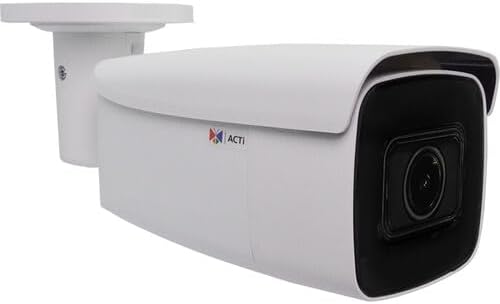
Figure 1: ACTi A422 4MP Outdoor Network Bullet Camera. This image displays the white bullet camera with its integrated mounting bracket, showcasing the main camera body and the dark lens housing.
Кључне компоненте:
- Објектив камере: 2.7-13.5mm varifocal lens with 102.8 to 32.4° horizontal field of view.
- ИР ЛЕД диоде: Three infrared LEDs for night vision up to 279 feet.
- Носач: Integrated for wall mounting.
- Етхернет порт: RJ-45 port for network and Power over Ethernet (PoE) connection.
- Аудио улаз/излаз: За двосмерну аудио комуникацију.
- Утор за мицроСД картицу: Supports Kingston or SanDisk microSD cards up to 256GB for local storage.
- Дугме за ресетовање: За ресетовање на фабричка подешавања.
Сетуп
1. Монтажа камере
- Изаберите локацију: Select a suitable wall or surface for mounting, ensuring a clear field of view and access to network cabling.
- Избушене рупе: Use the mounting template (if provided) to mark and drill pilot holes for the mounting screws.
- Обезбедите камеру: Attach the camera's mounting bracket to the surface using the provided screws and anchors.
- Подесите угао: Loosen the adjustment screws on the bracket to position the camera for the desired viewing angle, then tighten securely.
2. Мрежна и електрична веза
The ACTi A422 supports Power over Ethernet (PoE), simplifying installation by delivering both power and data through a single Ethernet cable.
- Повежите Етернет кабл: Connect one end of an Ethernet cable to the camera's RJ-45 port. Use the waterproof connector kit for outdoor installations to protect the connection.
- Connect to PoE Switch/Injector: Повежите други крај Етернет кабла на мрежни прекидач или ПоЕ инјектор који подржава ПоЕ.
- Потврдите везу: Once connected, the camera will power on and attempt to obtain an IP address from your network's DHCP server.
3. Почетна конфигурација
Приступите камери web interface for initial setup and configuration.
- Откријте камеру: Use ACTi's IP Utility software or a network scanner to find the camera's IP address on your network.
- Приступ Web Интерфејс: Отвори а web browser (Internet Explorer 11, Chrome, Edge, or Safari are compatible) and enter the camera's IP address in the address bar.
- Пријава: Enter the default username and password (refer to the Quick Start Guide for default credentials). It is highly recommended to change the default password immediately for security.
- Основна подешавања: Configure network settings (if not using DHCP), date/time, and user accounts.
Управљање камером
Video and Image Settings
- Резолуција: The camera supports up to 2688 x 1520 resolution at 30 fps.
- Компресија: Utilizes H.265 video compression for efficient storage and bandwidth usage.
- Побољшања слике: Adjust white balance, brightness, contrast, sharpness, saturation, backlight compensation (BLC), and strong light suppression (HLC) via the web interface. The camera also features 150 dB Wide Dynamic Range (WDR) and 2D-DNR/3D-DNR for clear images in challenging lighting.
- Corridor Mode: Supports 90, 180, and 270° rotation for optimized vertical viewинг области.
- Заштита приватности: Configure up to four configurable regions to mask out sensitive areas from surveillance.
Нигхт Висион
The camera is equipped with three IR LEDs and an IR cut filter for automatic day/night switching, providing clear surveillance up to 279 feet in low-light or no-light conditions.
Deep Learning Analytics
The ACTi A422 includes built-in deep learning analytics for enhanced monitoring:
- Фаце Детецтион
- Tampеринг Детецтион
- Object-based Motion Detection
- Object Line Crossing Detection
- Object Enter Area Detection
- People Line Crossing Detection
- People Enter Area Detection
- Vehicle Line Crossing Detection
- Vehicle Enter Area Detection
These analytics can be configured to trigger alarms or recordings based on specific events within the camera's field of view.
Audio and Storage
- Двосмерни аудио: Connect external microphone and speaker to enable two-way audio communication.
- Локално складиште: Insert a Kingston or SanDisk microSD card (up to 256GB) into the onboard slot for local video recording.
Систем Интегратион
The camera is fully compatible with ACTi software and complies with ONVIF profiles G, M, S, and T, ensuring broad compatibility with various surveillance devices and Network Video Recorders (NVRs).
Одржавање
- Чишћење: Редовно чистите сочиво и кућиште камере меком крпомamp крпу. Избегавајте абразивна средства за чишћење или раствараче.
- Надоградње фирмвера: Periodically check the ACTi website for firmware updates. Auto firmware upgrades are supported. Keeping the firmware updated ensures optimal performance and security.
- Инспекција каблова: Периодично проверавајте све каблове и прикључке на хабање или оштећења, посебно код спољних инсталација.
Решавање проблема
| Проблем | Могући узрок | Решење |
|---|---|---|
| Нема напајања/Камера се не укључује | No PoE connection; faulty Ethernet cable; PoE switch issue. | Verify Ethernet cable connection; ensure PoE switch/injector is active; try a different port or cable. |
| Није могуће приступити web интерфејс | Нетачна IP адреса; проблем са мрежном везом; блокирање заштитног зида (фајервола). | Confirm IP address using ACTi IP Utility; check network cables; temporarily disable firewall for testing; ensure browser compatibility. |
| Лош квалитет слике | Dirty lens; improper focus; lighting conditions; incorrect image settings. | Clean the lens; adjust focus via web interface; configure image enhancement settings (WDR, BLC); ensure adequate lighting. |
| Analytics not triggering | Incorrect analytics configuration; environmental factors. | Review and adjust analytics settings (detection zones, sensitivity); ensure clear view without obstructions. |
Спецификације
- Модел: А422
- Сензор слике: 1/2.7" CMOS сензор са прогресивним скенирањем
- Видео резолуција: 2688 x 1520 (4MP) at 30 fps
- Објектив: 2.7-13.5мм Варифоцал
- Поље оф View (Horizontal): 102.8° до 32.4°
- Ноћни вид: 3 IR LEDs, up to 279 ft (85m)
- Минимално осветљење: 0.005 lux (color), 0 lux (IR on)
- Видео компресија: Х.265, Х.264, МЈПЕГ
- аудио: Two-way (input/output)
- Складиштење: MicroSD card slot (up to 256GB, Kingston/SanDisk recommended)
- Мрежни интерфејс: RJ-45 Ethernet (10/100 Mbps)
- Снага: Напајање преко Етхернета (ПоЕ)
- Заштита од уласка: IP68-rated (Dust and Water Resistant)
- Vandal Resistance: IK10-rated
- Радна температура: -40°Ц до 60°Ц (-40°Ф до 140°Ф)
- Димензије: 6.7 к 2.8 к 2.8 инча (170 к 71 к 71 мм)
- Тежина: 1.2 фунте (0.54 кг)
- ONVIF Compliance: Проfiles G, M, S, T
- аналитика: Face detection, tampering detection, object-based motion detection, object/people/vehicle line crossing/enter area detection.
Гаранција и подршка
For warranty information and technical support, please refer to the official ACTi website or contact your authorized ACTi dealer. Keep your purchase receipt as proof of purchase for warranty claims.
Ask a question about this manual
Ask about setup, troubleshooting, compatibility, parts, safety, or missing instructions. Manuals+ will review the question and use this page’s manual context to help answer it.