
Bluesound NODE ICON
Bluesound Node ICON Reference Multi-Room High Resolution Wireless Music Streamer
Model: NODE ICON | Brand: Bluesound
Производ је завршенview
The Bluesound Node ICON is a high-resolution wireless music streamer designed to deliver an exceptional audio experience across multiple rooms. It features a meticulously crafted Dual-Mono DAC design with two ESS SABRE ES9039Q2M DACs, ensuring unparalleled dynamic range, ultra-low distortion, and superior resolution. The device integrates advanced technologies like MQA Labs' QRONO d2a for precise digital-to-analogue conversion and THX AAA for lifelike headphone listening. Its sleek design, intuitive controls, and comprehensive connectivity options make it a versatile centerpiece for any modern audio setup.

Фронт view of the Bluesound Node ICON, showcasing its sleek black finish and integrated display.
Водич за подешавање
1. Распакивање и почетно постављање
Carefully remove all components from the packaging. Ensure the Node ICON is placed on a stable, flat surface with adequate ventilation. Avoid placing it near heat sources or in direct sunlight.
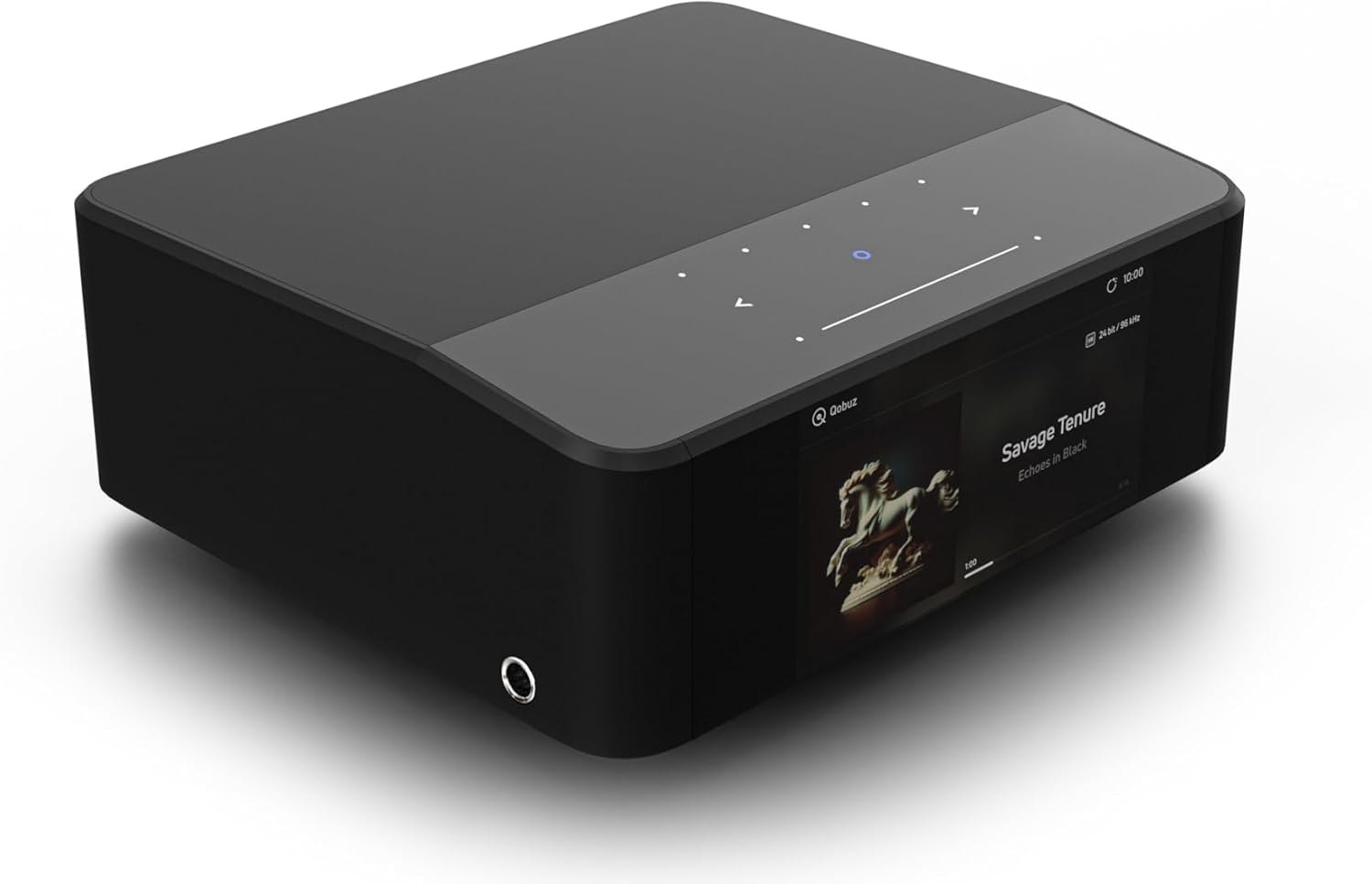
Англед view of the Node ICON, highlighting its compact and modern design.
2. Повезивање на напајање
Connect the provided 120V or 230V AC power cord to the AC Power input on the rear panel of the Node ICON. Plug the other end into a wall outlet.
3. Аудио везе
The Node ICON offers various audio output options:
- Analog Audio Out (RCA): Use the provided Stereo RCA to RCA cable to connect to your amplifier or receiver's analog input.
- Balanced Audio Out (XLR): For professional-grade connections, use XLR cables to connect to compatible ampлифиерс.
- Коаксијални излаз: Connect to a digital coaxial input on your DAC or ampлифиер.
- Оптички излаз: Connect to a digital optical input on your DAC or ampлифиер.
- Излаз за сабвуфер: Connect to a powered subwoofer for enhanced bass.
For audio input, the Node ICON features:
- Analog In (RCA): Connect external analog sources like a turntable (with a phono preamp) or CD player.
- Оптички улаз: Connect digital optical sources.
- USB-C (Audio In): Connect a computer or other USB audio source.
- ХДМИ еАРЦ: Connect to your TV's HDMI eARC port for high-resolution TV audio.
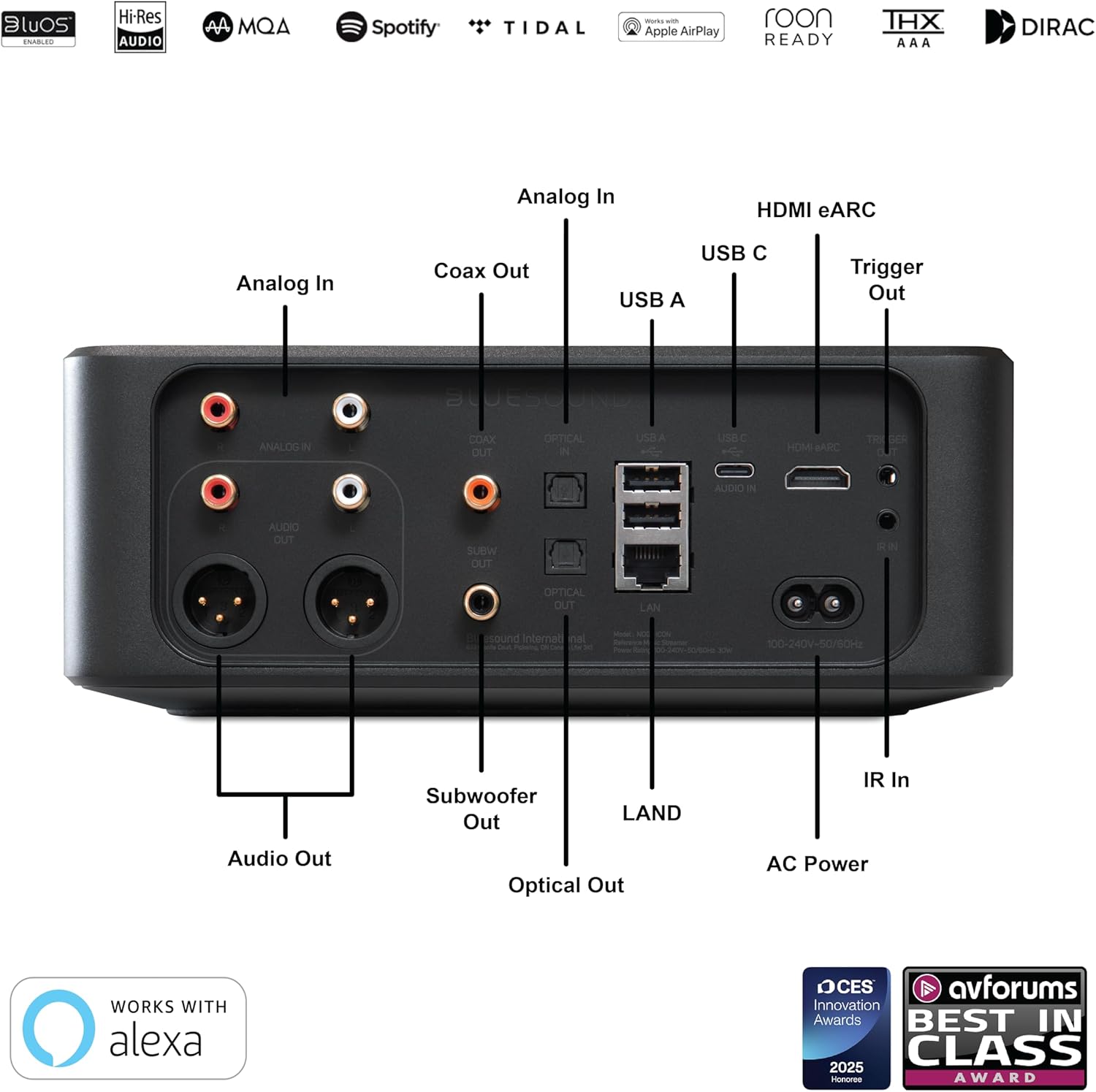
Детаљно view of the rear panel connections, including analog, digital, and network ports.
4. Мрежна веза
The Node ICON can connect to your network via Wi-Fi or Ethernet.
- Ви-Фи: The device supports dual-band Wi-Fi for stable wireless streaming. Follow the on-screen prompts or BluOS app instructions for Wi-Fi setup.
- Етхернет (ЛАН): For the most stable connection, use the provided Ethernet cable to connect the Node ICON to your router or network switch.
Упутство за употребу
1. BluOS Controller App
The primary method for controlling your Node ICON is through the BluOS Controller app, available for iOS, Android, Windows, and macOS. Download the app from your device's app store or the Bluesound webсајту.
- Покрените апликацију: Open the BluOS Controller app on your smartphone, tablet, or computer.
- Discover Player: The app will automatically search for available Bluesound players on your network. Select your Node ICON.
- Чаробњак за подешавање: Follow the on-screen setup wizard to configure network settings, add music services, and customize your preferences.
- Стримовање музике: Access popular streaming services (e.g., Spotify Connect, Tidal Connect, Qobuz), internet radio, and your personal digital music libraries directly from the app.
- Аудио за више соба: Group multiple Bluesound players together to create a seamless multi-room music system, playing the same music everywhere or different music in different rooms.

The BluOS Controller app interface, demonstrating multi-room control and music playback.
2. On-Device Controls and Display
The Node ICON features a 5-inch full-color HD display and touch-sensitive controls on its top panel for basic operations.
- Приказ: Shows album art, track information, time, and device status.
- Тоуцх Панел: Control playback (play/pause, skip tracks), adjust volume, and navigate menus directly on the device. The panel is motion-activated.

The Node ICON's front display showing album art and track information during playback.
3. Headphone Listening
Connect your high-performance headphones to the 1/4" headphone jack located on the side of the unit. The integrated THX AAA technology ensures a lifelike and high-fidelity listening experience with remarkably low noise and distortion.

The Node ICON with headphones connected, ready for a personal listening session.
4. Dirac Live Room Correction (Optional Upgrade)
The Node ICON is compatible with Dirac Live room correction software, available as an upgrade directly from Dirac. This technology helps to optimize your audio system's performance by correcting acoustic imperfections in your listening environment. A calibration kit with a high-sensitivity microphone is required for this feature.
Одржавање
To ensure the longevity and optimal performance of your Bluesound Node ICON, follow these maintenance guidelines:
- Чишћење: Use a soft, dry cloth to clean the exterior surfaces. For the display, use a microfiber cloth specifically designed for electronics. Avoid abrasive cleaners, solvents, or spray directly onto the unit.
- вентилација: Уверите се да отвори за вентилацију нису блокирани. Правилан проток ваздуха је кључан за спречавање прегревања.
- Искључивање: Ако се уређај неће користити дуже време, искључите га из утичнице.
- Ажурирања софтвера: Regularly check for and install software updates via the BluOS app to ensure the best performance and access to new features.
Решавање проблема
If you encounter issues with your Node ICON, refer to the following common troubleshooting steps:
| Проблем | Могући узрок / решење |
|---|---|
| No power / Unit unresponsive |
|
| Нема излаза звука |
|
| Cannot connect to Wi-Fi / Network issues |
|
| BluOS app not finding player |
|
Спецификације
| Феатуре | Детаљ |
|---|---|
| Бранд | Блуесоунд |
| Назив модела | ИКОНА ЧВОЛА |
| Тежина артикла | 6.61 фунти (3000 грама) |
| Димензије производа | 8.7 к 7.6 к 3.3 инча |
| Боја | Црно |
| Технологија повезивања | Блутут, Ви-Фи, УСБ, Етернет, ХДМИ |
| Типови конектора | HDMI eARC, Toslink Optical, RCA Analog, USB Type C (PC input) |
| Резолуција | 1080p (for display) |
| Подржане Интернет услуге | Spotify Connect, Tidal Connect, Dirac Live Ready, Roon Ready |
| Тип контролера | App Control, Button Control |
| ДАЦ | Dual-Mono ESS SABRE ES9039Q2M DACs |
| Headphone Technology | THX AAA |
| ДСД репродукција | Supported (via ES9826 SABRE ADC) |
Шта је у кутији
The Bluesound Node ICON package includes the following items:
- Bluesound Node ICON Streamer
- 120В АЦ кабл за напајање
- 230В АЦ кабл за напајање
- Етхернет Цабле
- Стерео РЦА на РЦА кабл
- Водич за брзо подешавање
Званични видео снимци производа
Званичник прекоview video from Bluesound US, showcasing the key features and design of the Node ICON Reference Multi-Room Music Streamer.
Гаранција и подршка
For warranty information, product registration, and technical support, please visit the official Bluesound webсајт или контактирајте њихову корисничку службу. Сачувајте доказ о куповини за потребе гаранције.
Онлине ресурси: ввв.блуесоунд.цом
Служба за кориснике: Refer to the contact information provided in your product's quick setup guide or on the Bluesound webсајту.
Ask a question about this manual
Ask about setup, troubleshooting, compatibility, parts, safety, or missing instructions. Manuals+ will review the question and use this page’s manual context to help answer it.