
Увод
Thank you for choosing the MARK ADLER Xeno 7.6 Electric Dual Motor Desk Frame. This manual provides detailed instructions for the assembly, operation, maintenance, and troubleshooting of your new height-adjustable desk frame. Please read this manual carefully before installation and use to ensure proper function and safety.
Безбедносне информације
Да бисте спречили повреде или оштећење производа, молимо вас да се придржавате следећих безбедносних упутстава:
- Немојте прекорачити максималну носивост од 80 кг (176 лбс).
- Ensure all cables are properly routed and secured to avoid entanglement during height adjustments.
- Држите децу и кућне љубимце даље од стола током рада.
- Use the anti-collision system with caution to prevent damage or injury.
- Do not place hands or other body parts near moving parts of the frame.
- Only use the desk frame indoors in a dry environment.
- If any unusual sounds or movements occur, immediately stop operation and consult the troubleshooting section or contact support.
Подешавање и монтажа
The MARK ADLER Xeno 7.6 desk frame requires assembly. It is recommended that two people assemble the desk frame for ease and safety.
Садржај пакета
Before starting assembly, verify that all components are present. The package includes the electric dual motor desk frame, control panel, and necessary mounting hardware. A desktop is not included and must be purchased separately.
Монтажни кораци
- Распакујте компоненте: Пажљиво извадите све делове из паковања и положите их на чисту, меку површину како бисте спречили огреботине.
- Assemble Legs and Crossbars: Attach the lifting columns to the feet and then connect the crossbars. Ensure all screws are tightened securely.
- Install Motors and Control Box: Mount the dual motors and the control box according to the diagrams. Connect all motor and power cables to the control box.
- Прикључите контролну таблу: Secure the control panel to the desired location on the desk frame, typically on the front edge.
- Монтирај радну површину: Place your chosen desktop (120-150 cm width recommended) onto the assembled frame. Secure the desktop to the frame using appropriate screws. The frame supports both left and right-hand L-shaped configurations.
- Управљање кабловима: Route all cables neatly using cable ties or clips to prevent them from interfering with the desk's movement.
- Приложите додатну опрему: Install the included headphone hook and bag holder as desired.

Image: MARK ADLER Xeno 7.6 Desk Frame layout showing dimensions and components. The frame is adjustable from 72 cm to 118 cm in height, and accommodates desktops from 105 cm to 150 cm in width on the main section, and 108 cm on the return section, with a depth of 58 cm.
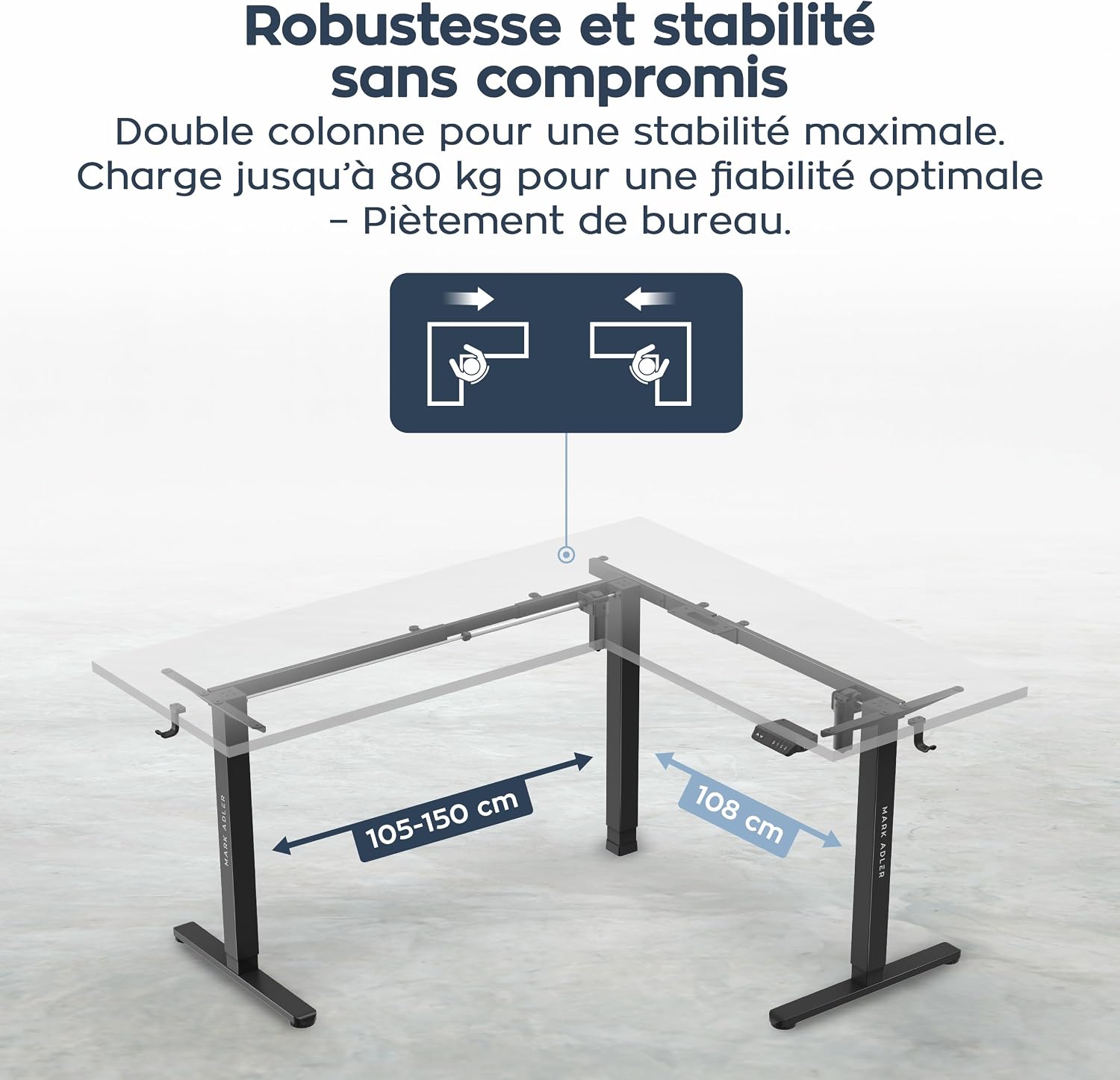
Image: Diagram illustrating the robust and stable construction of the MARK ADLER Xeno 7.6 desk frame, highlighting its dual column design and adjustable width for different desktop sizes.
Упутство за употребу
The MARK ADLER Xeno 7.6 desk frame features an intuitive control panel for easy height adjustment and memory functions.
Функције контролне табле

Image: Close-up of the MARK ADLER Xeno 7.6 control panel, showing the up/down arrows, memory buttons (1, 2, 3), and integrated USB and USB-C charging ports.
- Подешавање висине: Користите ▲ (Up) и ▼ (Down) arrow buttons to manually adjust the desk height. The height range is from 72 cm to 118 cm.
- Меморијска подешавања: The control panel has three programmable memory positions (1, 2, 3).
- To save a height: Adjust the desk to your desired height. Press the "S" button, then press one of the number buttons (1, 2, или 3) within 3 seconds. The display will show "S-" followed by the number to confirm.
- To recall a saved height: Simply press the corresponding number button (1, 2, или 3). Сто ће се аутоматски померити на сачувану позицију.
- УСБ портови за пуњење: The integrated USB and USB-C ports allow you to conveniently charge your devices directly from the desk.

Image: Graphic illustrating the height adjustment range of the MARK ADLER Xeno 7.6 desk frame, from 72 cm to 118 cm, emphasizing the smooth transition between sitting and standing positions.
Одржавање
Regular maintenance ensures the longevity and optimal performance of your MARK ADLER Xeno 7.6 desk frame.
- Чишћење: Wipe the desk frame with a soft, damp крпом. Избегавајте абразивна средства за чишћење или раствараче који би могли оштетити завршну обраду.
- Провера кабла: Periodically inspect all cables for wear or damage. Ensure they are securely connected and not pinched.
- Затегнутост завртња: Occasionally check and tighten any loose screws, especially after initial assembly and a few weeks of use.
- подмазивање: The lifting columns are generally maintenance-free. Do not apply lubricants unless specifically instructed by the manufacturer.
Решавање проблема
If you encounter issues with your desk frame, refer to the following common problems and solutions.
| Проблем | Могући узрок | Решење |
|---|---|---|
| Радни сто се не помера. | Power cable disconnected, control box error, overload. | Check power connection. Unplug and replug the power cord. Reduce load if exceeding 80 kg. Perform a reset (see below). |
| Uneven movement or noise. | Loose connections, uneven load, obstruction. | Check all screws and connections. Ensure weight is evenly distributed. Remove any obstructions. |
| Memory function not working. | Memory not properly set, power interruption. | Re-program the memory positions. Perform a reset. |
| Приказан је код грешке. | Specific system error. | Refer to the specific error code in the full manual (if available) or contact customer support. Often, a reset can resolve temporary errors. |
Поступак ресетовања
If the desk is not functioning correctly, a reset may resolve the issue.
- Искључите кабл за напајање из зидне утичнице.
- Сачекајте најмање 30 секунди.
- Укључите кабл за напајање назад у зидну утичницу.
- Притисните и држите ▼ (Down) button until the desk reaches its lowest position and slightly retracts, then stops. This indicates a successful reset.
Спецификације
| Феатуре | Детаљ |
|---|---|
| Бранд | МАРК АДЛЕР |
| Број модела | Ксено 7.6 |
| Деск Десигн | Computer Desk (L-shaped frame) |
| Боја | Црно |
| Материјал | Metal (Frame) |
| Опсег подешавања висине | 72 cm - 118 cm (28.3 inches - 46.5 inches) |
| Recommended Desktop Width | 120 cm - 150 cm (main section) |
| Дубина | 58 цм (22.8 инча) |
| Максимални капацитет оптерећења | 80 кг (176 лбс) |
| Мотори | Двомоторни систем |
| Меморијске позиције | 3 програмабилне позиције |
| Посебне карактеристике | Electric height adjustment, Ergonomic, Memory function, USB & USB-C ports, Headphone hook, Bag holder |
| Обавезна монтажа | Да (препоручују се 2 особе) |
| Земља порекла | Кина |
Гаранција
The MARK ADLER Xeno 7.6 Electric Dual Motor Desk Frame comes with a Ограничена гаранција. Please refer to the warranty card included with your product or contact MARK ADLER customer support for specific terms and conditions. This warranty typically covers manufacturing defects and malfunctions under normal use.
Подршка
For further assistance, technical support, or warranty claims, please contact MARK ADLER customer service.
- Подршка на мрежи: Visit the official MARK ADLER webсајт за често постављана питања, додатне ресурсе и контакт форме.
- Емаил: Погледајте паковање производа или званична упутства webсајт за адресу е-поште за корисничку подршку.
- Телефон: Погледајте паковање производа или званична упутства website for customer support phone numbers.
When contacting support, please have your product model number (Xeno 7.6) and purchase information readily available.