
1. Увод
The IMIKI FRAME LITE ST2 is a versatile smartwatch designed for daily use, offering a blend of style and functionality. It features a 1.96-inch IPS display, Bluetooth connectivity, and various health monitoring capabilities. This manual provides essential information for operating and maintaining your device.
2. Садржај пакета
Молимо вас да проверите да ли су све ставке присутне у вашем пакету:
- IMIKI FRAME LITE ST2 Smartwatch
- Магнетни кабл за пуњење
- Упутство за употребу
3. Девице Оверview
Familiarize yourself with the main components of your smartwatch.
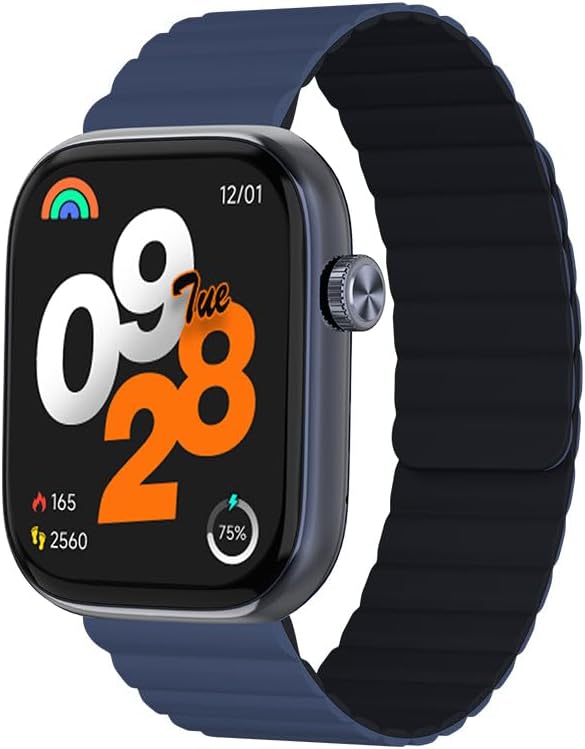
Слика 1: Фронт view of the IMIKI FRAME LITE ST2 Smartwatch, displaying the time, date, and activity metrics on its 1.96-inch IPS screen. The watch features a blue case and a blue magnetic strap.

Слика 2: Сиде view of the IMIKI FRAME LITE ST2 Smartwatch, highlighting its slim profile and the integrated crown button for navigation and control.
4. Подешавање
4.1 Пуњење паметног сата
Before initial use, fully charge your IMIKI FRAME LITE ST2 Smartwatch.
- Повежите магнетни кабл за пуњење са прикључцима за пуњење на задњој страни паметног сата.
- Прикључите УСБ крај кабла у стандардни УСБ адаптер за напајање (није укључен) или УСБ порт рачунара.
- The watch display will indicate charging status. A full charge takes approximately 2 hours.
A fully charged 250 mAh battery provides up to 15 days of typical use or 5 days of intensive use.
4.2 Инсталирање пратеће апликације
To unlock the full features of your smartwatch, download and install the companion application on your smartphone.
- Scan the QR code provided in the quick start guide or search for the official IMIKI app in the Apple App Store (for iOS) or Google Play Store (for Android).
- Инсталирајте апликацију на паметном телефону.
- Follow the on-screen instructions to create an account and set up your profile.
4.3 Упаривање са вашим паметним телефоном
Ensure Bluetooth is enabled on your smartphone and the smartwatch is sufficiently charged.
- Open the IMIKI companion app on your smartphone.
- Navigate to the 'Device' or 'Add Device' section within the app.
- The app will search for available devices. Select 'IMIKI FRAME LITE ST2' from the list.
- Потврдите захтев за упаривање и на паметном телефону и на паметном сату ако се то од вас затражи.
- Once paired, the smartwatch will synchronize data with your phone.
5. Управљање паметним сатом
5.1 Основна навигација
- Екран на додир: Превуците прстом лево, десно, горе или доле да бисте се кретали кроз меније и обавештења. Додирните да бисте изабрали ставке.
- Бочно дугме/круница: Press to wake the screen, return to the home screen, or access the app list. Rotate (if applicable) to scroll through lists.
5.2 Управљање позивима
With Bluetooth 5.3 connectivity, you can manage calls directly from your smartwatch when paired with your smartphone.
- Одговарање на позиве: Tap the green icon on the watch screen when an incoming call is displayed.
- Одбијање позива: Tap the red icon to reject an incoming call.
- Гласовни асистент: Access your smartphone's voice assistant directly from the watch for hands-free commands.
5.3 Health and Fitness Monitoring
The IMIKI FRAME LITE ST2 is equipped with sensors to track your health and fitness activities.
- Мониторинг срчане фреквенције: The optical sensor continuously monitors your heart rate. View подаци у реалном времену на сату или у апликацији.
- Мерење кисеоника у крви (SpO2): Measure your blood oxygen saturation levels. Ensure the watch is worn snugly on your wrist for accurate readings.
- Режими вежбања: Choose from 105 supported workout modes to track specific activities. The watch records statistics such as duration, calories burned, and heart rate during exercise.
- Праћење спавања: Monitor your sleep patterns, including deep sleep, light sleep, and wake times.
НИКАДА Прилагодба
Personalize your smartwatch experience through the companion app.
- Лица за гледање: Select from a variety of watch faces or create custom ones using the app.
- Подешавања обавештења: Manage which app notifications appear on your smartwatch.
6. Одржавање
6.1 Чишћење
Regular cleaning helps maintain the smartwatch's appearance and functionality.
- Обришите екран и кућиште сата меком крпом која не оставља влакна.
- За тврдокорну прљавштину, благо дampИсперите крпу водом. Избегавајте употребу јаких хемикалија или абразивних материјала.
- Периодично чистите контакте за пуњење како бисте осигурали правилно пуњење.
6.2 Отпорност на воду
The IMIKI FRAME LITE ST2 has an IP68 water resistance rating, meaning it is protected against dust ingress and can withstand immersion in water up to 1.5 meters for 30 minutes. It is suitable for daily use, such as hand washing or light rain. However, it is not recommended for swimming, diving, or exposure to high-pressure water.
6.3 Складиштење
Када се не користи дуже време, чувајте паметни сат на хладном и сувом месту. Уверите се да је батерија напуњена како бисте спречили дубоко пражњење.
КСНУМКС. Решавање проблема
Ако наиђете на проблеме са паметним сатом, погледајте следећа уобичајена решења:
- Сат се не укључује: Уверите се да је сат потпуно напуњен. Повежите га са пуњачем најмање 10 минута.
- Не може се упарити са паметним телефоном:
- Уверите се да је Блуетоотх омогућен на вашем телефону.
- Уверите се да је сат у домету вашег телефона.
- Поново покрените и паметни сат и паметни телефон.
- Обришите Bluetooth кеш меморију на телефону (ако је применљиво).
- Нетачни здравствени подаци: Уверите се да сат чврсто приања на зглоб, не превише стегнут или превише лабав. Очистите сензор на полеђини сата.
- Обавештења се не приказују: Check notification settings in the companion app and on your smartphone. Ensure the app is running in the background.
- Екран не реагује: Try restarting the smartwatch by pressing and holding the side button for several seconds.
8. Спецификације
| Феатуре | Спецификација |
|---|---|
| Бранд | ИМИКИ |
| Назив модела | IMIKI FRAME LITE ST2 |
| Величина екрана | 1.96 инча |
| Дисплаи Типе | ИПС |
| Технологија повезивања | Блуетоотх 5.3 |
| Компатибилни уређаји | Smartphone (Android & iOS) |
| Капацитет батерије | 250 мАх |
| Типична употреба Трајање батерије | До 15 дана |
| Intensive Usage Battery Life | До 5 дана |
| Време пуњења | Отприлике 2 сата |
| Оцена водоотпорности | ИП68 |
| Мониторинг здравља | Blood Oxygen, Heart Rate |
| Режими вежбања | 105 |
| Тип траке | Магнетиц |
9. Гаранција и подршка
For warranty information and customer support, please refer to the warranty card included in your product packaging or visit the official IMIKI webсајт. Сачувајте рачун као доказ о куповини.
If you require further assistance or have questions not covered in this manual, please contact IMIKI customer service through their official channels.