
1. Увод
Thank you for choosing the Candy Wave 600 Built-in Microwave. This manual provides essential information for the safe and efficient operation, installation, and maintenance of your appliance. Please read these instructions carefully before using the microwave oven and keep them for future reference.
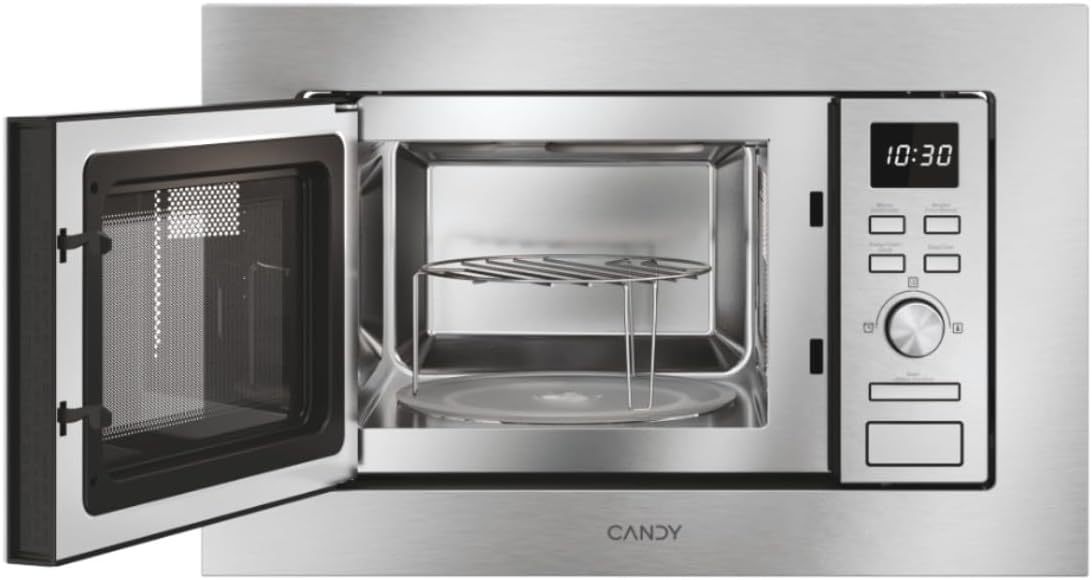
Слика 1: Предња страна view of the Candy Wave 600 Built-in Microwave.
2. Безбедносне информације
Увек се придржавајте основних мера предострожности приликом коришћења електричних уређаја како бисте смањили ризик од пожара, струјног удара, повреда особа или излагања прекомерној микроталасној енергији.
- Прочитајте сва упутства пре употребе уређаја.
- Не покушавајте да користите ову рерну са отвореним вратима јер то може довести до штетног излагања микроталасној енергији.
- Не загревајте течности или другу храну у затвореним посудама јер могу да експлодирају.
- Дозволите деци да користе пећницу без надзора само када су дата адекватна упутства како би дете могло да користи пећницу на безбедан начин и да разуме опасности од неправилне употребе.
- Немојте користити корозивне хемикалије или испарења у овом апарату.
- Ако су врата или заптивке на вратима оштећене, пећница не сме да се користи док је не поправи стручна особа.
- Уређај мора бити уземљен. Прикључите га само на правилно уземљену утичницу.
3. Подешавање и инсталација
Proper installation is crucial for the performance and safety of your microwave oven. This appliance is designed for built-in installation.
3.1 Распакивање
- Remove all packaging materials from inside the oven cavity and from the door.
- Проверите да ли на рерни има оштећења, као што су удубљења или поломљена врата. Не инсталирајте је ако је оштећена.
- Уверите се да је сва додатна опрема присутна: обртни тањир, носач обртног тањира и решетка за роштиљ.
3.2 Постављање и димензије
The microwave must be installed in a cabinet opening that meets the specified dimensions. Ensure adequate ventilation around the appliance.

Figure 2: Installation dimensions for the Candy Wave 600 Built-in Microwave.
- The cabinet opening should be 560mm wide and 362mm high.
- The microwave itself measures 59.5 cm (width) x 34.4 cm (depth) x 38.2 cm (height).
- Ensure a minimum depth of 500mm for the cabinet.
3.3 Електрични прикључак
- Connect the microwave to a properly earthed 230V AC power outlet.
- Немојте користити продужне каблове или вишеструке утичнице.
- The power cord should be easily accessible after installation.
3.4 Почетно чишћење
Пре прве употребе, обришите унутрашњост и спољашњост микроталасне пећницеamp cloth. Ensure the turntable and support are clean and correctly placed.

Слика 3: Унутрашњост view with turntable and grill rack.
4. Упутство за употребу
Your Candy Wave 600 microwave offers various functions for convenient cooking. Familiarize yourself with the control panel for optimal use.
4.1 Контролна табла прекоview
The microwave features an integrated screen and touch controls for easy operation. A rotary knob is used for setting time and selecting options.
4.2 Подешавање сата
- When the oven is plugged in, the display will show '0:00'.
- Press the clock button (usually indicated by a clock icon).
- Use the rotary knob to set the hour, then press the clock button again.
- Use the rotary knob to set the minutes, then press the clock button to confirm.
4.3 Microwave Cooking (Power Levels)
The microwave offers 5 power levels. To cook with microwave power:
- Ставите храну у рерну и затворите врата.
- Press the 'Microwave' button repeatedly to select the desired power level (e.g., P100 for 100% power).
- Користите ротационо дугме да подесите време кувања.
- Притисните дугме „Старт“ да бисте започели кување.
4.4 Функција роштиља
Функција роштиља је идеална за пржење и хрскање хране.
- Ставите храну на решетку роштиља (ако је предвиђена) директно на обртни тањир.
- Притисните дугме „Роштиљ“.
- Use the rotary knob to set the grilling time.
- Притисните дугме „Старт“.
4.5 Аутоматски програми кувања
The microwave features 7 automatic cooking programs for various food types. These programs automatically adjust cooking time and power.
- Press the 'Auto Menu' button.
- Use the rotary knob to select the desired program number.
- Enter the food weight (if prompted) using the rotary knob.
- Притисните „Старт“.
4.6 Easy Touch Controls
The Easy Touch controls allow you to select the food weight, and the microwave will automatically adjust the cooking time and power.
- Select the desired cooking function (e.g., Microwave).
- Press the 'Easy Touch' button (or similar icon).
- Use the rotary knob to input the food weight.
- Притисните „Старт“.
4.7 Start Express Function
The Start Express button provides quick cooking at maximum power.
- Press the 'Start Express' button once for 30 seconds of cooking at maximum power.
- Each subsequent press adds another 30 seconds.
4.8 Defrost Program
The defrost program thaws food based on weight.
- Притисните дугме „Одмрзавање“.
- Use the rotary knob to select the food weight.
- Press 'Start'. The oven will automatically calculate the defrosting time.
4.9 Функција браве за децу
The Child Lock prevents accidental operation, especially by children.
- To activate: Press and hold the 'Stop/Cancel' button for approximately 3 seconds until a 'beep' sounds and a lock indicator appears on the display.
- To deactivate: Press and hold the 'Stop/Cancel' button again for approximately 3 seconds until the lock indicator disappears.
5. Одржавање и чишћење
Редовно чишћење и одржавање ће осигурати дуготрајност и оптималне перформансе ваше микроталасне пећнице.
5.1 Чишћење ентеријера
- Очистите унутрашњост рерне након сваке употребе помоћуamp тканина.
- For stubborn stains, use a mild detergent or a microwave-safe cleaner.
- Немојте користити абразивна средства за чишћење или металне јастучиће за рибање.
- Remove and wash the glass turntable and turntable support in warm soapy water.
5.2 Спољашње чишћење
- Обришите спољашње површине меком, дamp тканина.
- Clean the door and door seals regularly to ensure proper closure.
- Avoid excessive moisture near the control panel.
КСНУМКС. Решавање проблема
Ако наиђете на проблеме са микроталасном пећницом, погледајте следеће уобичајене проблеме и решења пре него што контактирате сервис.
| Проблем | Могући узрок | Решење |
|---|---|---|
| Пећ се неће покренути | Кабл за напајање није укључен; Врата нису правилно затворена; Осигурач је прегорео или је прекидач активирао. | Ensure plug is firmly in outlet; Close door securely; Check household fuse or reset circuit breaker. |
| No microwave power | Incorrect power level selected; Technical malfunction. | Verify power level setting; Contact customer support if issue persists. |
| Храна се не загрева равномерно | Храна није мешана или преуређена; Обртни тањир се не окреће. | Stir or rearrange food during cooking; Check if turntable is correctly placed and rotating. |
| Светло не ради | Потребна је замена сијалице. | За замену сијалице обратите се квалификованом сервисном особљу. |
7. Спецификације
Technical details for the Candy Wave 600 Built-in Microwave (Model CA20FMW7NG).
| Феатуре | Спецификација |
|---|---|
| Број модела | CA20FMW7NG |
| Бранд | ЦАНДИ |
| Капацитет | 20 литара |
| Мицроваве Повер | 800 Ваттс |
| Волtage | 230 волти (наизменичне) |
| Тип контроле | Контрола додиром |
| Материјал | нерђајући челик |
| Димензије (Д к Ш к В) | 34.4 цм к 59.5 цм к 38.2 цм |
| Тежина | 15 килограма |
| Метода грејања | Radiant and Grill |
| Укључене компоненте | Грилл Рацк |
8. Гаранција и подршка
Your Candy Wave 600 Built-in Microwave comes with a 2-годишња гаранција на производ.
For warranty claims, technical assistance, or to purchase spare parts, please contact Candy customer support. Refer to the contact information provided with your purchase documentation or visit the official Candy webсајту.
Please have your model number (CA20FMW7NG) and proof of purchase ready when contacting support.