
1. Увод
This manual provides essential information for the proper use and maintenance of your EBTOOLS 8-Inch 2-in-1 Pocket PC Computer. Please read this guide thoroughly before operating the device to ensure optimal performance and longevity. This compact and versatile device features an 8-inch touchscreen, a 360-degree rotating design, and runs on Windows 11 Pro.

Image: The EBTOOLS 8-Inch 2-in-1 Pocket PC shown in its tablet configuration, with a scenic road displayed on the screen.
2. Садржај пакета
Проверите да ли су све ставке наведене у наставку укључене у пакет вашег производа:
- 1 x EBTOOLS 8-Inch 2-in-1 Laptop
- 1 к кабл за напајање
- 1 к адаптер за напајање (утикач за САД)
- 2 x User Manuals (this document is one of them)

Image: The EBTOOLS 8-Inch 2-in-1 Pocket PC, its power supply cord, and the US plug adapter, laid out as they would appear in the package.
3. Производ је готовview
The EBTOOLS 8-Inch 2-in-1 Pocket PC is designed for portability and versatility. It features a compact form factor and a 360-degree rotating display, allowing it to function as both a laptop and a tablet.
Кључне карактеристике:
- процесор: N100 CPU, capable of up to 3.4GHz frequency.
- Меморија: 12 ГБ ЛПДДР5 РАМ меморије.
- Складиштење: 512GB M.2 SSD, expandable up to 2TB.
- Приказ: 8-inch touchscreen with 360-degree rotation.
- Повезивање: WiFi6 (2.4G/5G band) and Bluetooth 5.2.
- камера: 2MP 30 Frame HD built-in front camera for video calls.
- тастатура: Edge-less full-size QWERTY keyboard with integrated touchpad.
- батерија: Built-in 5000mAh polymer lithium battery, providing 4-6 hours of use.
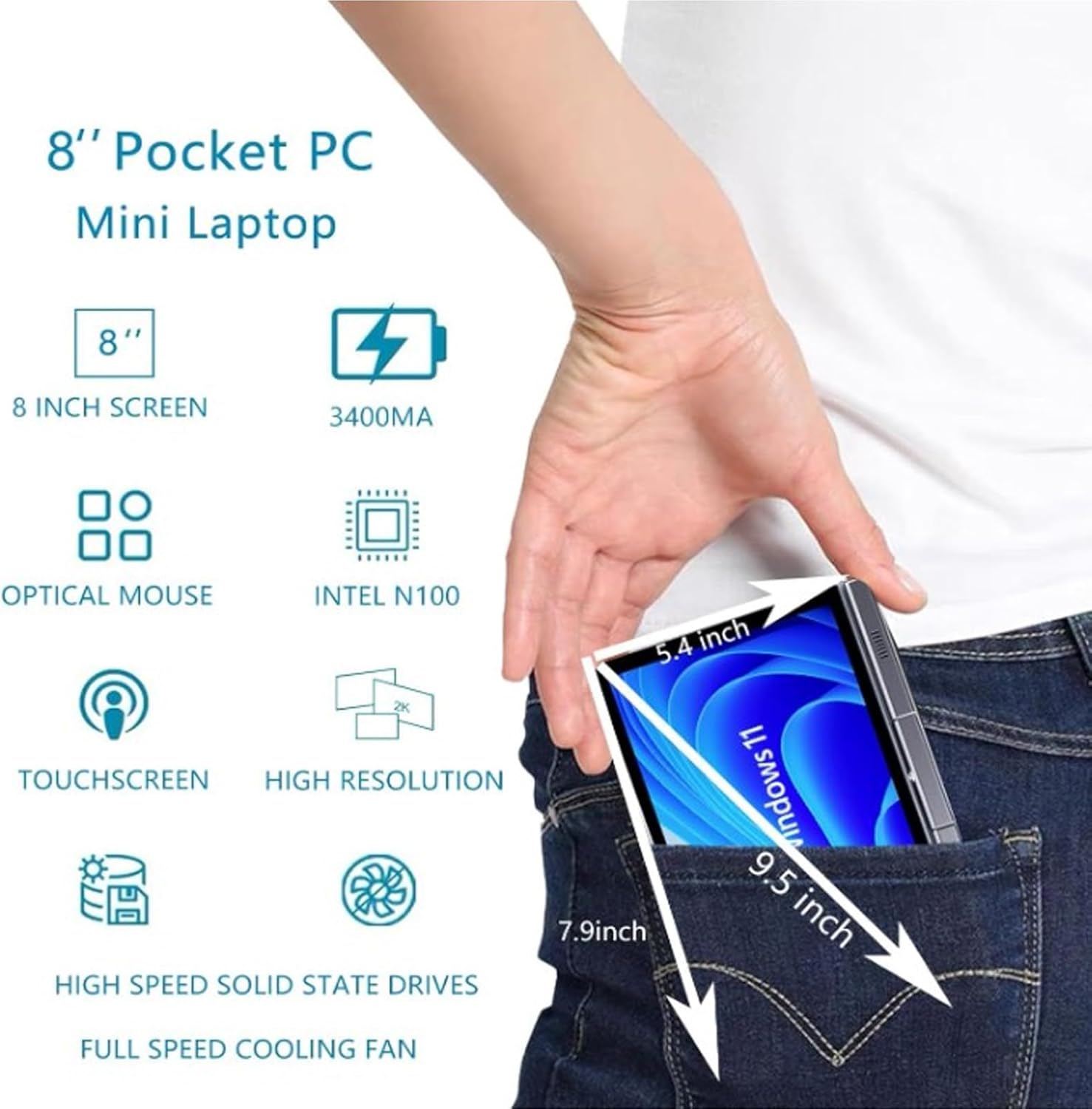
Image: A visual representation of the 8-inch Pocket PC's compact dimensions, demonstrating its portability by showing it fitting into a standard pocket.

Image: A labeled diagram highlighting the various ports (USB 3.0, Type-C, Audio, RJ45) and keyboard components (Front Camera, Speaker, Power Light, Power Button, Left/Right/Middle Mouse Buttons) of the EBTOOLS 8-Inch 2-in-1 Pocket PC.
4. Подешавање
4.1 Прво укључивање и пуњење
- Напуните уређај: Before first use, connect the power adapter to the Type-C port on the device and plug it into a power outlet. Allow the device to charge fully. The power light indicator will show charging status.
- Укључено: Press and hold the Power Button located on the keyboard deck until the screen illuminates.
- Почетно подешавање: Пратите упутства на екрану да бисте завршили процес подешавања система Windows 11 Pro, укључујући избор језика, мрежну везу и креирање корисничког налога.
The device is designed for immediate use upon completion of the initial Windows setup.
5. Упутство за употребу
5.1 Тастатура и тачпед
- The device features an edge-less full-size QWERTY keyboard for typing.
- The integrated touchpad supports standard mouse functions, including moving the pointer, scrolling, and left/right clicks. The left, right, and middle mouse buttons are clearly indicated on the diagram.
5.2 Управљање екраном осетљивим на додир
- The 8-inch display is a multi-touch screen. Use gestures such as tap, swipe, pinch-to-zoom, and rotate for navigation and interaction with applications.
5.3 Ротација од 360 степени
- The display can be rotated 360 degrees to switch between laptop mode (traditional clamshell) and tablet mode (screen folded back against the base).
- When in tablet mode, the keyboard is automatically disabled to prevent accidental input.
5.4 Повезивање периферних уређаја
- УСБ 3.0: Connect external devices such as USB drives, mice, or keyboards to the USB 3.0 port.
- Тип-Ц: Користи се за пуњење и пренос података.
- High Definition Multimedia Interface (HDMI): Connect an external monitor or projector using an HDMI cable for extended display.
- 3.5mm Standard Headphone Jack: Повежите слушалице или спољне звучнике.
- RJ45 мрежни порт: Повежите Етернет кабл за жичану интернет везу.
5.5 Бежично повезивање
- ВиФи6: Access wireless networks (2.4G and 5G bands) for internet connectivity. Enable Wi-Fi through Windows settings.
- Блуетоотх КСНУМКС: Pair with Bluetooth-enabled devices such as headphones, speakers, or other peripherals. Enable Bluetooth through Windows settings.
6. Одржавање
6.1 Чишћење
- Користите меку крпу која не оставља влакна за чишћење екрана и спољашњих површина. За тврдокорне мрље, благо обришитеampобришите крпу водом или средством за чишћење екрана.
- Избегавајте употребу јаких хемикалија, абразивних средстава за чишћење или аеросолних спрејева директно на уређају.
- Уверите се да је уређај искључен и искључен пре чишћења.
6.2 Складиштење
- Уређај чувајте на хладном и сувом месту, даље од директне сунчеве светлости и екстремних температура.
- If storing for an extended period, ensure the battery is charged to approximately 50% to preserve battery health.
КСНУМКС. Решавање проблема
This section addresses common issues you might encounter with your EBTOOLS 8-Inch 2-in-1 Pocket PC.
7.1 Уређај се не укључује
- Ensure the device is fully charged. Connect the power adapter and wait a few minutes before attempting to power on again.
- Verify the power adapter and cable are securely connected and the power outlet is functional.
- Покушајте да држите дугме за напајање 10-15 секунди да бисте извршили хард ресетовање.
7.2 Wi-Fi or Bluetooth Connectivity Issues
- Проверите да ли је Wi-Fi или Bluetooth омогућен у подешавањима система Windows.
- Restart the device and your wireless router/Bluetooth device.
- Ensure you are within range of the Wi-Fi network or Bluetooth device.
- Update wireless drivers if available.
7.3 Екран осетљив на додир не реагује
- Поново покрените уређај.
- Уверите се да је екран чист и без прљавштине.
- Check for any system updates that might include touchscreen driver fixes.
7.4 Кратак век трајања батерије
- Прилагодите подешавања напајања у оперативном систему Windows да бисте оптимизовали потрошњу батерије.
- Затворите непотребне апликације које раде у позадини.
- Смањите осветљеност екрана.
- Ensure the device is not running resource-intensive tasks continuously.
8. Спецификације
| Феатуре | Спецификација |
|---|---|
| Оперативни систем | Виндовс 11 Про |
| Величина екрана | 8 инча |
| Процесор | N100 CPU (up to 3.4GHz) |
| РАМ | 12ГБ ЛПДДР5 |
| Складиштење | 512GB M.2 SSD (supports up to 2TB) |
| Предња камера | 2MP 30 Frame HD Built-In Camera |
| Блуетоотх | БТ 5.2 |
| Wireless Fidelity Type | 2.4G / 5G Band (WiFi6) |
| Интерфејси | 1 x USB3.0, 1 x 3.5mm Standard Headphone Jack, 1 x High Definition Multimedia Interface Port, 1 x Type-C, 1 x RJ45 Network Port |
| Тип батерије | Уграђена 5000мАх полимер литијумска батерија |
| Трајање батерије | 4-6 hours (typical use) |
| Тежина артикла | 2.68 фунти (приближно 1.22 кг) |
| Димензије пакета | 9.45 к 7.09 к 2.36 инча |
9. Гаранција и подршка
9.1 Гаранција на производ
Specific warranty details for your EBTOOLS 8-Inch 2-in-1 Pocket PC are typically provided with your purchase documentation or on the manufacturer's official website. Please refer to these resources for information regarding warranty coverage, duration, and terms.
9.2 Корисничка подршка
For technical assistance, troubleshooting beyond this manual, or warranty claims, please contact EBTOOLS customer support. Contact information can usually be found on the product packaging, the manufacturer's webсајту или преко вашег продавца.
When contacting support, please have your product model number (EBTOOLS9pxf4058ch-12) and purchase information readily available.