
БТ4
Упутство за употребу бежичних слушалица Pro 4 TWS
Model: BT4 | Brand: Generic
Производ је завршенview
The Pro 4 TWS Wireless Headphones are designed to provide a high-quality audio experience with the convenience of wireless technology. These earbuds feature Bluetooth 5.0 for stable connectivity, an IPX7 waterproof rating for durability, and a built-in microphone for clear calls. The ergonomic design ensures a comfortable and secure fit for extended use.

Image: The black protective storage case included with the Pro 4 TWS Wireless Headphones. This compact case helps protect your earbuds when not in use.

Image: The Pro 4 TWS Wireless Earbuds resting inside their open charging case. The earbuds are white with black tips, and the case is also white.
Шта је укључено
- Pro 4 TWS Wireless Earbuds (Left and Right)
- Футрола за пуњење
- Protective Case (Black, as shown in product images)
- Кориснички приручник (овај документ)
- Charging Cable (not explicitly mentioned but standard for earbuds)
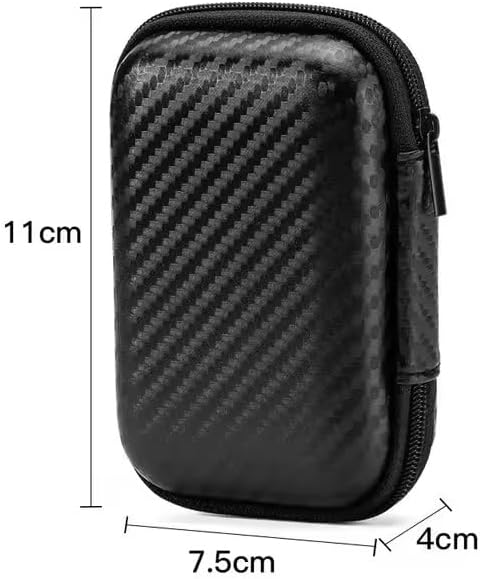
Image: A visual representation of the protective storage case with its dimensions: approximately 11cm in height, 7.5cm in width, and 4cm in depth. This illustrates the compact size of the included accessory.
Водич за подешавање
1. Почетно пуњење
Before first use, ensure both the earbuds and the charging case are fully charged. Place the earbuds into the charging case and connect the charging case to a power source using the provided charging cable. The indicator light on the case will show charging status.
2. Упаривање са уређајем
- Отворите кућиште за пуњење. Слушалице ће аутоматски ући у режим упаривања.
- На свом уређају (паметном телефону, таблету, лаптопу) идите на подешавања Блутут-а.
- Тражи available devices and select "Pro 4 TWS" (or similar name) from the list.
- Када се једном повеже, гласовна порука ће потврдити успешно упаривање.
Note: If pairing fails, ensure the earbuds are charged and within range of your device. You may need to "forget" previous pairings on your device and try again.

Image: The Pro 4 TWS earbuds shown with a smartphone, illustrating the touch control feature for connection. A blue light effect indicates active connection or touch interaction.
Упутство за употребу
Додирните контроле
The Pro 4 TWS headphones feature intuitive touch controls on each earbud. Specific functions may vary slightly, but common controls include:
- Једнократни додир: Пуштање/паузирање музике, одговарање/прекидање позива.
- Двапут додирните (лева слушалица): Претходна нумера.
- Двапут додирните (десна слушалица): Следећа нумера.
- Трипле Тап: Активирајте гласовног асистента (Сири, Гугл асистент).
- Дуго притисните: Одбиј позив.
Ношење слушалица
Gently insert each earbud into your ear canal. Rotate slightly until you achieve a comfortable and secure fit. The ergonomic design is intended to keep them stable during various activities.

Image: A woman wearing the Pro 4 TWS earbuds, highlighting their ergonomic design and comfortable fit within the ear. The image emphasizes that the earbuds are designed to stay securely in place.
Одржавање и њега
- Чишћење: Користите меку, суву крпу која не оставља влакна за чишћење слушалица и кућишта за пуњење. Не користите јаке хемикалије или абразивне материјале.
- Отпорност на воду: The earbuds have an IPX7 waterproof rating, meaning they are resistant to sweat and rain. Do not submerge them in water or expose them to strong jets of water. Ensure they are dry before placing them back in the charging case.
- Складиштење: When not in use, store the earbuds in their charging case, preferably within the included protective case, to prevent damage and keep them clean.
- Одржавање батерије: Да бисте продужили век трајања батерије, избегавајте често потпуно пражњење слушалица и кућишта за пуњење. Редовно их пуните, чак и ако их не користите стално.
Решавање проблема
| Проблем | Могуће решење |
|---|---|
| Слушалице се не упарују |
|
| Нема звука из једне слушалице |
|
| Лош квалитет звука |
|
| Проблеми са пуњењем |
|
Спецификације
| Феатуре | Детаљ |
|---|---|
| Број модела | БТ4 |
| Технологија повезивања | Бежични, Блуетоотх |
| Блуетоотх верзија | 5.0 |
| Домет | До 33 стопе (приближно 10 метара) |
| Отпорност на воду | IPX7 (Resistant to sweat and rain) |
| Микрофон | Built-in, High-Quality |
| Контролни метод | Даљински управљач (контроле на додир) |
| Постављање уха | Ин Еар |
| Материјал | Силикон, пластика |
| Укључене компоненте | Протецтиве Цасе |
| Компатибилни уређаји | Smartphones, Tablets, Laptops, Desktops, Smart Speakers, Cars (with Bluetooth capabilities) |

Image: A diagram highlighting the upgraded Bluetooth 5.0 chip, emphasizing features like HD Voice, Quick Connect, and Stable Reception, which contribute to high-fidelity sound quality and anti-interference.

Слика: Експлодирана view of the earbud's internal components, specifically showcasing the high-quality dynamic unit and balanced adjustment technology designed to deliver rich sound effects.
Гаранција и подршка
For warranty information and customer support, please refer to the documentation provided at the time of purchase or contact the seller directly. The product is manufactured by "wireless earphone".
За додатну помоћ, можете посетити и страницу производа на Амазону: Pro 4 TWS Wireless Headphones on Amazon.
Ask a question about this manual
Ask about setup, troubleshooting, compatibility, parts, safety, or missing instructions. Manuals+ will review the question and use this page’s manual context to help answer it.