
1. Увод
Thank you for choosing the YEAHBOX A8 Portable Bluetooth Speaker. This manual provides essential information for the proper setup, operation, and maintenance of your device. Please read it thoroughly before use and retain it for future reference.

Image 1.1: The YEAHBOX A8 Portable Bluetooth Speaker, showcasing its waterproof design with water splashing around it.
2. Садржај пакета
Проверите да ли су све ставке наведене у наставку укључене у ваш пакет. Ако неке ставке недостају или су оштећене, обратите се корисничкој подршци.
- YEAHBOX A8 Portable Bluetooth Speaker x 1
- Тип-Ц кабл за пуњење к 1
- Audio Cable (AUX) x 1
- Упутство за употребу x 1
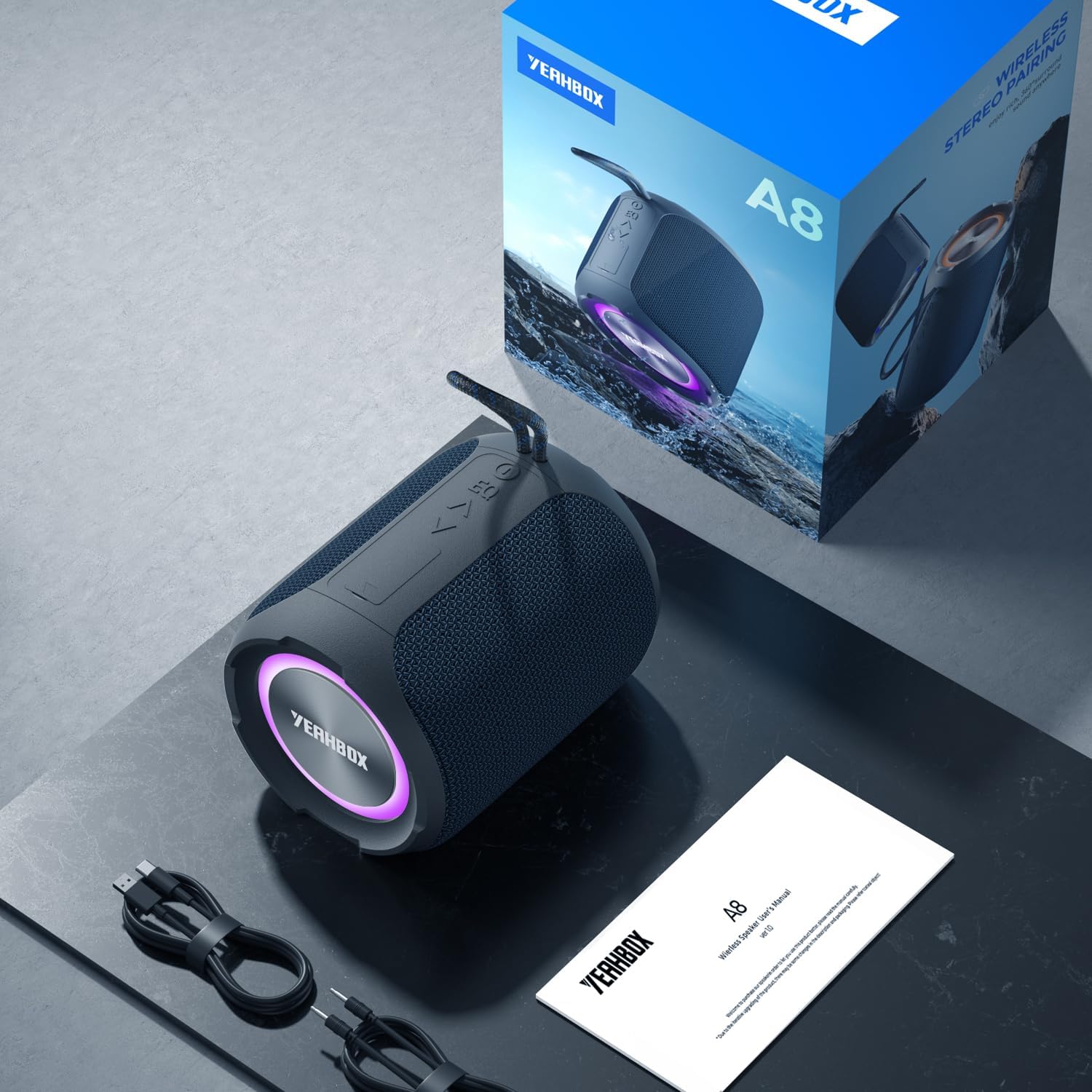
Image 2.1: Contents of the YEAHBOX A8 package, including the speaker, cables, and manual.
3. Производ је готовview
3.1 Компоненте звучника

Image 3.1: An exploded diagram illustrating the internal components of the YEAHBOX A8 speaker, highlighting its 40W sound architecture.
3.2 Control Buttons and Ports
The speaker features intuitive controls and versatile input options:
- Дугме за напајање: Press and hold to power on/off. Short press to control LED lights.
- Дугме за репродукцију/паузу: Play or pause audio. Answer/end calls.
- Јачина звука (+): Increase volume. Long press for next track.
- Утишавање (-): Decrease volume. Long press for previous track.
- ЕК тастер: Cycle through Pop, Bass Boost, and 3D sound modes.
- Дугме за режим (М): Switch between Bluetooth, AUX, TF Card, and U Disk input modes.
- Порт за пуњење типа Ц: За пуњење звучника.
- AUX-in порт: За жично повезивање звука.
- Слот за ТФ картицу: За репродукцију музике са MicroSD картице.
- УСБ-А порт: For playing music from a U Disk (USB flash drive).

Image 3.2: The YEAHBOX A8 speaker demonstrating its multiple input options: Bluetooth, USB (U Disk), TF Card, and AUX.
4. Подешавање
4.1 Пуњење звучника
- Повежите приложени кабл за пуњење типа C са портом за пуњење звучника.
- Повежите други крај кабла са УСБ адаптером за напајање (није укључен) или УСБ портом рачунара.
- ЛЕД индикатор ће приказивати статус пуњења. Потпуно пуњење обично траје 3-4 сата.
- Disconnect the charging cable once fully charged to preserve battery life.
4.2 Укључивање/искључивање
- За укључивање: Press and hold the Power button for 2-3 seconds until you hear an audible prompt and the LED lights activate.
- За искључивање: Press and hold the Power button for 2-3 seconds until the LED lights turn off and you hear an audible prompt.
4.3 Блуетоотх упаривање
- Ensure the speaker is powered on and in Bluetooth mode (indicated by a flashing blue LED). If not, short press the 'M' button to switch to Bluetooth mode.
- На свом уређају (паметном телефону, таблету итд.) омогућите Блутут и потражите доступне уређаје.
- Select "YEAHBOX A8" from the list of devices.
- Once paired, the speaker will emit an audible confirmation, and the blue LED will remain solid.
4.4 Жична веза (AUX)
- Connect one end of the provided 3.5mm audio cable to the speaker's AUX-in port.
- Повежите други крај са аудио излазом вашег уређаја.
- The speaker will automatically switch to AUX mode, or you may need to press the 'M' button to select AUX mode.
4.5 TF Card / U Disk Playback
- Insert a TF (MicroSD) card or U Disk (USB flash drive) containing MP3 audio files into the respective slot/port on the speaker.
- The speaker will automatically detect the storage device and begin playing music, or you may need to press the 'M' button to select the appropriate mode.
5. Упутство за употребу
5.1 Основне аудио контроле
- Пусти/паузирај: Кратко притисните дугме Плаи/Паусе.
- Појачавање звука: Кратко притисните дугме '+'.
- Смањивање јачине звука: Кратко притисните дугме '-'.
- Следећа нумера: Дуго притисните дугме „+“.
- Претходни запис: Дуго притисните дугме '-'.
5.2 EQ Sound Modes
The YEAHBOX A8 offers three distinct equalization (EQ) modes to customize your listening experience:
- Поп режим: Професионални балансирани звукfile погодно за већину музичких жанрова.
- Режим појачавања баса: Enhances low frequencies for a deeper bass response.
- 3Д режим: Provides an immersive, spatial audio experience.
To cycle through these modes, short press the 'EQ' button.
5.3 Wireless Stereo Pairing (TWS)
You can connect two YEAHBOX A8 speakers for a combined 80W output and an immersive stereo sound experience.
- Уверите се да су оба звучника укључена и да нису повезана ни са једним Bluetooth уређајем.
- On one speaker (this will be the primary speaker), double-press the Play/Pause button. It will enter TWS pairing mode.
- Два звучника ће се аутоматски повезати један са другим. Чућете звук потврде када се повежу.
- Once TWS is successful, connect your device via Bluetooth to the primary speaker as described in Section 4.3.

Image 5.1: Two YEAHBOX A8 speakers connected via Wireless Stereo Pairing (TWS) for enhanced audio.
5.4 Позивање без употребе руку
Када је повезан путем Блутут-а, уграђени микрофон звучника омогућава позиве без употребе руку.
- Одговори на позив: Кратко притисните дугме Плаи/Паусе.
- Заврши позив: Кратко притисните дугме Репродукуј/Паузирај током позива.
- Одбиј позив: Дуго притисните дугме Плаи/Паусе.
5.5 LED контрола светала
The speaker features vibrant LED lights that sync with your music. To control the lights, short press the Power button to cycle through different light modes or turn them off.
6. Одржавање
6.1 Чишћење
- Обришите звучник меком, дamp тканина.
- Не користите абразивна средства за чишћење, алкохол или хемијске раствараче.
- Ensure all ports are dry before charging or connecting cables after cleaning.
6.2 Складиштење
- Чувајте звучник на хладном и сувом месту, даље од директне сунчеве светлости и екстремних температура.
- If storing for an extended period, charge the battery to approximately 50% every three months to maintain battery health.
6.3 Water Resistance Guidelines (IPX7)
The YEAHBOX A8 speaker is IPX7 waterproof, meaning it can be submerged in water up to 1 meter (3.3 feet) for up to 30 minutes. To ensure water resistance:
- Ensure the rubber flap covering the charging and AUX ports is securely closed before exposure to water.
- Do not expose the speaker to saltwater or other chemicals, as this may degrade the waterproof seals.
- After exposure to water, dry the speaker thoroughly before opening the port cover or charging.

Image 6.1: The YEAHBOX A8 speaker demonstrating its IPX7 waterproof capability, suitable for use near water.
КСНУМКС. Решавање проблема
| Проблем | Могући узрок | Решење |
|---|---|---|
| Звучник се не укључује. | Ниска батерија. | Потпуно напуните звучник. |
| Није могуће упаривање преко Bluetooth-а. | Звучник није у режиму упаривања; Bluetooth уређај је искључен; превише је удаљен од звучника. | Ensure speaker is in Bluetooth pairing mode (flashing blue LED). Turn on device Bluetooth. Move device closer to speaker (within 10 meters). |
| Нема звука. | Јачина звука је прениска; неисправан режим уноса; уређај не репродукује звук. | Increase speaker and device volume. Press 'M' button to select correct input mode. Ensure audio is playing on your connected device. |
| Изобличење звука. | Прејака јачина звука; празна батерија; сметње. | Reduce volume on speaker and device. Charge the speaker. Move away from other electronic devices. |
| Упаривање TWS-а не успева. | Speakers already connected to another device; incorrect pairing procedure. | Ensure both speakers are disconnected from other devices. Follow TWS pairing steps precisely (Section 5.3). |
8. Спецификације
| Феатуре | Спецификација |
|---|---|
| Назив модела | YEAHBOX A8 |
| Максимална излазна снага звучника | 40 Ваттс |
| Технологија повезивања | Блуетоотх 5.3 |
| Блуетоотх домет | До 12 метара (39 стопе) |
| Ниво отпорности на воду | ИПКС7 |
| Капацитет батерије | 5200 мАх литијум-јонски |
| Плаитиме | 5-8 hours (varies with volume and content) |
| Време пуњења | Прибл. 3-4 сати |
| Опције уноса | Bluetooth, AUX, TF Card, U Disk |
| Димензије производа | 13.5 цм Д x 9.6 цм Ш x 9.6 цм В |
| Тежина артикла | 0.91 килограма (2.01 фунте) |
| Материјал | Акрилонитрил Бутадиен Стирен (АБС), Метал |
| Контролни метод | Додирни дугмад |
| УПЦ | 750707212564 |

Image 8.1: The YEAHBOX A8 speaker's 5200 mAh battery provides extended playtime for both day and night use.
9. Информације о гаранцији
The YEAHBOX A8 Portable Bluetooth Speaker comes with a limited warranty. Please refer to the warranty card included in your package for specific terms and conditions. This warranty typically covers manufacturing defects and material flaws under normal use.
- Врста гаранције: Ограничено
- Политика враћања: 30-day refund/replacement (check retailer for details)
Сачувајте доказ о куповини за гаранцијске захтеве.
10. Подршка
For technical assistance, warranty claims, or general inquiries, please contact YEAHBOX customer support through the following channels:
- Подршка на мрежи: Visit the official YEAHBOX website (if available) for FAQs and contact forms.
- Подршка путем е-поште: Refer to your warranty card or product packaging for the customer service email address.
When contacting support, please provide your product model (A8) and proof of purchase for faster service.