
OHAYO X2
OHAYO Portable Bluetooth Speaker User Manual
Model: X2 | Brand: OHAYO
1. Увод
Thank you for choosing the OHAYO Portable Bluetooth Speaker. This manual provides essential information for setting up, operating, and maintaining your speaker to ensure optimal performance. Designed for both indoor and outdoor use, this speaker delivers exceptional audio quality with its 15W loud stereo sound, IPX7 waterproof rating, and versatile connectivity options.
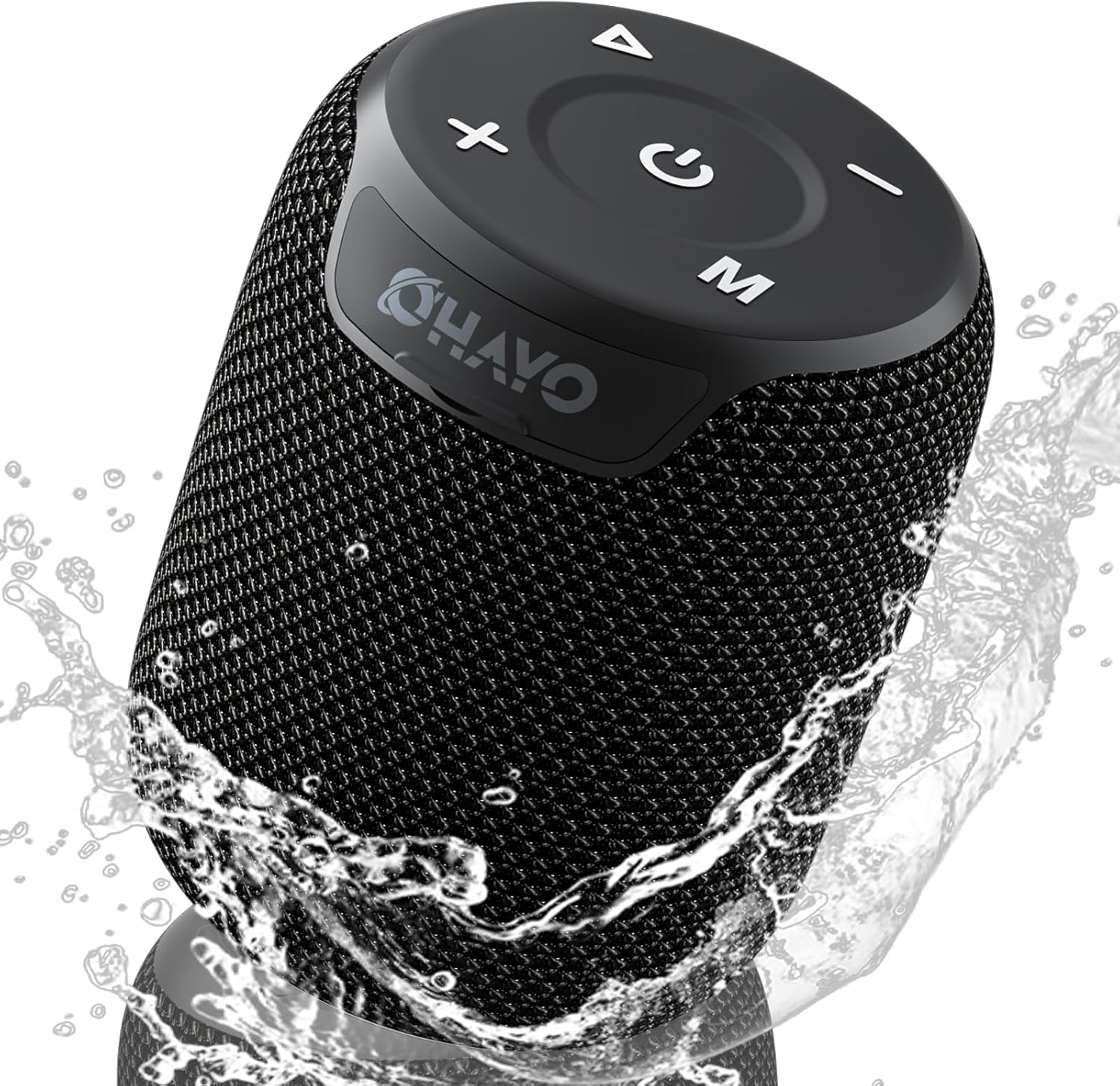
Image: The OHAYO Portable Bluetooth Speaker, showcasing its compact design and IPX7 waterproof capability with water splashing around it.
2. Производ је готовview
2.1 Кључне карактеристике
- Изузетне аудио перформансе: Features a 60mm mid-high speaker and a 65mm bass diaphragm for clear treble and rich bass.
- ИПКСКСНУМКС Водоотпоран: Fully submersible up to 3 feet for 30 minutes, resistant to rain, dust, snow, and spills.
- Блуетоотх В5.3: Ensures quick pairing and stable connection with automatic re-connection.
- ТВС упаривање: Connect two speakers for synchronized, immersive stereo sound.
- Разноврсна репродукција: Supports Bluetooth, TF cards, and 3.5mm AUX input.
- Дуго време репродукције: До 18 сати репродукције музике са једним пуњењем.
- Уграђени микрофон: For high-quality, hands-free calls.
- Преносиви дизајн: Compact, lightweight, and includes a handy lanyard for easy carrying.

Слика: Експлодирана view of the speaker's internal components highlighting the 60mm mid-high speaker and 65mm bass diaphragm, alongside icons representing key features like Aux-in, HD Mic, Hand-free Call, IPX7 Waterproof, Bluetooth 5.3, Micro SD support, and 16 hours of playtime.
2.2 Контроле и портови
The OHAYO speaker features intuitive controls located on the top panel and essential ports for connectivity.

Слика: Детаљна view of the speaker's top panel, showcasing the sleek black design with bold white buttons for power, volume control, mode selection, and track navigation.
- Дугме за напајање: Притисните и држите за укључивање/искључивање.
- Јачина звука (+): Повећајте јачину звука.
- Утишавање (-): Смањите јачину звука.
- Дугме за репродукцију/паузу: Пустите или паузирајте звук.
- Дугме за режим (M): Пребацујте се између режима Bluetooth, AUX и TF картице.
- УСБ-Ц прикључак за пуњење: За пуњење звучника.
- AUX-in порт: За жично повезивање звука.
- Слот за ТФ картицу: За репродукцију музике директно са Micro SD картице.
3. Први кораци
3.1 Пуњење звучника
Before first use, fully charge the speaker. Use the provided Type-C charging cable.
- Connect the Type-C end of the cable to the speaker's charging port.
- Повежите USB-A крај са компатибилним USB адаптером за напајање (није укључен) или USB портом рачунара.
- Индикаторска лампица пуњења ће се упалити. Потребно је отприлике 3 сата за потпуно пуњење.
- Индикаторска лампица ће се променити или искључити када се пуњење заврши.

Image: The OHAYO speaker connected to a USB-C charging cable, illustrating its fast charging capability and long battery life.
3.2 Укључивање/искључивање
- За укључивање: Притисните и држите дугме за напајање 2-3 секунде док не чујете звучни сигнал и индикаторска лампица се не упали.
- За искључивање: Притисните и држите дугме за напајање 2-3 секунде док не чујете звучни сигнал и индикаторска лампица се не угаси.
4. Повезивање
4.1 Блуетоотх упаривање
Звучник ће аутоматски ући у режим упаривања путем Bluetooth-а када се први пут укључи или ако ниједан уређај није повезан.
- Ensure the speaker is powered on and in Bluetooth mode (blue indicator light blinking).
- На свом уређају (паметном телефону, таблету, лаптопу) омогућите Блутут и потражите доступне уређаје.
- Select "OHAYO X2" from the list of devices.
- Once connected, the speaker will emit a confirmation sound, and the blue indicator light will remain solid.
- Звучник ће се аутоматски поново повезати са последњим упареним уређајем када се укључи, ако је Bluetooth уређаја активан и у домету.
4.2 Упаривање са правим бежичним стерео (TWS) системом
You can pair two OHAYO X2 speakers together for a true stereo sound experience.
- Ensure both OHAYO X2 speakers are powered on and not connected to any Bluetooth device.
- On one speaker (this will be the primary speaker), double-press the Power button. You will hear a prompt indicating TWS pairing mode.
- Два звучника ће аутоматски тражити и повезати се један са другим. Када се повежу, чућете звук потврде.
- Сада повежите уређај са примарним звучником путем Bluetooth-а као што је описано у одељку 4.1. Звук ће се репродуковати преко оба звучника у стерео режиму.

Image: Two OHAYO Portable Bluetooth Speakers wirelessly connected to a laptop, demonstrating the True Wireless Stereo (TWS) pairing feature for an immersive audio experience.
4.3 Режим AUX-улаза
Use the 3.5mm AUX input for wired connection to devices without Bluetooth.
- Connect one end of a 3.5mm audio cable (not included) to the speaker's AUX-in port.
- Повежите други крај са аудио излазом вашег уређаја.
- The speaker will automatically switch to AUX mode. If not, press the 'M' (Mode) button to select AUX mode.
4.4 TF Card Mode
Play music directly from a Micro SD (TF) card.
- Insert a Micro SD (TF) card with MP3 audio fileс у отвор за ТФ картицу.
- The speaker will automatically switch to TF Card mode and begin playing music. If not, press the 'M' (Mode) button to select TF Card mode.
5. Управљање звучником
5.1 Репродукција музике
- Пусти/паузирај: Притисните дугме Плаи/Паусе једном.
- Следећа нумера: Притисните и држите дугме за појачавање јачине звука (+).
- Претходни запис: Притисните и држите дугме за смањивање јачине звука (-).
- Контрола јачине звука: Кратко притисните дугмад за појачавање јачине звука (+) или смањивање јачине звука (-).
5.2 Позивање без употребе руку
When connected via Bluetooth, you can use the speaker for hands-free calls.
- Одговори на позив: Притисните дугме Плаи/Паусе једном.
- Заврши позив: Притисните дугме Репродукуј/Паузирај једном током позива.
- Одбиј позив: Притисните и држите дугме Плаи/Паусе 2 секунде.
- Поновно бирање последњег броја: Двапут притисните дугме Плаи/Паусе.
6. Нега и одржавање
Proper care ensures the longevity of your OHAYO Portable Bluetooth Speaker.
6.1 Водоотпорност (IPX7)
The speaker is IPX7 waterproof, meaning it can be submerged in water up to 1 meter (3 feet) for up to 30 minutes. Ensure the charging port cover is securely closed before exposing the speaker to water.

Image: A person submerged in water, holding the OHAYO speaker, demonstrating its fully IPX7 waterproof capability and seamless, enclosed design.
6.2 Чишћење
- Обришите звучник меком, дamp тканина.
- Не користите абразивна средства за чишћење, алкохол или хемијске раствараче.
- Ensure the speaker is dry before charging.
6.3 Складиштење
- Чувајте звучник на хладном и сувом месту, даље од екстремних температура.
- Избегавајте продужено излагање директној сунчевој светлости.
КСНУМКС. Решавање проблема
If you encounter issues with your speaker, please refer to the following common problems and solutions.
| Проблем | Могући узрок | Решење |
|---|---|---|
| Звучник се неће укључити. | Слаба батерија; Дугме за напајање није довољно дуго притиснуто. | Charge the speaker fully. Press and hold the Power button for 2-3 seconds. |
| Није могуће упаривање преко Bluetooth-а. | Звучник није у режиму упаривања; Bluetooth уређаја је искључен; Предалеко од звучника. | Ensure speaker is in Bluetooth pairing mode (blinking blue light). Turn on Bluetooth on your device. Move device closer to speaker (within 33 feet/10 meters). |
| Нема звука. | Volume too low; Incorrect mode selected; Device not playing audio. | Increase speaker and device volume. Press 'M' button to select correct mode (Bluetooth, AUX, TF Card). Ensure audio is playing on your device. |
| Упаривање TWS-а није успело. | Speakers already connected to another device; Incorrect pairing steps. | Disconnect both speakers from any Bluetooth devices. Follow TWS pairing steps carefully (Section 4.2). |
| Лош квалитет звука. | Low battery; Obstructions between speaker and device; Source audio quality. | Charge the speaker. Reduce distance or remove obstructions. Try a different audio source. |
8. Спецификације
Detailed technical specifications for the OHAYO Portable Bluetooth Speaker.
| Феатуре | Детаљ |
|---|---|
| Назив модела | X2 |
| Бранд | ОХАИО |
| Спеакер Типе | Оутдоор |
| Технологија повезивања | Блуетоотх |
| Бежична комуникациона технологија | Блуетоотх В5.3 |
| Максимална излазна снага звучника | 15 Ваттс |
| Тип аудио драјвера | Dynamic Driver (60mm mid-high, 65mm bass diaphragm) |
| Фреквенцијски одзив | 20 KHz (typical range for portable speakers) |
| Режим аудио излаза | Стерео (са TWS упаривањем) |
| Водоотпорна оцена | ИПКС7 |
| Трајање батерије | До 16-18 сата |
| Капацитет батерије | 3300 мАх |
| Време пуњења | Прибл. 3 сата |
| Извор напајања | Баттери Поверед |
| Димензије производа | 3.97"Д к 3.97"Ш к 4.8"В |
| Тежина артикла | 14.9 унци |
| Контролни метод | Touch (buttons on top) |
| Компатибилни уређаји | Лаптоп, паметни телефон, таблет, телевизор |
| Материјал | Other (durable mesh and plastic) |
9. Гаранција и подршка
9.1 Информације о гаранцији
The OHAYO Portable Bluetooth Speaker comes with a Ограничена гаранција. Please retain your proof of purchase for warranty claims. For specific terms and conditions, refer to the warranty card included in your product packaging or contact customer support.
9.2 Корисничка подршка
For any questions, technical assistance, or warranty inquiries, please contact OHAYO customer support. We offer 24-hour customer support and easy, hassle-free returns & replacements. Support Extended Term of Service is also available.
Контакт информације: Please refer to the contact details provided on the product packaging or the official OHAYO webсајту.