
1. Увод
Thank you for choosing the Mesqool CR1025 Clock Radio. This device combines an alarm clock, Bluetooth speaker, FM radio, night light, and phone charger into one compact unit. This manual provides detailed instructions for setup, operation, and maintenance to ensure optimal performance and user experience.

Figure 1: Mesqool CR1025 Clock Radio
2. Производ је готовview
2.1 Кључне карактеристике
- Мултифункционални дизајн: Alarm Clock, Bluetooth Speaker, FM Radio, Night Light, and Phone Charger.
- Блуетоотх КСНУМКС: For stable and quick wireless audio streaming.
- ФМ радио: 87.5MHz-108.0MHz frequency range with 20 preset stations.
- Подесива осветљеност: 5 levels for the LED display.
- Подесива јачина звука: 16 levels (45dB to 116dB).
- Мерач спавања: Allows automatic shutdown of audio playback.
- Одгода функција: 9-minute delay for alarms.
- Резервна батерија: Retains time and alarm settings during power outagес.
- Двоструки УСБ портови за пуњење: Type-C and USB-A for device charging.
- Формат времена: 12-hour and 24-hour display options.
- Летње рачунање времена (ДСТ): Quick adjustment feature.

Figure 2: 5-in-1 Functionality
2.2 Садржај пакета
- Mesqool CR1025 Clock Radio
- Повер Адаптер
- УСБ кабл
- CR2032 Lithium Battery (pre-installed or separate for backup)
- Кориснички приручник (овај документ)

Слика 3: Садржај пакета
3. Контроле и дисплеј
Familiarize yourself with the buttons and ports on your Mesqool CR1025 Clock Radio.
3.1 Контроле на горњој плочи
- Sleep Timer Knob: Rotate to set sleep timer duration. Press to confirm.
- Дугме за аларм: Press to set or activate/deactivate alarms.
- Time/12/24 Button: Press to set time. Hold to switch between 12/24-hour format.
- Dimmer/DST Button: Press to adjust display brightness. Hold to activate/deactivate Daylight Saving Time.
- SNOOZE/LIGHT Button: Press to snooze alarm or turn night light on/off.
- Preset/Pair Button: Press to cycle through FM presets. Hold to enter Bluetooth pairing mode.
- Play/Mode Button: Press to play/pause in Bluetooth mode. Hold to switch between FM/Bluetooth modes.
- Power/Scan Knob: Rotate to adjust volume. Press to power on/off. Hold to auto-scan FM stations.
3.2 Портови на задњој плочи
- ДЦ ИН: Улазни порт за напајање.
- УСБ-А излаз: За пуњење екстерних уређаја.
- Излаз типа Ц: За пуњење екстерних уређаја.
4. Подешавање
4.1 Прикључак за напајање
- Connect the power adapter to the DC IN port on the back of the clock radio.
- Укључите адаптер за напајање у стандардну зидну утичницу. Екран ће се упалити.

Слика 4: Прикључак за напајање
4.2 Резервна батерија
The CR2032 battery provides backup for time and alarm settings during a power outage. The display will not show time, and alarms will not sound until power is restored.
- Ensure the battery insulator tab is removed if the battery was pre-installed.
- If replacing, open the battery compartment on the bottom and insert a new CR2032 battery with the correct polarity.
4.3 Подешавање времена
- Притисните и држите Time/12/24 дугме док цифре сати не почну да трепћу.
- Ротирајте Повер/Сцан дугме за подешавање сата.
- Притисните тастер Time/12/24 поново притисните дугме да бисте потврдили сат, а цифре за минуте ће трептати.
- Ротирајте Повер/Сцан knob to adjust the minutes.
- Притисните тастер Time/12/24 button to save the time setting.
4.4 12/24-Hour Format
To switch between 12-hour and 24-hour time formats, press the Time/12/24 button briefly while the time is displayed.

Figure 5: 12H/24H and DST Display
4.5 Летње рачунање времена (DST)
To activate or deactivate DST, press and hold the Dimmer/DST button. The 'DST' indicator will appear or disappear on the display.
5. Упутство за употребу
5.1 Подешавање аларма
- Притисните и држите Аларм дугме док цифре сата аларма не затрепере.
- Ротирајте Повер/Сцан knob to adjust the alarm hour.
- Притисните тастер Аларм поново притисните дугме да бисте потврдили сат, а цифре за минуте ће трептати.
- Ротирајте Повер/Сцан knob to adjust the alarm minutes.
- Притисните тастер Аларм дугме да бисте сачували време аларма.
- Да бисте активирали/деактивирали аларм, притисните дугме Аларм дугме кратко. Икона аларма ће се појавити/нестати на екрану.
5.2 Функција одлагања
Када се огласи аларм, притисните СНООЗЕ / СВЕТЛО button to activate the 9-minute snooze function. The alarm will sound again after 9 minutes. This can be repeated up to 9 times. To stop the alarm completely, press the Аларм дугме.

Слика 6: Функција одлагања
Рад са 5.3 FM радиом
- Притисните тастер Play/Mode дугме за пребацивање у режим ФМ радија.
- Аутоматско скенирање: Притисните и држите Повер/Сцан knob to automatically scan and save available FM stations (up to 20 presets).
- Ручно подешавање: Briefly rotate the Повер/Сцан knob to fine-tune the frequency.
- Изаберите унапред подешене вредности: Притисните тастер Preset/Pair дугме за прелазак кроз сачуване станице.
- Подешавање јачине звука: Ротирајте Повер/Сцан knob to adjust the volume (16 levels).

Figure 7: FM Radio Features
5.4 Рад Bluetooth звучника
- Притисните тастер Play/Mode button to switch to Bluetooth mode. The 'BT' icon will flash on the display.
- On your mobile device, enable Bluetooth and search for 'CR1025'.
- Select 'CR1025' to pair. Once connected, the 'BT' icon will stop flashing.
- Play audio from your device. Use the Play/Mode дугме за репродукцију/паузу.
- Подешавање јачине звука: Ротирајте Повер/Сцан дугме за подешавање јачине звука.

Слика 8: Bluetooth 5.0 повезивање
5.5 Night Light Operation
Притисните тастер СНООЗЕ / СВЕТЛО button to turn the night light on or off. The night light provides a soft, warm glow.

Figure 9: Warm Night Light
5.6 Подешавање осветљености екрана
Притисните тастер Dimmer/DST button repeatedly to cycle through 5 levels of display brightness, from off to brightest.
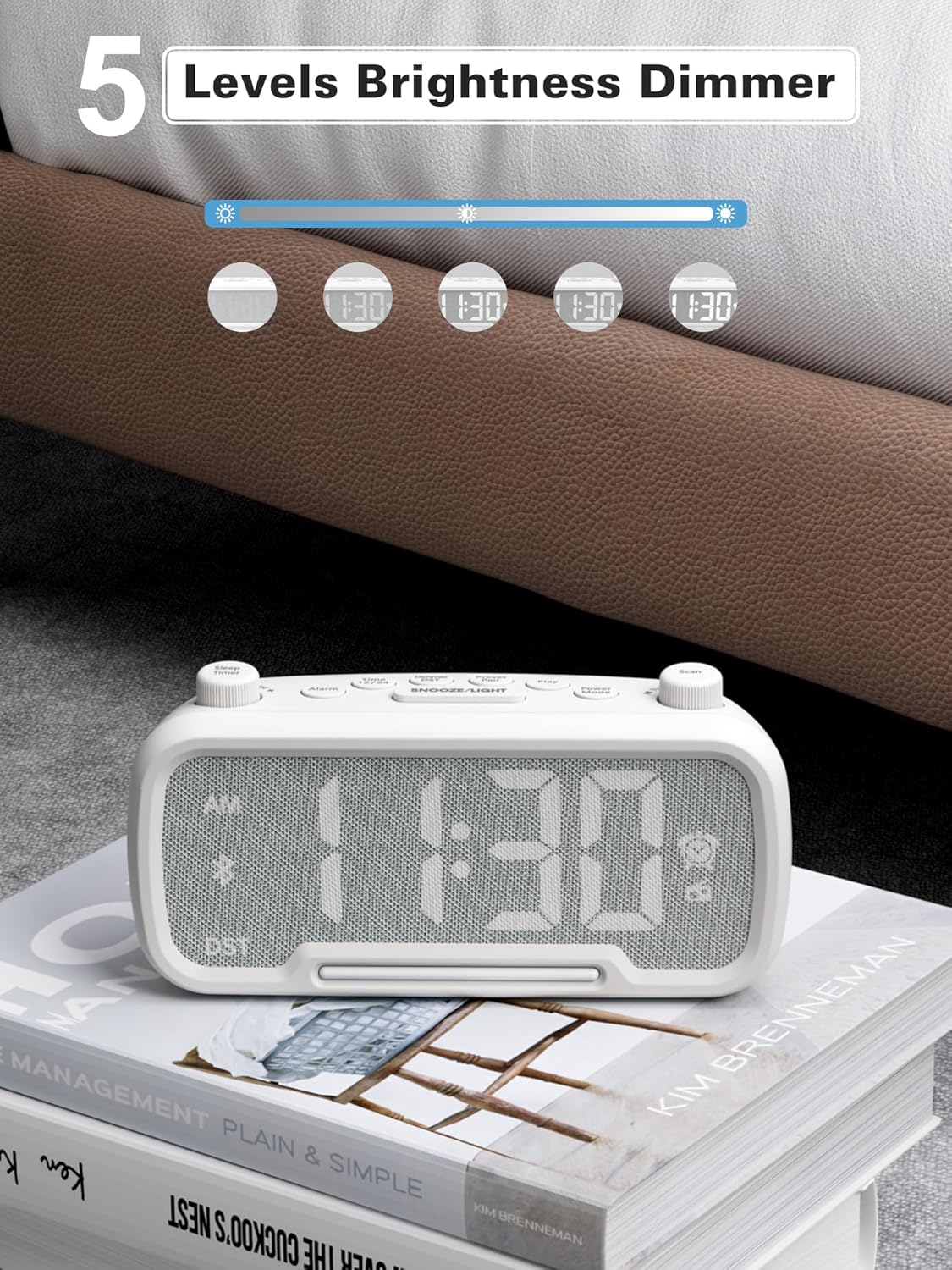
Figure 10: 5 Levels Brightness Dimmer
5.7 Тајмер за спавање
The sleep timer allows you to set a duration after which the radio or Bluetooth audio will automatically turn off.
- While playing FM radio or Bluetooth audio, rotate the Слееп Тимер knob to select the desired sleep duration (e.g., 15, 30, 60, 90 minutes).
- The display will show the remaining sleep time. The audio will turn off automatically when the timer expires.
5.8 Пуњење телефона
The clock radio features two USB charging ports (Type-C and USB-A) for convenient charging of your mobile devices.
- Connect your device's charging cable to either the USB-A or Type-C port on the back of the clock radio.
- Повежите други крај кабла са мобилним уређајем. Пуњење ће почети аутоматски.

Figure 11: Dual USB Charging Ports
6. Одржавање
- Очистите уређај меком, сувом крпом. Не користите абразивна средства за чишћење или раствараче.
- Држите уређај даље од директне сунчеве светлости, извора топлоте и влаге.
- Осигурајте одговарајућу вентилацију око јединице.
- Ако се уређај неће користити дуже време, искључите га из електричне утичнице.
КСНУМКС. Решавање проблема
| Проблем | Могући узрок | Решење |
|---|---|---|
| Нема напајања/Екран је искључен | Адаптер за напајање није повезан или је неисправан. | Ensure power adapter is securely plugged into the unit and wall outlet. Check outlet functionality. |
| Аларм се не оглашава | Аларм није активиран или је погрешно подешен. | Verify alarm time is set and the alarm icon is visible on the display. Check alarm volume. |
| Лош ФМ радио пријем | Слаб сигнал или сметње. | Adjust the unit's position. Try auto-scanning again. |
| Блуетоотх се не упарује | Device not in pairing mode or too far. | Ensure the clock radio is in Bluetooth mode (BT icon flashing). Move device closer. Forget device on phone and re-pair. |
| УСБ пуњење не ради | Cable faulty or device incompatible. | Try a different USB cable. Ensure the clock radio is powered on. |
8. Спецификације
- Модел: ЦР1025
- Улазна снага: АЦ 100-240В, 50/60Хз
- Резервна батерија: 1 к ЦР2032 (укључено)
- ФМ фреквенција: 87.5 - 108.0 MHz
- Блуетоотх верзија: 5.0
- УСБ излаз: USB-A, Type-C (Charging only)
- Осветљеност екрана: 5 нивоа
- Нивои јачине звука: 16 levels (45dB - 116dB)
- Димензије: КСНУМКС к КСНУМКС к КСНУМКС цм (КСНУМКС к КСНУМКС к КСНУМКС инча)
- Тежина: 216 г (0.48 лбс)
Слика 12: Димензије производа
9. Гаранција и подршка
Mesqool products are designed and manufactured to the highest quality standards. For warranty information, technical support, or customer service inquiries, please refer to the contact information provided on the product packaging or visit the official Mesqool webсајту.
Webсајт: Mesqool Official Store