
Увод
The Hotmoon Cocoon Pro White Noise Sound Machine is designed to create an optimal soundscape environment for various activities such as sleep, relaxation, study, work, or soothing infants. It features a comprehensive library of 388 high-fidelity sounds, a night light, a sleeping timer, and convenient app control for personalized routines.
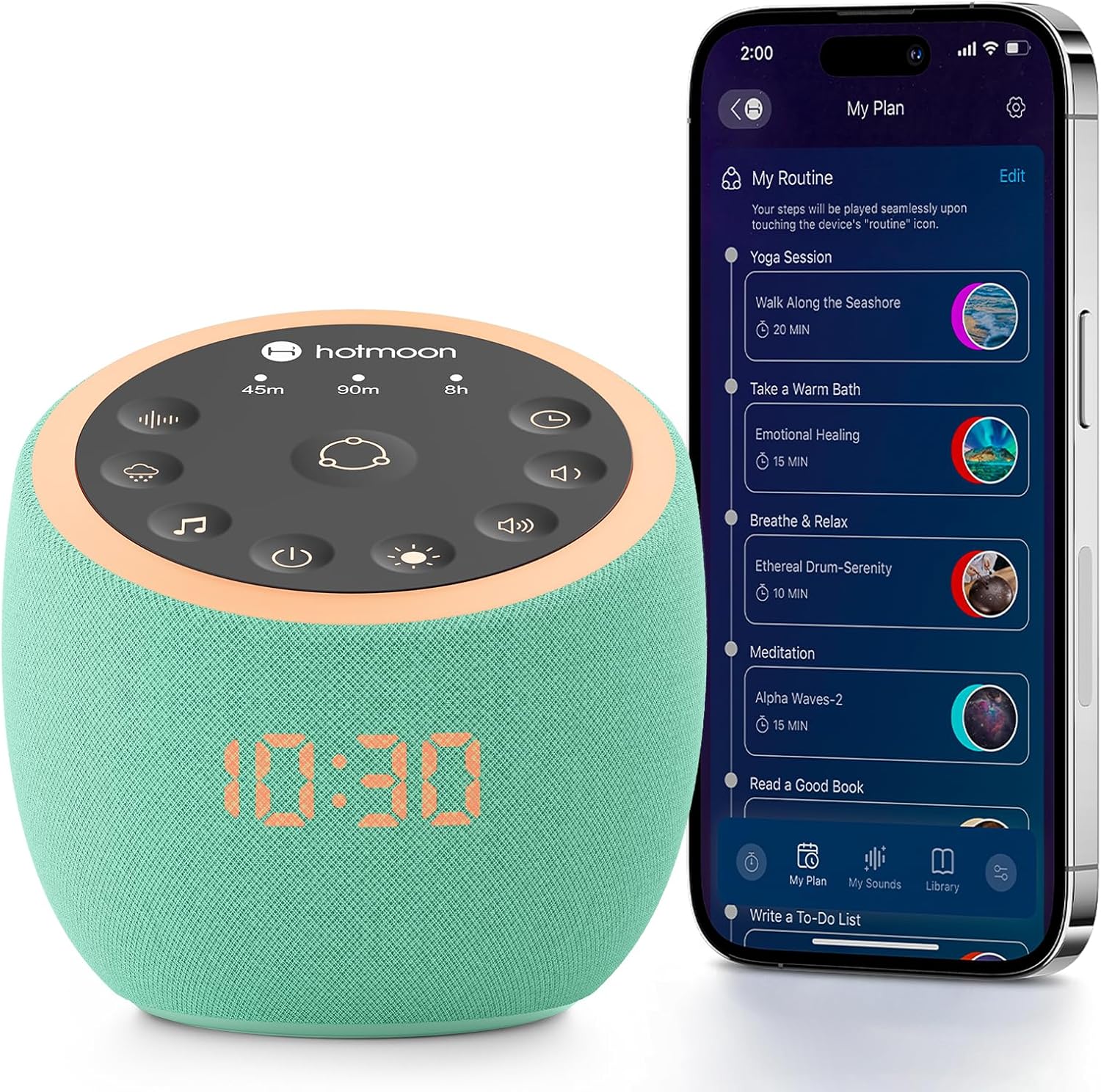
Image: The Hotmoon Cocoon Pro White Noise Sound Machine, a compact, mint-green device with a digital clock display, shown next to a smartphone illustrating its app control interface. The device features a top panel with various control icons.
Кључне карактеристике
- 388 High-Fidelity Sounds: Includes White noises, Fan sounds, Nature sounds, Lullabies, Alpha brainwaves, Zen sounds, Meditation melodies, High frequency sound, and more.
- Контрола апликације: Adjust settings remotely via a companion app on your smartphone.
- DIY Sound Buttons: Three customizable buttons allow personalization with 1 to 9 sounds from the professional sound library.
- Colorful Night Lights: Various professional anti-glare baby night lights for soothing sleep, with adjustable brightness and static/breath modes.
- Sleeping Timer: Set timers for 45 minutes, 90 minutes, or 8 hours.
- растући аларм: Features exclusive awakening melodies with volume fade-in. Clock brightness can be dimmed, turned off, or scheduled.
- Компактан дизајн: Portable and suitable for travel.

Image: A visual representation highlighting the 388 sounds available on the Hotmoon Sound Machine, categorized by type, emphasizing no subscription fees.
Сетуп
1. Прикључак за напајање
Connect the sound machine to a power source using the provided cable. The device is not battery-operated and requires continuous power.
2. Преузимање апликације и повезивање
- Download the official Hotmoon companion app from your smartphone's app store.
- Омогућите Блуетоотх на свом паметном телефону.
- Open the Hotmoon app. The app will automatically detect and connect to your Cocoon Pro device via Bluetooth. No Wi-Fi password is required for initial setup.
Упутство за употребу
Контрола апликација
The primary method for controlling the Cocoon Pro is through its companion app. This allows for comprehensive customization and scheduling.
- Избор звука: Browse and select from 388 high-fidelity sounds categorized by Weather (e.g., Heavy Rain, Light Rain, Thunder), Nature, Noise (e.g., Warm Pink Noise, White Noise), Brainwave Music, Instrumental, Lullaby, and more.
- Подешавање јачине звука: Control the sound volume from 0-100% using a slider in the app.
- Контрола светла:
- Turn the night light on/off.
- Customize light color and brightness.
- Select between Static or Breath light modes.
- Routine Setup: Create personalized routines for various activities (e.g., meditation, wake-up, bedtime).
- Combine multiple sounds and light settings.
- Schedule routines to turn on/off at specific times and repeat on selected days of the week.
- DIY Sound Buttons: Assign up to 9 sounds to each of the three physical DIY buttons on the device for quick access.

Image: A smartphone screen displaying the Hotmoon app's sound library, showing various sound categories and options to customize the three physical sound buttons on the device.
Контрола физичког дугмета
The device also features intuitive physical buttons for basic control without the app.
- Routine Button (Center): Press to activate pre-set or customized routines.
- Timer Buttons (45m, 90m, 8h): Select a specific duration for sound playback.
- Sound Selection Buttons: Cycle through different sound categories (e.g., fan, rain, meditation).
- Дугмад за контролу јачине звука: Adjust sound volume up or down.
- Дугме за контролу светла: Turn the night light on/off and cycle through brightness levels.
- Дугме за напајање: Укључите или искључите уређај.

Image: A close-up of the Hotmoon Sound Machine's top panel, showing the illuminated touch-sensitive buttons for direct control of sounds, timers, volume, and light, enabling phone-free operation.
Одржавање
To ensure the longevity and optimal performance of your Hotmoon Cocoon Pro:
- Одржавајте уређај чистим тако што ћете га обрисати меком, сувом крпом.
- Избегавајте употребу течних средстава за чишћење или абразивних материјала.
- Не излажите уређај води или прекомерној влажности.
- Чувати на хладном и сувом месту када се не користи.
Решавање проблема
Уређај се не укључује
- Ensure the power cable is securely connected to both the device and a working power outlet.
- Проверите да ли је утичница функционална тако што ћете је тестирати са другим уређајем.
Проблеми са везом апликације
- Уверите се да је Блуетоотх омогућен на вашем паметном телефону.
- Make sure the device is powered on and within Bluetooth range of your smartphone.
- Try restarting both the app and the sound machine.
Нема излаза звука
- Check the volume level on both the device and within the app.
- Ensure a sound is selected and playing in the app.
Спецификације
| Атрибут | Детаљ |
|---|---|
| Бранд | Hotmoon |
| Модел | Цоцоон Про |
| Боја | Mint-green |
| Материјал | акрилонитрил бутадиен стирен (АБС) |
| Димензије пакета | 4.92 к 4.92 к 4.52 инча; 15.04 унци |
| Батерије | Потребна је 1 литијум-метална батерија (укључена) - Note: Device is not battery operated, this likely refers to a small internal battery for clock/memory. |
| Произвођач | Hotmoon |
| Први доступан датум | 25. јуна 2025. године |