
Увод
Thank you for choosing the PRT S1 Mini Thermal Printer. This compact and portable device is designed for convenient printing of stickers, labels, notes, and pictures directly from your smartphone or tablet via Bluetooth. This manual provides essential information on setting up, operating, maintaining, and troubleshooting your printer to ensure optimal performance and longevity.
Шта је у кутији
Молимо вас да проверите да ли су све ставке присутне у пакету:
- 1 x PRT S1 Mini Printer
- 1 x Roll of Thermal Paper
- КСНУМКС к кабл за напајање
- 1 к Упутство за употребу
Сетуп
Почетно подешавање
- Распакујте штампач: Пажљиво извадите штампач и сву додатну опрему из паковања.
- Напуните штампач: Connect the power cord to the printer and a suitable power source. Ensure the printer is fully charged before first use for optimal battery life.
- Убаците термо папир:

Image Description: A four-panel image illustrating the steps to prepare and load paper into the PRT S1 Mini Printer. Step 1 shows opening the top cover. Step 2 shows placing the paper roll inside the printer. Step 3 shows pressing the power button. Step 4 shows connecting the app via Bluetooth.
- Open the top cover of the printer by gently pressing the release button or lifting the lid.
- Insert the thermal paper roll into the paper compartment, ensuring the smooth side of the paper faces upwards and the paper feeds out correctly.
- Чврсто затворите горњи поклопац док не кликне на своје место.
Упутство за употребу
Повезивање са апликацијом
The PRT S1 Mini Printer operates via the "HerePrinter" mobile application. Follow these steps to connect your device:
- Преузмите апликацију: Download the "HerePrinter" app from your device's app store (available for Android and iOS). You can also scan the QR code below or visit hereprint.hprt.com/app/hereprint.

Image Description: An image showing the PRT S1 Mini Printer, a smartphone displaying the HerePrinter app interface, and a tablet. A QR code for downloading the HerePrinter app is prominently displayed, along with a Bluetooth symbol indicating wireless connectivity.
- Укључите штампач: Press and hold the power button on the printer until the indicator light turns on.
- Омогући Блуетоотх: Уверите се да је Блутут омогућен на вашем паметном телефону или таблету.
- Повежите се у апликацији: Open the "HerePrinter" app. The app will automatically search for available printers. Select "PRT-S1" or a similar device name from the list to establish a connection. The indicator light on the printer may change to confirm connection.
Штампање
Once connected, you can begin printing various content:
- Изаберите садржај: Within the HerePrinter app, choose the type of content you wish to print (e.g., text, images, labels, templates).

Image Description: The PRT S1 Mini Printer is shown centrally, surrounded by various examples of its printed output, including study notes, diagrams, coloring pages, photos, and labels, demonstrating its versatility. A roll of thermal paper and a smartphone with the app interface are also visible.
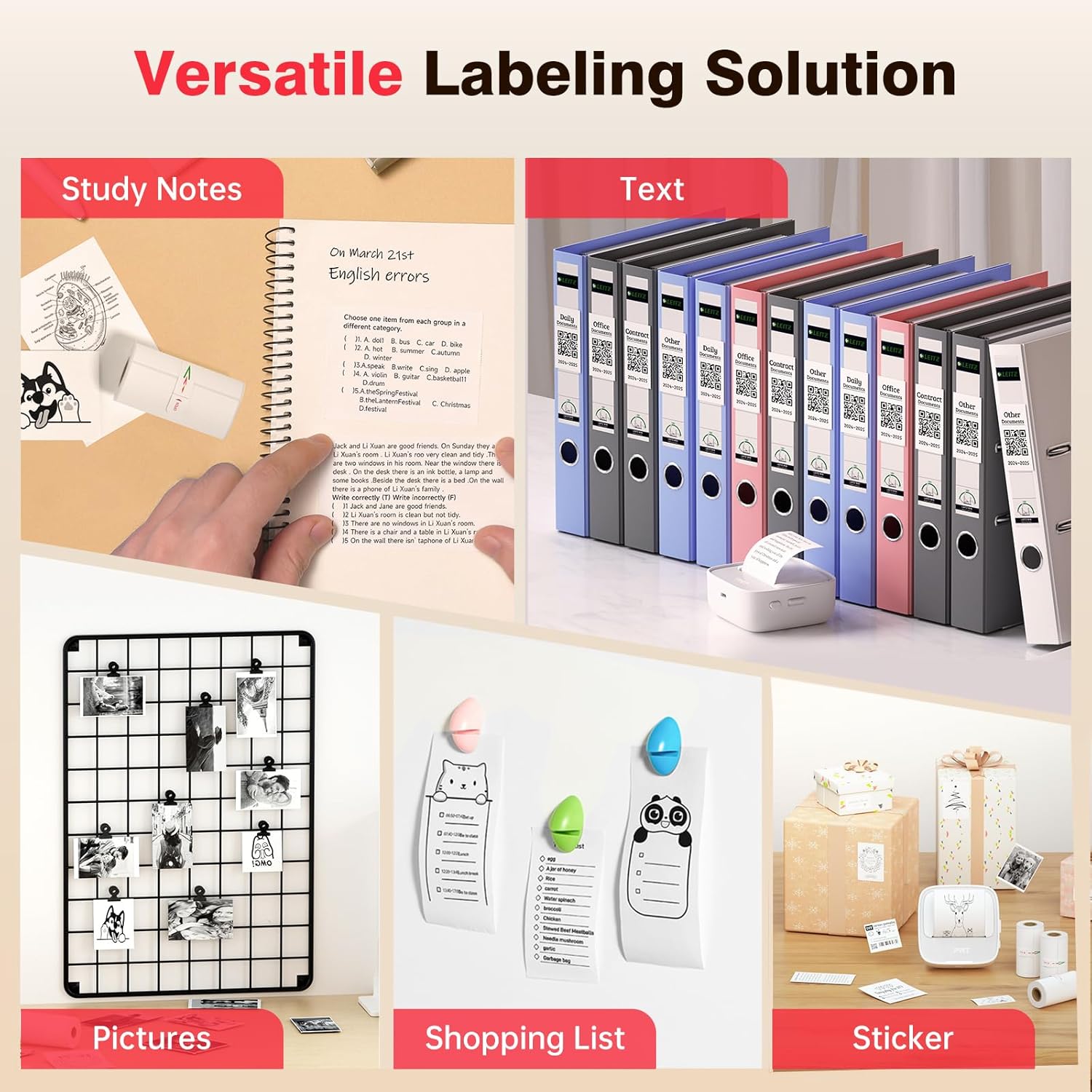
Image Description: A collage showcasing various applications of the PRT S1 Mini Printer. Examples include printing study notes in a notebook, text for binder labels, small pictures for a photo grid, shopping lists, and custom stickers for gifts.
- Прилагоди (опционо): Use the app's editing tools to customize your print, such as adjusting size, adding frames, or applying filters.
- Штампа: Tap the print button in the app. The printer will feed the paper and print the selected content.
- Tear Off: Once printing is complete, gently tear the paper upwards against the printer's serrated edge.
Употреба апликације
The HerePrinter app offers a wide range of features to enhance your printing experience:
- ДИИ прилагођавање: Design your own stickers and labels with various text, image, and graphic options.

Image Description: A wide image showing the PRT S1 Mini Printer next to a smartphone displaying the HerePrinter app. The app interface shows various design elements like text, images, and templates, highlighting the DIY customization features for creating stickers.
- Templates and Fonts: Access a library of pre-designed templates for different purposes (e.g., study notes, to-do lists, labels) and a variety of fonts to personalize your prints.

Image Description: A wide image showcasing multiple smartphone screens, each displaying different templates and font options available within the HerePrinter app. This illustrates the wide variety of design choices users have for their prints.
- Штампање слика: Print photos and images directly from your device's gallery. Note that the printer produces black and white thermal prints.
- Webpage Printing: Штампајте садржај директно са web странице.
Одржавање
Proper maintenance ensures the longevity and performance of your PRT S1 Mini Thermal Printer:
- Чишћење главе штампача:
- Искључите штампач и искључите кабл за напајање.
- Отворите горњи поклопац.
- Gently wipe the thermal print head (the black strip inside the printer) with a cotton swab lightly dampened with isopropyl alcohol. Allow it to dry completely before closing the cover.
- Clean the print head regularly, especially if print quality degrades.
- Руковање папиром:
- Use only high-quality thermal paper designed for mini printers.
- Store thermal paper in a cool, dry place away from direct sunlight and heat to prevent fading.
- Avoid touching the thermal paper surface excessively, as oils from your skin can affect print quality.
- Одржавање батерије:
- Charge the printer regularly, even if not in frequent use, to maintain battery health.
- Избегавајте често потпуно пражњење батерије.
Решавање проблема
If you encounter issues with your PRT S1 Mini Thermal Printer, refer to the table below for common problems and solutions:
| Проблем | Могући узрок | Решење |
|---|---|---|
| Штампач се не укључује | Слаба батерија; Дугме за напајање није правилно притиснуто | Charge the printer; Press and hold the power button for a few seconds. |
| Повезивање преко Блуетоотх-а није могуће | Bluetooth off on device; Printer not in pairing mode; App issue | Ensure Bluetooth is enabled on your phone/tablet; Restart printer and app; Forget device in Bluetooth settings and re-pair. |
| No print or blank page | No paper; Paper loaded incorrectly (upside down); Print head dirty | Load new paper; Ensure smooth side of paper faces up; Clean the print head. |
| Poor print quality (faint, lines) | Print head dirty; Low battery; Old/poor quality thermal paper | Clean the print head; Charge the printer; Replace thermal paper with a new roll. |
| Застој папира | Paper loaded incorrectly; Foreign object inside | Turn off printer, open cover, carefully remove jammed paper; Check for obstructions. |
Спецификације
Key technical specifications for the PRT S1 Mini Thermal Printer:
| Феатуре | Детаљ |
|---|---|
| Назив модела | PRT-S1 |
| Технологија штампе | Тхермал |
| Технологија повезивања | Блуетоотх |
| Максимална резолуција црно-беле штампе | 203dpi Dots Per Inch |
| Максимална величина медија | 2 инча |
| Компатибилни уређаји | Android, Smartphones, iPhone |
| Контролни метод | Апп |
| Димензије производа | 7.09 к 4.33 к 1.57 инча |
| Тежина артикла | 8.1 унци |
| Батерије | Потребне су 1 А батерије (укључене) |
Гаранција и подршка
The PRT S1 Mini Thermal Printer comes with a limited warranty. For specific details regarding the warranty period and coverage, please refer to the warranty card included in your product packaging or contact PRT customer support.
For technical support, troubleshooting assistance, or inquiries about replacement parts and accessories, please visit the official PRT webсајт или контактирајте њихову службу за кориснике. Контакт информације се обично могу наћи на паковању производа или на званичном онлајн сајту бренда.
Note: No official seller videos were provided in the product data.