
Увод
Thank you for choosing the Gritin G1310 Rechargeable Book Light. This manual provides essential information for the safe and efficient operation of your device. Please read it thoroughly before use and retain it for future reference.
Производ је завршенview
The Gritin G1310 is a compact, eye-caring LED reading light designed for comfortable reading in various environments. It features adjustable color temperatures, brightness levels, and a flexible design for optimal illumination.
Кључне карактеристике:
- Дизајн који брине о очима: 7 high-quality LED beads with a unique honeycomb lampshade for soft, diffused, anti-glare, anti-flicker, and anti-shadow lighting.
- Adjustable Color Modes: Three color temperatures (1800K Amber, 3400K Mixed, 6000K White) to suit different reading preferences and environments.
- Flexible Brightness Control: 5 preset brightness levels and stepless dimming from 10% to 100%.
- Дуготрајна батерија: Built-in 600mAh USB-C rechargeable battery provides up to 80 hours of illumination.
- Подешавање под више углова: Light head rotates 90° left/right, tilts 45° downwards, and the clip adjusts 215° for precise positioning.
- Функција меморије: Automatically recalls the last used color temperature and brightness settings.
- Преносиви дизајн: Compact and lightweight, made from durable ABS material.
Садржај пакета
- Gritin G1310 Rechargeable Book Light
- УСБ-Ц кабл за пуњење
- Упутство за употребу
Сетуп
Charging the Book Light
Before first use, fully charge the book light. The device comes with a built-in 600mAh battery and a USB-C charging port.
- Пронађите УСБ-Ц прикључак за пуњење на уређају.
- Connect the provided USB-C cable to the book light and the other end to a USB power source (e.g., computer, wall adapter).
- The power indicator lights will illuminate to show charging status. All four lights indicate a full charge.

Image: Gritin G1310 Book Light with USB-C charging port and battery indicator showing 80 hours of use from a 600mAh battery.
Attaching the Book Light
The book light features a sturdy clip for attachment to books, e-readers, or other surfaces.
- Gently open the clip and attach it to the desired page or cover of your book.
- Ensure the clip is securely fastened to prevent the light from falling.
Упутство за употребу
Укључивање/искључивање
- Press the power button (marked with a circle and vertical line) once to turn the light on or off.
Подешавање температуре боје
The book light offers three distinct color temperatures.
- Short press the color temperature adjustment button (marked with a thermometer icon) to cycle through the modes: Amber Light (1800K), Mixed Light (3400K), and White Light (6000K).
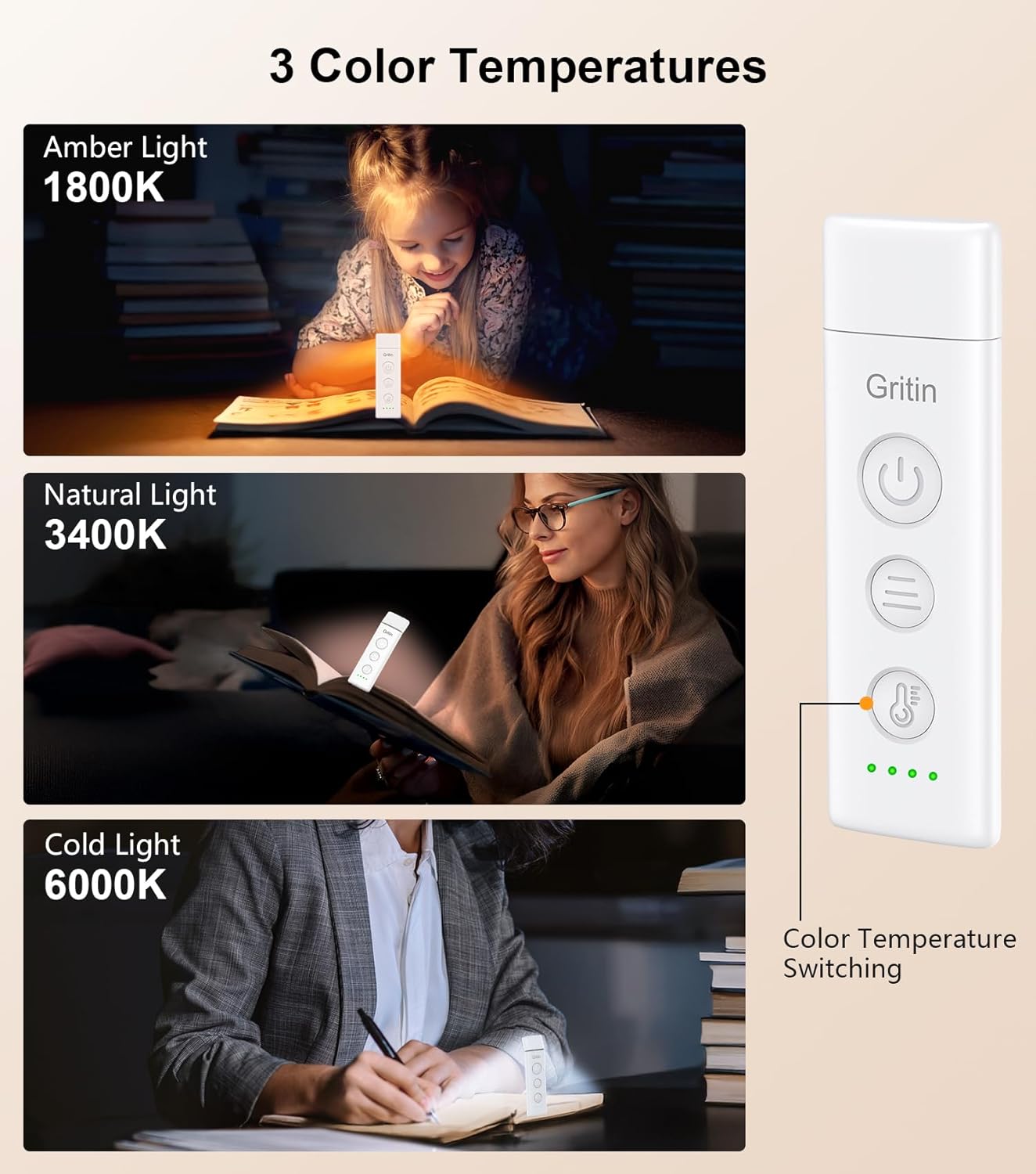
Image: Gritin G1310 Book Light showing three color temperature options: Amber (1800K), Natural (3400K), and Cold (6000K) with a user reading under each light setting.
Подешавање осветљености
The book light provides both preset brightness levels and stepless dimming.
- Preset Brightness: Short press the brightness adjustment button (marked with three horizontal lines) to quickly switch between 10%, 25%, 50%, 75%, and 100% brightness levels.
- Безстепено затамњење: Long press the brightness adjustment button for 4 seconds to smoothly adjust the brightness from 10% to 100%. Release the button when the desired brightness is reached.
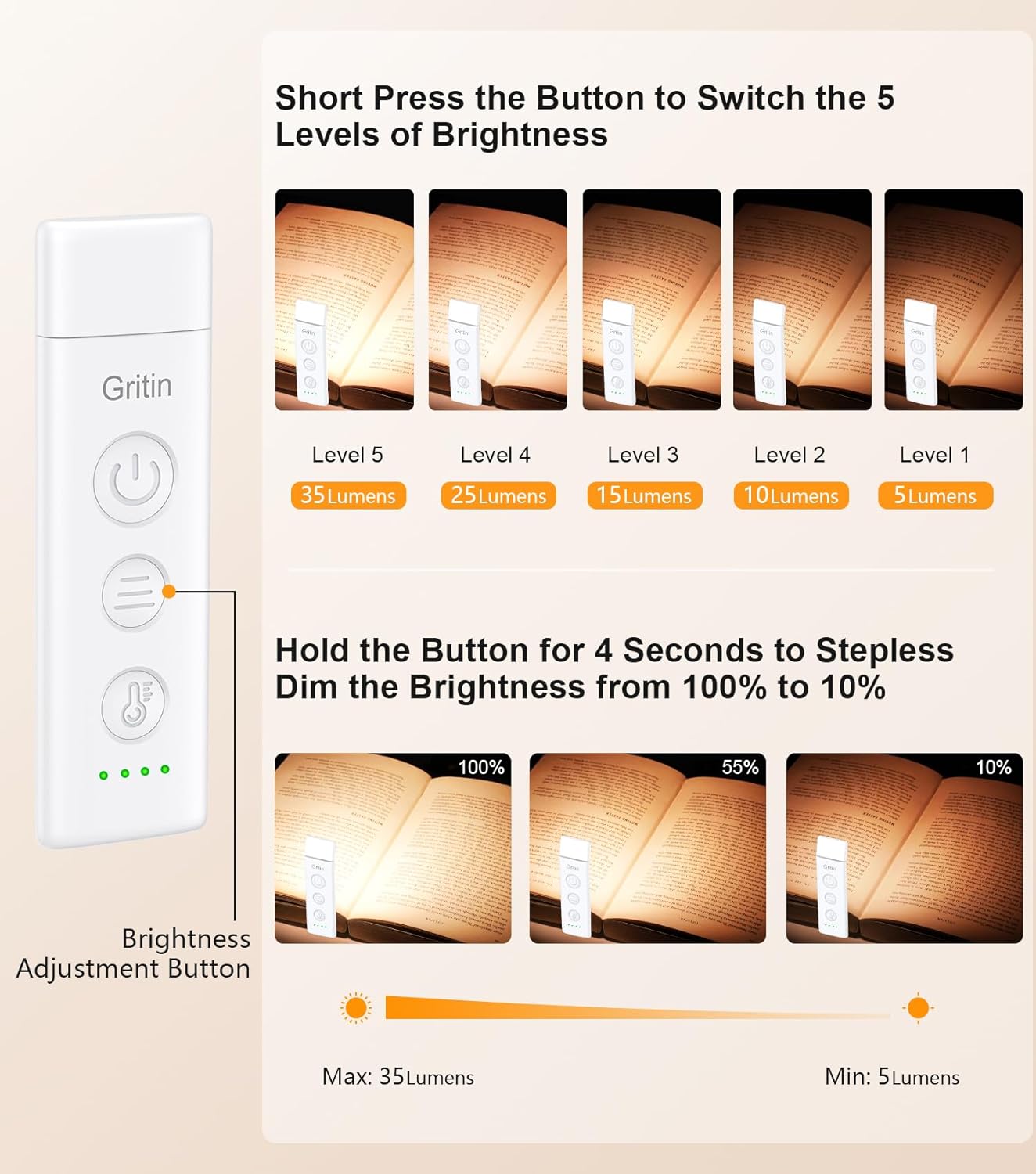
Image: Gritin G1310 Book Light illustrating 5 levels of brightness (5 to 35 lumens) with short presses and stepless dimming (10% to 100%) with a long press of the brightness adjustment button.
Подешавање угла светлости
The flexible design allows for precise light positioning.
- The light head can be rotated 90° to the left or right.
- The light head can be tilted 45° downwards.
- The clip base can be adjusted up to 215°.
- Adjust the light head and clip to direct the illumination exactly where needed.

Image: Gritin G1310 Book Light demonstrating flexible angle adjustment: 90 degrees left/right rotation and 45 degrees downward tilt of the light head.
Одржавање
Чишћење
- Уверите се да је уређај искључен пре чишћења.
- Обришите површину меком, сувом крпом.
- Немојте користити абразивна средства за чишћење или раствараче, јер могу оштетити завршни слој.
Складиштење
- Store the book light in a cool, dry place away from direct sunlight and extreme temperatures.
- Ако складиштите батерију дуже време, периодично је пуните како бисте је одржали у добром стању.
Решавање проблема
| Проблем | Могући узрок | Решење |
|---|---|---|
| Светлост се не пали. | Батерија је празна. | Charge the book light using the provided USB-C cable. |
| Светло трепери или је слабо. | Ниска батерија. | Recharge the book light. |
| Cannot change color mode or brightness. | Неправилно притискање дугмета. | Ensure you are using short presses for cycling modes/levels and a long press for stepless dimming. |
| Светлост не држи наелектрисање. | Faulty charging cable or adapter; battery degradation. | Пробајте други USB-C кабл и адаптер за напајање. Ако проблем и даље постоји, контактирајте корисничку подршку. |
Спецификације
| Феатуре | Детаљ |
|---|---|
| Назив модела | Г1310 |
| Тип извора светлости | ЛЕД (7 перли) |
| Температуре боје | 1800K (Amber), 3400K (Mixed), 6000K (White) |
| Бригхтнесс Левелс | 5 preset levels (10%, 25%, 50%, 75%, 100%), Stepless dimming (10%-100%) |
| Капацитет батерије | Литијум полимер 600мАх |
| Порт за пуњење | УСБ-Ц |
| Максимално време осветљења | Up to 80 hours (at lowest setting) |
| Материјал | АБС пластика |
| Димензије производа | 10.97 цм x 3.26 цм x 1.5 цм |
| Тежина артикла | 1.52 унце (43 грама) |
| Волtage | 5 Волтс |
| Ватtage | 1.5 ват-сати |
Безбедносне информације
- Немојте растављати или модификовати уређај.
- Keep away from water and high humidity. This product is not waterproof.
- Избегавајте директно излагање очију ЛЕД светлом током дужег периода.
- Чувати ван домашаја деце.
- Use only the provided or certified USB-C charging cable.
Гаранција и подршка
Гаранција
Gritin products come with a standard manufacturer's warranty. Please refer to the product packaging or the official Gritin webсајт за конкретне услове гаранције.
Корисничка подршка
For any questions, technical support, or warranty claims, please contact Gritin customer service through the retailer where the product was purchased or visit the official Gritin webсајт за контакт информације.