
Увод
This manual provides essential information for the setup, operation, and maintenance of your xmartO Dual-CAM 6MP WiFi Home Security Camera. This advanced 2-in-1 camera offers a wide 180°+ field of view, AI auto-tracking, Pan Tilt Zoom (PTZ) functionality, and dual-band 5G/2.4G WiFi connectivity for comprehensive home surveillance. Please read this guide thoroughly before using your device.
Шта је у кутији
- Dual Lens WiFi 6 Security Camera
- 12V 1A DC Power Adapter with 10ft Wire
- Pre-attached Wall & Ceiling Mounting Bracket
- Упутство за употребу
- Налепница за надзор
Кључне карактеристике
Dual-Camera System
The xmartO Dual-CAM features two lenses: a stationary lens and a Pan-Tilt-Zoom (PTZ) tracking lens. This innovative design allows you to monitor and record two distinct areas simultaneously, providing a broader and more detailed surveillance coverage with two separate video feeds.

Image illustrating the dual-camera system, providing two simultaneous views from a single unit.
Аутоматско праћење помоћу вештачке интелигенције
Equipped with advanced Artificial Intelligence, the camera can automatically detect and track the movement of people, animals, or vehicles within its field of view. This ensures that important activities are continuously monitored and recorded, reducing the chance of missing critical events.

Image showing the camera's AI auto-tracking feature following a person and a dog.
Контрола панорамирања, нагињања и зумирања (PTZ)
The PTZ lens offers flexible control, allowing you to remotely adjust the camera's horizontal (pan) and vertical (tilt) angles to cover a full 360° viewing area. Digital zoom functionality further enhances your ability to focus on specific details.

Image demonstrating the Pan, Tilt, and Zoom capabilities of the camera, controllable via smartphone.
Dual Band WiFi 6 Connectivity
Supporting both 5G and 2.4G WiFi 6 bands, the camera provides cutting-edge wireless performance. You can choose 5G for faster speeds in closer proximity or 2.4G for extended range, optimizing connectivity based on your installation environment.
Easy Automatic Setup
With built-in Bluetooth, your smartphone can automatically detect the camera, simplifying the initial setup process. Just input your WiFi password, and the camera connects effortlessly.
Двосмерни аудио
Communicate directly through the camera using its high-gain microphone and speaker. This feature allows you to hear what's happening and speak to visitors or deter intruders from anywhere.

Image depicting the two-way audio function, allowing users to communicate through the camera.
Powerful Night Vision
The camera is equipped with 5 professional IR + spotlight LEDs and 2 additional Infrared LEDs. You can select between black & white infrared night vision or full-color night vision using the spotlights, all configurable via the mobile app.

Image showing the camera's automatic floodlights providing color night vision in low light.
Дизајн отпоран на временске услове
With an IP66 weatherproof rating, the camera is designed for reliable performance in various outdoor and indoor conditions, protecting it from dust and water exposure.

Image highlighting the camera's IP66 weatherproof rating, suitable for outdoor use in various conditions.
Више опција снимања
Videos can be saved to a local SD card, an xmartO Wi-Fi 6 NVR, or to cloud storage, providing flexible options for video retention and access.
Водич за подешавање
Step 1: Unpack and Power On
Carefully remove all components from the packaging. Connect the provided 12V 1A DC power adapter to the camera and plug it into a nearby electrical outlet. The camera will power on and initiate its startup sequence.
Корак 2: Преузмите апликацију
За контролу и view your camera, you need to download the official mobile application. Важно: The correct app is named "PixelWall", not "WallPixel" as may be indicated in some older documentation. Тражи "PixelWall" in your device's app store (Google Play for Android or App Store for iOS) and install it.
Official product video demonstrating the features and setup process of the xmartO 2-in-1 Wireless Home Security Camera.
Step 3: Account Creation and Device Pairing
Open the PixelWall app and create a new user account. Follow the in-app instructions to add your new camera. The camera's built-in Bluetooth will facilitate an easy and automatic pairing process; you will only need to enter your WiFi network password.
Корак 4: Монтирање камере
The camera comes with a pre-attached wall and ceiling mounting bracket. Detach the bracket from the camera, secure it to your desired indoor or outdoor surface using the provided screws and wall anchors, and then re-attach the camera to the bracket. The camera can be mounted upright or inverted; the app allows for image inversion to correct the view if mounted upside down.
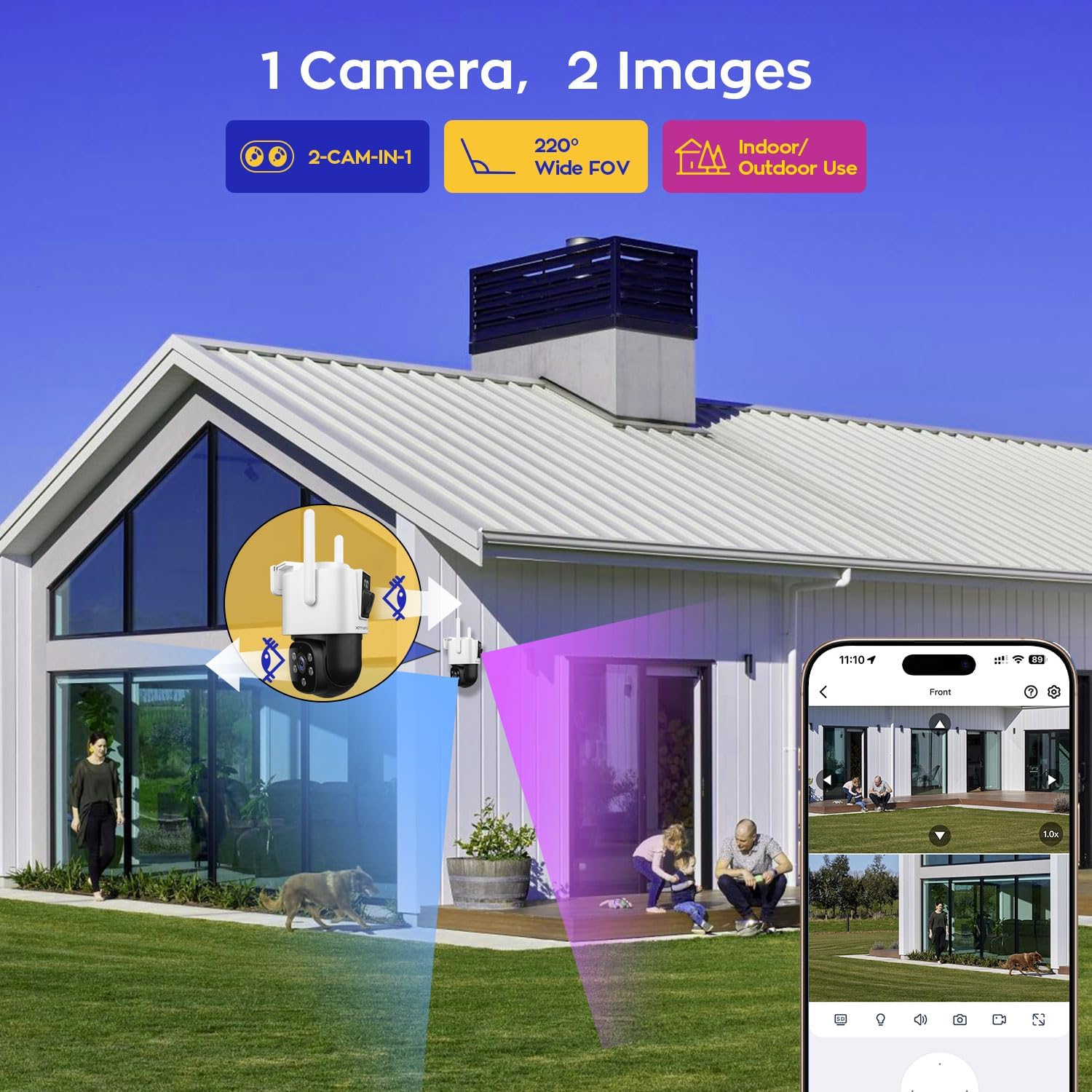
Image showing the xmartO security camera with its pre-attached wall and ceiling mounting bracket.
Упутство за употребу
Уживо View и репродукцију
Access real-time video feeds from both lenses and review снимљено фооtage directly through the PixelWall app. The app interface provides intuitive controls for navigating your surveillance.
ПТЗ контрола
Use the directional controls within the app to pan the PTZ lens horizontally and tilt it vertically. Pinch-to-zoom gestures can be used for digital zoom.
AI Tracking Activation
Enable AI auto-tracking in the camera settings within the PixelWall app. Once activated, the PTZ lens will automatically follow detected motion, keeping subjects in frame.
Двосмерна аудио комуникација
Tap the microphone icon in the app to speak through the camera's speaker. Ensure your phone's microphone is enabled for two-way communication.
Режими ноћног вида
Select your preferred night vision mode (infrared B&W or color night vision with spotlights) from the app's settings. The spotlights can also be configured to activate automatically upon motion detection.
Упозорења о детекцији покрета
Customize motion detection zones and sensitivity levels in the app. Receive instant notifications on your smartphone when motion is detected, with options for human, animal, or vehicle specific detection.
Управљање складиштем
Access and manage recorded videos. If using an SD card, ensure it is properly inserted and formatted via the app. Review cloud storage options and subscriptions if applicable.
Одржавање
- Чишћење: Gently wipe the camera lenses and body with a soft, damp крпу. Избегавајте абразивна средства за чишћење или раствараче.
- Ажурирања фирмвера: Regularly check the PixelWall app for available firmware updates to ensure optimal performance and security.
- Напајање: Ensure the camera is connected to a stable power source. Avoid frequent power interruptions.
- Заштита животне средине: While weatherproof, avoid direct high-pressure water jets on the camera.
Решавање проблема
- Проблеми са повезивањем апликација: Ensure you have downloaded the correct "PixelWall" app. Verify your camera is connected to your home WiFi (supports both 5G and 2.4G bands). If issues persist, try restarting your router and the camera.
- Feedback during Two-Way Audio: This can occur if the phone and camera are too close. Try increasing the distance or adjusting the volume levels in the app.
- Excessive Motion Detection Alerts: Adjust the motion detection sensitivity and define specific detection zones within the app to minimize false alarms from environmental factors like rain, trees, or passing vehicles.
- Нејасан ноћни вид: Ensure the camera lenses and IR/spotlight LEDs are clean and free from obstructions. Check app settings to confirm the desired night vision mode is selected.
- Камера не реагује: Locate the reset key (often a small pinhole) on the camera. Use a pin to press and hold the reset button for several seconds until the camera restarts.
Техничке спецификације
| Феатуре | Спецификација |
|---|---|
| Назив модела | ДЛП4054 |
| Унутрашња/спољна употреба | У затвореном, на отвореном |
| Резолуција снимања видео записа | 2160p, 4MP |
| Технологија повезивања | Dual Band WiFi, Wireless (Bluetooth, Ethernet, Wi-Fi) |
| Viewинг Англе | 360 Degrees (PTZ) |
| Посебне карактеристике | 2 Cameras in One, 2-Way Audio, Built-In Light, HD Resolution, PTZ Technology, AI Tracking |
| Извор напајања | Corded Electric (12V 1A DC) |
| Компатибилни уређаји | Desktop, Digital Video Recorder, Laptop, Smartphone, Tablet |
| Тип монтаже | Валл Моунт |
| Димензије артикла (Д к Ш к В) | 6.9 к 4.7 к 4.7 инча |
| Тежина артикла | 3.12 фунте (1.42 килограма) |
| Формат видео снимања | Х.265 |
| Компатибилност паметног дома | Amazon Alexa, WallPixel (App) |
Гаранција и подршка
xmartO offers a 1-годишња ограничена гаранција on this product. Additionally, you benefit from a 30-дневна гаранција поврата новца и бесплатан повраћај. For any inquiries or assistance, Онлајн подршка 24/7 1-на-1 је доступан.
For more information, visit the official xmartO Store: xmartO Store