
1. Увод
Хвала вам на куповиниasing the Audizio Genua DAB Radio. This manual provides essential information for the safe and efficient operation of your device. Please read it thoroughly before use and retain it for future reference. The Audizio Genua is a versatile DAB+/FM stereo radio featuring Bluetooth connectivity, USB playback, and an alarm function, designed for both home and portable use.
2. Безбедносне информације
- Извор напајања: Користите само приложени адаптер за напајање. Уверите се да је јачина звукаtagе одговара захтевима вашег региона.
- Вода и влага: Do not expose the unit to rain, moisture, or dripping/splashing liquids. Do not place objects filled with liquids, such as vases, on the apparatus.
- вентилација: Обезбедите одговарајућу вентилацију. Не блокирајте вентилационе отворе.
- топлота: Држите уређај даље од извора топлоте као што су радијатори, грејни уређаји, шпорети или други уређаји (укључујући ampлифиерс) који производе топлоту.
- Чишћење: Чистите само сувом крпом.
- Сервисирање: Не покушавајте сами да сервисирате овај производ. Све сервисирање препустите квалификованом сервисном особљу.
- Антена: Do not bend or force the antenna.
3. Садржај пакета
Молимо вас да проверите да ли су сви предмети присутни и у добром стању приликом распакивања:
- Audizio Genua DAB Radio
- Ремоте Цонтрол
- Повер Адаптер
- Quick Start Guide (language not guaranteed)
4. Производ је готовview
4.1 Контроле и екран на предњој плочи

Слика 4.1: Предња страна view of the Audizio Genua DAB Radio.
The front panel features a clear color TFT display, two speaker grilles, and an array of control buttons and a central rotary knob. The display shows station information, track details, time, and menu options. Buttons include Menu, Preset, Scan, Dimmer, Alarm, and playback controls (Play/Pause, Skip). The central knob is used for volume adjustment, tuning, and selection.
4.2 Прикључци задње плоче
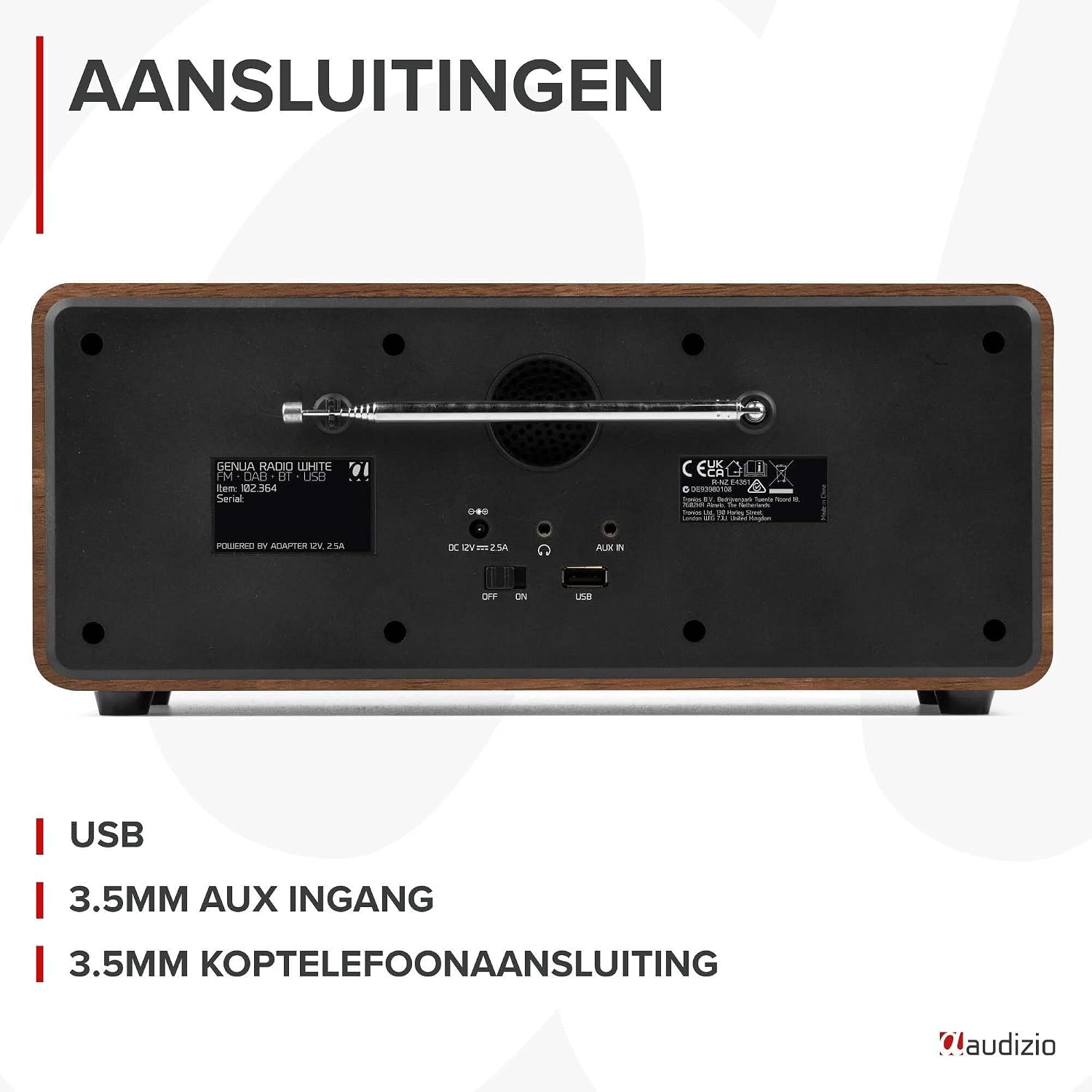
Слика 4.2: Задња страна view of the Audizio Genua DAB Radio with connections.
The rear panel includes the telescopic antenna for radio reception, a USB port for media playback, a 3.5mm AUX input for external audio devices, a 3.5mm headphone output, a DC 12V power input, and a main power ON/OFF switch.
4.3 Даљински управљач

Figure 4.3: Remote control for the Audizio Genua DAB Radio.
The included remote control provides full functionality, allowing you to power on/off, adjust volume, change modes, navigate menus, set alarms, and control playback from a distance.
5. Подешавање
5.1 Прикључак за напајање
- Connect the power adapter to the DC 12V input on the rear of the radio.
- Укључите адаптер за напајање у одговарајућу зидну утичницу.
- Flip the main power switch on the rear panel to the 'ON' position.
5.2 Подешавање антене
Extend the telescopic antenna fully for optimal DAB+ and FM radio reception. Adjust its position for the best signal quality.
5.3 Initial Setup and Auto Scan
- Upon first power-on, the radio may prompt you to perform an auto-scan for DAB+ stations. Select 'Yes' or press the 'Scan' button.
- The radio will scan for available DAB+ stations and store them. This process may take a few minutes.
- Када се скенирање заврши, радио ће се подесити на прву доступну станицу.
6. Упутство за употребу
6.1 Избор режима
Press the 'Mode' button on the remote control or the 'Menu' button on the unit to cycle through available modes: DAB+, FM, Bluetooth, USB, and AUX In.
6.2 Рад са DAB+ радиом
- Select DAB+ mode.
- If no stations are found or you wish to rescan, press the 'Scan' button to perform a full scan.
- Use the 'Tune/Select' knob or the navigation buttons on the remote to browse through the list of available stations.
- Press the 'OK' button (on remote) or push the 'Tune/Select' knob to select a station.
- Чување пресета: To store a favorite station, press and hold the 'Preset' button until the preset menu appears. Use the knob/navigation to select a preset number (1-30) and press 'OK' to confirm.
- Подсећање на унапред подешене поставке: Briefly press the 'Preset' button, then use the knob/navigation to select the desired preset and press 'OK'.
Рад са 6.3 FM радиом
- Изаберите ФМ режим.
- Аутоматско скенирање: Press the 'Scan' button to automatically scan for and store available FM stations.
- Ручно подешавање: Use the 'Tune/Select' knob to manually tune to a specific frequency.
- Чување пресета: Similar to DAB+ mode, press and hold 'Preset', select a number, and confirm.
- Подсећање на унапред подешене поставке: Briefly press 'Preset', select the desired preset, and confirm.
6.4 Bluetooth повезивање
- Select Bluetooth mode. The display will show "Pairing" or "Waiting for connection".
- На паметном телефону или другом уређају који подржава Bluetooth омогућите Bluetooth и потражите доступне уређаје.
- Select "Audizio Genua" from the list of devices.
- Once paired, the radio will confirm the connection, and you can start playing audio from your device.
6.5 Репродукција са УСБ-а
- Убаците УСБ флеш диск који садржи МП3 fileу УСБ порт на задњој плочи.
- Select USB mode. The radio will automatically detect the USB drive and begin playing the first compatible audio file.
- Use the playback control buttons (Play/Pause, Skip Forward/Backward) on the unit or remote to manage your music.
6.6 АУКС улаз
- Connect an external audio device (e.g., MP3 player, smartphone) to the 3.5mm AUX IN port on the rear panel using an audio cable (not included).
- Изаберите АУКС режим.
- Контролишите репродукцију и јачину звука са свог екстерног уређаја.
6.7 Аларм и тајмер за спавање
- Подешавање аларма: Press the 'Alarm' button on the unit or remote. Follow the on-screen prompts to set Alarm 1 and Alarm 2, including time, source (DAB/FM/Buzzer), and volume.
- Одгода функција: When the alarm sounds, press any button (except Power) to activate snooze. The alarm will sound again after a set interval.
- Мерач спавања: Press the 'Sleep' button on the remote to set a sleep timer (e.g., 15, 30, 60 minutes). The radio will automatically turn off after the selected time.
6.8 Затамњивач дисплеја
Press the 'Dimmer' button on the unit or remote to adjust the brightness of the display. This is useful for different lighting conditions or for use in a bedroom.
7. Одржавање
- Чишћење: Користите меку, суву крпу за чишћење спољашњости радија. Не користите абразивна средства за чишћење, воскове или раствараче.
- Антена: Handle the telescopic antenna with care to prevent damage.
- Складиштење: Ако складиштите радио дуже време, искључите га из напајања.
КСНУМКС. Решавање проблема
| Проблем | Могући узрок | Решење |
|---|---|---|
| Нема струје | Power adapter not connected; Main power switch off | Ensure power adapter is securely connected and plugged in; Turn main power switch to 'ON' |
| Слаб радио пријем (DAB+/FM) | Антена није извучена; Подручје слабог сигнала; Сметње | Fully extend and adjust the telescopic antenna; Try repositioning the radio; Move away from other electronic devices |
| Блуетоотх се не упарује | Radio not in Bluetooth mode; Device not discoverable; Already paired with another device | Select Bluetooth mode on the radio; Ensure Bluetooth is enabled on your device and it's in pairing mode; Disconnect from other Bluetooth devices |
| УСБ репродукција не ради | УСБ диск није правилно уметнут; Некомпатибилан file format; USB drive corrupted | Ensure USB drive is fully inserted; Check if files are in MP3 format; Try a different USB drive |
| Нема звука | Јачина звука је прениска; активирано је искључивање звука; изабран је погрешан извор | Increase volume; Check if mute is active; Ensure correct input source (DAB/FM/BT/USB/AUX) is selected |
9. Спецификације

Figure 9.1: Audizio Genua DAB Radio dimensions.
- Бренд: Аудизио
- Број модела: Генуа
- Боја: Бела
- Посебна карактеристика: Bluetooth Connectivity, DAB+ Radio
- Технологија повезивања: Aux, Bluetooth, USB
- Димензије производа (Д к Ш к В): 13.5 к 31 к 13.3 цм
- Технологија тјунера: ДАБ+
- Стил: Модерна
- Извор напајања: Цордед Елецтриц
- Подржани радио бендови: ФМ, ДАБ+
- Компатибилни уређаји: Smartphone, Tablet, Laptop, MP3 Player, Headphones, Speaker
- Волtage: 220 Волтс
- Max Speaker Output Power: 50 Ваттс
- Број батерија: 1 Non-standard battery (Type of battery required)
- Тип екрана: ТФТ
- Тежина артикла: 2.25 килограма
10. Гаранција и подршка
This product is covered by a standard manufacturer's warranty. For detailed warranty terms and conditions, please refer to the documentation provided at the time of purchase or contact your retailer. For technical support or service inquiries, please contact the Audizio customer support team through their official webсајт или место ваше куповине.