
1. Увод
The Kaise SK-8536 Battery Checker is a versatile diagnostic tool designed for various battery types and standards. It supports the latest JIS and SBA standards, as well as international standards like EN (DIN), SAE, and BCI. The device includes an internal database for SBA and EN (for Japanese vehicles) standards. It is capable of diagnosing batteries for charge-controlled vehicles, idling stop vehicles, and auxiliary batteries for hybrid vehicles. Featuring a built-in printer, it allows for quick printouts of diagnostic results. The double differential pulse measurement method ensures more accurate diagnostics. It also includes a mode for diagnosing unused batteries. Free software updates support additions and changes to JIS/SBA standards. The device offers clear Japanese display and printing, with English also available. It can measure industrial batteries.
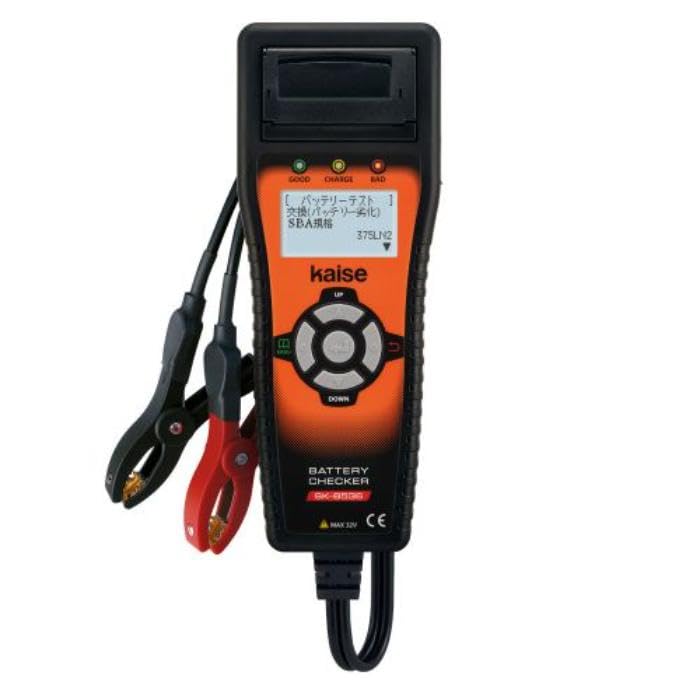
Figure 1: The Kaise SK-8536 Battery Checker. This image shows the compact, handheld device with its display screen and integrated printer slot.
2. Безбедносне информације
- Увек носите одговарајућу личну заштитну опрему, укључујући заштиту за очи, када радите са батеријама.
- Обезбедите одговарајућу вентилацију у радном простору како бисте спречили накупљање експлозивних гасова.
- Избегавајте контакт са киселином из батерије. У случају контакта, одмах исперите водом и потражите медицинску помоћ.
- Немојте кратко спајати терминале батерије.
- Држите уређај сувим и даље од екстремних температура.
- Only use the device for its intended purpose as a battery checker.
3. Садржај пакета
Проверите да ли су све ставке наведене у наставку укључене у ваш пакет:
- Kaise SK-8536 Battery Checker Unit
- 934 УСБ кабл
- Printer Paper (2 sample rolls)
- 1035 Футрола за ношење
- Упутство за употребу
4. Подешавање
- Прикључак за напајање: The device is powered by the test battery or via a USB connection. Connect the clamps to the battery terminals or plug in the USB cable to a power source.
- Избор језика: Upon first use or after a reset, the device may prompt for language selection. Use the navigation buttons to select your preferred language (Japanese or English). The initial setting is Japanese.
- Printer Paper Installation: Open the printer compartment and insert a roll of printer paper, ensuring the paper feeds correctly through the mechanism.
5. Упутство за употребу
5.1. General Battery Test (12V)
- Повежите црвени цлamp на позитивни (+) терминал батерије и црни цлamp на негативни (-) терминал батерије.
- Уређај ће се аутоматски укључити.
- Select "12V Battery Test" from the main menu.
- Choose the appropriate battery standard (JIS, SBA, EN, SAE, BCI) and input the CCA rating if prompted.
- Follow the on-screen instructions to initiate the test. The results will be displayed on the LCD.
5.2. Starting/Charging System Test (12V & 24V)
This device supports engine starting capability and charging system tests for both 12V and 24V systems.
- Connect the device to the battery as described in Section 5.1.
- Select "12V & 24V Starting/Charging System Test" from the menu.
- Follow the on-screen prompts, which may include starting the engine or revving it to a specific RPM.
- The device will analyze the system and display the results.
5.3. Industrial Battery Measurement
The SK-8536 can measure industrial batteries. When prompted for battery type, select the industrial option. The measurement range for industrial batteries is 1.0mΩ to 50.0mΩ.
5.4. Unused Battery Diagnosis Mode
This mode allows for the diagnosis of new or unused batteries to assess their initial health and charge status. Select "Unused Battery Diagnosis Mode" from the menu and follow the instructions.
5.5. Printing Diagnostic Results
After a test is completed and results are displayed, an option to print will appear. Select "Print" to generate a physical record of the diagnostic results using the built-in printer.
6. Спецификације
| Дисплаи | LCD (Dot display; 128x64 dots) |
| Display/Print Language | Japanese, English (Initial setting: Japanese) |
| Штампач | Уграђени штампач |
| Извор напајања | Test battery, USB connection |
| Measurable Battery Types | 12V Lead-acid batteries (24V for engine starting/charging system tests only) |
| Стандарди мерења | JIS, SBA, EN (DIN), SAE (BCI) (CCA input, industrial selection available) |
| Меасуремент Ранге | 100-1400 CCA (standard), 1.0mΩ-50.0mΩ (industrial) |
| Меасуремент Итемс | 12V Battery Test, 12V & 24V Starting/Charging System Test |
| Димензије | 96 к 50 к 248 мм |
| Тежина | 550 г |
7. Одржавање
7.1. Ажурирања софтвера
The device supports free version updates to accommodate additions and changes to JIS/SBA and other standards. Refer to the manufacturer's website or contact support for information on how to perform updates.
7.2. Чишћење
Wipe the device with a soft, dry cloth. Do not use abrasive cleaners or solvents. Ensure the battery clamps are clean and free of corrosion for accurate readings.
7.3. Printer Paper
Replace printer paper rolls as needed. Use only compatible thermal paper for the built-in printer.
КСНУМКС. Решавање проблема
Овај одељак пружа решења за уобичајене проблеме на које можете наићи.
- Уређај се не укључује: Уверите се да је батерија цлamps are securely connected to the battery terminals, or that the USB cable is properly connected to a power source. Check the battery voltage if using battery power.
- Нетачна очитавања: Ensure battery terminals are clean and free of corrosion. Verify that the correct battery type and standard are selected in the device settings.
- Штампач не ради: Check if printer paper is installed correctly and if there is enough paper. Ensure the printer compartment is closed properly.
- Проблеми са приказом: If the display is unreadable or frozen, try disconnecting and reconnecting the power source to reset the device.
Ако наиђете на проблеме који нису овде обрађени, обратите се корисничкој подршци.
9. Гаранција и подршка
Specific warranty information for the Kaise SK-8536 Battery Checker is not provided in the product details. Please refer to the documentation included with your purchase or contact the retailer/manufacturer directly for warranty terms and customer support.
For technical assistance or inquiries, please visit the official Kaise webсајту или се обратите њиховом одељењу за корисничку подршку.