
1. Увод
Thank you for choosing the FEELWORLD P215-9HSD 21.5 Inch Broadcast Production Monitor. This monitor is designed for professional video production environments, offering a 1920x1080 Full HD display, multiple input/output options including 4K HDMI and 3G-SDI, and advanced monitoring features. This manual provides essential information for the safe and efficient operation of your device. Please read it thoroughly before use and retain it for future reference.

Слика 1.1: Предња страна view of the FEELWORLD P215-9HSD monitor, highlighting its 21.5-inch screen, Full HD 1920x1080 resolution, 3000:1 contrast, and 250 nits brightness.
2. Безбедносне информације
- Извор напајања: Use only the provided 3A DC power adapter. Ensure the power supply voltagе је унутар наведеног опсега.
- вентилација: Do not block ventilation openings. Ensure adequate airflow around the monitor to prevent overheating.
- Вода и влага: Do not expose the monitor to rain, moisture, or immerse it in water. If liquid enters the unit, disconnect power immediately and contact service personnel.
- Чишћење: Искључите напајање пре чишћења. Користите меку, суву крпу. Не користите течна или аеросолна средства за чишћење.
- Пласман: Place the monitor on a stable surface. Avoid placing it in direct sunlight, near heat sources, or in environments with excessive dust or vibration.
- Сервисирање: Не покушавајте сами да сервисирате овај производ. Све сервисирање препустите квалификованом сервисном особљу.
3. Садржај пакета
Проверите да ли су све ставке наведене у наставку укључене у ваш пакет. Ако неке ставке недостају или су оштећене, обратите се продавцу.
- FEELWORLD P215-9HSD 21.5 Inch Broadcast Production Monitor
- 3A DC Power Adapter
- V Battery Plate
- Мини ХДМИ кабл
- Tally Kit
- Сунчаница
- У Брацкет
- Оперативни приручник
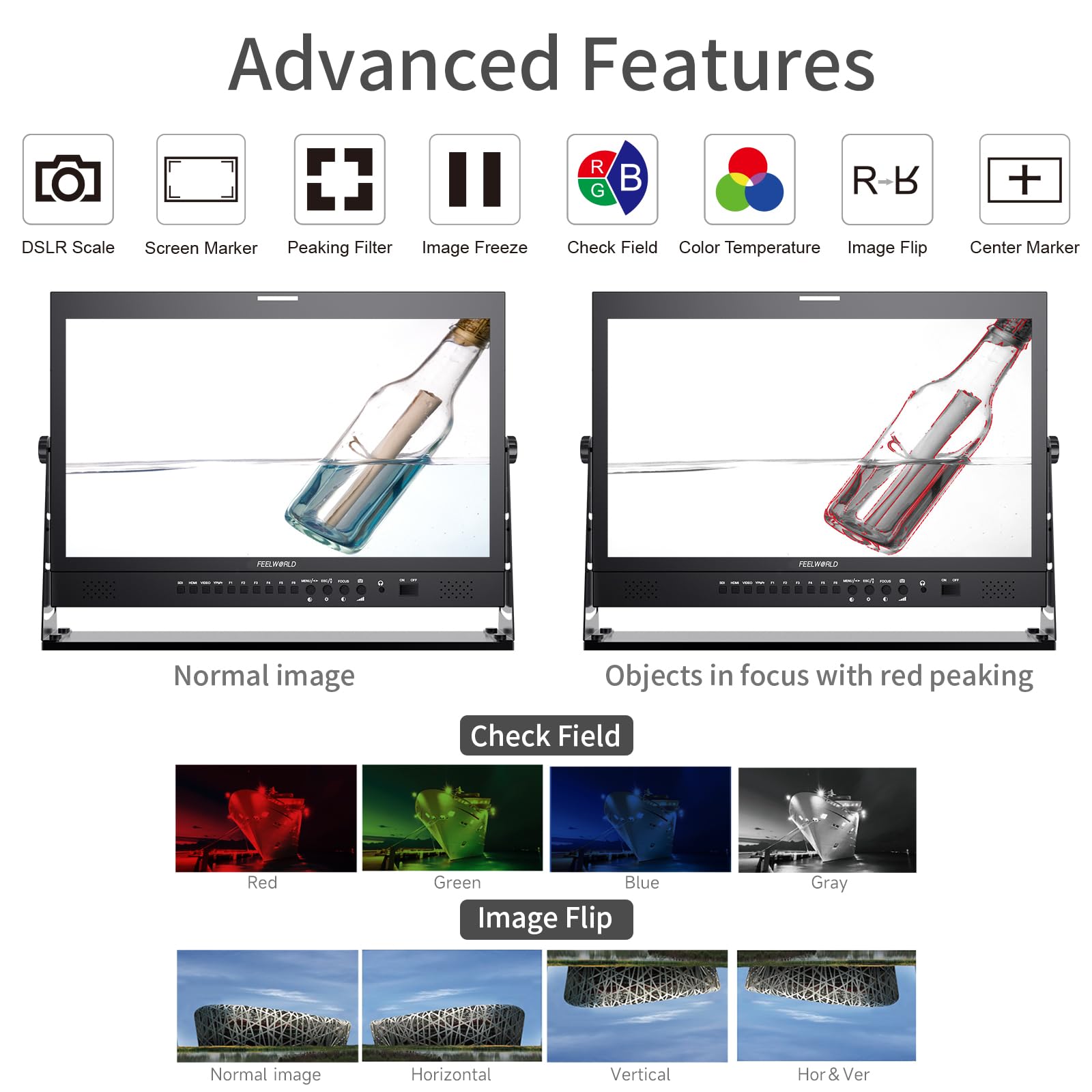
Figure 3.1: Included accessories with the FEELWORLD P215-9HSD monitor, showing the monitor, Mini HDMI cable, V battery plate, 3A power adapter, Tally Kit, Jib Crane Bracket (U bracket), and Operation Manual.
4. Производ је готовview
4.1 Контроле на предњој плочи
The front panel features various buttons and indicators for controlling the monitor's functions and navigating the On-Screen Display (OSD) menu.
- Дугмад за избор уноса: SDI, HDMI, VIDEO, YPbPr for selecting video sources.
- Функцијска дугмад (F1-F6): Customizable shortcut buttons for quick access to frequently used features.
- MENU/ESC/◄/► Buttons: Used for OSD menu navigation, entering sub-menus, and adjusting settings.
- FOCUS Button: Activates peaking focus assist.
- Дугме за укључивање/искључивање: Powers the monitor on or off.
- Уграђени звучници: За аудио праћење.
- 3.5mm Stereo Earphone Jack: For private audio monitoring.
4.2 Прикључци задње плоче
The rear panel provides all necessary input and output ports for connecting video and audio sources, as well as power.
- DVI улаз: Digital Visual Interface input.
- ХДМИ улаз/излаз: High-Definition Multimedia Interface for both input and loop-through output.
- YPbPr Input: Компонентни видео улаз.
- Видео улаз/излаз: Composite video input and loop-through output.
- Аудио улаз/излаз: RCA connectors for analog audio.
- 3G-SDI Input/Output: Serial Digital Interface for professional video input and loop-through output.
- КСЛР конектор: For professional audio input.
- DC Barrel (5.5, 2.1): Power input for the 3A DC adapter.
- УСБ порт за надоградњу: За ажурирања фирмвера.
- LAN улаз: Етхернет порт.
- TALLY Port: DP-9 connector for Tally light control.

Figure 4.1: Top section shows the front panel OSD operation buttons. Bottom section details the rear panel connections including DVI, HDMI, YPbPr, Video, Audio, 3G-SDI, XLR, DC power, USB, LAN, and Tally.
Слика 4.2: Крупни план view of the rear panel, emphasizing the 3G-SDI, HDMI, Video, and Audio input/output connections, along with the USB upgrade port and DC power input.
5. Подешавање
5.1 Монтирање монитора
The monitor comes with an adjustable U bracket for desktop placement. Ensure the bracket is securely attached to the monitor and placed on a stable, flat surface. The monitor also supports VESA mounting for alternative setups (mounting hardware not included).
5.2 Повезивање напајања
- Connect the provided 3A DC power adapter to the DC barrel input on the rear of the monitor.
- Uključite adapter za struju u odgovarajuću utičnicu.
- Alternatively, attach a compatible V-mount battery to the V Battery Plate on the rear of the monitor for portable power.
5.3 Повезивање видео извора
Connect your video source (camera, video switcher, etc.) to the appropriate input port on the monitor's rear panel.
- ДВИ: Use an HDMI cable (Mini HDMI cable included) to connect to the HDMI IN port.
- 3Г-СДИ: Use an SDI cable to connect to the 3G-SDI IN port.
- ИПбПр: Use component video cables to connect to the YPbPr IN ports.
- видео: Use a composite video cable to connect to the VIDEO IN port.
If you need to loop out the signal to another device, connect an appropriate cable from the corresponding OUT port (HDMI OUT, 3G-SDI OUT, VIDEO OUT) to your next device.
6. Упутство за употребу
6.1 Укључивање/искључивање
Притисните тастер ОН/ОФФ button on the front panel to power the monitor on or off.
6.2 Избор улаза
Press the corresponding input button (СДИ, ХДМИ, ВИДЕО, ИПбПр) on the front panel to switch between video sources.
6.3 Навигација кроз OSD мени
Притисните тастер МЕНУ button to open the On-Screen Display menu. Use the ◄ и ► buttons to navigate through menu options and adjust values. Press МЕНУ again to confirm a selection or ЕСЦ да изађете из менија.
6.4 Напредне функције
The monitor includes several advanced features to assist with professional monitoring:
- Peaking Focus Assist: Highlights sharp edges in the image to aid in achieving precise focus. Activate with the ФОЦУС button or assign to a function button.
- Централни маркер: Displays a crosshair in the center of the screen.
- Screen Marker: Provides various aspect ratio markers (e.g., 16:9, 4:3, 2.35:1) and safety area markers.
- Замрзавање слике: Pauses the current video frame.
- Преокрет слике: Flips the image horizontally, vertically, or both. Useful for specific mounting orientations.
- Camera 5D II Mode: Optimizes display for Canon 5D Mark II camera output.
- Проверите поље: Displays only Red, Green, Blue, or Mono channels for color calibration.
- Пикел у Пикел: Displays the image at its native resolution without scaling.
- Зумирај све: Magnifies the entire image.
- U/D & L/R Zoom: Allows independent vertical and horizontal zooming.
- Размера: Adjusts the display aspect ratio.
- Подешавање температуре боје: Allows fine-tuning of the display's color temperature.
Figure 6.1: Visual demonstration of advanced features including Peaking Filter (red peaking), Check Field (Red, Green, Blue, Gray channels), and Image Flip (Normal, Horizontal, Vertical, Horizontal & Vertical).
6.5 Tally Light System
The monitor features a 3-color Tally light system (Red, Green, Yellow) on both the front and rear panels, controlled via the DP-9 Tally port. This allows for clear indication of live, preview, and standby states in a multi-camera setup.
- црвено: Indicates the camera is live (On Live).
- зелено: Indicates the camera is on preview (On Preview).
- Жута: Indicates the camera is on standby (Standby).

Figure 6.2: Illustration of the Red, Green, and Yellow Tally lights and their corresponding states (On Live, Standby, On Preview), controlled via the DP-9 Barrel on the rear.
7. Одржавање
- Чишћење екрана: Нежно обришите екран меком крпом која не оставља влакна. За тврдокорне мрље, благо обришитеampОчистите крпу водом или средством за чишћење екрана. Не прскајте течност директно на екран.
- Чишћење Цasing: Користите меку, суву крпу да обришете површину монитораasinг. Избегавајте абразивна средства за чишћење или раствараче.
- Складиштење: Када се монитор не користи дуже време, чувајте га на хладном и сувом месту, даље од директне сунчеве светлости и екстремних температура.
- Ажурирања фирмвера: Periodically check the FEELWORLD official website for any available firmware updates to ensure optimal performance and access to new features. Use the USB Upgrade Port for this purpose.
КСНУМКС. Решавање проблема
Ако наиђете на проблеме са монитором, погледајте следеће уобичајене проблеме и решења:
| Проблем | Могући узрок | Решење |
|---|---|---|
| Нема струје | Адаптер за напајање није повезан или је неисправан; проблем са утичницом. | Ensure power adapter is securely connected to monitor and outlet. Test outlet with another device. Check if V-mount battery is charged and properly installed. |
| Нема видео сигнала | Incorrect input selected; cable not connected or faulty; source device not outputting signal. | Select the correct input source (HDMI, SDI, etc.). Check all video cables for secure connection. Verify the source device is powered on and outputting video. Try a different cable. |
| Image is distorted or incorrect colors | Incorrect display settings; faulty cable; source issue. | Reset monitor settings to default via OSD menu. Check cable connections. Verify source device output. Adjust color temperature settings. |
| Нема звука | Audio cable not connected; volume too low; source device not outputting audio. | Ensure audio cables are connected (if applicable). Increase monitor volume. Check audio settings on the source device. |
| Tally light not working | Tally cable not connected or faulty; switcher not sending Tally signal. | Ensure the Tally Kit is correctly wired and connected to the DP-9 port. Verify your video switcher is configured to send Tally signals. |
9. Спецификације
Detailed technical specifications for the FEELWORLD P215-9HSD Broadcast Production Monitor:
- Величина екрана: 21.5 инча
- Изворна резолуција: 1920 к 1080 (Фулл ХД)
- Тип приказа: LED IPS Panel
- Размера: 16:9
- Осветљеност: 400 цд/м²
- Viewугао угла: 160 Degrees (H/V)
- Однос контраста: 3000:1
- Дубина боје: 8-бит, 16.7 милиона боја
- Видео улази: 1x HDMI, 1x 3G-SDI, 1x YPbPr, 1x Video, 1x DVI
- Видео излази: 1x HDMI, 1x 3G-SDI, 1x Video
- Аудио улази: Analog Audio (RCA), XLR
- Аудио излази: 3.5mm Stereo Earphone Jack, Built-in Speakers
- Улазна снага: ДЦ 12В (3А)
- Технологија повезивања: HDMI, 3G-SDI
- Посебне карактеристике: Peaking Focus Assist, Center Marker, Screen Marker, Image Freeze, Image Flip, Camera 5D II Mode, Check Field, Pixel to Pixel, Zoom All, U/D & L/R Zoom, Aspect Ratio, Color Temperature Adjustment, 3-Color Tally Light
Слика 9.1: Завршеноview of key specifications and features including 8-bit color, HDMI input/output, 3G-SDI input/output, 1920x1080 resolution, 3000:1 contrast, and 250 nits brightness.
10. Гаранција и подршка
The FEELWORLD P215-9HSD Broadcast Production Monitor comes with a Двогодишња гаранција произвођача од дана куповине. Ова гаранција покрива недостатке у материјалу и изради при нормалној употреби.
For warranty claims, technical support, or service inquiries, please contact your authorized FEELWORLD dealer or visit the official FEELWORLD website for customer service contact information. Please retain your proof of purchase for warranty validation.
For more information about FEELWORLD products, visit the FEELWORLD Store on Amazon.